Azure AI Document Intelligence: Automate Docs Fast
Azure AI Document Intelligence automates document processing with OCR, structured extraction, and Microsoft workflow integration—delivering measurable business value for enterprises.
Learn how Azure AI Document Intelligence automates document processing with OCR, structured extraction, and Microsoft workflow integration—delivering measurable business value for enterprises.
Al Rafay Consulting
· Updated June 12, 2026 · ARC Team

Modern enterprises process a massive volume of documents every day—invoices, contracts, onboarding forms, purchase orders, compliance records, identity documents, and scanned PDFs. Yet document handling often remains one of the most manual and inefficient parts of business operations.
Organizations looking to strengthen this area can work with AI document automation.
Manual document processing causes delays, increases cost, and introduces accuracy and compliance risk—especially when layouts vary or context is needed. Azure AI Document Intelligence (formerly Azure Form Recognizer) enables organizations to automate document processing fast by applying AI-driven document understanding. It converts unstructured and semi-structured documents into structured, usable data—without requiring organizations to build or manage complex machine learning pipelines.
At Al Rafay Consulting (ARC), we help enterprises design and implement enterprise-grade Azure AI Document Intelligence solutions that integrate securely with Microsoft ecosystems, support governance, and deliver measurable business outcomes—not just technical automation.
What Is Azure AI Document Intelligence?
Azure AI Document Intelligence is a cloud-based AI service that combines optical character recognition (OCR), layout analysis, and machine learning models to extract information from documents. It enables organizations to:
- Process PDFs, images, and scanned documents at scale
- Extract text, tables, and key-value pairs accurately
- Use prebuilt AI models for common document types such as invoices and receipts
- Train custom models for organization-specific formats
- Integrate extracted data into applications and workflows through APIs
Unlike traditional OCR tools that only convert images into text, Azure AI Document Intelligence understands document structure, relationships, and context. This makes it suitable for complex enterprise workflows such as approvals, validations, reporting, and compliance tracking.
Why Manual Document Processing No Longer Scales
As organizations grow, manual document processing shifts from being a temporary workaround to a structural bottleneck. Common enterprise challenges include:
- Slow document turnaround times and approval delays
- Heavy reliance on manual data entry
- Errors caused by inconsistent document formats
- Limited visibility into processing status
- Difficulty meeting audit and regulatory requirements
- Increasing operational and labor costs
These challenges affect multiple departments simultaneously, creating downstream delays and fragmented workflows. Azure AI Document Intelligence addresses these issues by automating extraction, validation, and integration, enabling faster, more consistent document-driven operations.
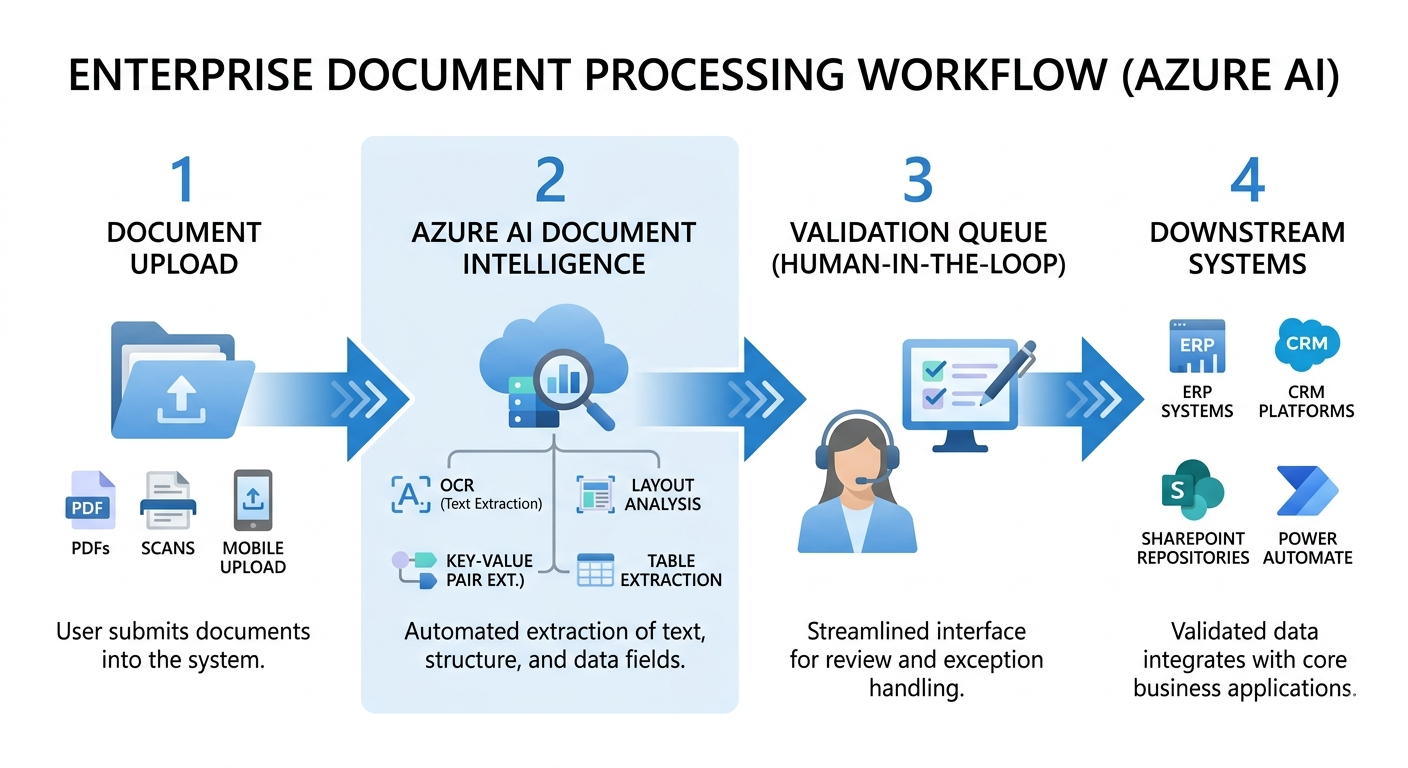
Core Capabilities of Azure AI Document Intelligence
| Capability | Description |
|---|---|
| OCR & Layout Detection | Extracts text while understanding document structure |
| Prebuilt Models | Ready-to-use models for invoices, receipts, IDs |
| Custom Models | Trains AI models for unique document layouts |
| Table & Key-Value Extraction | Converts unstructured content into structured data |
| API-Based Integration | Enables automation across business applications |
These capabilities allow organizations to automate document processing fast without extensive custom development, reducing both implementation time and operational complexity.
How Azure AI Document Intelligence Works
A common enterprise architecture pattern is:
Ingestion (app/API) → Secure Storage (Azure Blob) → Extraction (Azure AI Document Intelligence) → Orchestration (Azure Functions/Logic Apps) → Validation (exception queue) → Persistence (SQL/Cosmos DB) → Downstream Systems (ERP/CRM/SharePoint)
This design supports scalability, retries, and auditability. Azure AI Document Intelligence follows a scalable workflow:
- Documents are uploaded through applications, portals, or APIs
- AI models analyze text, layout, and structural relationships
- Data is extracted into structured formats such as JSON
- Results are validated and integrated into downstream systems
To make this workflow production-ready, define security controls, exception handling, and audit logging—especially for high-volume or compliance-driven use cases.
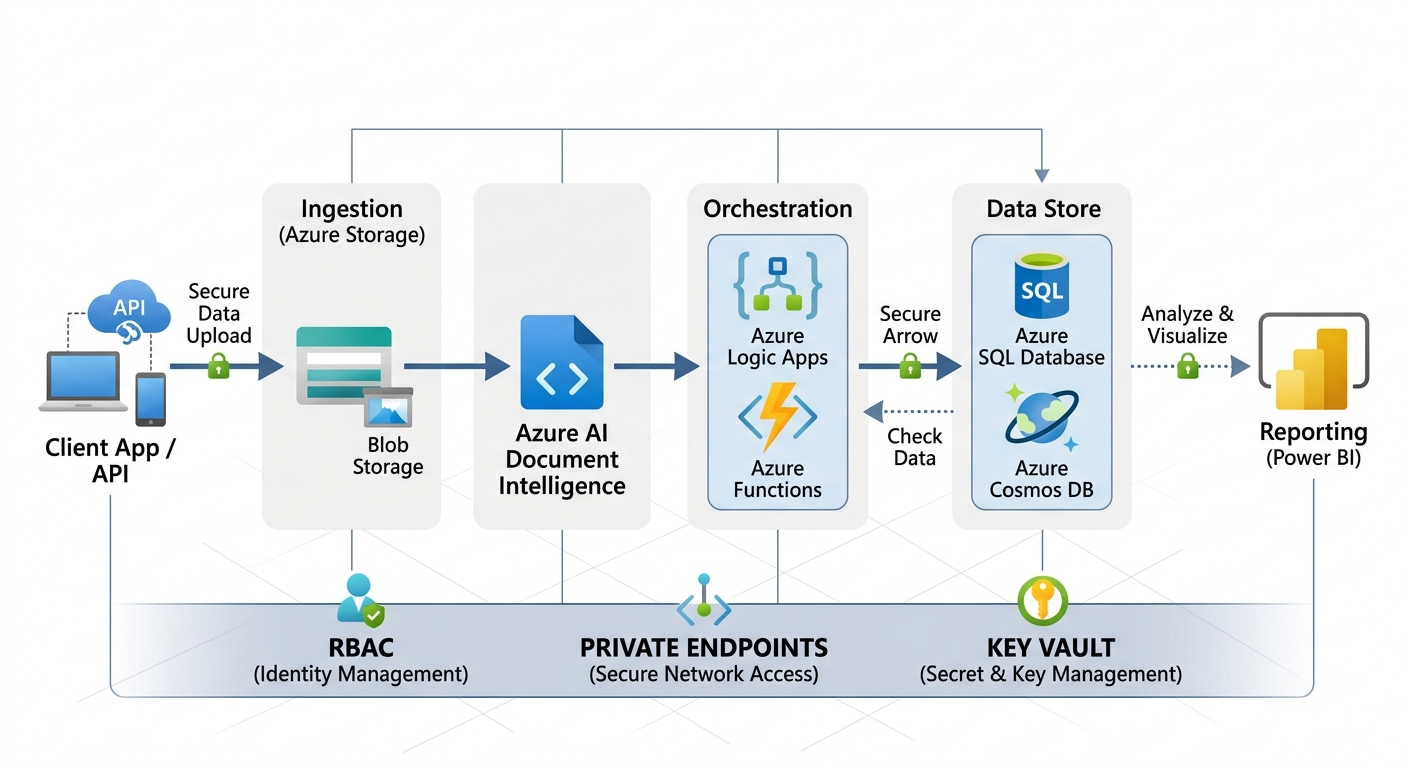
Step-by-Step: How to Implement Azure AI Document Intelligence
| Decision Area | Options | ARC Guidance |
|---|---|---|
| Model approach | Prebuilt, custom, composite | Start with prebuilt; move to custom when layouts/fields differ materially |
| Deployment connectivity | Public endpoint, private networking | Use private networking for regulated/enterprise workloads |
| Validation | Human-in-the-loop, auto-approve | Define confidence thresholds + exception queues |
| Downstream integration | ERP/CRM, SharePoint, Power Platform | Design for idempotency, retries, and audit logging |
Step 1: Assess Document Types and Volumes
Identify high-volume and high-impact documents such as invoices, contracts, onboarding forms, procurement requests, or regulatory submissions. Evaluate document formats, quality, language variation, and compliance requirements to prioritize automation candidates.
Step 2: Select Prebuilt or Custom Models
Use prebuilt models to accelerate deployment for standard document types. Choose custom models only when document structures vary significantly or contain organization-specific fields.
Step 3: Design Secure and Scalable Architecture
Define data flow, access controls, storage, logging, and integrations to meet enterprise requirements—often alongside broader Azure AI services initiatives.
Step 4: Integrate with Business Workflows
Integrate extracted data with Power Automate, Azure Logic Apps, SharePoint, or line-of-business systems to automate routing, approvals, and downstream updates.
Step 5: Validate, Monitor, and Optimize
Validate extraction accuracy, monitor confidence scores, implement exception handling, and continuously optimize models to maintain accuracy and performance at scale.
Step 6: Run UAT and Define Acceptance Criteria
Before go-live, run user acceptance testing with real document samples and edge cases—low-quality scans, handwriting, multi-page documents, language variations. Define acceptance criteria such as field-level accuracy targets, maximum exception rate, throughput, and audit logging requirements.
Step 7: Go-Live, Monitor, and Operationalize
Operationalize the solution with monitoring dashboards, alerting, and model lifecycle management. Track KPIs such as straight-through-processing (STP) rate, exception rate, average handling time, and cost per document.
| KPI | Why It Matters | Example Target |
|---|---|---|
| STP rate | Percent processed without human review | 60–90% after tuning |
| Field accuracy | Quality of extracted data | 95–99% for critical fields |
| Exception rate | Controls workload on reviewers | <10–20% |
| Cost per document | Shows ROI and optimization opportunities | Downward trend quarter-over-quarter |
Common Enterprise Use Cases
| Use Case | What to Extract | Typical Workflow Integration |
|---|---|---|
| Invoice processing | Vendor, invoice #, totals, taxes, line items | AP/ERP posting + approvals (Power Automate/Logic Apps) |
| Contract intake | Parties, dates, terms, renewal, obligations | CLM routing + compliance review + retention |
| HR onboarding | Employee details, IDs, forms, signatures | SharePoint/HRIS + Teams notifications |
| Compliance documents | License #, expiry, certificate fields | Audit trails + alerts for renewals/expirations |
ARC’s Implementation Framework
| Phase | Focus Area | Business Outcome |
|---|---|---|
| Assessment | Document analysis, risk review | Clear automation roadmap |
| Model Strategy | Prebuilt vs custom models | Faster time to value |
| Architecture | Security and integrations | Scalable foundation |
| Implementation | APIs and workflows | Production readiness |
| Optimization | Accuracy tuning | Continuous improvement |
To maximize value, document intelligence should be embedded into enterprise operations—not deployed as an isolated AI experiment.
Business Value
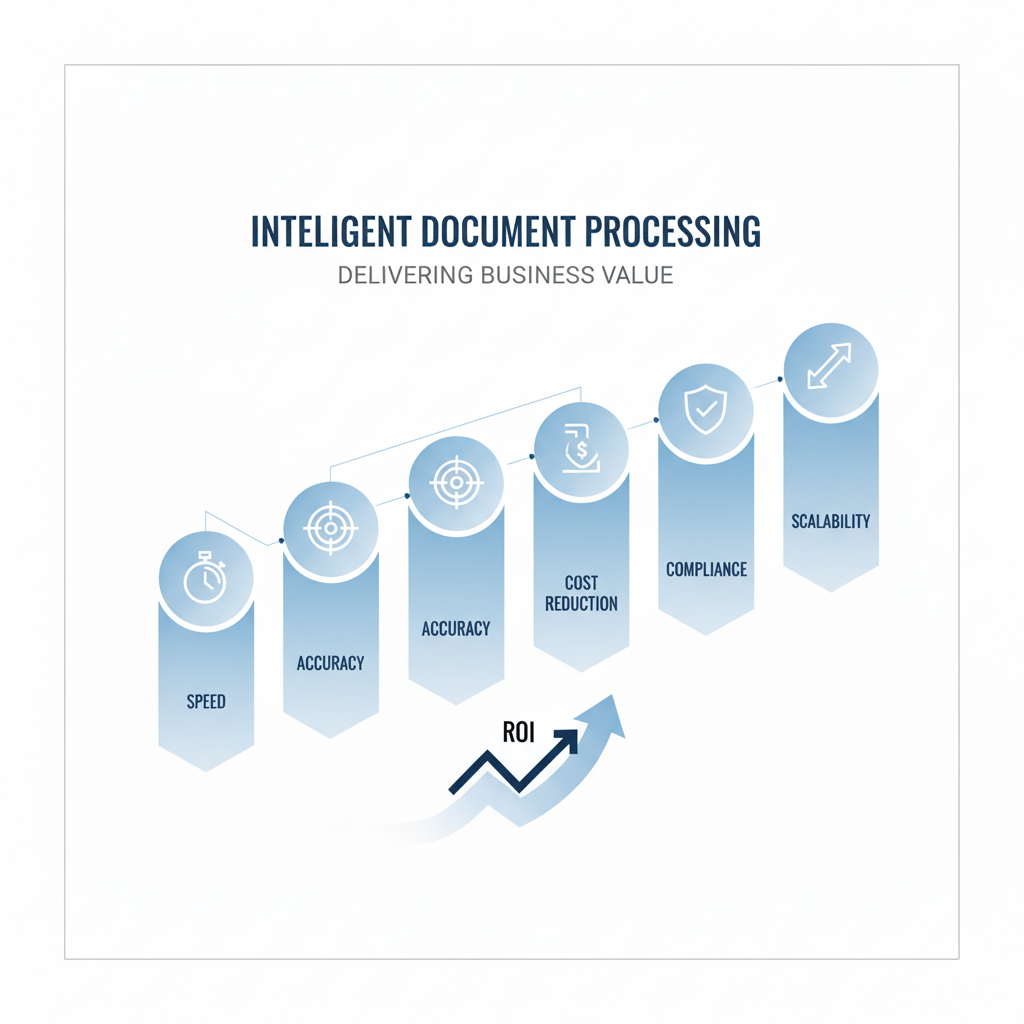
- Faster processing: Reduced document turnaround times across departments
- Lower costs: Reduced manual effort and operational expenses
- Improved accuracy: Better data consistency and fewer downstream errors
- Compliance readiness: Stronger audit trails and regulatory alignment
- Scalable automation: Processes more documents without adding headcount
- Better visibility: Real-time insight into document-driven operations
Security, Compliance, and Governance
Azure AI Document Intelligence aligns with Azure security and compliance standards, including encryption, role-based access control, data residency, and audit logging. ARC ensures deployments meet enterprise governance and regulatory requirements from day one.
Integrating with the Microsoft Ecosystem
Azure AI Document Intelligence integrates seamlessly with:
- Power Automate for no-code workflow automation
- Azure Logic Apps for enterprise orchestration
- SharePoint for document repositories and approvals
- Microsoft Teams for notifications and exception handling
- Azure SQL / Cosmos DB for structured data persistence
ARC often implements these integrations as part of broader Microsoft 365 and automation programs.
Frequently Asked Questions
What documents can Azure AI Document Intelligence process?
▼
Invoices, receipts, contracts, forms, IDs, and custom document formats. It supports PDFs, scanned images, and mobile uploads across structured and semi-structured layouts.
Do we need to train custom models?
▼
Not always. Prebuilt models cover many use cases. Custom models are optional and only needed when document structures vary significantly or contain organization-specific fields not covered by prebuilt options.
Is Azure AI Document Intelligence secure for enterprises?
▼
Yes. It follows Azure’s enterprise-grade security and compliance standards including encryption at rest and in transit, RBAC, private endpoints, and data residency controls.
Can it integrate with existing workflows?
▼
Yes. It integrates with Power Automate, Logic Apps, SharePoint, and enterprise systems including ERP and CRM platforms through standard REST APIs.
How do we handle low-quality scans or handwritten content?
▼
Results depend on document quality. ARC typically recommends improving scan standards, using validation queues for low-confidence fields, and piloting with real samples early to establish realistic accuracy baselines.
Conclusion
Azure AI Document Intelligence gives enterprises a practical path from manual document handling to scalable, AI-driven automation. With prebuilt models ready for common document types and flexible custom model training for organization-specific formats, organizations can reduce processing costs, improve accuracy, and build a foundation for wider intelligent automation.
If your organization is exploring document automation, ARC can help with strategy, implementation, governance, and optimization—from pilot to enterprise scale.
Frequently Asked Questions
What is Power Automate?
Power Automate is Microsoft's workflow automation platform that connects apps and services to automate repetitive tasks, business processes, and approvals without writing code.
Do I need coding experience to use Power Automate?
No. Power Automate provides a visual drag-and-drop designer for building flows. Advanced scenarios can leverage expressions and custom connectors, but most automations are no-code.
What can Power Automate automate?
Common automations include approval workflows, email notifications, data synchronization between systems, document processing, social media monitoring, and scheduled reporting tasks.
How does Power Automate integrate with Microsoft 365?
Power Automate has deep native integration with SharePoint, Teams, Outlook, Excel, OneDrive, Dataverse, and all Microsoft 365 services — plus 1,000+ third-party connectors.
Is Power Automate included in Microsoft 365?
Basic Power Automate capabilities are included in Microsoft 365 licenses. Premium features like custom connectors, RPA (desktop flows), and AI Builder require additional Power Automate licensing.

Al Rafay Consulting
ARC Team
AI-powered Microsoft Solutions Partner delivering enterprise solutions on Azure, SharePoint, and Microsoft 365.
LinkedIn Profile