Strategy & architecture
We define the right site structure, taxonomy, permissions model, and governance before the platform scales.
Intranets, document management, and custom SharePoint development for enterprises. As a 3x Microsoft Solutions Partner, our certified consultants plan, build and migrate without the data loss, sprawl, and stalled adoption that derail most rollouts.
SharePoint is powerful out of the box, but most organizations need help turning it into a secure, searchable, and adoption-ready system that supports how work actually happens.
SharePoint is Microsoft’s collaboration and content platform used to build intranets, document libraries, team sites, and workflow-driven business applications. It ships with most Microsoft 365 plans, which is exactly why many organizations struggle with it. Turning it on is easy. Turning it into a system employees trust, a knowledge base they can actually search, and a platform that scales with governance needs is the hard part.
SharePoint consulting is the professional service that closes that gap. It brings together strategy, architecture, security design, migration planning, workflow automation, and change management so the outcome is a useful digital workplace instead of a sprawling file dump with unclear permissions and weak adoption.
We define the right site structure, taxonomy, permissions model, and governance before the platform scales.
We build or migrate SharePoint environments in planned waves so content, workflows, and access stay intact.
We help you secure, manage, and improve the platform so it remains trusted and usable over time.
A SharePoint consultant is different from a site administrator or a handoff developer. The consultant typically owns the full arc from strategy to delivery and helps connect the business process to the right solution architecture.
Cost depends heavily on scope, data volume, and how much customization you need — but here’s what the market actually looks like in 2026.
Basic configuration and simple site builds.
Full site design, migrations, and governance setup.
Complex migrations, custom development, and enterprise integrations.
Security, AI, and Power Platform work for high-risk initiatives.
A few thousand documents is very different from 700,000+ across multiple libraries and workflows.
Out-of-the-box configuration is affordable; custom SPFx and deep integrations add real scope.
Finance, healthcare, and regulated environments raise governance, audit, and security requirements.
Connecting SharePoint to CRM, ERP, or line-of-business systems increases project complexity.
Senior US consultants sit at the top of the range; hybrid teams often lower the blended rate.
The biggest cost mistake isn’t overpaying for the build — it’s underpaying for discovery and then re-architecting the platform six months later because the permission model or taxonomy didn’t scale.
Price and a Microsoft badge are not enough to evaluate a consultant. A strong partner brings deeper governance thinking, real delivery experience, and a support model that lasts after launch.
The right partner should be able to explain how they design permissions, metadata, migration waves, governance, adoption, and post-launch support without wavering. If the conversation stays at a visual demo, the complexity is likely still hidden.
Ask which Microsoft designations they hold and confirm them on the partner directory before trusting the badge.
Ask for a migration or intranet example close to your user count, document volume, and industry complexity.
Good consultants can explain permissions, metadata, retention, and compliance design in plain business terms.
Fixed-fee works well for defined scope; time-and-materials is smarter for exploratory or unknown work.
Senior architects should be visible in the plan; junior team members should be supervised, not left to learn on your environment.
A rollout without training, documentation, and support often decays within a year because adoption never sticks.
Ask a past client whether they would hire the firm again and whether the engagement ended with a stable platform or more cleanup work.
Most well-run SharePoint engagements follow the same four phases: discovery, implementation, adoption, and ongoing optimization. The difference is whether the partner manages the complexity or just delivers a demo.
The consultant audits your content, permissions, workflows, and governance, then produces a target architecture and phased roadmap.
1–6 weeksThe environment is built or migrated in validated waves so content, permissions, and workflows move without a high-risk cutover.
4–16 weeksUser acceptance testing and role-based training run in parallel so the system is usable by the people who depend on it.
2–6 weeksPost-launch, most organizations keep a managed support relationship for optimization, governance, and new capability rollout.
ContinuousThat’s what good SharePoint consulting looks like in general. Here’s specifically how we run it.
100+ projects delivered, 12+ years of Microsoft expertise. As a 3x Microsoft Solutions Partner, our certified consultants plan, build, migrate, and support environments thousands of employees rely on every day without the data loss, sprawl, and stalled adoption that derail most rollouts.
100+ SharePoint Projects · 700K+ Documents Managed · $6M Client Savings · 7 yrs Longest Engagement
Four connected disciplines. Most engagements start in one and grow into the others — which is exactly why 100% of our clients stay with us. Underpinning all four: AI, baked into the architecture rather than bolted on later.
We architect and build modern SharePoint Online and Server environments from the ground up — intranets, document management, team and communication sites, and governance models designed to scale.
Explore intranet portal developmentWe move content, permissions, workflows, and customizations from on-premises SharePoint, file shares, or legacy platforms to SharePoint Online with zero data loss and minimal downtime.
Explore SharePoint migrationWhen out-of-the-box won’t cut it, our developers build SPFx web parts, Power Platform integrations, and document-centric applications tailored precisely to your processes.
Explore custom developmentAfter launch, our SLA-backed managed services keep your environment secure, optimized, and continuously improving as Microsoft ships new SharePoint, Syntex, and Copilot capabilities.
Talk to our teamTen focused capabilities — from custom development and migration to Syntex and Copilot AI agents. Each links to a dedicated service page.
When SharePoint’s out-of-the-box features can’t model your process, our developers build custom solutions on the modern SharePoint Framework (SPFx). You need this when teams are forcing workarounds, exporting to spreadsheets, or living in email because the platform doesn’t fit how they actually work. We build SPFx web parts and extensions, Microsoft Graph integrations, and document-centric business applications using React, TypeScript, and the PnP libraries — the same patterns Microsoft itself recommends. A typical engagement delivers production-ready, source-controlled components, deployment packaging, and documentation your team can maintain. Everything is built to survive Microsoft’s frequent platform updates rather than break on the next release, so the investment keeps paying off for years.
Manual approvals, onboarding checklists, and contract routing quietly drain hours and introduce errors every week. Workflow automation replaces those email-and-spreadsheet chains with reliable, auditable processes — and it’s usually the fastest way to show SharePoint ROI. You need this when approvals stall, status is invisible, or compliance sign-offs are hard to evidence. We design and build Power Automate and SharePoint-native flows for approvals, document generation, employee onboarding, and policy attestation, with proper error handling, escalation, and notifications built in. Deliverables include mapped process diagrams, configured flows, test cases, and admin documentation so your team can extend them later. Most workflows go live in two to six weeks and start saving time immediately.
Sign and approve documents without leaving Microsoft 365. We automate approvals and add e-signature to your everyday workflows with the Power Platform. You need this when contracts and sign-offs stall in inboxes, approvals lack visibility, or audit trails are hard to prove. We implement SharePoint and Power Automate approval flows with native or third-party e-sign support, including multi-stage routing, notifications, and full compliance logging. The result is faster sign-offs, cleaner governance, and a reliable process your teams can trust.
A SharePoint site people actually want to use looks and feels like your organization, not a generic template. Branding and design is what turns a technically correct intranet into one employees adopt. You need this when sites feel clunky, navigation confuses people, or your intranet looks nothing like your brand. We deliver custom themes, site templates, and SPFx-based design components, plus information architecture and navigation that make content easy to find. Everything is built with modern, supported techniques that survive Microsoft’s frequent platform updates — no fragile hacks that break on the next release. A typical engagement includes a design system, branded templates, and reusable components, giving you a polished, consistent experience across every site you create.
SharePoint delivers the most value when it’s wired into the rest of Microsoft 365 rather than used in isolation. Integration connects content, conversations, and processes into one source of truth across the tools your people already use. You need this when documents live in silos, teams duplicate work across apps, or information is hard to find. We integrate SharePoint with Microsoft Teams, OneDrive, Outlook, the Power Platform, and Viva, configuring surfacing, search, and governance so everything works together. Deliverables include connected workspaces, document-management structures, and automated flows between systems. The result is a unified digital workplace where a file, a chat, and an approval all reference the same governed content — cutting the friction that slows everyday work.
Frontline staff, field teams, and executives need SharePoint content wherever they are — not just at a desk. Mobile-ready experiences put documents, approvals, and dashboards securely in their hands on any device. You need this when people can’t act on approvals away from their desk, or field teams resort to paper and phone calls. We build responsive SharePoint sites and, where it makes sense, dedicated mobile apps that respect your existing permissions and security model. Deliverables include mobile-optimized interfaces, secure authentication, offline-tolerant patterns where appropriate, and testing across devices. Whether it’s a property manager approving an invoice on-site or an executive reviewing a dashboard between meetings, the right information is one tap away and always in sync.
Migrating SharePoint is where most projects go wrong — content breaks, permissions scramble, and workflows vanish. Our migration practice exists to make sure that doesn’t happen to you. You need this when moving from on-premises to SharePoint Online, consolidating tenants, or upgrading legacy versions. We start with a full inventory and dependency map, then execute a staged, validated migration with delta passes so nothing is lost and there’s no productive downtime. Content, metadata, permissions, and workflows arrive intact, and we keep a rollback plan ready throughout. Deliverables include a migration plan, mapping documentation, validation reports, and post-migration support. We’ve migrated environments holding 700,000+ documents, so even large, complex moves are familiar territory rather than a risky first attempt.
A modern intranet is the front door to your digital workplace — the place employees go to find news, documents, people, and tools. Done well, it lifts productivity and adoption across the whole organization. You need this when your current intranet is outdated, search doesn’t work, or staff can’t find what they need. We build modern communication sites and hub-site architectures with the navigation, search, personalization, and governance that make content effortless to find. Deliverables include information architecture, branded hub and communication sites, news and content models, and an adoption plan. Whether you’re launching a brand-new intranet or replacing an aging one, you get a portal employees actually use — backed by the structure to keep it healthy as you grow.
Collaboration rarely stops at your firewall — partners, clients, and vendors often need access too. B2B integration lets you share securely with external parties without exposing internal content or losing control. You need this when you’re emailing sensitive files to partners, running clunky FTP handoffs, or standing up partner portals. We configure secure external sharing, extranets, and partner portals with the identity, conditional-access, and governance controls to keep collaboration safe. Using Microsoft Entra ID B2B, sensitivity labels, and least-privilege permissions, external users see only what they should — and you keep a full audit trail. Deliverables include a configured external-sharing model, partner-facing sites, and governance documentation, so you can collaborate beyond your walls with confidence rather than risk.
When teams spend hours manually tagging contracts, invoices, leases, or claims, SharePoint Syntex (now part of Microsoft Syntex) pays for itself fast. It uses AI to read incoming documents, classify them, and extract key fields automatically. You need this when high document volumes make manual metadata impractical and poor tagging is hurting search and compliance. We design and train Syntex models tuned to your document types, then wire the extracted metadata into your libraries, retention, and workflows. Deliverables include trained content-understanding models, configured libraries, and validation of extraction accuracy. The result turns unstructured piles of documents into structured, searchable, compliant information at scale — eliminating tedious manual work and making the content far easier to govern and find.
Your SharePoint already holds the knowledge employees need — the problem is finding it. AI agents built with Microsoft Copilot Studio turn that content into a secure, conversational assistant your team can simply ask. You need this when staff waste time hunting through libraries, or the same questions get asked over and over. We build permission-aware Copilot agents grounded in your own governed SharePoint content, with security trimming so people only see what they’re allowed to. Employees ask questions in plain language and get accurate, sourced answers — not guesses. Deliverables include a configured agent, grounding and security setup, and testing against real questions. It effectively turns your document libraries into a knowledge assistant that respects every existing permission boundary.
When BioMed Realty, a leading life-science REIT, needed to bring order to documents scattered across 20+ properties, they turned to Al Rafay Consulting. A focused SharePoint workflow-automation initiative grew, over a seven-year partnership, into DocuArc an enterprise document management system now governing 700,000+ documents with automated metadata tagging, compliance tracking, and AI-powered search.
“We’ve now grown our work with SharePoint into a full-blown Business Intelligence platform that has created tremendous efficiency and value for our organization.”David Hsiao — SVP & CIO, BioMed RealtyRead the full DocuArc case study
Twelve years and 100+ projects taught us that outcomes come from process, not heroics. Every engagement runs through four phases each with deliverables you can hold us to.
We audit your current environment, content, and workflows, review governance and security, and identify quick wins alongside long-term opportunities.
Deliverables: Current-state audit, governance review, target architecture & written roadmap.
Microsoft Certified architects build and configure the solution, then migrate content, permissions, and workflows in staged, validated waves.
Deliverables: Configured environment, migrated & validated content, and a rollback plan.
Technology only pays off when people use it. We run role-based training, change management, and champion enablement backed by clear documentation.
Deliverables: Training sessions, adoption plan, and end-user & admin documentation.
After launch we provide SLA-backed support, proactive optimization, and a steady cadence of feature releases as Microsoft evolves the platform.
Deliverables: Ongoing support with defined response times, health checks & enhancement backlog.
Three transparent ways to work with us. Most clients start with an assessment, move into a scoped project, then transition to managed support but you can enter at any stage.
A focused architecture review of your current SharePoint environment, governance, and workflows — delivered as a written roadmap you own, whether or not you build with us.
A fixed, well-defined build — implementation, migration, or custom development — scoped from your assessment so the price, timeline, and deliverables are clear before we start.
SLA-backed support, proactive optimization, and a steady cadence of small enhancements as Microsoft ships new SharePoint, Syntex, and Copilot capabilities.
Every engagement is scoped to your environment after a short discovery conversation — no surprise invoices, no commitment to start. Request a tailored quote.
We work across the full Microsoft stack, current and legacy so we can meet you wherever your environment is today.
We deliberately specialize rather than serve everyone — which means deeper knowledge for your specific challenges.
Deep vertical expertise, including a 7-year SharePoint and document-management engagement with a publicly traded REIT managing 700,000+ documents across a national portfolio.
SharePoint intranets, document workflows, and mobile-ready portals built for distributed, on-site teams managing multiple properties.
Collaboration and content solutions for venues and arts organizations, including event-driven workflows and member-facing portals.
Cost-conscious SharePoint and Microsoft 365 deployments that maximize the nonprofit grant, with governance and reporting suited to boards and funders.
Don’t see your industry? Our SharePoint consulting services translate across sectors. Explore all industries.
12+ years focused on the Microsoft stack and 100+ completed SharePoint projects across enterprise and mid-market organizations.
Three concurrent designations — including Data & AI and Digital & App Innovation — independently validating our expertise.
Inc. 5000 #749 and Inc. Regionals #57, with 557% growth — proof of a stable, scaling partner you can build on.
Trusted by demanding organizations including BioMed Realty, CNA, and Innovative Industrial Properties.
A 7-year SharePoint engagement with a public REIT gives us pattern knowledge generalists simply don’t have.
Chicago and Karachi offices provide time-zone coverage and cost efficiency without compromising quality.
Every client who has worked with us has chosen to continue the relationship — the clearest signal of delivered value.
You get Microsoft Certified SharePoint architects and developers, not junior staff learning on your project.
Al Rafay Consulting was an outstanding partner in developing our internal pipeline tracker. They took a detailed upfront inventory of our existing tools and processes, were extremely communicative throughout, and were instrumental in the successful launch.
 Adam GoldblattDirector, Investments, BioMed Realty
BioMed Realty engaged ARC 7 years ago to kick-start an internal SharePoint campaign focused on productivity through workflow automation. We’ve grown that into a full business-intelligence platform that created tremendous efficiency and value.
 David HsiaoSVP & CIO, BioMed Realty
When we were looking to design and implement our new website, ARC was an invaluable partner — helping us select a flexible platform and implement our design into a site we can easily manage as we grow.
 Catherine HastingsCFO, Innovative Industrial Properties
ARC went above and beyond to give us the tool we needed. Ali and his team sat side by side with us learning our industry, and through it all showed patience, collaboration, and resolve.
 Kelly BargabosCFO/COO, San Diego Theatres
Working with ARC over three years has been exceptional. A vast knowledge of their core business plus a hunger to learn new industries has proven critical to our partnership.
 Mark ZikraDirector of Technology, CA Ventures
SharePoint consulting is professional guidance and hands-on delivery that helps organizations plan, build, migrate, secure, and adopt Microsoft SharePoint. A SharePoint consultant assesses your needs, designs the right architecture and governance, implements intranets, document management, and custom solutions, then trains your team and supports the environment so you realize SharePoint’s full value.
Cost depends on scope, complexity, and data volume. Most engagements begin with a short discovery and architecture review that defines requirements and produces an accurate estimate before any build work starts. Smaller projects like a single workflow are modest; enterprise migrations or custom development are larger investments. We scope transparently so there are no surprises.
A focused intranet or document-management build typically takes 6 to 12 weeks; complex migrations or custom development can run 3 to 4 months. Timelines depend on content volume, integrations, and customizations to rebuild. Our discovery phase produces a phased roadmap with realistic milestones, and we deliver in validated waves so you see value early.
SharePoint Server is the on-premises or hybrid version you host and maintain yourself, with full infrastructure control. SharePoint Online is the cloud service in Microsoft 365, where Microsoft handles hosting, updates, and scale, and you get the latest features including Copilot and Syntex first. Most organizations are moving to SharePoint Online, though regulated industries sometimes retain on-premises or hybrid.
For most organizations, SharePoint Online wins on cost, security, scalability, and access to new AI capabilities. On-premises or hybrid can still make sense for strict data-residency, regulatory, or deep-customization requirements. We assess your compliance needs, customizations, and integrations during discovery and give you an unbiased recommendation rather than a default push to the cloud.
We inventory and map all content, permissions, and dependencies, then migrate in staged waves with validation at each step. Delta migrations capture changes made during the move, and we cut over outside business hours. Users keep working on the source until the validated switch, so there’s no productive downtime, and we keep a rollback plan ready throughout.
Yes. We connect SharePoint to systems like Dynamics 365, Salesforce, SAP, and others using the Power Platform, APIs, and custom connectors. Integrations can sync records, surface CRM and ERP data inside SharePoint and Teams, and automate cross-system workflows so your people stop re-keying data between platforms. We design these connections with security and maintainability in mind.
We deliver role-based training for end users, site owners, and administrators, plus a champions program to sustain adoption internally. Sessions are tailored to your actual environment and workflows, not generic SharePoint demos, and we leave behind documentation and quick-reference guides. Strong adoption is why our solutions keep delivering value years after launch.
Yes. Our SLA-backed managed services cover administration, monitoring, user support, security and compliance maintenance, and continuous optimization. As Microsoft ships new SharePoint, Syntex, and Copilot capabilities, we evaluate and roll out what benefits you. This is why many clients stay with us for years, including a 7-year support relationship with a public REIT.
We design least-privilege permission models, configure Microsoft Entra ID and modern authentication, apply sensitivity labels and data-loss-prevention policies, and build audit trails into workflows. We align deployments with frameworks relevant to your industry and support data-residency requirements. Governance is part of the architecture from the first phase, not an afterthought.
SharePoint Syntex, now part of Microsoft Syntex, uses AI to automatically read, classify, and tag documents and extract key data. Use it when you handle high volumes of similar documents such as contracts, invoices, leases, or claims, and manual tagging is slowing your team or hurting findability. Syntex turns unstructured content into structured, searchable, compliant information at scale.
Yes. We build permission-aware AI agents grounded in your own SharePoint content using Copilot Studio. Employees ask questions in plain language and get accurate answers sourced from your governed repositories, with security trimming so people only see what they’re allowed to. It effectively turns your document libraries into a secure, conversational knowledge assistant.
Our developers build SPFx web parts and extensions, Power Platform solutions, and document-centric applications using React, TypeScript, and the PnP libraries. We’ve delivered everything from executive dashboards to enterprise document systems managing 700,000+ documents. We write maintainable, well-documented code that survives Microsoft’s platform updates rather than breaking with the next release.
We embed AI in every SharePoint solution, specialize in four industries for deeper domain knowledge, and maintain 100% client retention across 100+ projects. You get Microsoft Certified architects, not rotating junior staff, and one accountable team from discovery through long-term support. A generalist spreads thin; we go deep on SharePoint and the verticals we serve.
Start with a free SharePoint architecture review, a 30-minute conversation with a Microsoft Certified architect. We’ll discuss your goals, assess your current environment at a high level, and outline practical next steps. There’s no obligation, and you’ll leave with clarity on what’s possible and where to focus first.
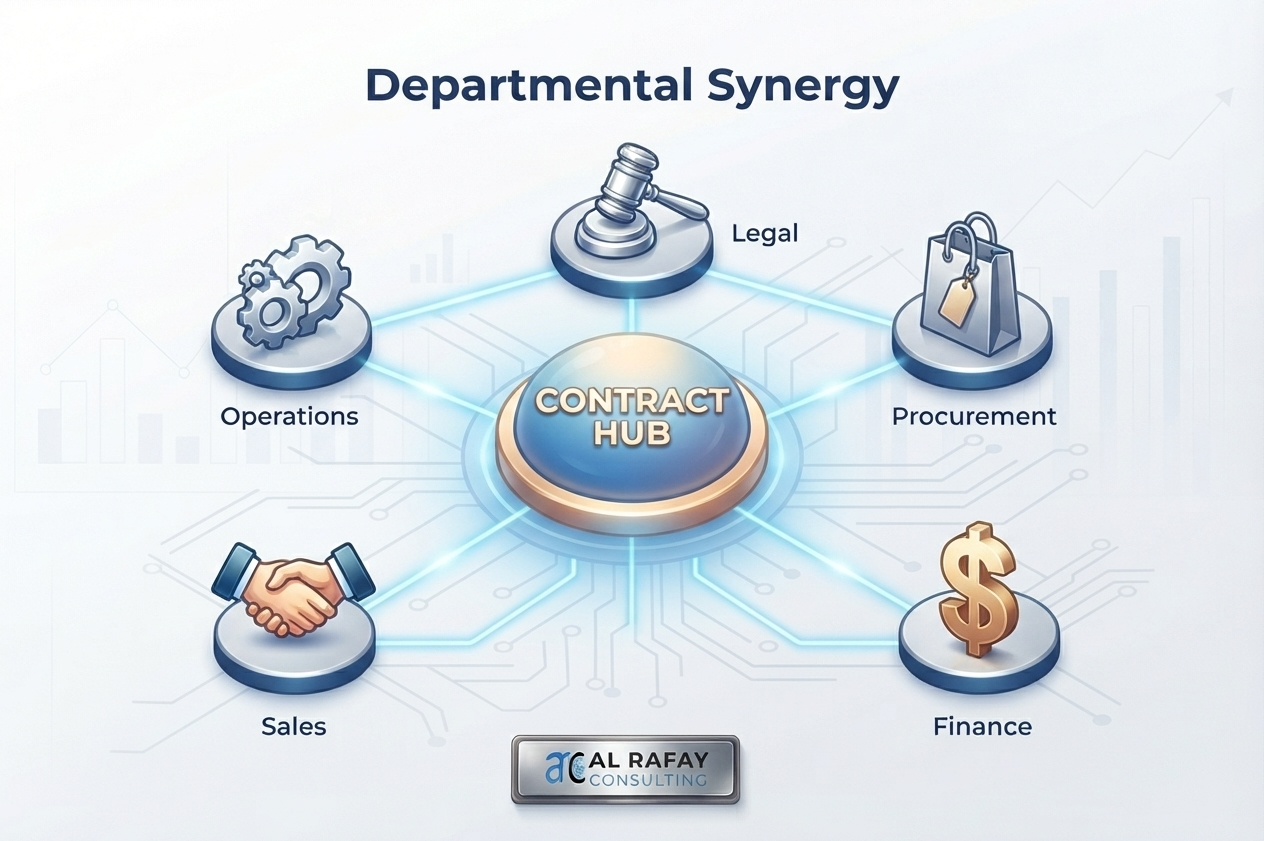
See how contract automation software delivers measurable ROI through faster cycles, reduced risk, and protected revenue. Get the business case.

Learn how AI contract review works step by step — and how it connects to full AI contract management on Microsoft 365.
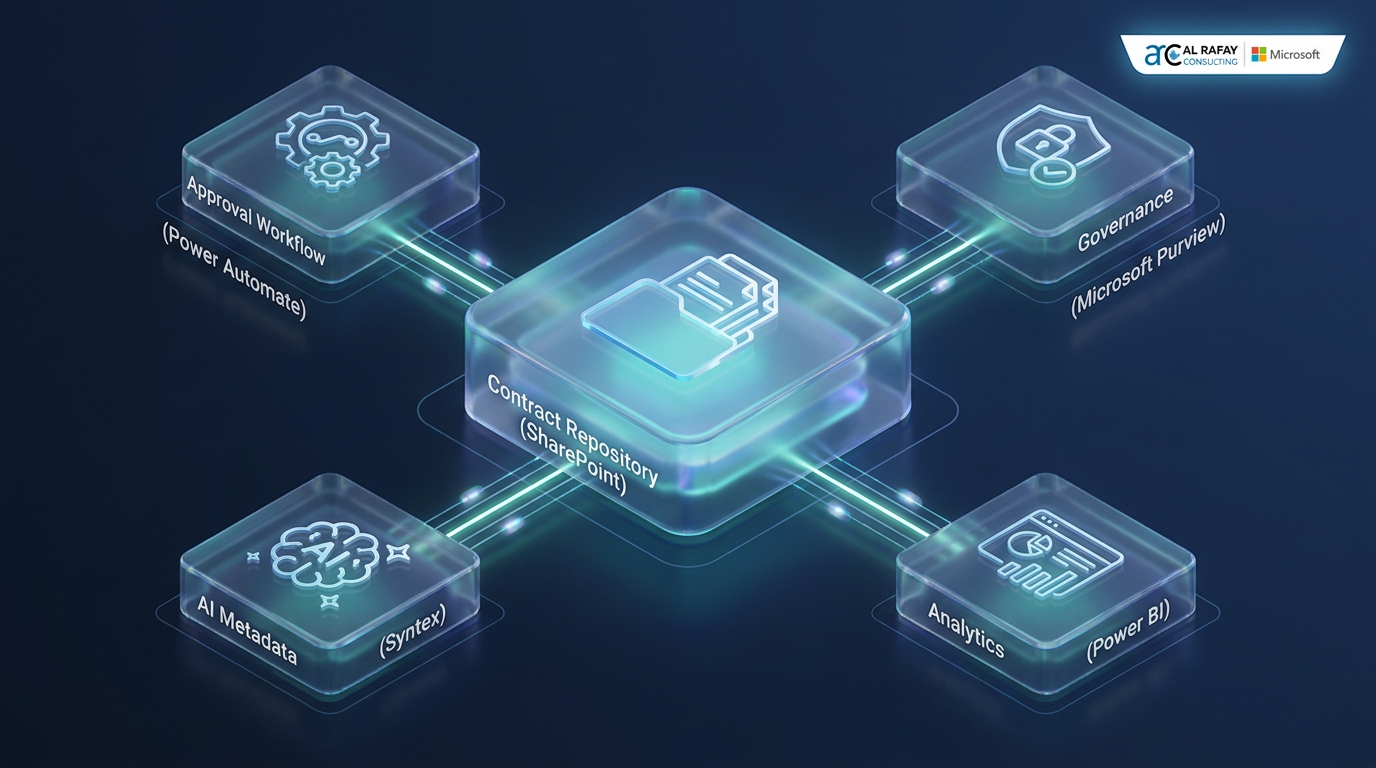
Learn contract lifecycle management stages, CLM software features, Microsoft 365 implementation patterns, and a practical roadmap to improve renewal control and compliance.
Free SharePoint architecture review — 30 minutes with a Microsoft Certified architect, no obligation. Bring your goals and your current environment; leave with a clear, practical roadmap.
