Contract Lifecycle Management: Complete Guide to CLM Stages, Benefits, and Automation
Contract lifecycle management (CLM) is the end-to-end process of creating, negotiating, approving, executing, monitoring, and renewing contracts through governed workflows and centralized data.
Learn contract lifecycle management stages, CLM software features, Microsoft 365 implementation patterns, and a practical roadmap to improve renewal control and compliance.
Al Rafay Consulting
· Updated July 14, 2026 · ARC Team
Every organization runs on contracts: vendor agreements, NDAs, MSAs, SOWs, leases, and sales commitments. Yet many teams still manage contracts through inbox threads, shared drives, and manual reminders.
That model creates hidden risk. Missed renewals, weak obligation tracking, and inconsistent approvals are not only legal issues. They directly affect cost control, forecasting, and operating discipline.
This guide explains contract lifecycle management (CLM) end to end: what it means, how the lifecycle works, which software capabilities matter, how Microsoft 365 tools support CLM, and how to implement a practical roadmap.
If you are planning CLM modernization, review our Contract Management System solution to align process design, automation, and governance from day one.
What Is Contract Lifecycle Management?
Contract lifecycle management is the structured process of managing contracts from intake to renewal or termination through standardized workflows, centralized storage, and role-based controls.
CLM is not just document storage. It governs the full contract operating model before signature, during active performance, and at renewal decision points.
CLM vs Contract Management vs Document Management vs E-Signature
| Term | What it covers | Limitation on its own |
|---|---|---|
| Contract lifecycle management (CLM) | End-to-end process: intake, drafting, review, approval, execution, obligations, renewal | Broad process discipline; requires governance maturity |
| Contract management | Often used broadly, sometimes only post-signature | Ambiguous without defined scope |
| Document management system (DMS) | Storage, indexing, version control | Lacks contract-specific workflow and obligation logic |
| E-signature | Electronic signing | Covers execution only, not the full lifecycle |
A mature CLM program usually includes DMS and e-signature, but neither one alone equals CLM.
Why CLM Matters for Business Outcomes
Poor contract controls create measurable impact:
- Renewal decisions happen too late
- Obligations are not actively monitored
- Business teams cannot quickly locate enforceable terms
- Audit and compliance response becomes reactive
When contract data is fragmented across tools and inboxes, no team has complete visibility. CLM addresses this by centralizing process, ownership, and reporting.
The Contract Lifecycle Management Process
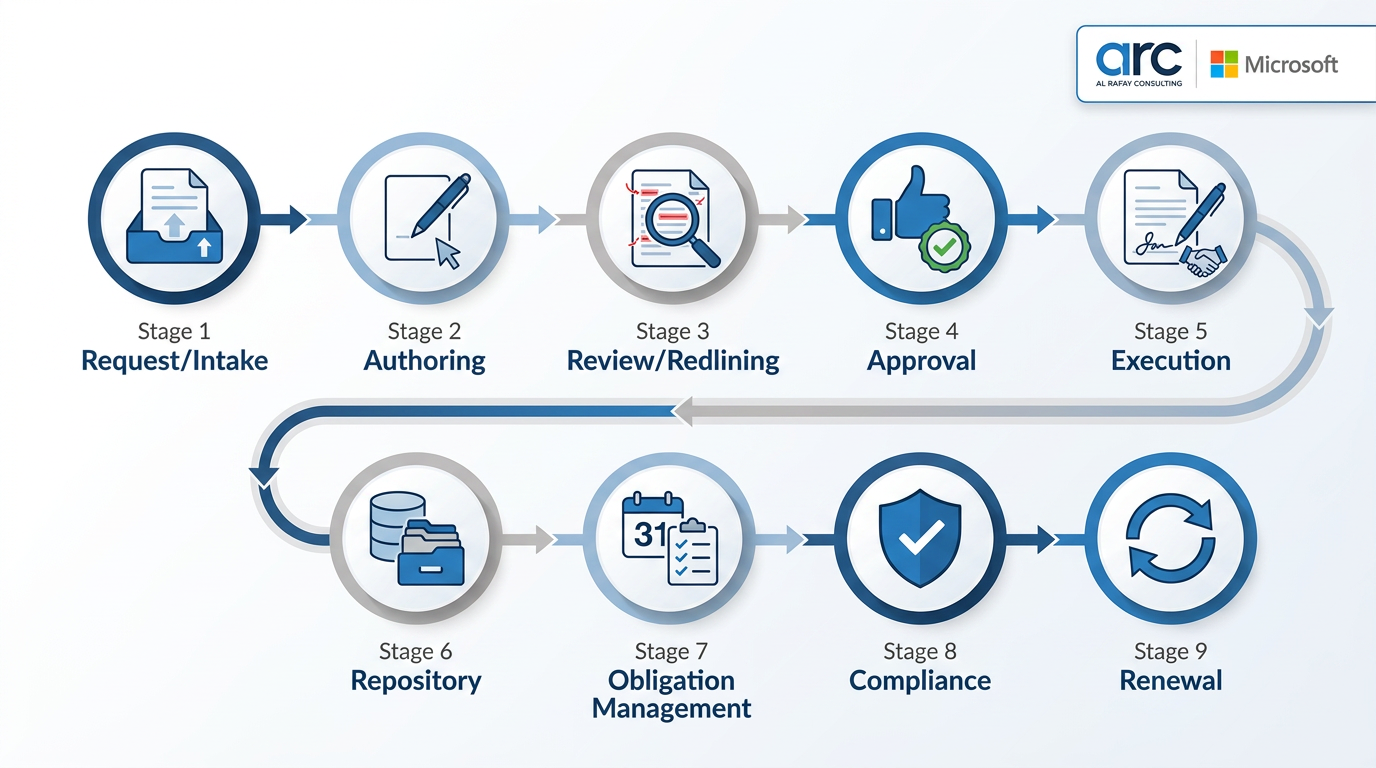
A practical CLM model spans these connected stages:
- Intake and request capture
- Authoring with approved templates
- Internal and external redlining
- Risk-based approval routing
- E-signature execution
- Centralized repository storage
- Obligation and milestone tracking
- Compliance and reporting
- Renewal or termination management
Each stage should be owned, measurable, and auditable.
Common CLM Challenges and Controls
| Challenge | Why it happens | Control |
|---|---|---|
| Email-driven process | No structured intake or routing | Use form-based intake and automated workflow |
| Version confusion | Redlines live in multiple attachments | Enforce collaborative version history |
| Metadata inconsistency | No standard classification model | Define mandatory metadata fields upfront |
| Missed renewals | No proactive alerts | Configure 60-90 day renewal notifications |
| Weak accountability | No named contract owner | Assign owner and legal reviewer at intake |
| Audit exposure | Retention and records controls are ad hoc | Apply policy-driven retention and audit trails |
CLM Software Features That Actually Matter
When selecting a CLM platform or designing a Microsoft-native stack, prioritize:
- Centralized repository with search and metadata
- Intake workflow and request tracking
- Clause library and template governance
- Redlining and approval controls
- Integrated e-signature
- Obligation and milestone monitoring
- Renewal and termination alerting
- Portfolio reporting and analytics
- CRM/ERP integrations
- Retention, records, and audit controls
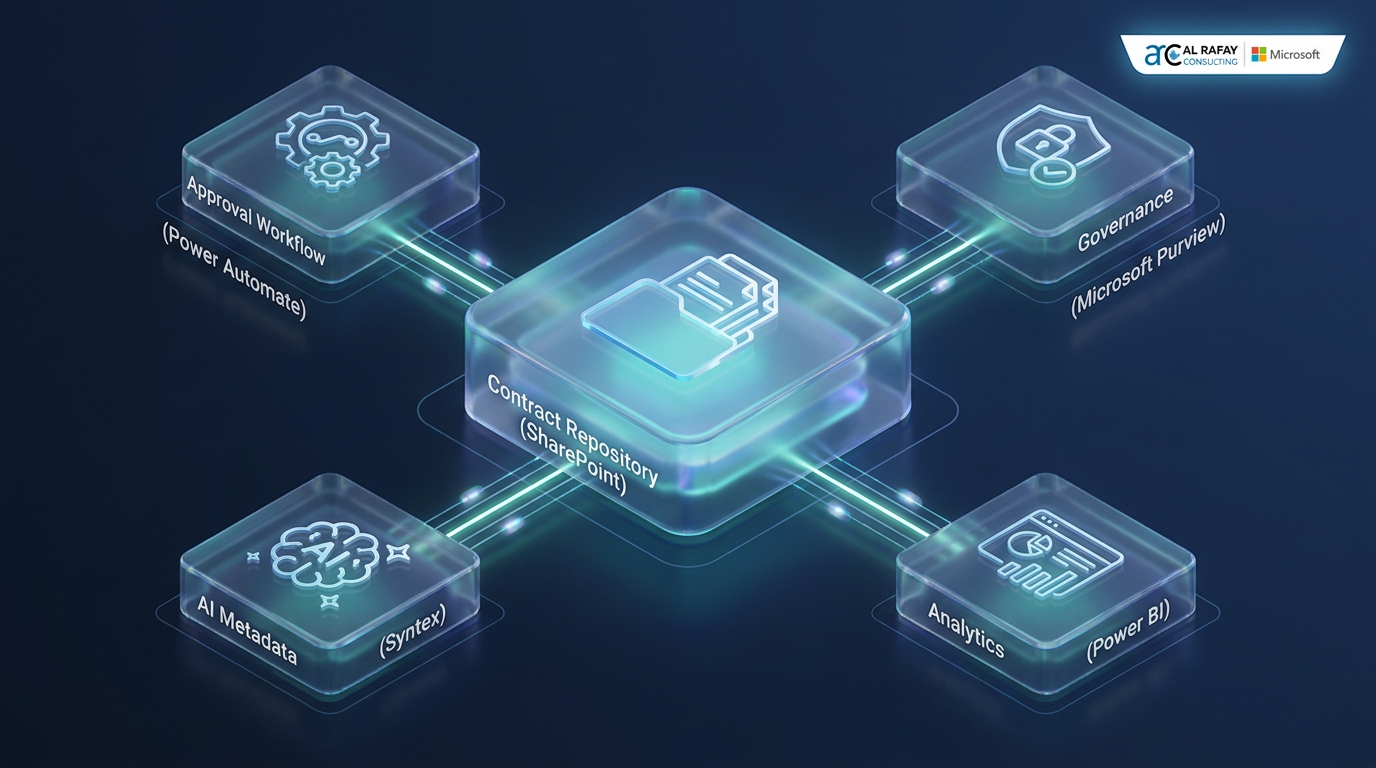
Contract Lifecycle Management with Microsoft 365
Organizations already on Microsoft can implement a strong CLM foundation without introducing disconnected tooling.
SharePoint for Repository and Metadata
SharePoint provides governed contract storage with content types, metadata, permissions, and enterprise search.
Power Automate for Approval Orchestration
Power Automate enables sequential or parallel approvals, escalation paths, and SLA-based reminders.
Microsoft Purview for Governance
Purview retention labels and records controls strengthen defensibility for compliance, audits, and legal retention requirements.
Microsoft Syntex for AI Extraction
Syntex helps extract key fields such as dates, counterparties, and financial terms, reducing manual tagging effort.
Dynamics 365 Integration for Commercial Visibility
Integrating CLM records with Dynamics 365 connects contract events to sales, procurement, and finance operations.

How to Implement CLM: A Practical Roadmap
1. Audit the Current State
Map where contracts live, how approvals happen, and where renewal or obligation failures occur.
2. Define Metadata Standards
Set mandatory fields such as contract type, owner, value band, effective date, expiration date, and risk tier.
3. Design Workflow by Risk
Route low-risk agreements quickly while requiring deeper review for high-value or non-standard terms.
4. Migrate in Phases
Start with active contracts and near-term renewals, then expand repository coverage in controlled waves.
5. Pilot One Contract Type First
Use a high-volume contract type to validate workflow speed, data quality, and adoption.
6. Train Cross-Functional Stakeholders
Legal, procurement, sales, and finance must follow the same intake, approval, and ownership model.
7. Measure and Optimize
Track cycle time, renewal capture, approval bottlenecks, and compliance exceptions to refine the process.
CLM Use Cases by Team
| Team | CLM value |
|---|---|
| Legal | Faster drafting and stronger defensibility through standardized templates and audit trails |
| Procurement | Better vendor renewal timing and visibility into commitments |
| Sales | Faster contract turnaround and fewer approval delays |
| Finance | Improved forecasting through reliable contract value and renewal data |
| Operations | Clear obligation ownership and milestone accountability |
| IT | Controlled repository and reduced shadow document systems |
CLM Best Practices
- Treat CLM as process redesign, not only tool deployment
- Finalize metadata standards before bulk migration
- Apply risk-based approval routing
- Configure renewal alerts with meaningful lead time
- Assign a business owner for every contract
- Keep AI-assisted drafting and extraction under human review
- Pilot and iterate before enterprise-wide rollout
Conclusion
Contract lifecycle management turns contract operations from fragmented administration into a governed, measurable business process. The organizations that win with CLM are not just buying software. They are designing ownership, workflow, and data standards that make contract value visible and actionable.
If your team is still managing contracts through inboxes and disconnected folders, now is the right time to build a controlled lifecycle model.
To evaluate your next step, review our Contract Management System solution and align legal, procurement, and operations around one governance framework.
Ready to Modernize Contract Lifecycle Management?
Al Rafay Consulting helps teams design Microsoft-native CLM workflows using SharePoint, Power Automate, Purview, Syntex, and Dynamics 365 integration patterns.
Frequently Asked Questions
What is contract lifecycle management?
Contract lifecycle management is the structured process of creating, negotiating, approving, executing, monitoring, and renewing or terminating contracts through standardized workflows and centralized governance.
What are the stages of CLM?
A typical CLM model includes intake, authoring, review, approval, execution, repository storage, obligation tracking, compliance reporting, and renewal or termination.
What is the difference between CLM and e-signature?
E-signature handles only contract execution, while CLM covers the full lifecycle before and after signing, including approvals, obligations, and renewals.
Can SharePoint be used for contract management?
Yes. SharePoint can be used as a governed contract repository with metadata, permissions, and search, then extended with Power Automate, Purview, and Syntex for broader CLM capabilities.
How does Power Automate support CLM approvals?
Power Automate supports sequential and parallel approval patterns, custom responses, and reminder logic, which helps teams implement risk-based contract routing.
Why is CLM important for renewals?
CLM creates proactive renewal alerts and ownership tracking, reducing auto-renewal surprises and improving negotiation timing.
How long does CLM implementation take?
A phased implementation commonly starts in 6 to 12 weeks for one contract type and then expands by business unit based on process complexity and migration scope.
What KPIs should teams track for CLM?
Core KPIs include contract cycle time, approval turnaround, renewal capture rate, obligation compliance rate, and percentage of contracts using standardized templates.

Al Rafay Consulting
ARC Team
AI-powered Microsoft Solutions Partner delivering enterprise solutions on Azure, SharePoint, and Microsoft 365.
LinkedIn Profile