Azure Cost Optimization: Cut Your Bill Right Now
Azure Cost Optimization is cut Azure infrastructure costs with a proven framework: remove waste, right-size resources, use Savings Plans and Reservations, apply Azure Hybrid Benefit, and enforce governance that sticks.
Cut Azure infrastructure costs with a proven framework: remove waste, right-size resources, use Savings Plans and Reservations, apply Azure Hybrid Benefit, and enforce governance that sticks.
Al Rafay Consulting
· Updated June 13, 2026 · ARC Team

Azure cloud costs rarely spiral out of control because of a single architectural decision. In most organizations, overspending is the result of many small, well-intentioned decisions made over time. Teams provision extra capacity to stay safe, non-production environments run longer than expected, and temporary resources quietly become permanent.
Organizations looking to strengthen this area can work with Azure cost optimization services.
When combined with fast-paced delivery and limited cost ownership, these behaviors create a steady upward cost curve. Azure cost optimization is the discipline of aligning cloud infrastructure spend with real business value. It focuses on reducing waste, improving efficiency, and lowering the unit cost of required resources—without sacrificing performance, security, or reliability.
Importantly, cost optimization does not mean slowing innovation. When done correctly, it enables teams to scale faster because financial risk is controlled. Microsoft treats cost optimization as an architectural responsibility rather than a finance-only concern—it’s one of the five pillars of the Azure Well-Architected Framework.
Why Azure Bills Spike
Azure cost overruns are rarely sudden. They typically emerge gradually as environments grow more complex. Multiple subscriptions, shared services, regional deployments, and parallel delivery teams all contribute to cost opacity if governance is weak.
| Cost Driver | What Happens in Practice | Long-Term Impact |
|---|---|---|
| Idle resources | VMs, disks, gateways left running after initiatives end | 100% wasted spend |
| Over-provisioned compute | Capacity sized for peak demand that rarely occurs | Ongoing overspend |
| Always-on dev/test | Non-production environments run nights/weekends | Silent monthly cost |
| No discount strategy | PAYG pricing used for steady workloads | Higher unit prices |
| Weak ownership | No tagging or accountability | No one fixes the problem |
Common Azure Cost Leaks We See in Audits
- Orphaned storage: unattached managed disks, old snapshots, and abandoned storage accounts
- Over-sized SKUs that never get revisited: production VMs sized for launch week that stay that way for months
- Non-production sprawl: duplicated environments running 24/7 with no shutdown schedule
- Unbounded platform services: Log Analytics retention, data egress, and high-throughput tiers left enabled by default
- Missing tags: resources without Owner/Application/Environment tags that become “nobody’s problem”
A Practical Azure Cost Optimization Framework
At Al Rafay Consulting (ARC), Azure cost optimization works best when approached as a repeatable framework, not a collection of ad hoc fixes.
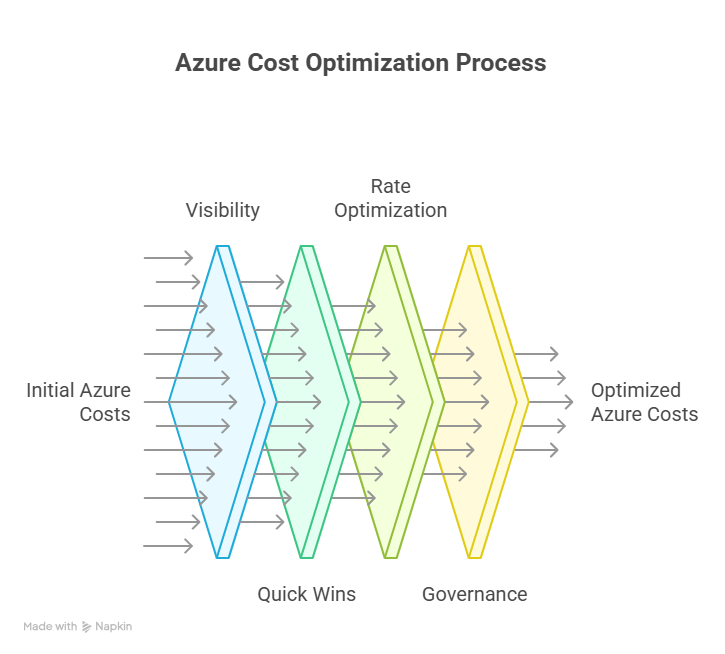
1. Visibility
Establish cost transparency using Azure Cost Management, consistent tagging, and clearly defined scopes. Without visibility, optimization efforts lack direction.
2. Quick Wins
Remove obvious waste such as idle resources, oversized compute, and unnecessary always-on environments. These actions typically deliver immediate savings and build momentum.
3. Rate Optimization
Once usage patterns are understood, reduce unit costs using savings plans, reservations, and Azure Hybrid Benefit.
4. Governance
Implement budgets, alerts, and Azure Policy so savings persist as environments evolve.
This framework allows organizations to control costs today while building long-term discipline into their cloud operations.
Quick Wins to Reduce Azure Spend
Many Azure cost reductions can be achieved without re-architecting workloads or slowing delivery. High-impact quick win actions include:
- Shutting down unused virtual machines and services
- Right-sizing underutilized compute based on actual utilization
- Scheduling dev/test environment shutdowns outside business hours
- Cleaning up orphaned disks, IPs, and gateways
- Using autoscaling for workloads with variable demand
These steps immediately reduce baseline spend and simplify the environment, making deeper optimization easier later.
How to Implement Azure Cost Optimization (Step-by-Step)
Step 1: Establish Visibility and Ownership
Define who owns Azure spend and enforce consistent tagging across subscriptions and resource groups. Ownership enables accountability and timely action.
Step 2: Set Budgets and Alerts
Create budgets with thresholds (80%, 90%, and 100%) so teams respond before invoices arrive. Alerts should reach both technical and financial stakeholders.
Step 3: Execute Quick Wins
Use Azure Advisor to identify idle and oversized resources, then act quickly to remove waste and track savings.
Step 4: Apply Rate Optimization
Match discounts to usage patterns:
- Savings Plans for dynamic workloads
- Reservations for predictable baseline usage
- Azure Hybrid Benefit for eligible licenses
Step 5: Enforce Governance
Apply Azure Policy to control allowed regions, SKUs, tagging requirements, and deployment standards so cost efficiency becomes part of daily operations.
Example: What a 2-Week Optimization Sprint Looks Like
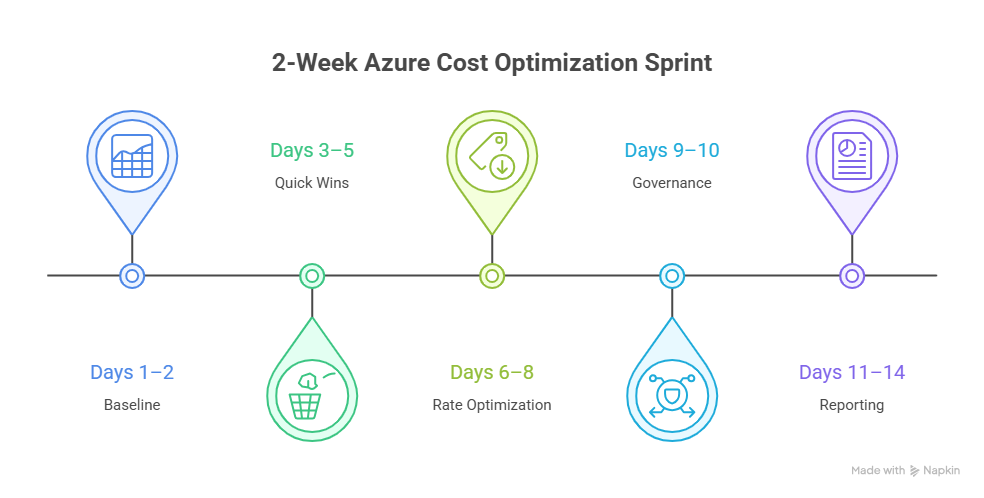
- Days 1–2 (Baseline): Confirm scope, export current costs, agree on targets (e.g., 10–20% reduction) and owners
- Days 3–5 (Quick Wins): Remove idle resources, schedule dev/test shutdowns, clean orphaned disks/IPs, right-size obvious over-provisioned compute
- Days 6–8 (Rate Optimization): Validate steady-state usage and apply Savings Plans/Reservations where utilization is proven; apply Azure Hybrid Benefit where eligible
- Days 9–10 (Governance): Budgets + alerts, tagging policy, allowed SKUs/regions policy, and a recurring review cadence
- Days 11–14 (Reporting): Document changes, quantify savings, and create a backlog of deeper optimizations
Azure Cost Allocation & Chargeback
Azure cost optimization breaks down when teams can see costs but don’t own them. Cost allocation solves this by assigning Azure spend to the applications, environments, and teams that actually consume resources using consistent tagging: Application, Environment, Owner, and Cost Center.
Chargeback or showback then makes this visibility actionable. When teams understand the financial impact of always-on environments, oversized resources, or skipped cleanup, behavior changes naturally. Cost optimization becomes part of everyday engineering decisions instead of a periodic finance exercise.
Deep Dive: Rate Optimization Strategies
Rate optimization focuses on paying less for the infrastructure you actually need. Once waste is removed, this is where long-term savings are locked in.
- Savings Plans work best for workloads with fluctuating usage but predictable overall spend
- Reservations are ideal for steady, always-on workloads that form your baseline
- Azure Hybrid Benefit reduces costs further by allowing eligible Windows Server and SQL Server licenses to be reused in Azure
The key is sequencing: right-size first, then commit. Locking discounts onto inefficient workloads only entrenches waste.
Business Value of Azure Cost Optimization
| Business Area | Value |
|---|---|
| Financial predictability | Fewer surprises and clearer forecasting |
| Engineering efficiency | Less firefighting, more delivery |
| Platform reliability | Right-sized infrastructure reduces risk |
| Accountability | Clear ownership across teams |
| Strategic agility | Budget freed for innovation |
Governance and Guardrails That Prevent Cost Creep
Cost optimization fails when savings are achieved once and forgotten. Effective guardrails include:
- Continuous cost monitoring with Azure Cost Management
- Policy-based deployment standards via Azure Policy
- Regular optimization and architecture reviews on a defined cadence
These controls ensure cost efficiency becomes part of daily operations rather than a reactive exercise.
Frequently Asked Questions
What is Azure cost optimization?
▼
It is a continuous approach to reducing waste, improving efficiency, and aligning cloud spend with business value. It covers visibility, quick wins, rate optimization, and governance as ongoing disciplines.
Which Azure tool helps identify fast savings?
▼
Azure Advisor highlights idle and underutilized resources and estimates potential savings. It should be reviewed regularly alongside Azure Cost Management for ongoing visibility.
Savings Plans or Reservations—which should I use?
▼
Savings Plans suit dynamic workloads where overall spend is predictable but resource types vary. Reservations work best for specific, steady baseline resources that run continuously. ARC recommends right-sizing first before committing to either.
How do I prevent cost creep after initial savings?
▼
Budgets, Azure Policy, and recurring reviews are essential to sustain optimization. Without governance guardrails, savings erode as teams onboard new workloads and scale existing ones.
What is Azure Hybrid Benefit and when does it apply?
▼
Azure Hybrid Benefit lets you reuse eligible Windows Server and SQL Server licenses in Azure, reducing compute costs significantly for organizations with existing on-premises license agreements (including Software Assurance).
Conclusion
Azure cost optimization is not a one-time cleanup—it is a continuous operating model. Organizations that embed visibility, quick wins, rate optimization, and governance into their cloud practices gain predictable spend, faster delivery, and the financial agility to invest in growth rather than firefighting overruns.
If your organization is ready to reduce Azure infrastructure costs without slowing delivery, ARC can help with assessment, implementation, and ongoing governance to make savings sustainable.
Frequently Asked Questions
What is Microsoft Azure?
Microsoft Azure is a comprehensive cloud computing platform offering 200+ services including compute, storage, AI, databases, networking, and DevOps tools for building and managing enterprise applications.
How does Azure pricing work?
Azure uses pay-as-you-go pricing with options for reserved instances (1-3 year commitments) for significant discounts. Azure Cost Management helps monitor and optimize cloud spending.
Is Azure secure for enterprise workloads?
Yes. Azure has 90+ compliance certifications, operates in 60+ regions, and provides enterprise security features including network isolation, encryption, identity management, and threat detection.
Can Azure work with existing on-premises infrastructure?
Yes. Azure supports hybrid scenarios through Azure Arc, VPN gateways, ExpressRoute, and Azure Stack — allowing organizations to extend on-premises environments into the cloud seamlessly.
How do you help with Azure adoption?
We provide cloud readiness assessments, migration planning, architecture design, implementation, optimization, and ongoing managed services to ensure successful Azure adoption with measurable outcomes.

Al Rafay Consulting
ARC Team
AI-powered Microsoft Solutions Partner delivering enterprise solutions on Azure, SharePoint, and Microsoft 365.
LinkedIn Profile