Azure Kubernetes Service: Deploy Apps at Scale Now
Azure Kubernetes Service is deploy and scale modern workloads on Azure Kubernetes Service (AKS) with enterprise-grade security, monitoring, and autoscaling. This guide covers containerization, Kubernetes deployment, observability, backup, and governance.
Deploy and scale modern workloads on Azure Kubernetes Service (AKS) with enterprise-grade security, monitoring, and autoscaling. This guide covers containerization, Kubernetes deployment, observability, backup, and governance.
Al Rafay Consulting
· Updated June 14, 2026 · ARC Team

Infrastructure teams are under pressure to release faster, handle unpredictable demand, and keep platforms secure—while supporting microservices, APIs, and distributed workloads. When scaling relies on manual VM resizing and one-off scripts, reliability suffers and delivery slows.
This is where Azure Kubernetes Service becomes a foundation for modern delivery. AKS provides managed Kubernetes for container orchestration, enabling repeatable deployments, self-healing behavior, and scaling controls for containerized applications.
At Al Rafay Consulting (ARC), we implement AKS as part of Azure AI & Cloud infrastructure, aligning cluster design with enterprise networking, governance, and observability so scaling becomes a repeatable capability—not a one-time effort.
What Is Azure Kubernetes Service (AKS)?
Azure Kubernetes Service (AKS) is Microsoft’s managed Kubernetes platform for running containerized workloads. AKS is designed for teams that want Kubernetes capabilities while reducing management overhead. When you create an AKS cluster, Azure manages the control plane and you pay for the nodes that run your applications—so platform teams can focus on standardizing delivery patterns.
AKS delivers the most value when you treat it as a platform:
- Standard node pools for system workloads vs application workloads
- Consistent namespace strategy for workload isolation
- Repeatable deployment patterns (GitOps or CI/CD)
- Monitoring and alerting that scale with environments
What Are Containerized Applications (and Why They Matter)?
Containerized applications are apps packaged into container images (with dependencies) so they run consistently across environments. In practice, that means you deploy the same artifact in dev/test/prod with fewer “works on my machine” issues.
Application containerization is packaging an app into an image: create a Dockerfile, build and test, push to a registry, then deploy using Kubernetes manifests. Why this matters for AKS: containers are the deployable unit, Kubernetes schedules and heals workloads, and AKS manages the control plane with Azure integrations.
AKS Platform Blueprint for Scale
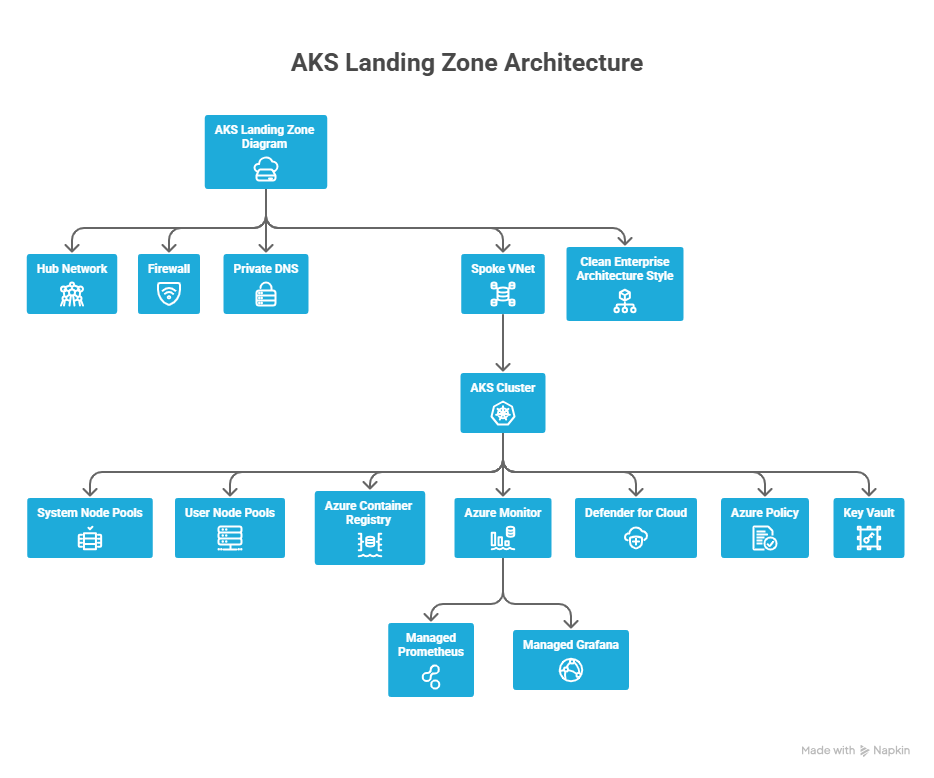
If you want repeatable scale, you need a platform foundation. A practical “deploy at scale” blueprint typically includes:
- Networking: hub/spoke or equivalent, controlled ingress/egress, private options where required
- Identity: role-based access model aligned to teams and environments
- Guardrails: policy-driven controls for configuration consistency
- Operations: standardized monitoring, alerting, and incident playbooks
- Resilience: backup and recovery strategy for stateful workloads
| Design Area | Decide Early | What It Prevents |
|---|---|---|
| Cluster model | Single-tenant vs multi-tenant | Sprawl or risky sharing |
| Networking | Ingress/egress + private needs | Accidental exposure |
| Identity | Who can do what and where | Privilege creep |
| Observability | Metrics/logs/alerts baseline | Blind incidents |
| Recovery | Backup scope + restore drills | “Can’t recover” events |
How to Containerize an Application (Step-by-Step)
- Inventory runtime and dependencies — Identify language/runtime, OS assumptions, ports, and external services
- Create a Dockerfile — Define the base image, copy source, install dependencies, and set the entrypoint
- Build the image — Example:
docker build -t myapp:1.0 . - Run locally to validate — Example:
docker run -p 8080:80 myapp:1.0and test key flows - Externalize configuration — Use environment variables and secret injection rather than hardcoding
- Push to a container registry — Store images in Azure Container Registry (ACR)
- Create Kubernetes manifests — Define Deployments/Services/Ingress so Kubernetes can manage lifecycle and availability
This is the foundation for reliable Kubernetes deployment: build once, deploy repeatedly, and let the cluster enforce health and scaling behavior.
Kubernetes Deployment on AKS (Step-by-Step)
Step 1: Create an AKS Cluster
Create the cluster and ensure you can authenticate and connect using kubectl.
Step 2: Store Images and Update Manifests
Store images in Azure Container Registry (ACR) and update your Kubernetes manifests with the correct image path.
Step 3: Apply Manifests
Apply the YAML for Deployment and Service/Ingress:
kubectl apply -f app.yaml
kubectl get pods
kubectl get svc
Step 4: Test and Validate
Verify readiness, endpoints, and health checks. Then push updates via rolling deployments.
Kubernetes Scalability on AKS (HPA + Cluster Autoscaler + KEDA)
Scaling on AKS typically combines pod scaling (to handle workload demand) and node scaling (to ensure enough capacity for scheduling).
| Scenario | Best Tool | Why |
|---|---|---|
| Traffic spikes | HPA | Increases replicas automatically |
| Pods pending | Cluster autoscaler | Adds nodes for scheduling |
| Queue backlog | KEDA | Scales based on events |
A practical scaling strategy:
- Use HPA for stateless web/API tiers that scale based on CPU/memory or custom metrics
- Use cluster autoscaler to expand node pools when pods can’t schedule due to capacity constraints
- Use KEDA for event-driven systems (queues, streaming) where scaling to meet event load is more meaningful
Important: Autoscaling only works when resource requests are realistic—otherwise it becomes noisy or wasteful. Define requests and limits before enabling autoscaling.
Observability at Scale
At scale, you need unified visibility into cluster health, workload performance, and control plane behavior. ARC typically standardizes dashboards per environment (Dev/Test/Prod) and aligns alerts to service objectives—so teams can detect issues early without drowning in noise.
Key components:
- Azure Monitor for unified cluster and workload metrics
- Managed Prometheus for Kubernetes-native metrics collection
- Managed Grafana for visualization dashboards
- Container logs for application and control plane diagnostics
Backup and Recovery
Stateful Kubernetes requires a recovery plan. Key steps:
- Define what you back up: namespaces, cluster state, persistent volumes
- Set a backup policy aligned to recovery objectives (RPO/RTO)
- Run restore drills to validate that recovery actually works
A backup strategy is incomplete until you confirm your recovery steps with real tests—not just configuration.
Governance & Security Best Practices
Governance ensures your AKS estate stays secure and consistent. ARC governance practices typically include:
- Access model based on roles and environments
- Policy-driven guardrails to prevent insecure drift
- Standard namespace conventions for workload isolation
- Regular reviews of alerts and access changes
- Securing API server access with role-based access controls
- Keeping cluster and node updates current to minimize risk exposure
Business Value
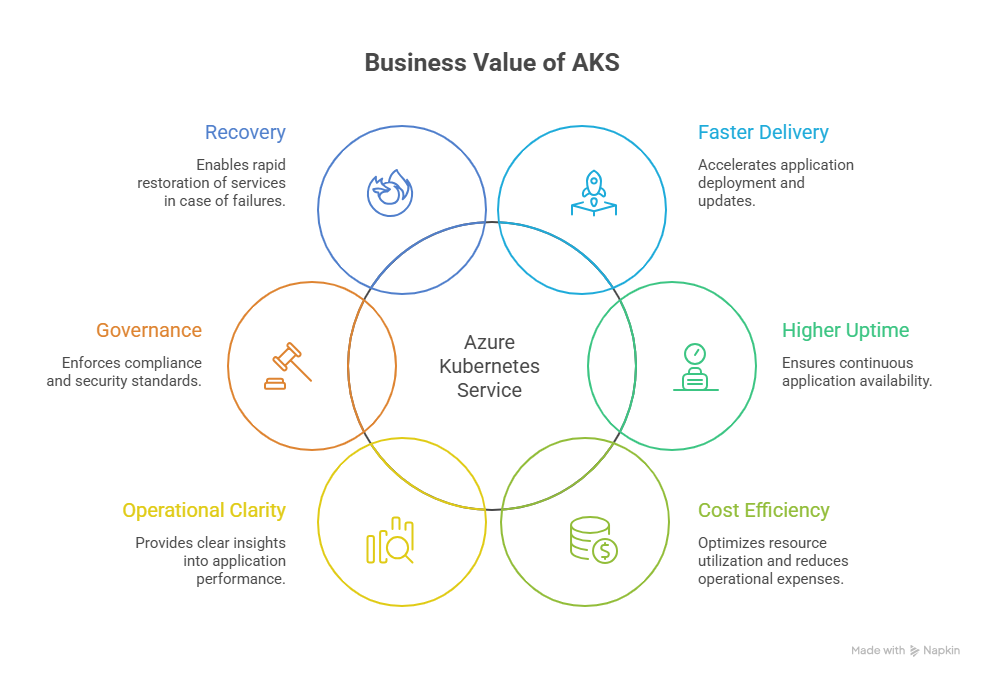
| Business Goal | AKS Benefit | Outcome |
|---|---|---|
| Faster delivery | Repeatable deployments | Shorter release cycles |
| Higher uptime | Self-healing + rolling updates | Fewer outages |
| Cost efficiency | Autoscaling | Less waste |
| Operational clarity | Metrics + logs | Faster troubleshooting |
| Governance | Guardrails and standards | Compliance at scale |
| Recovery | Backup strategy | Production resilience |
The value of AKS is not “Kubernetes for Kubernetes’ sake.” It’s a platform that reduces friction between build and run, improves resiliency, and supports faster releases.
Common Pitfalls to Avoid
- Pods stuck in Pending: often means node capacity is insufficient or requests are too high—validate requests/limits, then confirm autoscaler boundaries
- Rollouts feel slow: large images, missing readiness probes, or aggressive timeouts—standardize probes and keep images lean
- Scaling feels erratic: if the metric pipeline is noisy, scaling becomes noisy—confirm metrics are available and meaningful before tuning thresholds
- Incidents are “invisible”: without dashboards and logs, teams learn about failures from users—enable monitoring and define alerts
- Backups exist but restores fail: a backup strategy is incomplete until you run restore drills
Frequently Asked Questions
What are containerized applications?
▼
Applications packaged into container images so they run consistently across environments. They include the app and all its dependencies, eliminating environment-specific configuration issues.
What is Azure Kubernetes Service (AKS)?
▼
A managed Kubernetes service on Azure for deploying and managing containerized applications. Azure manages the control plane; you manage the nodes and workloads.
How does Kubernetes deployment work on AKS?
▼
You deploy manifests (Deployment/Service/Ingress), then validate endpoints and health checks. Updates are rolled out via rolling deployments that maintain availability during the update process.
How does Kubernetes scalability work on AKS?
▼
Scale pods with HPA (based on CPU/memory/custom metrics), scale nodes with the cluster autoscaler (based on scheduling pressure), and scale event-driven workloads with KEDA.
Is AKS suitable for enterprise security and compliance requirements?
▼
Yes. AKS supports RBAC, Azure Active Directory integration, private clusters, Azure Policy for Kubernetes, network policies, and Microsoft Defender for Containers—making it suitable for regulated enterprise workloads.
Conclusion
AKS gives organizations a managed Kubernetes foundation for deploying and operating modern platforms at scale. When combined with landing zone architecture, autoscaling strategy, observability, backup readiness, and governance controls, AKS becomes a reliable standard for teams building cloud-native applications.
At ARC, we help infrastructure teams move from “cluster created” to “platform operational”—with repeatable patterns for Kubernetes cluster management, deployment, and scalability. This approach reduces friction, improves resilience, and accelerates secure delivery across teams.
Work with Al Rafay Consulting: explore our Azure infrastructure services to put this into practice, or book a free assessment.
Frequently Asked Questions
What is Zero Trust security?
Zero Trust is a security framework that assumes no user or device should be trusted by default — requiring continuous verification of identity, device health, and access permissions for every request.
How does Microsoft implement Zero Trust?
Microsoft Zero Trust uses Entra ID for identity, Intune for device compliance, Defender for threat protection, Purview for data protection, and Conditional Access for policy enforcement.
What compliance certifications does Microsoft support?
Microsoft cloud services hold SOC 1/2/3, ISO 27001/27018, HIPAA, FedRAMP, GDPR, PCI DSS, and 90+ other compliance certifications across industries and regions.
How do you assess security posture?
We evaluate Microsoft Secure Score, conduct gap analyses against frameworks like NIST and CIS, review configurations, test access controls, and provide prioritized remediation recommendations.
Can you help with regulatory compliance?
Yes. We implement Microsoft Purview compliance solutions including data classification, retention policies, eDiscovery, audit logging, and information barriers for regulated industries.

Al Rafay Consulting
ARC Team
AI-powered Microsoft Solutions Partner delivering enterprise solutions on Azure, SharePoint, and Microsoft 365.
LinkedIn Profile