Microsoft Fabric: The Data Platform You Need Now
Microsoft Fabric unifies data integration, engineering, warehousing, real-time intelligence, and BI in one platform — eliminating fragmentation and accelerating insights with AI.
Discover how Microsoft Fabric unifies data integration, engineering, warehousing, real-time intelligence, and BI in one platform — eliminating fragmentation and accelerating insights with AI.
Al Rafay Consulting
· Updated July 3, 2026 · ARC Team

Microsoft Fabric is a unified analytics platform that promises a faster path to insights and AI by eliminating fragmented data stacks. Fewer tools to stitch together, no more duplicating data, and consistent governance across your enterprise data — that is the Fabric vision, and in 2026 it has become the practical standard for organizations modernizing their analytics infrastructure.
Organizations looking to strengthen this area can work with Microsoft Fabric consulting.
In this blog, we explore why Fabric delivers end-to-end value for both developers and business users, what has changed in 2025–2026, and how to determine if Fabric is the right fit for your organization.
Why Is Microsoft Fabric the Data Platform You Need Now?
The Cost of Fragmentation
Organizations today often struggle with fragmented data ecosystems — multiple ETL tools, separate warehouses, siloed BI systems — resulting in duplicate data and complex integrations. Data gets copied across systems and teams juggle disparate tools, which slows down insights and drives up costs.
Fabric’s Unified Solution
Microsoft Fabric addresses fragmentation with one comprehensive platform that unifies data integration, engineering, warehousing, real-time intelligence, data science, databases, and business intelligence in a single cloud service. All roles work over a shared OneLake foundation without needing to manually stitch together separate tools.
Business & Developer Value
A unified platform translates to tangible benefits. Teams see reduced complexity, improved collaboration, and faster time to insight. One platform handles licensing, security, and governance — no more managing separate models across assorted products.
OneLake: Your Unified Data Foundation (“OneDrive for Data”)
Every great structure needs a solid foundation — for Fabric, that foundation is Microsoft OneLake. Think of OneLake as “OneDrive for data”: a single, unified data lake automatically available in every Fabric tenant. It provides a central data repository for your entire organization, eliminating the sprawl of multiple data lakes.
One Lake for All
Before OneLake, companies often created separate data lakes for each department or project — a governance and collaboration nightmare. Every Fabric tenant automatically gets one OneLake, and all teams put their data in the same logical lake (organized by workspaces and folders), fostering a sole source of truth.
Single Copy of Data — Zero Copy Architecture
OneLake means you do not need multiple copies of the same data for different analytics engines. A CSV landed in OneLake can be used by a Spark notebook, a SQL data warehouse, and a Power BI report without duplicating it — all engines operate on the common data in place. This is possible because OneLake stores data in open formats (Delta Parquet) accessible to various engines uniformly.
OneLake File Explorer
In 2025, Microsoft released the OneLake File Explorer for Windows — a desktop application that mounts your OneLake as a Windows file system. Data engineers and analysts can browse, upload, and download OneLake files directly from Windows Explorer without needing the Fabric portal, simplifying day-to-day file operations for teams transitioning from traditional file share environments.
Built-in Governance and Security
Any data placed in OneLake automatically inherits tenant-level security, compliance, and data management policies through integration with Microsoft Purview. OneLake’s workspace-level segmentation supports distributed ownership — each Fabric workspace is like a folder in OneLake, with its own RBAC.
Open Standard Support and Shortcuts
OneLake is built on Azure Data Lake Storage Gen2, storing tabular data in Delta Parquet so you are never locked in. Shortcuts — pointers to data in ADLS, AWS S3, Google Cloud Storage, or other OneLake locations — bring outside data into OneLake virtually without copying it.
Pick Your Build Path: Workloads in Fabric (2026)
Fabric offers multiple analytics experiences under one roof. In 2026 the workload lineup has expanded significantly.
| Scenario | Recommended Workload |
|---|---|
| Building ETL pipelines or prepping big data | Data Engineering (Spark notebooks and Spark job definitions) |
| Central analytics database for BI | Data Warehouse (full T-SQL, DML, stored procedures) |
| Event streams or live dashboards | Real-Time Intelligence (KQL databases, Eventstreams, Activator) |
| Machine learning and model development | Data Science (MLflow, notebooks, PREDICT in SQL) |
| Dashboards and self-service reporting | Power BI (Direct Lake mode, semantic models) |
| Transactional SQL database workloads | Fabric Databases (SQL database in Fabric, now GA) |
| Mirroring external databases into OneLake | Fabric Mirroring (Azure SQL, Snowflake, Cosmos DB, and more) |
What’s New in 2025–2026
Fabric Databases (GA): A fully managed operational SQL database built into Fabric. Unlike the Data Warehouse (analytics-optimized), Fabric Databases supports transactional OLTP workloads. Database tables are automatically mirrored into OneLake as Delta Parquet, making operational data immediately available to analytics workloads without ETL. A built-in GraphQL API exposes database data to applications.
Fabric Mirroring (GA): Near-zero-ETL replication from external databases — Azure SQL, Azure SQL Managed Instance, Snowflake, Azure Cosmos DB, and more — into OneLake continuously with near-real-time latency. No Spark jobs or Data Factory pipelines required. Mirrored data is immediately available to all Fabric workloads.
Real-Time Intelligence (renamed from Real-Time Analytics): Expanded scope now includes Eventstreams for multi-source ingestion, KQL Databases for time-series storage, Real-Time Dashboards for sub-second-latency visualization, and Activator (now GA) for event-driven alerts and automation — Teams notifications, Power Automate flows, or custom webhooks triggered by data conditions.
All workloads meet in OneLake, so each workload’s output is immediately available to the others. Fabric’s unified UI and shared security model make it far easier to go end-to-end.
From Data to AI Apps: Build an AI-Ready Solution on Fabric
Scenario: Building an Intelligent FAQ Bot
Consider a retail company that wants to build an intelligent FAQ bot for customer support data. Here is how Fabric enables this:
- Ingest support tickets and product data into a OneLake lakehouse
- Transform raw data using Spark notebooks or Data Factory pipelines
- Index and chunk content for retrieval using Azure OpenAI embeddings
- Store embeddings in the Fabric SQL database or a vector index
- Query with RAG — the LLM answers questions grounded in company-specific context
- Surface insights through Power BI reports or a Copilot-powered application
Copilot + RAG in Fabric
Microsoft Fabric makes it practical to implement Retrieval-Augmented Generation (RAG) entirely within the platform. Load data into a lakehouse, chunk it, generate embeddings with an OpenAI model, store or index those embeddings, and then use an LLM to answer questions with that context. Fabric acts as the glue between your data and AI — everything from data prep to AI app deployment within Fabric’s managed environment.
Developer Velocity with Copilot in Notebooks
Copilot in Fabric Notebooks turns natural language prompts into working code, helps visualize data, and generates documentation. In 2025, Copilot in Fabric was extended beyond notebooks into Data Factory pipeline design, warehouse query editing, and Power BI report generation — making AI assistance available across the full analytics lifecycle.
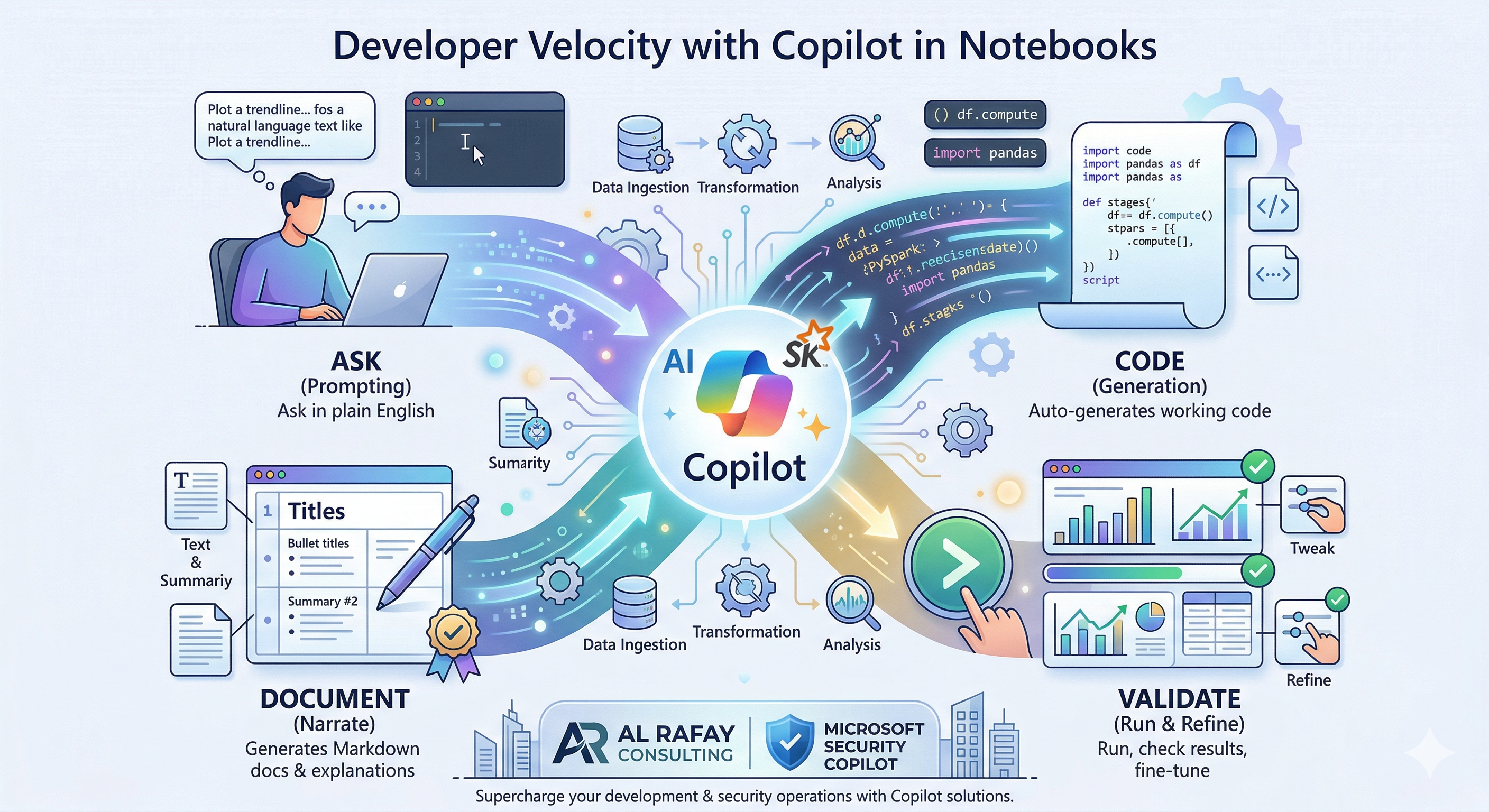
- Ask: Prompt Copilot in plain English and it generates working code
- Code: Intelligent completion trained on Spark, Pandas, T-SQL, and more
- Validate: Describe issues to Copilot and it adjusts — no context switching
- Document: Copilot generates markdown cells explaining the analysis automatically
Governance That Scales: Purview + Fabric
Microsoft Purview is natively integrated into Fabric, providing enterprise-grade governance that scales with your data.
Unified Catalog and Lineage: The OneLake Data Catalog serves as a central inventory of all data items — lakehouses, tables, pipelines, BI reports — across the tenant, with full lineage tracking from source to report.
Sensitivity Labels and Policies: Apply sensitivity labels through Purview and they flow with the data. Downstream consumers inherit the same classification and restrictions automatically.
Access Control: Fabric uses Microsoft Entra ID and Power BI’s familiar role model with workspace-level boundaries (Admin, Member, Contributor, Viewer).
Operating Fabric in Production: Cost, Capacity, and Reliability
Understand and Optimize Fabric Capacity
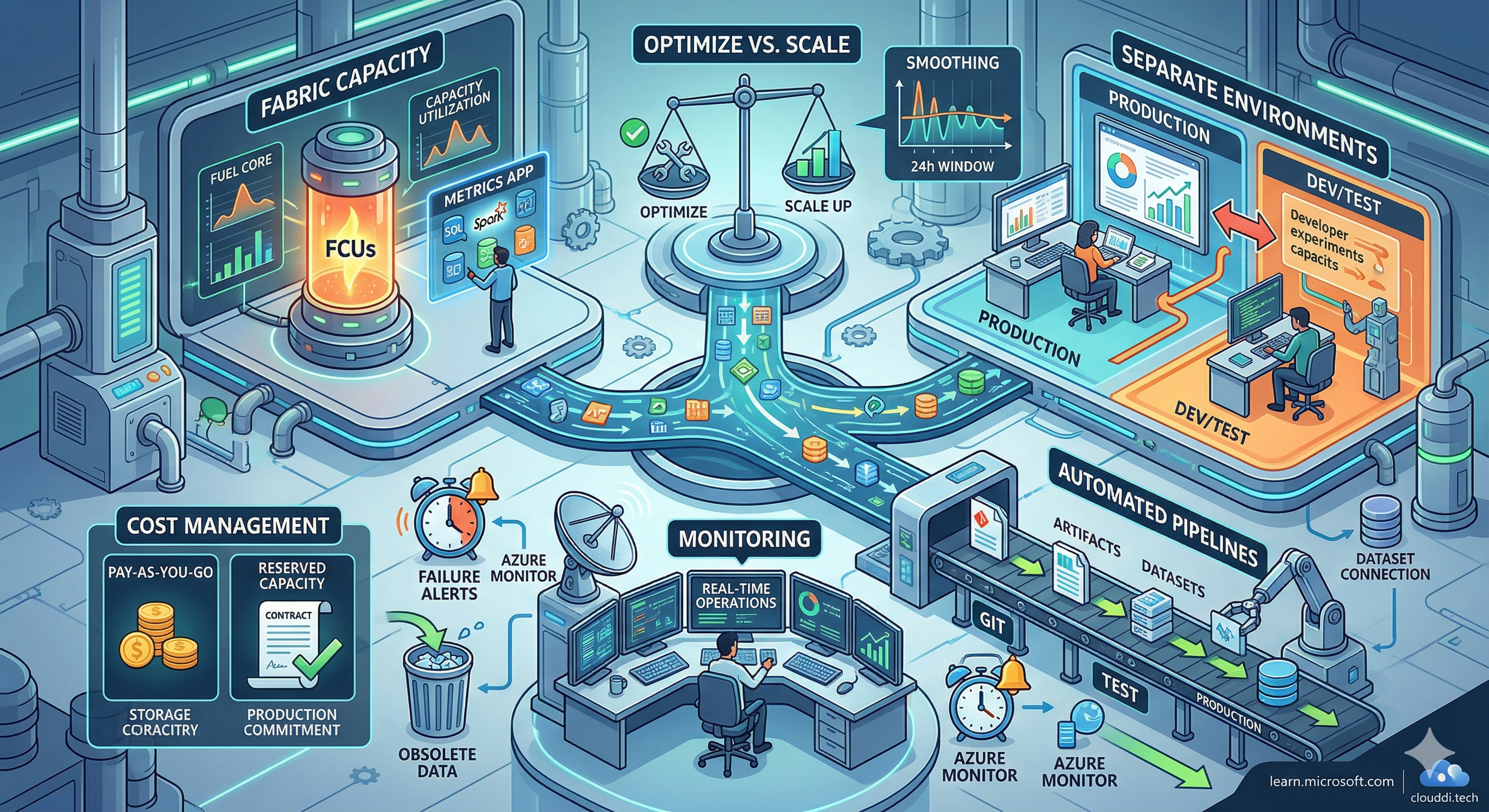
Fabric runs on a capacity model — you purchase capacity which provides a pool of compute for all your Fabric workloads. The Capacity Metrics app breaks down usage by workload so you can identify optimization opportunities. Fabric uses bursting to temporarily exceed your CU allocation for short workloads, and smoothing to average consumption over time.
Workload Separation for Reliability
Avoid running experiments in the same capacity that serves production reports. Use dedicated workspaces for Production and for Dev/Test — ideally on separate Fabric capacities — to prevent heavy development queries from impacting critical business reports.
CI/CD and Deployment Pipelines
Treat Fabric artifacts like code. Use Fabric’s Deployment Pipelines for controlled promotion from Dev to Test to Production. Source control your notebooks in Git for version control and auditability. Fabric’s native Git integration supports both Azure DevOps and GitHub.
Monitoring and Cost Management
- Route Fabric logs to Azure Monitor Log Analytics and set alerts on critical pipeline failures
- Use the Monitoring Hub in Fabric for real-time operational visibility
- Evaluate reserved capacity for predictable production workloads
- Use Fabric Mirroring instead of ETL pipelines where possible — it reduces compute costs for analytics on operational data
- Manage OneLake storage by retiring obsolete data regularly
Frequently Asked Questions
What is Microsoft Fabric and how is it different from Power BI or Azure Synapse?
Microsoft Fabric is a unified SaaS analytics platform that brings together capabilities previously spread across Power BI, Azure Synapse Analytics, Azure Data Factory, and Azure Data Explorer into a single, integrated experience. Unlike using these as separate services, Fabric provides one licensing model, one OneLake data foundation, and a unified governance layer — dramatically reducing operational complexity.
What is OneLake in Microsoft Fabric?
OneLake is Microsoft Fabric’s built-in, tenant-wide data lake — conceptually similar to OneDrive but for organizational data. Every Fabric tenant gets exactly one OneLake automatically. Data stored in OneLake in open Delta Parquet formats can be accessed by every Fabric workload without copying. External data in Azure, AWS S3, or Google Cloud Storage can be referenced via shortcuts without duplication.
What are the newest workloads added to Microsoft Fabric?
In 2025–2026, Microsoft added Fabric Databases (SQL database in Fabric for transactional workloads), Fabric Mirroring (near-real-time replication from Azure SQL, Snowflake, Cosmos DB into OneLake), and Fabric Activator (event-driven alerts and automation, now GA). Real-Time Analytics was also renamed to Real-Time Intelligence to reflect its expanded capabilities. The platform continues to grow with new workloads each quarter.
How does Copilot in Microsoft Fabric help data engineers and analysts?
Copilot is embedded across multiple Fabric experiences. In Notebooks, it generates Spark and Python code from natural language prompts, completes code intelligently, explains errors, and writes markdown documentation. In Power BI, Copilot generates reports and DAX measures from natural language descriptions. In Data Factory, it assists with pipeline design. In 2025 this was extended further into warehouse query editing and report generation, making AI assistance available across the full analytics lifecycle.
Conclusion
Microsoft Fabric in 2026 is no longer a promising early-adopter platform — it is the practical standard for enterprise analytics modernization. Its integrated OneLake foundation, expanded workload lineup including Databases, Mirroring, and Activator, native Copilot acceleration across the full analytics lifecycle, and built-in Purview governance make it the most complete unified data platform available today.
Whether you are starting a new data platform or modernizing a fragmented stack, Fabric provides a path to faster insights, lower operational overhead, and a foundation ready for AI at scale.
Your Next Steps
Start a 2-Week Fabric Proof-of-Concept: Identify a small project — unify one data source and create one insightful report — and deliver it on Fabric. With the right scope, you can demonstrate value in two weeks.
Assess Your Fabric Readiness: Ensure your organization is ready with proper guidance covering governance setup, capacity planning, and identifying candidate workloads to migrate.
Explore Copilot and Mirroring: Get hands-on with Copilot in notebooks and evaluate Fabric Mirroring for any operational databases you currently ETL into your analytics environment. Both offer quick, high-value wins without large migration projects.
If your organization is exploring Microsoft Fabric adoption, ARC can help with architecture design, workload migration, governance setup, and AI-ready data platform implementation.
Frequently Asked Questions
What is Microsoft Fabric?
Microsoft Fabric is a unified SaaS analytics platform that combines data engineering, data warehousing, real-time intelligence, data science, and business intelligence in one integrated environment.
How is Fabric different from Azure Synapse?
Fabric is the evolution of Synapse with a SaaS model, unified experience, and OneLake storage. It simplifies the analytics stack by eliminating the need to manage separate services and data copies.
What is OneLake in Microsoft Fabric?
OneLake is Fabric's unified data lake that automatically stores all data in Delta Parquet format. It provides a single copy of data accessible by all Fabric workloads, eliminating data silos.
How does Fabric pricing work?
Fabric uses capacity units (CUs) that can be purchased as reserved or pay-as-you-go. Capacities can be paused when not in use, and all workloads share the same capacity pool.
Can I use Fabric with existing Power BI reports?
Yes. Existing Power BI reports work seamlessly in Fabric. Power BI is a core workload within Fabric, so your current investments are fully preserved and enhanced.

Al Rafay Consulting
ARC Team
AI-powered Microsoft Solutions Partner delivering enterprise solutions on Azure, SharePoint, and Microsoft 365.
LinkedIn Profile