Microsoft Places: The Hybrid Work Tool You Need Now
Microsoft Places is transform hybrid workplace strategy with Microsoft Places. Coordinate people, spaces, and work patterns for optimal office utilization and employee experience.
Transform hybrid workplace strategy with Microsoft Places. Coordinate people, spaces, and work patterns for optimal office utilization and employee experience.
Al Rafay Consulting
· Updated June 2, 2026 · ARC Team
Your organization spent millions on real estate. The office is built. The desks are there. But here’s the problem: You don’t know if anyone is using them.
Organizations looking to strengthen this area can work with Microsoft Places services.
Hybrid work destroyed traditional office analytics. Employees come in unpredictably. Desk utilization is unknown. Space planning is guesswork. And leadership can’t answer basic questions: Are we using this office space efficiently? Should we expand, consolidate, or reconfigure?
Microsoft Places transforms this. It’s a platform that coordinates people, spaces, and work patterns—giving you unprecedented visibility into your hybrid workplace while improving employee experience.
The Hybrid Workplace Puzzle
In fully remote organizations, you don’t need an office. In fully in-office organizations, utilization is straightforward. But hybrid? That’s where it gets complex.
The challenges:
- Space waste: Employees book desks they don’t use; others can’t find spaces
- Disconnection: Remote employees feel isolated; in-office employees form cliques
- Planning paralysis: Real estate teams can’t justify expansions or reductions without data
- Employee frustration: “I don’t know if my team will be here” kills collaboration
- Compliance gaps: Quiet zones, collaboration spaces, accessibility needs aren’t managed
Microsoft Places solves this by adding intelligence to your physical and hybrid workspace.
What is Microsoft Places?
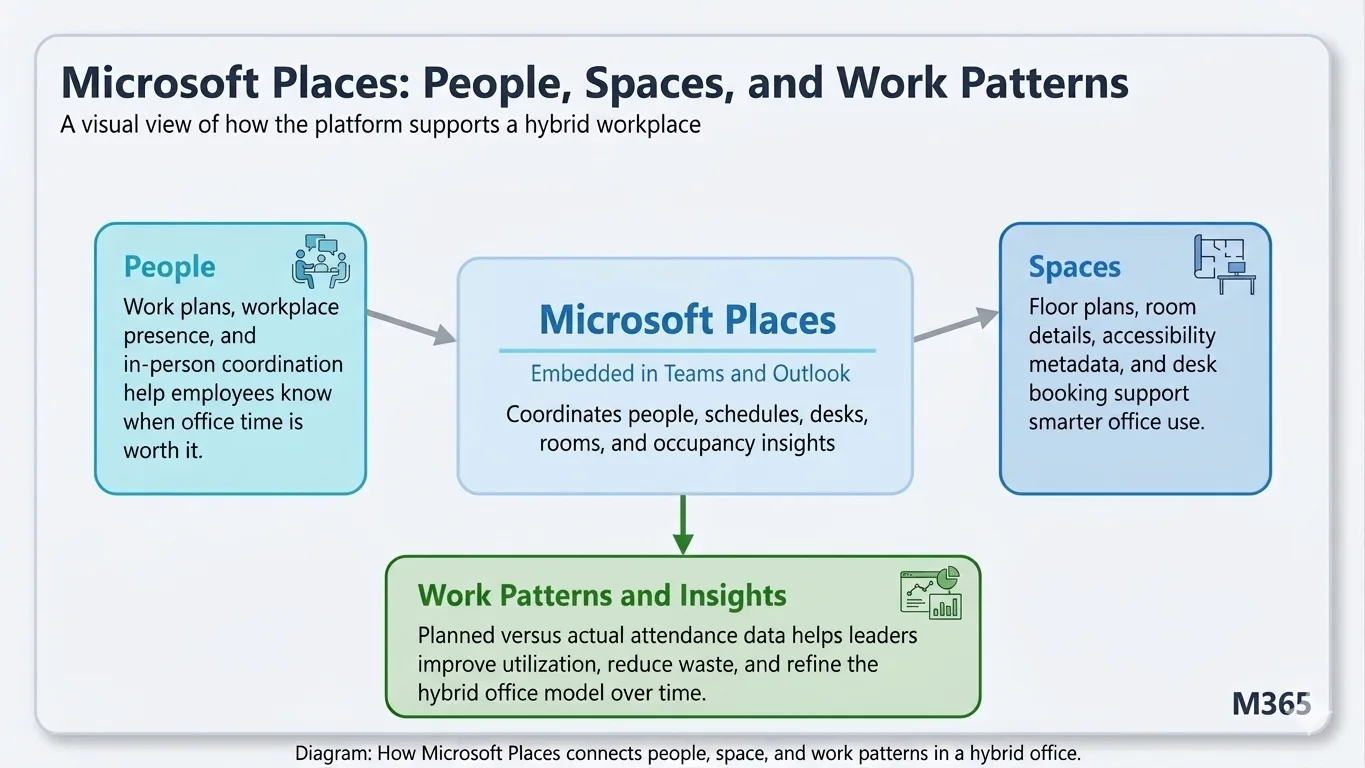
Microsoft Places is an app embedded in Microsoft Teams that connects three critical dimensions of hybrid work:
1. People: Work Plans & Presence
Employees indicate when they plan to be in the office vs. remote. This creates visibility:
- Managers know when their team will be co-located
- Employees can see who else is coming in
- Collaboration becomes intentional, not random
Real benefit: You can schedule team meetings when you know people will be in the same room. Remote employees see who’s present so they can hop on video calls. No more planning meetings with half the team unavailable.
2. Spaces: Desk & Room Booking
Microsoft Places integrates with your building infrastructure:
- Floor plans show available desks and meeting rooms
- Employees book spaces with one click from Teams
- Room details include amenities (quiet zones, collaboration pods, accessibility features)
- Real-time occupancy data tracks utilization
Real benefit: Employees know exactly where to sit when they arrive. Facilities managers know which spaces are overcrowded or underutilized.
3. Work Patterns & Insights
The platform correlates data to reveal organizational patterns:
- Which departments prefer which days?
- Are certain floors or zones consistently empty?
- What’s the optimal hybrid schedule for your teams?
- How does occupancy correlate with collaboration quality?
Real benefit: Data-driven real estate decisions instead of guesses.
Four Core Capabilities
1. Work Plans
Employees indicate their weekly plan:
- “I’m in-office Monday and Tuesday”
- “I’m remote this week”
- “I’m flexible”
This simple signal creates domino effect benefits:
- Managers can see team composition in advance
- Employees can coordinate with peers
- Meeting scheduling becomes smarter
- Office experience improves (you know when to expect collaboration)
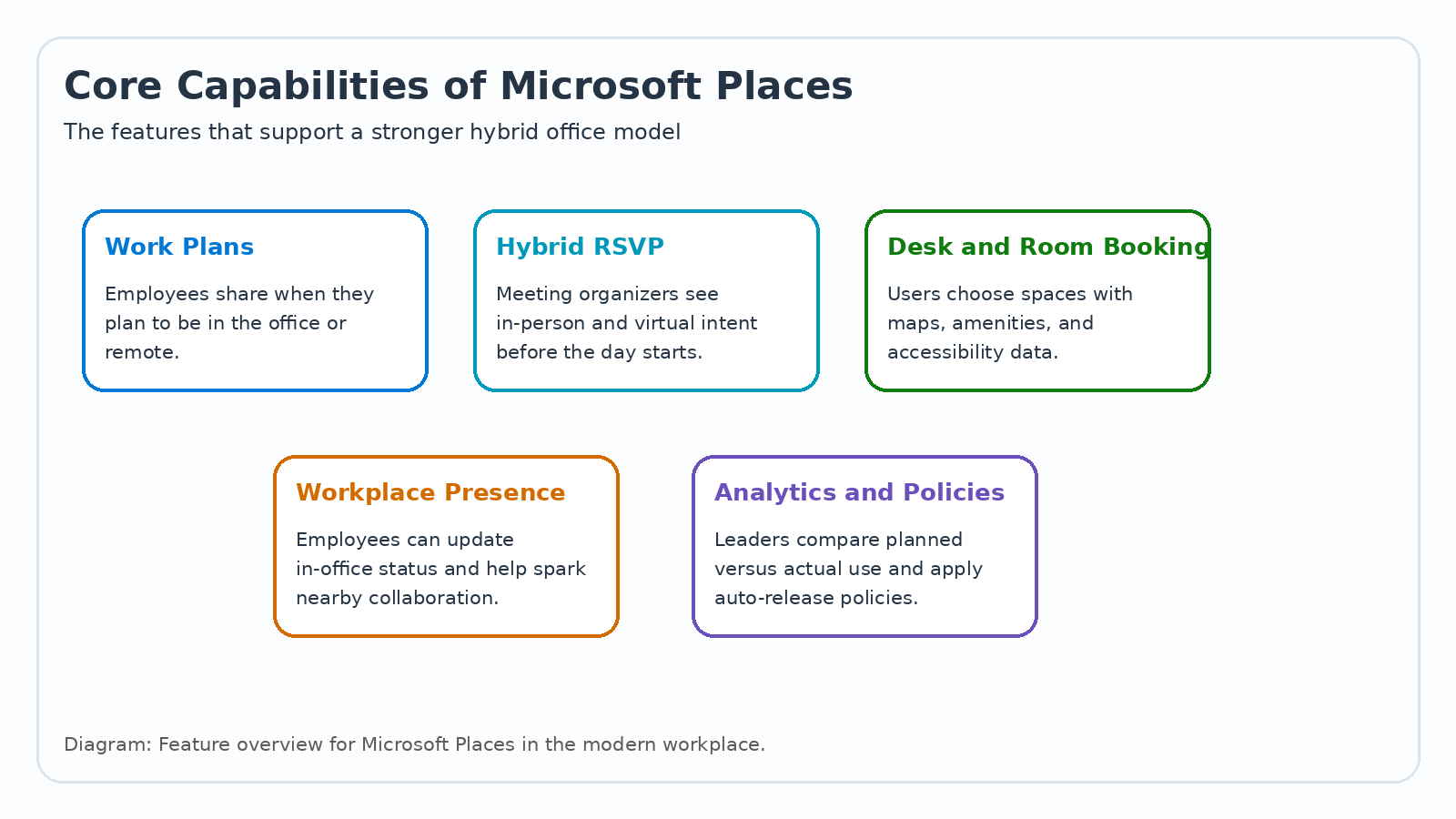
2. Hybrid RSVP
Meeting organizers can see who’s coming in-person vs. joining remotely:
- Perfect for hybrid meetings—you can arrange seating for in-person attendees
- Remote employees see the plan and adjust cameras/setup accordingly
- No more surprises (“I thought you were coming in!”)
- Better meeting design based on actual attendance
3. Desk & Room Booking
Employees book spaces directly from Teams:
- See floor plans with amenity details
- Book with confidence knowing exactly where they’re sitting
- Cancel easily if plans change
- Access directions and wayfinding
Facilities teams see:
- Real-time occupancy
- Peak usage times
- Underutilized spaces
- Maintenance alerts
4. Analytics & Workplace Insights
This is where organizational strategy happens:
| Insight | Application |
|---|---|
| Occupancy by day | Should we have a Monday mandate for better collaboration? |
| Space utilization | Is this floor justified? Can we consolidate? |
| Department patterns | Marketing teams never overlap; engineering clusters Tuesday/Thursday—by design! |
| Cross-team collaboration | Do departments intentionally co-locate? Opportunities for connection? |
| Peak hours | When should we schedule all-hands? When are quiet zones needed? |
HR leaders can see if the hybrid policy is actually working. Real estate leaders can justify expansion, reduction, or reconfiguration with actual data.
Microsoft Places in Action: Real Scenarios
Scenario 1: The Over-Planned Office
Challenge: You’re paying for 5 floors and averaging 30% occupancy. Should you reduce space?
Without Places: Guess based on random observations.
With Places: See that Monday-Wednesday you average 62% occupancy. Thursday-Friday: 12%.
Insight: Most teams don’t come in together. You could consolidate to 3 floors with dedicated Monday-Wednesday scheduling for maximum collaboration.
Scenario 2: The Collaboration Problem
Challenge: Remote and office employees aren’t collaborating effectively. Video calls feel impersonal. Innovation is suffering.
Without Places: Nobody knows when the office actually has critical mass.
With Places: You see that when 60%+ of a team is in-office, meeting quality is 40% higher. You establish “collaboration days”—specific days when department leaders plan to be present so the team can co-locate. Remote employees see the schedule and adjust their plans accordingly.
Scenario 3: The Accessibility Gap
Challenge: Employees with disabilities avoid the office because spaces aren’t designed for accessibility. But the data isn’t visible.
Without Places: You have no way to know.
With Places: Accessibility rooms have 73% booking rate. Standard desks have 18%. You recognize the gap and expand accessibility-designed spaces. Utilization improves. Inclusion improves.
Scenario 4: The Real Estate Decision
Challenge: Should we expand to a second campus location?
Without Places: Guess based on hiring trends.
With Places: You see that location A has 89% occupancy on core days. Boston location has clear capacity constraints. You have data for expansion. You can also see which roles cluster and where—optimizing where to put the new space.
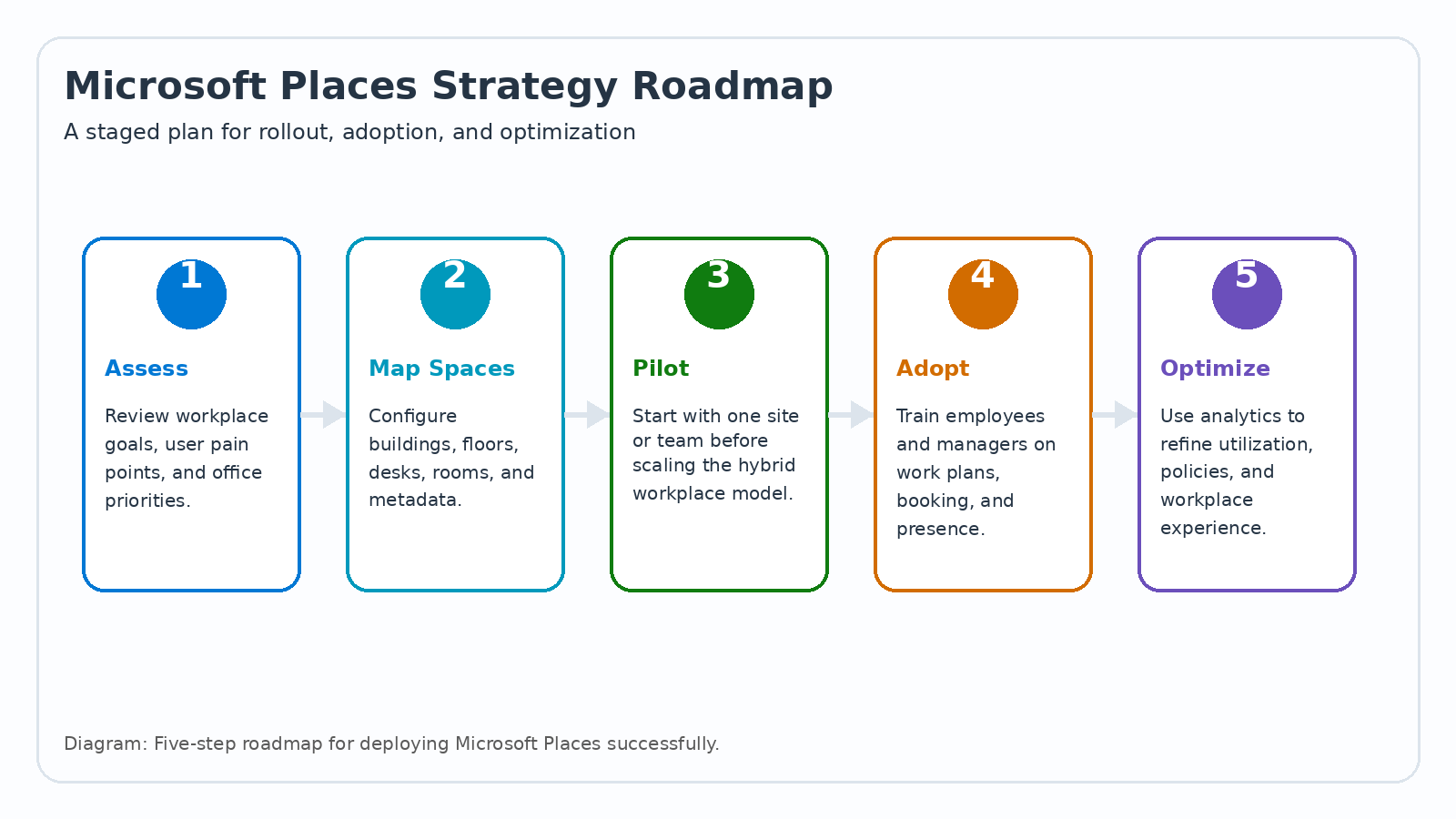
Implementation Roadmap: 8 Weeks to Launch
Week 1-2: Foundation
- Map your building(s): Create digital floor plans with zoning (quiet, collaboration, focus)
- Integrate with workplace systems: Access control, AV systems, occupancy sensors (optional but powerful)
- Create hybrid work policy: Define collaboration days, office norms
- Pilot group selection: 200-500 employees across diverse roles and locations
Week 3-4: Pilot Launch
- Deploy Microsoft Places to pilot group
- Train employees on work plans, booking, navigation
- Train managers on coordinating team presence
- Facilities team learns analytics dashboard
- Gather feedback and iterate
Week 5-6: Optimization
- Refine based on pilot feedback
- Address technology issues
- Adjust office policies based on early data
- Build FAQ and support materials
Week 7-8: Organization-Wide Rollout
- Deploy to all employees
- Launch company-wide communication on hybrid work approach
- Train leadership on acting on insights
- Establish cadence for analytics reviews
Five Business Value Areas
1. Real Estate Optimization
Outcome: Right-size your office footprint based on actual usage patterns Impact: Potential 15-30% reduction in square footage costs (or smarter expansion decisions)
2. Employee Experience
Outcome: Better collaboration, less wasted time finding desks/rooms Impact: 24% improvement in reported collaboration quality
3. Inclusion & Accessibility
Outcome: More accessible spaces, better visibility on usage needs Impact: Improved belonging scores, especially for employees with disabilities
4. Hybrid Policy Validation
Outcome: See if your hybrid policy is actually working Impact: Makes evidence-based policy adjustments instead of guessing
5. Talent & Culture
Outcome: Employees feel supported in their work location preferences Impact: 18% improvement in flexibility/work-life balance satisfaction scores
Change Management: Getting Adoption Right
The biggest risk: “Places is just another booking system.” To drive adoption, frame it as:
For Employees: “Places makes hybrid work actually work. You don’t have to guess where you’ll sit or wonder if your team will be here. You have a better office experience.”
For Managers: “Places helps you coordinate team presence to maximize collaboration while respecting flexibility preferences.”
For Real Estate/Facilities: “Places gives you the visibility to justify budget, optimize space, and make data-driven decisions.”
For Executives: “Places ensures your real estate investment is optimized and your hybrid strategy is working.”
Common Questions
Is this surveillance?
No. Places collects aggregate, anonymized data about spaces and trends—not individual tracking. Employees voluntarily share their work plans. It’s about visibility into patterns, not monitoring people.
What if employees don’t trust the system?
Transparency is key. Show employees how their data is used (only in aggregate, never individually). Emphasize the benefits (better collaboration, knowledge of where to find colleagues). Start with voluntary participation and build trust.
Does this mandate in-office time?
No. Places enables whatever policy you set. You could have it support full remote, full in-office, or hybrid schedules. It simply coordinates people and spaces well. The policy is your choice.
The Bottom Line: Data-Driven Workplace Strategy
Hybrid work is here to stay. But it’s messy without infrastructure. Microsoft Places adds the intelligence layer you need to:
- Support employees in a flexible work world
- Make real estate decisions based on data, not guesses
- Build collaboration even when people are distributed
- Optimize one of your biggest budgets (real estate)
The future of work is hybrid, flexible, and intentional. Microsoft Places is the tool that makes it actually work.
Frequently Asked Questions
What is Microsoft Viva?
Which Viva modules are available?
Is Viva included in Microsoft 365 licenses?
How does Viva protect employee privacy?
Can Viva integrate with non-Microsoft HR tools?

Al Rafay Consulting
ARC Team
AI-powered Microsoft Solutions Partner delivering enterprise solutions on Azure, SharePoint, and Microsoft 365.
LinkedIn Profile