Microsoft Security Copilot: AI Defense to Catch Threats Faster
Microsoft Security Copilot is accelerate threat detection and response with AI-powered Microsoft Security Copilot. Automate investigations, reduce response time, and strengthen your security posture.
Accelerate threat detection and response with AI-powered Microsoft Security Copilot. Automate investigations, reduce response time, and strengthen your security posture.
Al Rafay Consulting
· Updated June 3, 2026 · ARC Team
The average time to detect a breach is 207 days. By then, attackers have already exfiltrated data, moved laterally through your network, and established persistence. The cost? $4.45M per breach according to IBM’s 2023 Data Breach Report.
Organizations looking to strengthen this area can work with Microsoft Security Copilot.
Your security operations center (SOC) is drowning in alerts—100,000+ per day for mid-market organizations. With limited analysts and high burnout, security teams can’t investigate them all. Threats slip through the cracks.
What if you could reduce detection time from days to minutes? What if your SOC could investigate threats 10x faster?
Microsoft Security Copilot, powered by GPT-4 level AI and trained on Microsoft’s threat intelligence, transforms security defense from reactive firefighting to proactive threat hunting.
The Security Operations Crisis
The Alert Problem: Modern security stacks (SIEM, EDR, cloud security, network monitoring) generate massive alert volume. But 90% are false positives or low-importance events. Security analysts waste hours sorting signal from noise.
The Expertise Gap: Security talent is scarce. Experienced threat analysts can earn $150K+, and the industry has 450,000+ unfilled cybersecurity roles globally. Junior analysts spend 60% of their time on routine investigations that don’t develop expertise.
The Time Problem: Manual threat investigation is slow. An analyst might spend 2-3 hours correlating logs, checking threat intelligence databases, building timelines, and writing reports for a single incident. Meanwhile, attackers move quickly.
The Result:
- Dwell time averaging 207 days before detection
- High SOC burnout and turnover
- Breaches that could have been prevented go undetected
- Organizations pay millions in breach response costs
Microsoft Security Copilot attacks this from the root: AI-powered threat intelligence and investigation acceleration.
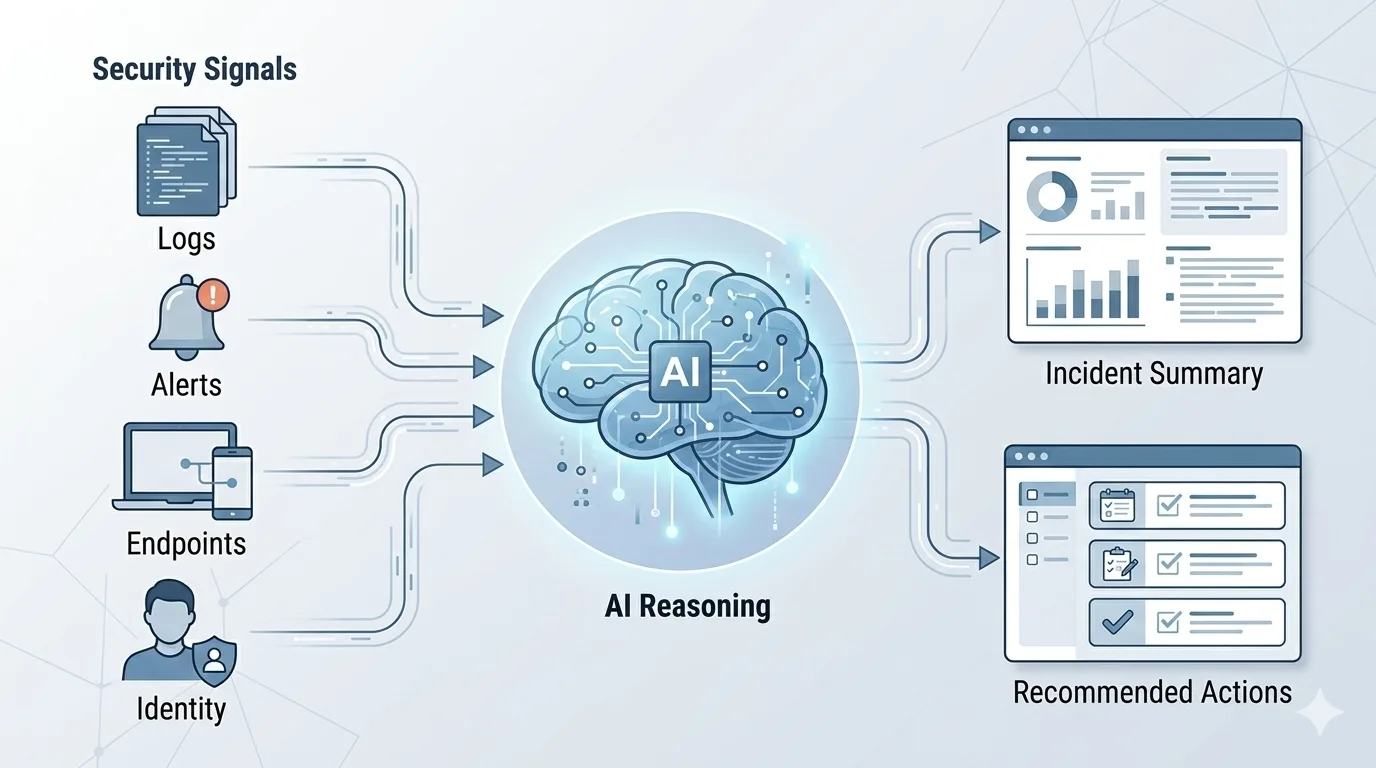
How Security Copilot Works
The Three-Layer Architecture
Layer 1: Data Ingestion Security Copilot aggregates data from your entire security stack:
- SIEM (Microsoft Sentinel, Splunk, elastic)
- Endpoint Detection & Response (Microsoft Defender for Endpoint)
- Cloud security (Microsoft Defender for Cloud)
- Identity (Microsoft Entra)
- Network & email security
- Third-party tools via connectors
The AI sees the complete picture—not siloed alerts from individual tools.
Layer 2: AI Reasoning & Analysis When an alert triggers, Security Copilot instantly:
- Correlates events across multiple data sources
- Identifies patterns that indicate malicious activity
- Checks threat intelligence (stored IOCs, known attack signatures)
- Builds incident timeline automatically
- Assesses severity and risk score
- Recommends response actions with confidence levels
All in seconds. What takes a human analyst 2+ hours happens in 30 seconds.
Layer 3: Response & Reporting Security Copilot presents findings in natural language:
- “This looks like ransomware preparation. Here’s why—[reasoning].”
- “Recommended actions: Isolate endpoints, check for lateral movement, preserve logs.”
- “Similar incidents in threat database: [link to pattern].”
Analysts can act with confidence because the AI explains its reasoning (not a black box).
Five Capabilities That Transform Defense
1. Incident Summarization
A breach in progress involves 10,000+ logs, multiple system alerts, and scattered evidence. Security Copilot synthesizes this into a coherent narrative:
Traditional approach: Analyst manually reviews logs, checks timelines, writes incident summary (2-3 hours).
With Security Copilot: “Here’s a timeline of the incident. Attack started at 2:14 AM with suspicious login from IP 203.0.113.45. Attacker moved laterally to servers A and B. Data exfiltration likely around 3:32 AM. Recommended containment: [actions].” (60 seconds)
The accuracy is often better than human analysis because the AI doesn’t miss connections.
2. Threat Intelligence Automation
Manually checking if an IP, domain, or file hash is malicious is time-consuming. Security Copilot automates this:
- Is this IP known malicious? Yes—part of botnet X. Attribution: North Korean APT group.
- Has this domain pattern been seen before? Yes—similar to 47 known phishing campaigns from group Y.
- Should this file hash be blocked? Yes—matches ransomware signature from last month’s campaign.
The AI correlates your internal data with global threat intelligence instantly.
3. Attack Pattern Recognition
Attackers follow predictable playbooks. Security Copilot recognizes them:
| Attack Pattern | What It Looks Like | Copilot Recognition |
|---|---|---|
| Ransomware prep | Lateral movement, admin credential use, mass shadow copies deleted | Flags as ransomware staging, 92% confidence |
| Data exfiltration | Unusual outbound traffic, compression tools, encrypted channels | Flags as suspected exfil, correlates to APT group known for data theft |
| Privilege escalation | Failed logins, then successful access with elevated privilege | Flags as privilege escalation attempt, suggests containment |
| Persistence | Scheduled tasks created, registry modifications, service install | Flags as persistence mechanism, suggests host isolation |
Early recognition of patterns = early containment. Early containment = massive damage reduction.
4. Guided Investigation
For ambiguous incidents, Security Copilot becomes the analyst’s assistant:
Scenario: You see suspicious PowerShell activity on a user’s machine. Is it legitimate? Malicious?
Security Copilot guidance:
- “This PowerShell command matches 3 known malware families”
- “BUT: I see this user runs similar commands monthly. Context: They’re in IT Support role.”
- “Recommendation: Ask the user to confirm. If legitimate, create known-good pattern. If denied, escalate to incident response.”
The AI doesn’t just detect; it guides the analyst toward correct decisions.
5. Reporting & Documentation
Compliance and board reporting require incident documentation. Security Copilot auto-generates:
- Executive summary
- Technical timeline
- Root cause analysis
- Lessons learned
- Recommendations for prevention
Real-World Impact: Three Detective Scenarios
Detective 1: The Ransomware That Was Caught Early
Scenario: Your organization detected unusual activity on a server at 2:17 AM.
Traditional SOC (Without Copilot):
- Alert sits in queue until business hours (6+ hours delay)
- Analyst reviews logs manually (1.5 hours)
- Confirms it’s ransomware staging (lateral movement, admin access, shadow copies deleted)
- Isolates systems (30 minutes)
- Total dwell time: 8+ hours. Damage: Significant file encryption.
With Security Copilot:
- Alert triggers immediately
- Copilot correlates 12,000+ events in 15 seconds, identifies ransomware attack pattern with 91% confidence
- Auto-isolates affected systems (configurable response)
- Alerts on-call analyst: “HIGH SEVERITY: Ransomware staging detected on Server-142. Attack likely started 14 minutes ago. Immediate actions taken: [list].”
- Total dwell time: 14 minutes. Damage: None. Attack contained before encryption.
Financial impact: Ransomware typically costs $4.3M. Early detection prevented it.
Detective 2: The Advanced Phishing Campaign
Scenario: Your email gateway detects 47 similar phishing emails over 2 hours.
Traditional SOC:
- Analyst realizes pattern after 30+ emails get through
- Manually blocks similar emails (error-prone)
- Traces phishing to domain Y
- Result: Some employees compromised. Credential theft possible.
With Security Copilot:
- Email gateway flags 47 emails as similar phishing pattern
- Copilot recognizes this matches APT group Z’s known campaign (based on threat intel)
- Auto-blocks entire domain and similar patterns organization-wide within 45 seconds
- Alerts analyst: “Phishing campaign detected. Origin: Known APT group Z. 47 emails identified, 3 got through before block deployed. Recommend: Reset passwords for 3 affected users, run EDR check.”
- Result: Immediate containment. Only 3 users potentially affected vs. hundreds.
Detective 3: The Insider Threat That Was Detected
Scenario: A contractor suddenly accesses files they’ve never touched before, then transfers large data to external storage.
Traditional SOC:
- Suspicious activity gets lost in alert noise
- Or manual review takes 6+ hours
- Result: Data exfiltration complete before detection.
With Security Copilot:
- Endpoint Detection & Response flags unusual file access
- UEBA (User & Entity Behavior Analytics) flags as deviation from normal pattern
- Security Copilot correlates: Access to confidential files + transfer to untrusted storage + timing coinciding with contract end date = insider threat indicator
- Alert: “CRITICAL: Suspected insider threat. [User] accessed 47 files outside normal scope in 12 minutes, transferred 2.3 GB to external storage. Behavioral anomaly: 98% deviation from baseline.”
- Result: Immediate investigation, containment, evidence preservation before data leaves network.
Implementation Roadmap: 12 Weeks to Deployment
Phase 1: Assessment & Planning (Weeks 1-2)
- Audit current security stack (SIEM, EDR, cloud tools, identity)
- Document alert volume and alert fatigue metrics
- Identify top incident types (ransomware, phishing, data exfil, etc.)
- Define success metrics (MTTR, analyst efficiency, threat detection rate)
Phase 2: Foundation & Pilot (Weeks 3-6)
- Deploy Security Copilot with connection to your primary SIEM
- Create initial threat intelligence integrations
- Run pilot with 2-3 security analysts and 15-20% of incident volume
- Test incident investigation workflows
- Gather feedback and refine prompts
Phase 3: Expansion & Training (Weeks 7-10)
- Expand to full SOC team
- Conduct analyst training on best practices
- Establish investigation playbooks
- Set up automated response actions (with human approval gates)
- Integrate with ticketing system (ServiceNow, Jira, etc.)
Phase 4: Optimization & Scale (Weeks 11+)
- Monitor MTTR improvements
- Refine threat detection tuning
- Implement advanced automation (where confidence is high)
- Expand to additional security domains (cloud, identity, network)
- Continuous training and skill development for analysts
Key Metrics to Track
- MTTR (Mean Time to Respond): Target 50% reduction
- Alert Triage Time: Target 70% reduction
- Analyst Efficiency: Hours freed up for strategic work
- Detection Rate: False negative reduction (threats previously missed)
- Analyst Burnout: Reduction in repetitive task load
- Incident Severity: Easier detection of critical threats
Common Questions
Will this replace security analysts?
No. Security Copilot frees analysts from repetitive investigations so they can focus on strategic threat hunting, advanced analysis, and skill development. Your analyst becomes a threat expert, not a log processor. You need more skilled analysts, not fewer.
What about false positives?
Security Copilot provides confidence scores on its recommendations. “91% confident this is ransomware” vs. “43% likely false positive.” Analysts use this confidence to prioritize. Over time, you’ll tune thresholds to your organization’s risk tolerance.
Does it work with our current SIEM?
Security Copilot integrates with Microsoft Sentinel (native), and via connectors to Splunk, Elastic, Google Chronicle, and other SIEMs. It works alongside your existing tools, not as a replacement.
The Bottom Line: AI-Powered Defense is Now Affordable
Breach costs keep rising. Threat sophistication keeps accelerating. Your SOC can’t keep pace with manual analysis.
Security Copilot brings enterprise-grade AI threat analysis to organizations of any size. You get:
- Faster threat detection (minutes, not days)
- Faster response (64% reduction in MTTR)
- Better analyst experience (strategic work, not alert triage)
- Higher detection accuracy (correlation across entire data landscape)
- Reduced breach risk (early containment)
The math is simple: A single prevented breach pays for years of Security Copilot investment.
Frequently Asked Questions
What is Zero Trust security?
Zero Trust is a security framework that assumes no user or device should be trusted by default — requiring continuous verification of identity, device health, and access permissions for every request.
How does Microsoft implement Zero Trust?
Microsoft Zero Trust uses Entra ID for identity, Intune for device compliance, Defender for threat protection, Purview for data protection, and Conditional Access for policy enforcement.
What compliance certifications does Microsoft support?
Microsoft cloud services hold SOC 1/2/3, ISO 27001/27018, HIPAA, FedRAMP, GDPR, PCI DSS, and 90+ other compliance certifications across industries and regions.
How do you assess security posture?
We evaluate Microsoft Secure Score, conduct gap analyses against frameworks like NIST and CIS, review configurations, test access controls, and provide prioritized remediation recommendations.
Can you help with regulatory compliance?
Yes. We implement Microsoft Purview compliance solutions including data classification, retention policies, eDiscovery, audit logging, and information barriers for regulated industries.

Al Rafay Consulting
ARC Team
AI-powered Microsoft Solutions Partner delivering enterprise solutions on Azure, SharePoint, and Microsoft 365.
LinkedIn Profile