Connect Copilot Studio to SAP and Salesforce: Enterprise Integration Guide
Connect Copilot Studio to SAP and Salesforce is a practical guide to integrating Copilot Studio with SAP and Salesforce using secure identity, governed connectors, and enterprise-ready orchestration patterns.
A practical guide to integrating Copilot Studio with SAP and Salesforce using secure identity, governed connectors, and enterprise-ready orchestration patterns.
ARC Team
· Updated April 11, 2026 · ARC Team

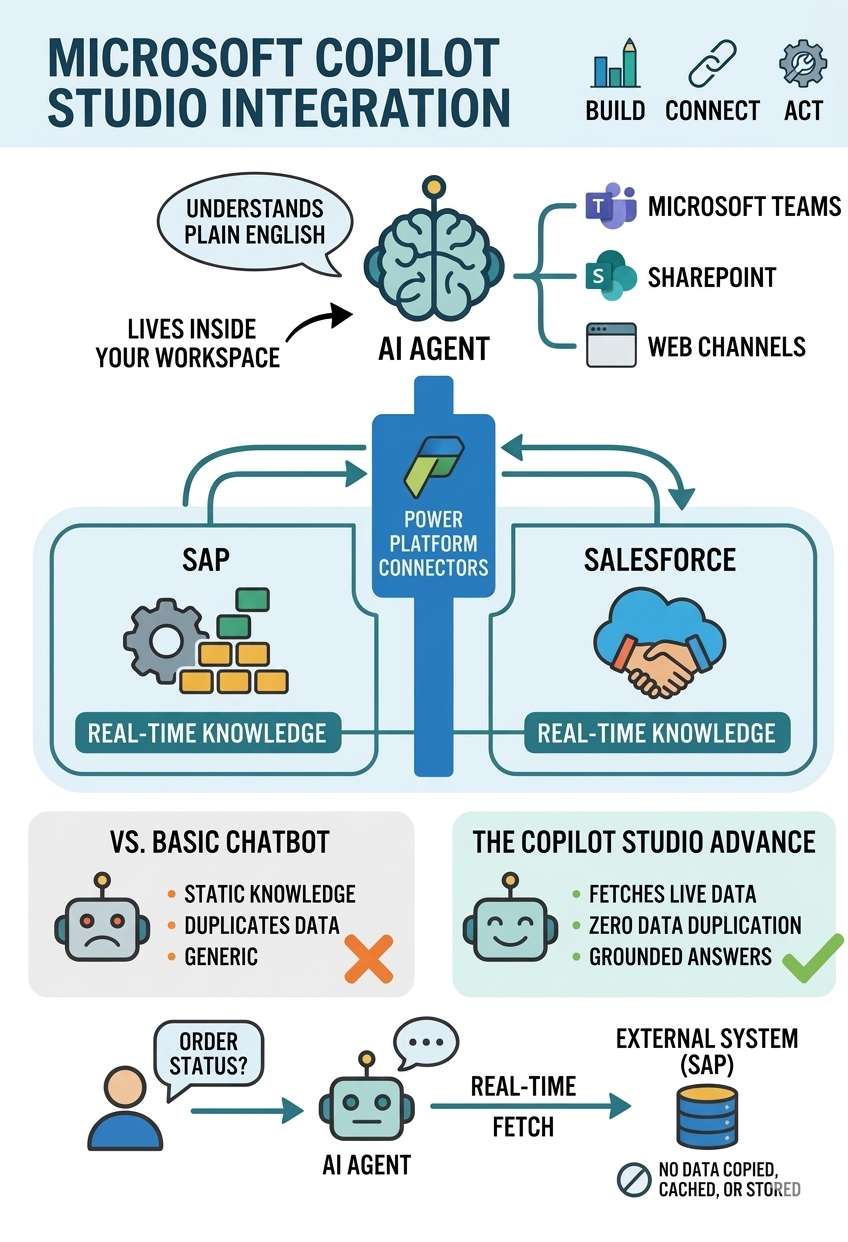
Enterprises are moving beyond isolated chatbots. The next step is connecting AI agents to real business systems like SAP and Salesforce so teams can retrieve and act on live data in context.
Copilot Studio can bridge this gap when integration is designed with identity controls, data boundaries, and process governance from the beginning.
Why SAP + Salesforce Integration Matters
Business users need fast answers across multiple systems. They should not switch between portals to check account status, order details, or opportunity updates. A well-designed Copilot Studio integration reduces friction and improves response quality.
Core Integration Building Blocks
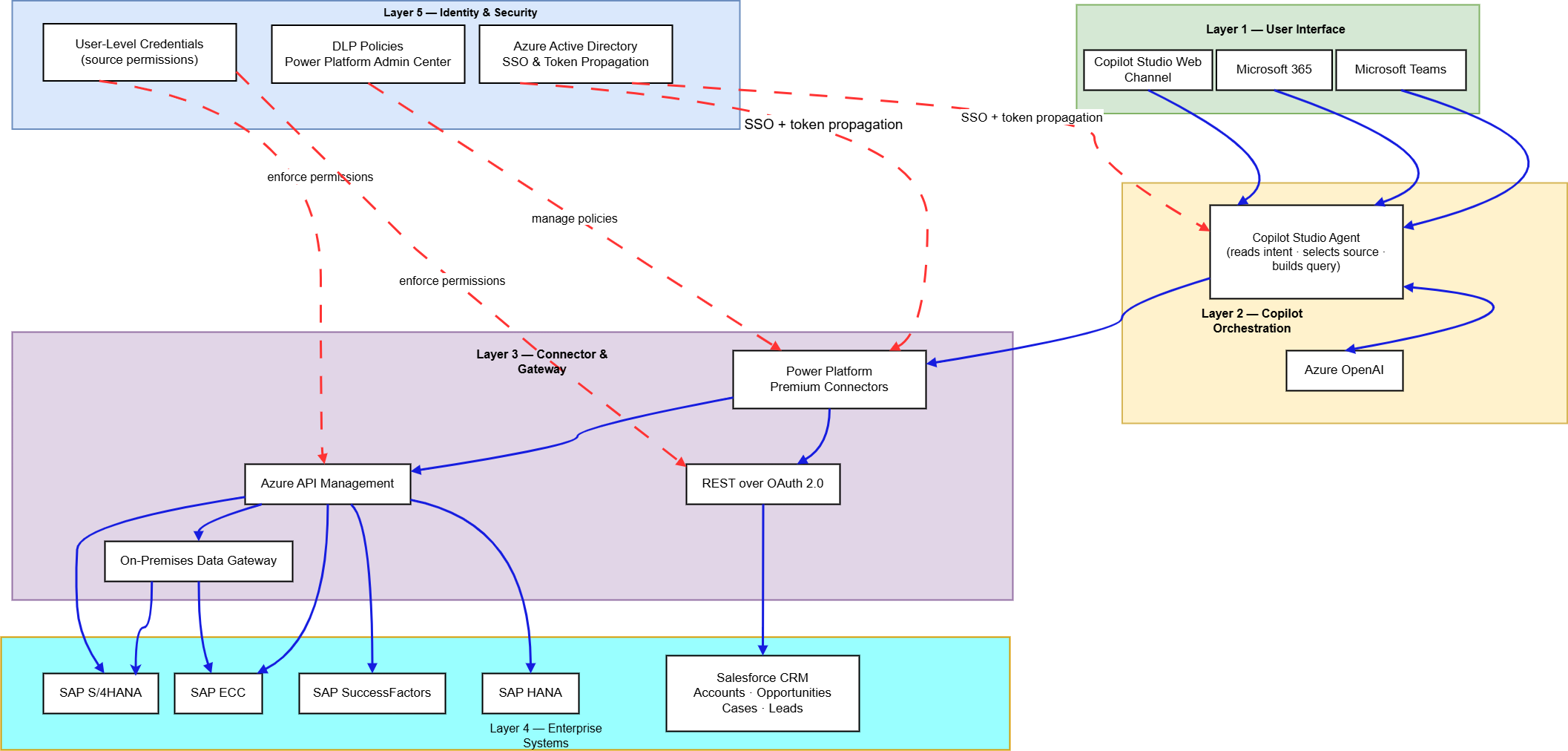
Identity and Access Controls
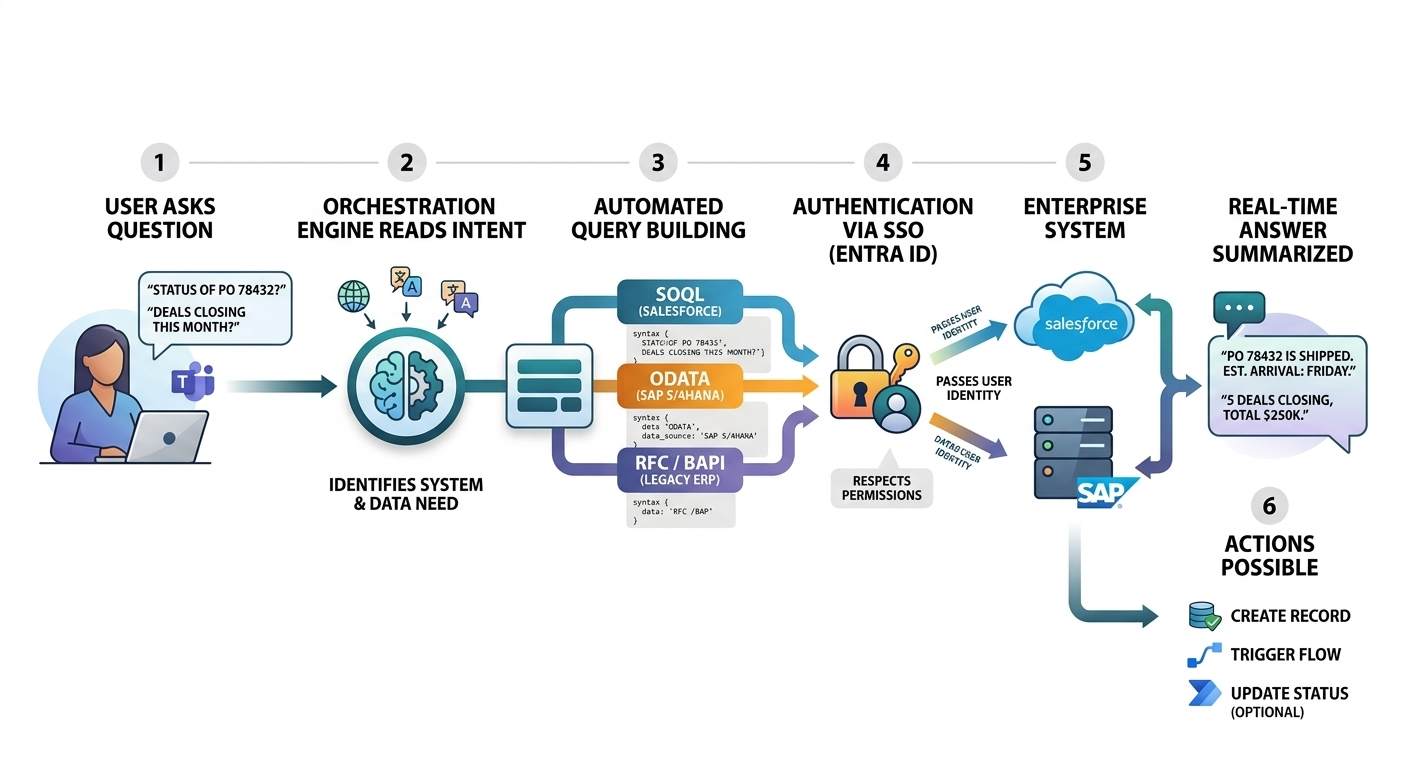
Use Microsoft Entra ID and role-based access controls so the agent only retrieves data users are authorized to see.
Connector and API Layer
Use Power Platform connectors or API management patterns to standardize access between Copilot Studio, SAP, and Salesforce.
Governance and Logging
Track prompts, actions, and downstream requests for auditability, troubleshooting, and policy compliance.
Enterprise Rollout Framework
| Phase | Focus | Outcome |
|---|---|---|
| Phase 1 | Use case scoping and security design | Controlled pilot scope |
| Phase 2 | Connector implementation and validation | Reliable system access |
| Phase 3 | Rollout and optimization | Scalable agent operations |
Phase 1: Scope and Guardrails
Define specific scenarios such as account lookup, order status, and case summaries. Document data sensitivity and approval rules before implementation.
Phase 2: Build and Validate
Implement connectors, enforce token propagation, and test with representative user roles. Validate both response quality and access restrictions.
Phase 3: Scale Safely
Expand to additional business workflows after proving performance, governance, and user adoption in pilot groups.
Business Benefits
- Unified Access: Users get cross-system answers in one conversation flow.
- Faster Decisions: Reduced delay between question, context, and action.
- Operational Consistency: Standardized process logic across teams.
- Controlled Risk: Role-based access and logging reduce governance gaps.
Common Mistakes to Avoid
- Exposing broad connector permissions to all users
- Skipping data classification and sensitivity mapping
- Designing generic prompts without business context
- Ignoring escalation and exception workflows
Frequently Asked Questions
Can Copilot Studio connect to both SAP and Salesforce in one agent?
Yes. With proper connector strategy and identity controls, one agent can orchestrate workflows across both systems.
Is this approach secure for enterprise use?
It can be, if implemented with role-based access, token propagation, policy controls, and logging from day one.
Do we need custom development?
Many scenarios can start with low-code connectors, but complex workflows often benefit from API and integration engineering support.
What should we pilot first?
Start with one or two high-frequency, low-risk use cases that have clear business value and measurable outcomes.
Conclusion
Copilot Studio integration with SAP and Salesforce can unlock real enterprise value, but only with strong architecture and governance foundations. The goal is not just answering questions faster; it is enabling secure, actionable intelligence across critical systems.
If your organization is exploring this journey, ARC can help with strategy, implementation, governance, and optimization.
Frequently Asked Questions
Can Copilot Studio connect to both SAP and Salesforce in one agent?
Is this approach secure for enterprise use?
Do we need custom development?
What should we pilot first?

ARC Team
ARC Team
AI-powered Microsoft Solutions Partner delivering enterprise solutions on Azure, SharePoint, and Microsoft 365.
LinkedIn Profile