Detect Threats Now with Microsoft Sentinel SIEM AI
Detect Threats Now with Microsoft Sentinel SIEM AI is transform threat detection with Microsoft Sentinel. AI-powered SIEM that reduces mean time to detect (MTTD) and gives you visibility into your entire security landscape.
Transform threat detection with Microsoft Sentinel. AI-powered SIEM that reduces mean time to detect (MTTD) and gives you visibility into your entire security landscape.
Al Rafay Consulting
· Updated June 4, 2026 · ARC Team
Your organization generates millions of security events daily:
- Firewall logs
- Endpoint activity
- Email interactions
- Cloud operations
- Identity changes
- Network traffic
Organizations looking to strengthen this area can work with managed detection & response.
But buried in that noise are the signals that matter: the attackers trying to break in.
Traditional SIEM systems give you volume—terabytes of logs—but not insight. Analysts drown in data. By the time they find the threat, the damage is done.
Microsoft Sentinel changes this fundamental equation. Built on Azure’s scale and powered by machine learning, Sentinel detects threats in minutes instead of days—then helps you respond in hours instead of weeks.
The SIEM Challenge
The Data Problem: Modern security stacks generate alert volume that overwhelms human analysts. A mid-market organization might have:
- 500,000+ firewall events/day
- 2M+ endpoint events/day
- 10M+ cloud API calls/day
- 50M+ email events/day
That’s 60M+ daily events. No team can manually investigate all of them.
The Correlation Problem: A single breach might involve 200+ events across 5 different systems. Finding those needles in the haystack requires correlating data from:
- Firewalls
- Endpoint detection tools
- Cloud security
- Identity platforms
- Email gateways
Most organizations can’t correlate across systems because their tools don’t integrate.
The Expertise Problem: Writing effective detection rules requires deep threat knowledge. Creating Sigma rules (detection format) requires expertise. Most organizations have 2-3 experts on staff. When they leave, institutional knowledge walks out the door.
The Result:
- Average dwell time: 207 days (attackers inside network for 6+ months before detection)
- Breach costs: $4.45M average, up to $10M+ for large organizations
- Analyst burnout: SOC analysts burn out in 2-3 years due to alert fatigue
Sentinel addresses all of these.
What Makes Sentinel Different
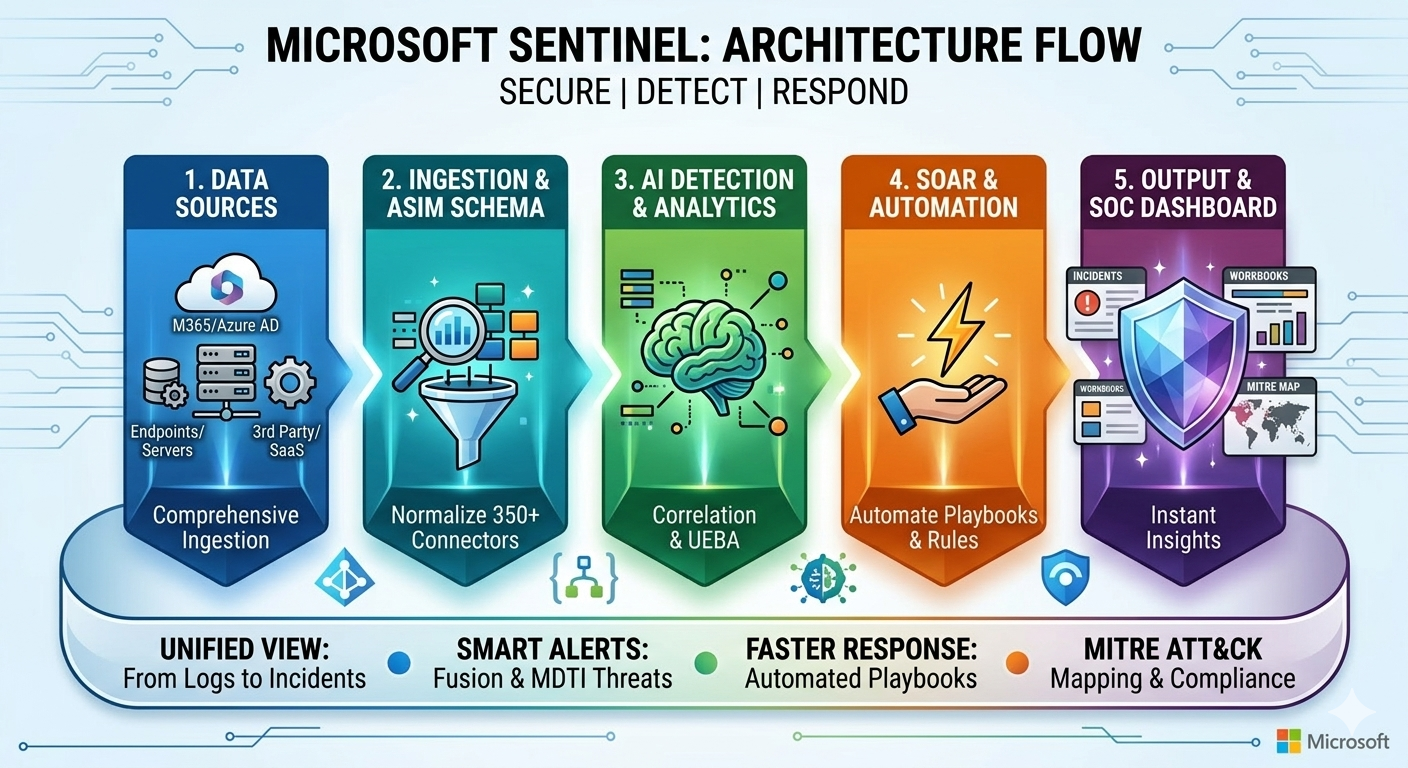
1. Unified Data Ingestion
Sentinel connects to 350+ data sources natively:
- Microsoft stack: Entra, Defender, Office 365, Teams, SharePoint
- Cloud providers: AWS, Google Cloud, Alibaba
- Network & endpoint: Cisco, Palo Alto, CrowdStrike, Carbon Black
- Traditional infrastructure: Fortinet, Check Point, Splunk
- Applications: Okta, Salesforce, Slack, ZenDesk—any log source
One platform. All your data. No more silos.
Real benefit: Instead of 5 separate dashboards, you have one unified view. Correlation happens automatically.
2. Built-in AI & Machine Learning
Sentinel doesn’t just store logs—it analyzes them:
Behavioral analytics:
- Creates baseline of normal user activity
- Flags deviations (user suddenly accessing files they never touch)
- Flags impossible travel (login from New York, then Tokyo 30 seconds later)
- Identifies compromised credentials
Anomaly detection:
- Unusual data exfiltration (user uploading 100GB when they normally upload 1MB)
- Unusual access patterns (IT support accessing CEO’s files)
- Unusual network activity (domain controller communicating with unknown IP)
Threat intelligence correlation:
- Automatically matches IPs, domains, and file hashes against threat intelligence
- Identifies indicators of compromise (IOCs)
- Links events to known attack campaigns
3. Pre-Built Detection Rules (2000+)
Microsoft’s security team creates thousands of detection rules based on:
- Real-world attack data
- Threat intelligence
- Academic research
- Industry best practices
You get these rules automatically. Instead of starting from scratch, you inherit enterprise-grade detection logic.
Examples of out-of-the-box detections:
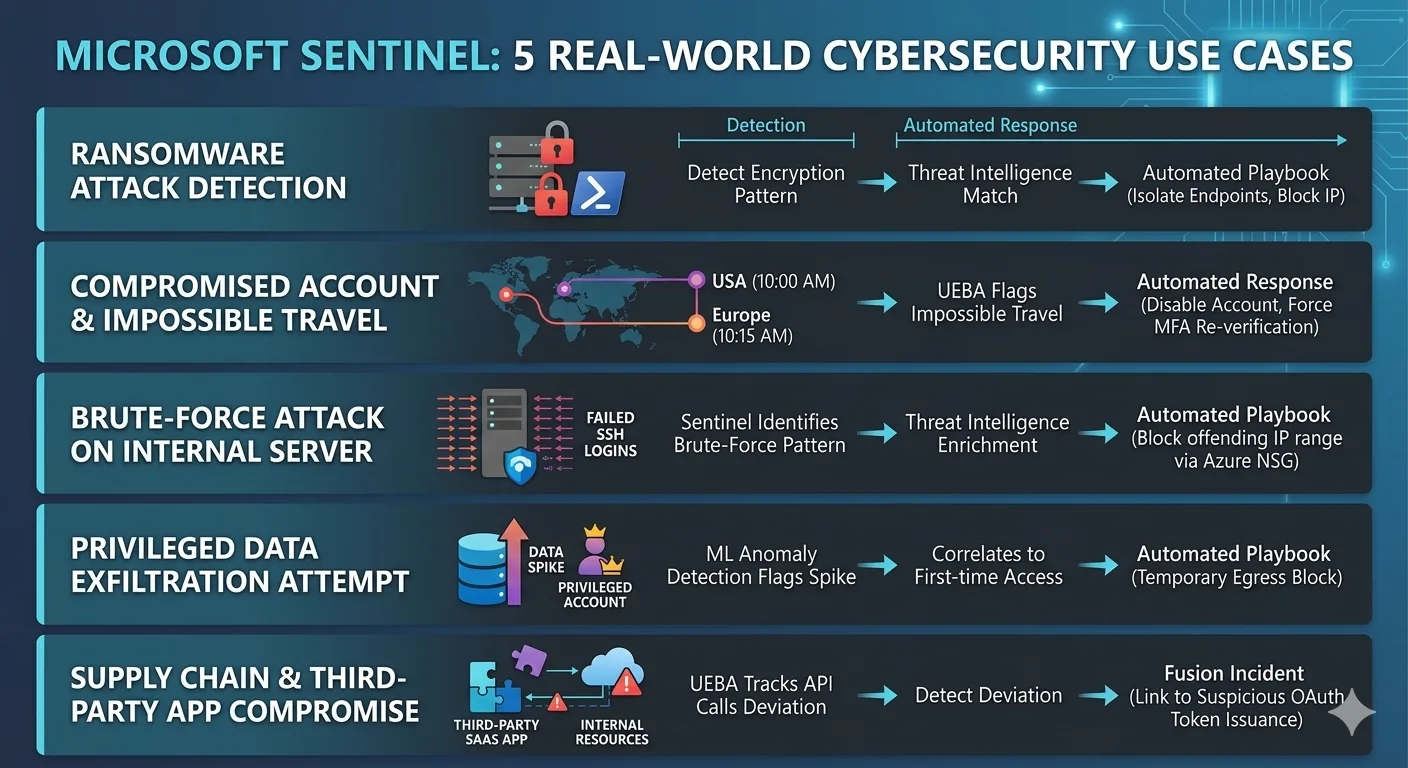
- Ransomware preparation (lateral movement, admin escalation, shadow copy deletion)
- Data exfiltration (unusual outbound data transfer)
- Privilege escalation attempts
- Brute force attacks
- Insider threats
- Supply chain attacks
| Detection | What It Catches | Detection Time |
|---|---|---|
| Ransomware staging | Lateral movement + admin access + shadow copy deletion | 2 minutes |
| Data exfil | Unusual outbound volume + encrypted tunnel + compression | 5 minutes |
| Impossible travel | Login from two geographic locations impossible to traverse | Real-time |
| Privilege escalation | Failed auth attempts followed by successful privileged access | 1 minute |
| Brute force | 100+ failed login attempts in under 10 minutes | Real-time |
4. Incident Investigation Tools
When a threat is detected, Sentinel helps you investigate:
Timeline reconstruction:
- Summarizes attack timeline automatically
- Shows all related events across all data sources
- Highlights key moments in the attack sequence
Impact assessment:
- Identifies all affected systems
- Shows what data was accessed
- Determines if persistence was established
- Estimates lateral movement
Recommendation engine:
- Suggests containment actions
- Recommends threat intelligence checks
- Proposes forensic evidence preservation
- Indicates similar historical incidents
5. Playbook Automation
Once you understand the threat, Sentinel can automate response:
Example playbook: Ransomware detected
- Isolate affected endpoint
- Notify security team
- Preserve forensic evidence
- Block C2 (command & control) domain
- Alert relevant stakeholders
- Trigger incident response runbook
All automatic, customizable, audit-logged.
Real-World Detection: Three Scenarios
Detection 1: The Ransomware Attack (Caught in 8 Minutes)
Timeline of attack:
- 2:14 AM: Attacker logins to domain via compromised credential
- 2:15 AM: Lateral movement to servers A and B
- 2:16 AM: Admin escalation on server A
- 2:17 AM: Shadow copies deleted (ransomware preparation)
- 2:22 AM: Encryption begins
Traditional SIEM (Without Sentinel AI):
- Analyst discovers attack at 3:45 PM (15+ hours later)
- Ransomware has encrypted thousands of files
- Business impact: $500K+ in ransom + remediation + downtime
With Microsoft Sentinel:
- 2:17 AM: AI behavioral analytics flag impossible login + lateral movement as ransomware staging
- Severity: CRITICAL, confidence: 94%
- Automated response: Isolate endpoints, block C2 domain, alert on-call analyst
- 2:25 AM: Analyst receives alert, confirms, begins investigation
- 2:35 AM: Attack contained. Only 47 files encrypted (vs. thousands)
- Business impact: Minimal. No ransom. No significant downtime.
Financial impact: $450K+ saved.
Detection 2: The Data Exfiltration (Caught in 7 Minutes)
Timeline of attack:
- 1:32 PM: Insider identifies confidential data folder
- 1:33 PM: Copies entire folder (5 GB) to personal cloud storage
- 1:34-1:38 PM: Uploading data to external account
Traditional SIEM:
- No real-time alert for file copy activity
- Exfiltration completes
- Discovered when data appears on competitor’s platform (weeks later)
With Microsoft Sentinel:
- 1:33 PM: Endpoint activity flags (user copying unusual volume to removable media)
- 1:34 PM: Network activity flags (unusual outbound data transfer)
- Sentinel correlates: User behavior deviation (98% anomalous) + destination risk (untrusted storage) + volume (5GB in 2 minutes) = DATA EXFIL
- Alert severity: CRITICAL, Confidence: 89%
- 1:35 PM: Analyst receives real-time alert
- 1:37 PM: User device network access disabled, investigation begins
- 1:45 PM: Forensic evidence collected, exfiltration confirmed, legal notified
- Data recovery: Only 87 seconds of transfer completed before block
Impact: Data breach prevented before it began.
Detection 3: The Compromised Admin Account (Caught in 4 Minutes)
Timeline of attack:
- Admin account credentials leaked in dark web
- Attacker logs in from GeoIP: Moscow
- Begins exporting distribution group lists (preparing for phishing)
- Then modifies email forwarding rules (persistence)
Traditional SIEM:
- Admin logon from new location might be flagged
- But email rule modification might not raise alarms
- Pattern linking all three events is missed
With Microsoft Sentinel:
- 3:22 PM: Impossible travel alert (admin account: USA → Russia in 18 seconds)
- 3:23 PM: Behavioral alert (admin exporting distribution groups—unusual activity)
- 3:24 PM: Configuration change alert (email rule modified by suspicious account)
- Sentinel correlates: These three events linked + impossible travel = ACCOUNT COMPROMISE
- Alert: CRITICAL. Recommended actions: Force password reset, revoke tokens, audit account actions
- 3:25 PM: Incident response activates
- 3:30 PM: Account secured. Attacker locked out. Damage mitigated.
Impact: Account compromise resolved before attacker could execute persistence.
Implementation Timeline: 8 Weeks to Full Deployment
Phase 1: Assessment & Planning (Week 1)
- Audit current security infrastructure
- Identify all data sources (firewalls, endpoints, cloud, identity, etc.)
- Document current alerting and investigation processes
- Define detection priorities and success metrics
Phase 2: Foundation & Data Collection (Weeks 2-3)
- Deploy Sentinel workspace in Azure
- Connect primary data sources (50+ connectors typically)
- Configure data retention policies (3-12 months based on compliance)
- Validate data ingestion accuracy
- Set up backup and disaster recovery
Phase 3: Detection Rules & Tuning (Weeks 4-5)
- Enable pre-built detection rules (2000+ available)
- Customize rules based on your environment
- Tune false positive thresholds
- Create custom rules for your specific threats
- Test detection accuracy against test cases
Phase 4: Analyst Training & Optimization (Weeks 6-7)
- Train SOC team on Sentinel UI and features
- Establish incident investigation workflow
- Create runbooks for common threat scenarios
- Set up automated response playbooks (optional)
- Configure dashboards and reporting
Phase 5: Production Launch & Monitoring (Week 8+)
- Fully deploy to production
- Monitor alert volume and analyst workload
- Refine detection rules based on real-world performance
- Continuously improve thread hunting capabilities
- Measure MTTD and MTTR improvements
Key Metrics to Track
- MTTD (Mean Time to Detect): Time from attack start to detection. Target: Hours or less.
- Alert accuracy: % of alerts that represent true threats (vs. false positives)
- Investigation speed: Time from alert to incident confirmation
- Containment speed: Time from detection to threat stopping
- Investigation efficiency: Manual time analysts spend per incident
- Threat coverage: % of known threat patterns detected
Migration from Legacy SIEM
If you’re currently on Splunk, ArcSight, or another SIEM:
| Aspect | Approach |
|---|---|
| Data transition | Run Sentinel alongside existing SIEM for 2-3 months, validating accuracy |
| Rule migration | Sentinel has tools to convert detection rules from other SIEMs |
| Analyst workflow | Training period ensures smooth transition to new UI and investigation methods |
| Cost | Savings from retiring legacy SIEM typically offset Sentinel costs within 18 months |
Common Questions
Will we lose our historical data when migrating to Sentinel?
No. You can export historical data from your current SIEM and import into Sentinel (typical: last 2-3 years of logs). Historical data remains searchable for forensic analysis and compliance.
What about data privacy with cloud-based SIEM?
Sentinel is HIPAA, FedRAMP, SOC 2, PCI-DSS compliant. Data stays within your Azure region. You can use customer-managed keys for encryption. Meets most regulatory requirements.
Does Sentinel require Microsoft Defender/Azure?
No. Sentinel works with any data source—on-premises, multicloud, third-party tools. You don’t need to be all-in on Microsoft ecosystem, though it works best with Microsoft security tools.
The Bottom Line: Modern Threat Data Requires Modern SIEM
The average dwell time of 207 days isn’t acceptable. Threats move fast. Your detection needs to move faster.
Microsoft Sentinel gives you:
- Unified visibility across all your security data
- AI-powered detection that catches threats humans miss
- Speed (minutes to detect, not days)
- Scale (Microsoft’s Azure infrastructure handles terabytes of logs)
- Flexibility (works with your existing tools)
- Cost efficiency (pay per GB ingested, not per license)
The question isn’t “Can we afford Sentinel?” It’s “Can we afford not to have Sentinel given the cost of a breach?”
Frequently Asked Questions
What is Zero Trust security?
Zero Trust is a security framework that assumes no user or device should be trusted by default — requiring continuous verification of identity, device health, and access permissions for every request.
How does Microsoft implement Zero Trust?
Microsoft Zero Trust uses Entra ID for identity, Intune for device compliance, Defender for threat protection, Purview for data protection, and Conditional Access for policy enforcement.
What compliance certifications does Microsoft support?
Microsoft cloud services hold SOC 1/2/3, ISO 27001/27018, HIPAA, FedRAMP, GDPR, PCI DSS, and 90+ other compliance certifications across industries and regions.
How do you assess security posture?
We evaluate Microsoft Secure Score, conduct gap analyses against frameworks like NIST and CIS, review configurations, test access controls, and provide prioritized remediation recommendations.
Can you help with regulatory compliance?
Yes. We implement Microsoft Purview compliance solutions including data classification, retention policies, eDiscovery, audit logging, and information barriers for regulated industries.

Al Rafay Consulting
ARC Team
AI-powered Microsoft Solutions Partner delivering enterprise solutions on Azure, SharePoint, and Microsoft 365.
LinkedIn Profile