GitHub Copilot: Every Dev Must Try This Now
GitHub Copilot pricing, GPT-4 features, and how it compares to ChatGPT. The complete guide to the best AI coding assistant for development teams in 2025.
Learn about GitHub Copilot pricing, GPT-4 features, and how it compares to ChatGPT. The complete guide to the best AI coding assistant for development teams in 2025.
Al Rafay Consulting
· Updated June 15, 2026 · ARC Team

Software development is changing faster than ever, and AI coding assistants are at the centre of that shift. GitHub Copilot puts a powerful AI pair programmer directly inside your code editor, so you get intelligent suggestions without breaking your focus or switching tools.
Organizations looking to strengthen this area can work with Azure DevOps consulting.
This guide covers everything you need to know about GitHub Copilot: what it is, how it works, what it costs, how it compares to ChatGPT, and why it is the best AI coding assistant available for development teams. Whether you are a solo developer or leading a large engineering team, every answer you need is here.
What Is GitHub Copilot?
GitHub Copilot is an AI-powered coding assistant built by GitHub, OpenAI, and Microsoft. It sits inside your code editor and suggests complete lines, functions, and full code blocks as you type, in real time.
Where it works: Visual Studio Code, Visual Studio, JetBrains IDEs, Neovim, and directly on GitHub.com—whether you are writing code locally, reviewing a pull request online, or working inside a cloud development environment.
How it differs from basic autocomplete: Standard autocomplete only finishes the word you are currently typing based on simple pattern matching. Copilot reads your entire file—including all comments, variable names, imports, and function signatures—to generate contextually accurate suggestions that match your specific code logic.
Copilot Chat: Beyond inline suggestions, Copilot includes a built-in chat assistant inside your IDE sidebar. You can ask it questions in plain English—such as “explain this function” or “suggest a better approach”—and it responds with context from your actual open files.
How GitHub Copilot Works
The AI model powering it: GitHub Copilot runs on GPT-4 class models from OpenAI, trained on billions of lines of public source code along with technical documentation. This gives the model a deep understanding of code syntax, common patterns, and the logic behind developer decisions.
Reading your editor context: When you type, Copilot reads your entire open file—including imports, comments, function names, and the code around your cursor. All of this context is bundled and sent to the AI model, which returns a relevant suggestion within milliseconds.
Inline ghost text suggestions: Suggestions appear as faint ghost text directly inside your editor, right where your cursor is. You press Tab to accept, Escape to dismiss, or use keyboard shortcuts to cycle through alternative options.
Security and privacy: All context sent to the Copilot service is transmitted over encrypted HTTPS connections. On Business and Enterprise plans, GitHub does not use your code to train or improve the underlying AI model, which protects proprietary and sensitive codebases.
Key Features at a Glance
| Feature | Description | Business Benefit |
|---|---|---|
| Code Completions | Suggests full lines and functions as you type in real time | Reduces routine coding time by up to 55% |
| Copilot Chat | Natural language Q&A and debugging assistant inside the IDE | Removes context switching and speeds up problem solving |
| Test Generation | Auto-writes unit and integration tests for existing code | Improves test coverage without extra QA effort |
| Multi-Language Support | Works with Python, JS, C#, Go, Java, Ruby, TypeScript, and more | Fits any project regardless of tech stack |
| PR Summaries | Generates pull request descriptions and commit messages automatically | Speeds up code review and documentation cycles |
| Security Alerts | Flags insecure code patterns before they reach production | Lowers security risk and reduces remediation cost |
| Azure & GitHub Sync | Native integration with Azure DevOps, GitHub Actions, VS Code | Fits inside existing Microsoft toolchain with zero friction |
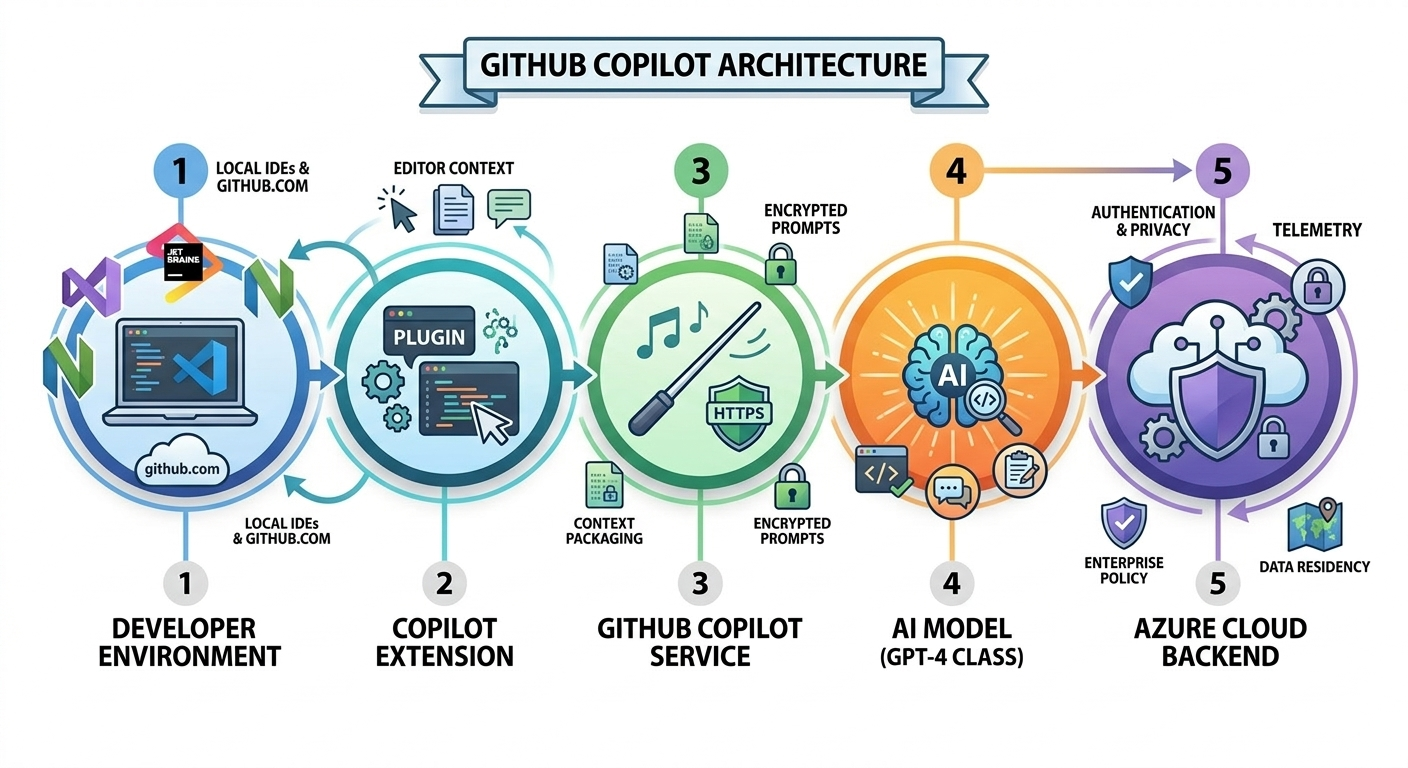
GitHub Copilot Architecture: A Five-Layer Design
GitHub Copilot is built on a five-layer architecture that moves from your local development environment up to a cloud-hosted AI model.
| Layer | Component | Details |
|---|---|---|
| Layer 1 | Developer Environment | VS Code, Visual Studio 2022, JetBrains IDEs, GitHub.com |
| Layer 2 | Copilot Extension | Captures editor context: cursor position, open files, comments, imports |
| Layer 3 | GitHub Copilot Service | Packages context and sends encrypted prompts to the AI model via HTTPS |
| Layer 4 | AI Model (GPT-4 Class) | OpenAI model generating code completions, chat answers, and test output |
| Layer 5 | Azure Cloud Backend | Handles authentication, telemetry, policy enforcement, and data privacy |
Administrators manage Copilot through GitHub organization settings—assigning or revoking licences, configuring content filtering, and enforcing usage policies across the entire team. No additional tooling or infrastructure is needed to manage these controls.
Real-World Use Cases
Eliminating boilerplate code: Copilot generates repetitive patterns—CRUD operations, data validators, API connectors—from a single descriptive comment, saving multiple hours of manual work every week.
Legacy code modernisation: A financial services firm used Copilot to read and explain the logic inside a 20-year-old application, then generate equivalent implementations in a modern language—cutting migration timelines significantly.
Accelerating test coverage: A SaaS company with low automated test coverage used Copilot to generate unit and integration tests for hundreds of existing functions in just a few days, raising coverage from 40% to over 80%.
Auto-generating documentation: Platform engineering teams use Copilot to produce README files, API reference documentation, deployment runbooks, and incident response guides—freeing senior engineers for architecture and code review.
Faster developer onboarding: New developers use Copilot Chat to ask plain-English questions about unfamiliar functions and design patterns inside an existing codebase, shortening onboarding time considerably.
Generating CI/CD pipeline configurations: DevOps engineers use Copilot to generate GitHub Actions workflows and Azure Pipelines YAML files from natural language descriptions—with fewer configuration errors.
GitHub Copilot vs ChatGPT
The core difference is context and workflow integration:
- ChatGPT operates in a browser tab with no knowledge of your project structure, existing functions, variable names, or team coding conventions. Every interaction requires copying code out, waiting, and pasting back.
- GitHub Copilot reads your entire project automatically because it operates within your editor. Suggestions appear inline in milliseconds with no workflow interruption.
When to use each: Use GitHub Copilot for active in-editor coding, test generation, debugging, and documentation tasks. Use ChatGPT for architectural discussions, concept exploration, or generating longer written explanations. Many experienced developers keep both tools open and choose based on the task.
GitHub Copilot Pricing and Plans
| Plan | Price | Best For |
|---|---|---|
| Free | $0/month | Individual developers exploring AI pair programming (2,000 completions + 50 chats/month) |
| Copilot Pro | $10/user/month | Individual developers who use Copilot daily (unlimited completions + 300 premium requests) |
| Copilot Business | $19/user/month | Engineering teams needing admin controls, IP indemnification, and code privacy guarantees |
| Copilot Enterprise | $39/user/month | Large organizations needing custom knowledge bases and 1,000 premium requests/month |
GitHub offers a 30-day free trial for Copilot Business with no credit card required—giving teams a full evaluation period before any financial commitment.
Business Value for Decision Makers
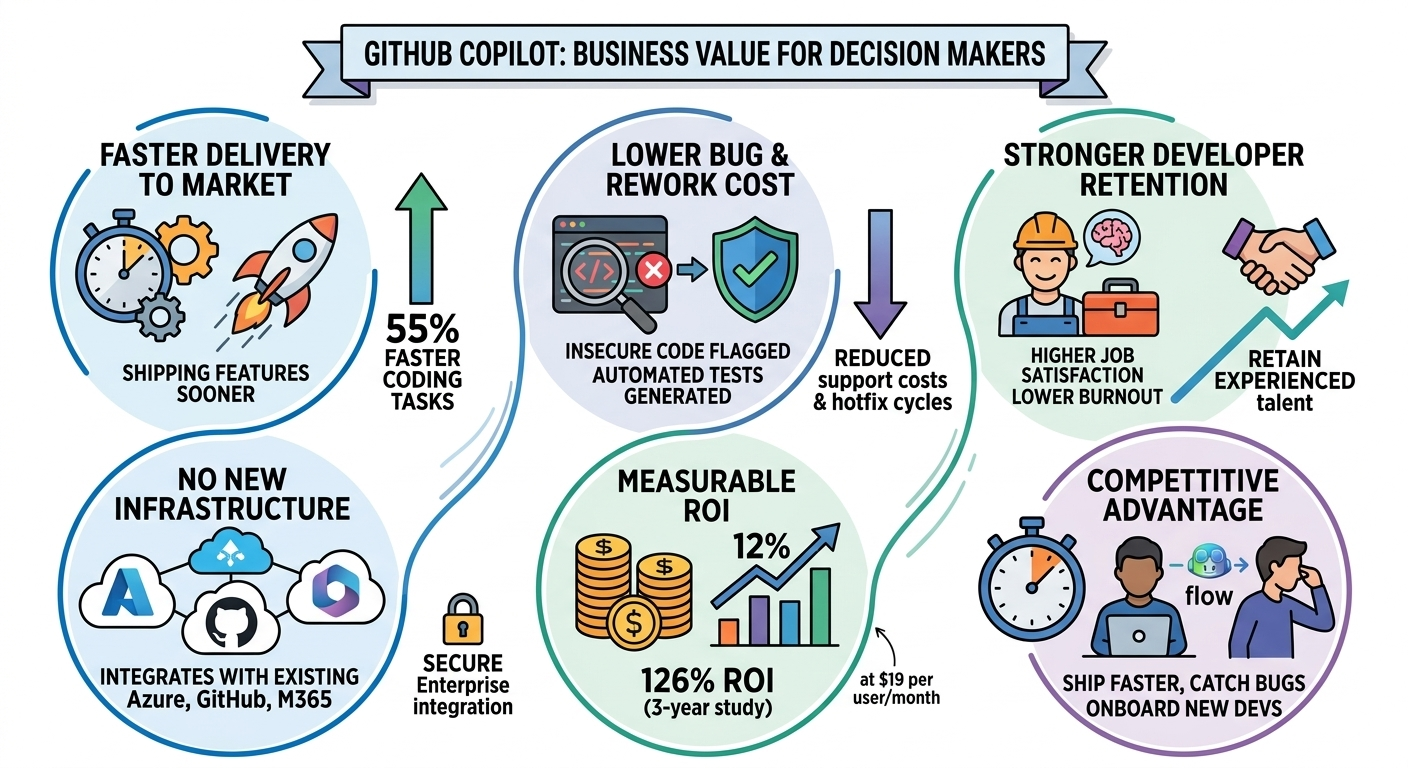
- Faster delivery to market: Features reach customers sooner when developers write code faster and spend less time on repetitive work
- Lower cost of bugs and rework: Copilot flags insecure code patterns and generates automated tests—fewer bugs in production means lower support costs and shorter hotfix cycles
- Stronger developer retention: Engineers using AI-assisted coding tools report higher job satisfaction and lower burnout—retaining talent avoids substantial recruiting and training costs
- No new infrastructure required: For organizations on Azure, GitHub, and Microsoft 365, Copilot integrates without new infrastructure or additional vendor agreements
- Measurable ROI: An independent Forrester study found 126% return on investment over three years at $19 per user/month
- Competitive advantage: Teams using AI pair programming tools ship faster, catch more bugs earlier, and onboard new developers more quickly
DevOps and Microsoft Ecosystem Integration
Copilot is built into Visual Studio Code by default in recent versions and available as an extension for Visual Studio 2022. Key integrations include:
- Azure DevOps and GitHub: Copilot bridges these two platforms, allowing teams to keep Azure Boards workflows while taking full advantage of Copilot’s capabilities in the GitHub editor
- GitHub Actions and CI/CD: Copilot can suggest and generate GitHub Actions workflows and Azure Pipelines configurations directly inside your editor
- Azure Cloud Awareness: When writing code that connects to cloud services, Copilot recognizes Azure SDK patterns and suggests the appropriate Azure service integrations automatically
How to Get Started
Individual developer setup: Go to github.com/features/copilot, choose a plan, and install the GitHub Copilot extension from the VS Code Marketplace. Sign in with your GitHub account and suggestions will start appearing immediately.
Team and enterprise setup: Organization administrators activate Copilot Business through GitHub organization settings, assign licences to individual developers, and configure content filtering and usage policies from a central dashboard—in less than an hour for most teams.
Running a pilot: Start with a small group of developers on the 30-day free Business trial. Measure the impact on sprint velocity, test coverage, and developer satisfaction after two to four weeks to build the internal business case for wider adoption.
Best practices for better suggestions:
- Write descriptive comments above functions before you start coding
- Use clear, specific variable and function names
- Use Copilot Chat for complex or multi-step problems
- Always review and test AI-generated code before merging
- Cycle through alternative suggestions to find the best fit
Frequently Asked Questions
What is GitHub Copilot?
▼
GitHub Copilot is an AI-powered coding assistant from GitHub, OpenAI, and Microsoft. It works inside your code editor and provides real-time code suggestions, automated test generation, and a built-in chat assistant for debugging and code explanation.
What is GitHub Copilot pricing?
▼
Copilot offers a free tier, a Pro plan at $10/month, a Business plan at $19/user/month, and an Enterprise plan at $39/user/month. A 30-day free trial is available for the Business plan with no credit card required.
Does GitHub Copilot use GPT-4?
▼
Yes. GitHub Copilot uses GPT-4 class models for its premium AI features. The model delivers high accuracy and context awareness across all supported programming languages.
How is GitHub Copilot different from ChatGPT for coding?
▼
GitHub Copilot is built specifically for in-editor coding and has full awareness of your current project files and context. ChatGPT operates in a browser with no project knowledge and requires constant copy-paste interaction. For active development, Copilot is significantly more productive.
Is GitHub Copilot safe for enterprise use?
▼
Yes. Copilot Business and Enterprise include IP indemnification, data privacy protections, and organization-wide policy controls. On these plans, your code is never used to train the AI model—essential for organizations working with proprietary or regulated codebases.
Conclusion
GitHub Copilot is no longer a tool for early adopters. It is a production-grade AI coding assistant that is actively changing how development teams build, ship, and scale software. The deep integration with Azure, GitHub, and Microsoft 365 makes it the natural choice for organizations already invested in the Microsoft ecosystem.
Setup is fast, pricing is accessible, and the business case is backed by independent research. If your team has not yet adopted AI-assisted coding tools, the gap between your delivery speed and that of teams using Copilot is growing every sprint. The best time to start is today.
If your organization is ready to deploy GitHub Copilot, ARC can help with licensing, configuration, Azure DevOps integration, and enablement strategy—so adoption is measurable and controlled from day one.
Frequently Asked Questions
How does Microsoft Copilot compare to Google Gemini?
Microsoft Copilot integrates deeply with Microsoft 365 apps and enterprise data, while Google Gemini is optimized for Google Workspace. Copilot excels in enterprise environments with Microsoft-centric tooling.
Which AI assistant is better for businesses?
For organizations using Microsoft 365, Copilot provides superior integration with existing workflows, security models, and compliance frameworks. Google Gemini is better suited for Google Workspace environments.
Can I use both Copilot and Gemini?
Yes, though most organizations choose the assistant that aligns with their primary productivity suite. Using both adds licensing costs and may create inconsistent user experiences.
Is Microsoft Copilot more secure than alternatives?
Copilot inherits Microsoft 365 enterprise security — RBAC, DLP, encryption, and compliance certifications. It does not send data outside your tenant, which is a key differentiator for regulated industries.
What about ChatGPT vs Microsoft Copilot?
ChatGPT is a general-purpose AI assistant, while Microsoft 365 Copilot is enterprise-focused with direct access to your organizational data, permissions, and business context within familiar Office apps.

Al Rafay Consulting
ARC Team
AI-powered Microsoft Solutions Partner delivering enterprise solutions on Azure, SharePoint, and Microsoft 365.
LinkedIn Profile