How to Implement Zero Trust Security with Microsoft's Identity-First Approach
Implement Zero Trust with Microsoft Before It's Late refers to the process of to implement Zero Trust with Microsoft using identity-first security, Conditional Access, PAM, and Purview. A practical roadmap for enterprises guided by Microsoft adoption best practices.
Learn how to implement Zero Trust with Microsoft using identity-first security, Conditional Access, PAM, and Purview. A practical roadmap for enterprises guided by Microsoft adoption best practices.
Al Rafay Consulting
· Updated June 5, 2026 · ARC Team

Cyberattacks today are no longer limited to external threats breaching a network perimeter. Identity theft, credential misuse, insider risks, and compromised devices have become the most common entry points for attackers. In this reality, traditional “trust but verify” security models fail to protect modern enterprises.
Organizations looking to strengthen this area can work with Microsoft Purview consulting.
This is why organizations are rapidly shifting to Zero Trust security principles — a strategy that assumes no user, device, or application is trustworthy by default, even if it sits inside the corporate network. Microsoft has operationalized Zero Trust across its security stack, making it practical to adopt at enterprise scale. With the right approach, organizations can implement Zero Trust with Microsoft without disrupting productivity — while significantly reducing cyber risk.
As a Microsoft Solutions Partner, Al Rafay Consulting (ARC) helps enterprises design and implement Zero Trust architectures that are technically sound, business aligned, and adoption ready.
What Is Zero Trust and Why Does It Matter Now?
Zero Trust is not a product. It is a security strategy. At its core, Zero Trust is built on three foundational principles:
- Verify explicitly — Every access request must be authenticated and authorized using multiple signals such as identity, device health, location, and risk.
- Use least privilege access — Users and systems receive only the minimum access required, for the minimum amount of time.
- Assume breach — Security controls are designed with the expectation that attackers may already be inside the environment.
These principles directly address modern threats such as identity theft in cybersecurity incidents, credential phishing and token theft, over-privileged accounts and standing admin access, and data exfiltration through trusted cloud applications.
For organizations relying on Microsoft 365, Azure, and SaaS platforms, Zero Trust is no longer optional — it is foundational.
Zero Trust with Microsoft: Architecture Overview
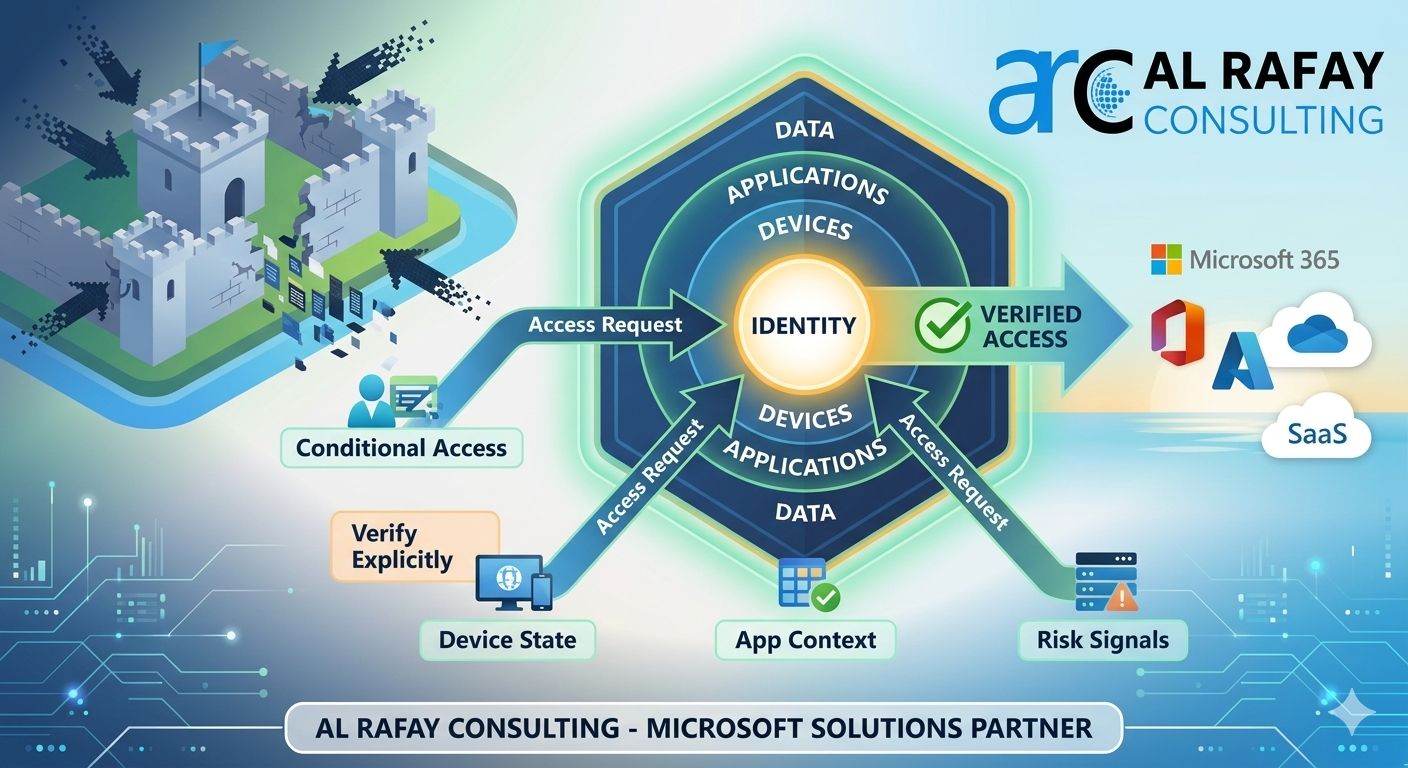
Microsoft’s Zero Trust architecture is identity-driven. Identity becomes the new security perimeter, replacing legacy network boundaries. Instead of trusting users based on location or VPN access, Microsoft evaluates every request in real time using signals from across the environment.
Core Pillars of Microsoft Zero Trust
- Identity & Access Management — Microsoft Entra ID
- Endpoint Security — Microsoft Intune, Microsoft Defender
- Application Access — App-level policies and session controls
- Data Security & Governance — Microsoft Purview
- Network & Infrastructure Security — Azure networking controls
- Visibility, Analytics, and Automation — Microsoft Sentinel, Defender XDR
This layered approach allows organizations to protect users, data, and systems wherever they are accessed.
Identity First: The Foundation of Zero Trust
Most security breaches begin with compromised identities — not malware. This makes identity security the most critical starting point for Zero Trust implementation.
Microsoft Entra ID enables identity-centric Zero Trust through:
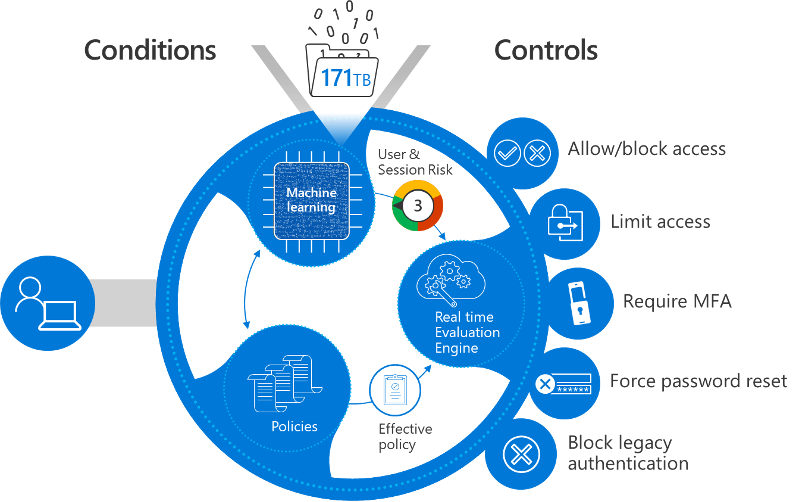
- Conditional Access — Microsoft’s Zero Trust policy engine
- Risk-based authentication powered by real-time signals
- Strong MFA and passwordless authentication
- Privileged Access Management (PAM)
- Identity governance and lifecycle controls
Conditional Access in Practice
Conditional Access policies evaluate who is requesting access, from which device, from which location, to which application, and with what level of risk. Based on these signals, access can be allowed, blocked, or allowed with restrictions such as read-only access.
This ensures authentication security and access control without creating friction for legitimate users.
Zero Trust Controls Mapped to Microsoft Capabilities
| Zero Trust Objective | Microsoft Capability | Outcome |
|---|---|---|
| Prevent credential misuse | Conditional Access + MFA | Strong authentication security |
| Reduce admin risk | Privileged Identity Management (PIM) | Just-in-time privileged access |
| Protect sensitive data | Microsoft Purview (DLP & labels) | Data loss prevention |
| Secure unmanaged devices | Intune + session controls | Controlled access without blocking work |
How to Implement Zero Trust with Microsoft: A Practical Roadmap
Implementing Zero Trust is a journey, not a one-time project. ARC recommends a phased, identity-first approach aligned with Microsoft adoption guidance.
| Phase | Focus | Outcome |
|---|---|---|
| Phase 1: Assess and Define Risk | Identify identities, apps, and data | Clear baseline and risk priorities |
| Phase 2: Secure Identities and Access | MFA, Conditional Access, PAM | Reduced identity-based attack surface |
| Phase 3: Secure Devices and Applications | Intune compliance, app session controls | Protected access from any device |
| Phase 4: Protect Data with Purview | Classification, DLP, encryption | Controlled data wherever it lives |
Phase 1: Assess and Define Risk
Identify critical identities, applications, and data. Review existing access models and privilege assignments. Establish Zero Trust success metrics before implementing any controls.
Phase 2: Secure Identities and Access
- Enforce MFA for all users
- Block legacy authentication protocols
- Apply Conditional Access based on risk signals
- Introduce Privileged Identity Management (PIM) for admin roles
- Establish identity governance workflows and access reviews
Phase 3: Secure Devices and Applications
Require compliant devices for sensitive workloads via Microsoft Intune. Apply app-level session controls. Protect access to Microsoft 365, SharePoint, Teams, and Azure applications through in-session policies that limit data transfer based on device compliance state.
Phase 4: Protect Data with Microsoft Purview
Microsoft Purview enables data classification and sensitivity labelling, encryption and rights management, data loss prevention across email, Teams, SharePoint, and OneDrive, and insider risk detection — all integrated directly with the Zero Trust enforcement layer.
Business Value of Zero Trust with Microsoft
Zero Trust is not just a security initiative — it is a strategic business enabler that helps organizations operate confidently in an increasingly digital, cloud-first world.
- Reduced breach impact through least privilege access: Zero Trust minimizes the “blast radius” of security incidents by ensuring users and administrators have only the access they need, only when they need it.
- Lower compliance risk with built-in auditing and governance: Microsoft’s Zero Trust model integrates deeply with logging, access reviews, and policy enforcement to help meet regulatory requirements continuously.
- Improved productivity through risk-based controls: Trusted users on compliant devices experience seamless access, while higher-risk scenarios trigger additional verification — balancing security with employee experience.
- Stronger customer and stakeholder trust: Implementing Zero Trust demonstrates a proactive commitment to protecting sensitive data, strengthening brand reputation.
- Scalable security for cloud, AI, and hybrid work: Zero Trust secures identities, devices, and data consistently — creating a foundation that scales with innovation rather than holding it back.
Organizations that implement Zero Trust early are far better positioned to adopt advanced technologies such as Microsoft Copilot, AI agents, and automation platforms safely — without increasing exposure to data leakage or identity-based attacks.
Common Mistakes Organizations Make
Despite good intentions, many Zero Trust initiatives fail to deliver expected results due to strategic and operational missteps.
- Treating Zero Trust as a tool deployment instead of a strategy: Zero Trust requires a mindset shift, policy alignment, and cross-functional ownership. Deploying tools without redefining access models leads to fragmented implementations.
- Skipping identity governance and privileged access management: Many organizations focus on MFA and Conditional Access but overlook identity lifecycle management and privileged roles. Without proper governance, access accumulates over time, increasing insider risk.
- Over-restricting users and hurting adoption: Excessively strict controls applied without context can frustrate users and lead to shadow IT. Successful Zero Trust implementations use adaptive, risk-based controls rather than blanket restrictions.
- Ignoring change management and user education: Security changes directly affect how people work. Without training, communication, and clear rationale, even well-designed policies face resistance.
Frequently Asked Questions
What is Zero Trust security and how is it different from traditional perimeter security?
Traditional perimeter security assumes that everything inside the corporate network is safe. Zero Trust operates on the opposite assumption — no user, device, or application is trusted by default, regardless of location. Every access request is verified using multiple signals including identity, device health, location, and real-time risk. This approach is designed for modern cloud and hybrid environments where the network perimeter no longer exists.
How does Microsoft Entra ID enable Zero Trust?
Microsoft Entra ID is the identity foundation of Microsoft’s Zero Trust architecture. It provides Conditional Access policies that evaluate signals such as user risk, device compliance, location, and application sensitivity before granting access. Combined with MFA, passwordless authentication, Privileged Identity Management (PIM), and identity governance, Entra ID enforces the “verify explicitly” and “use least privilege” principles across every access request.
How long does it take to implement Zero Trust with Microsoft?
Zero Trust implementation is a phased journey rather than a single project. Most organizations can achieve meaningful risk reduction within 60 to 90 days by starting with identity and access controls — MFA enforcement, Conditional Access policies, and blocking legacy authentication. Full implementation across identities, devices, applications, and data typically spans 6 to 18 months depending on organizational complexity and existing security maturity.
Does Zero Trust disrupt employee productivity?
When implemented correctly, Zero Trust improves the experience for legitimate users while tightening controls against risky access. Conditional Access evaluates real-time signals — a trusted user on a compliant device in a familiar location experiences seamless access, while unusual or high-risk scenarios trigger additional verification. The key is adaptive, risk-based controls rather than blanket restrictions. ARC focuses on balancing security with usability to ensure adoption succeeds alongside the technical rollout.
Conclusion
Zero Trust is no longer a future security concept — it is a business necessity for organizations operating in cloud-first, AI-enabled environments. As identity-based attacks, insider risks, and data exposure continue to grow, enterprises must move beyond perimeter security and adopt an identity-first Zero Trust strategy with Microsoft.
By starting with strong identity and access management, enforcing least privilege access, and protecting data wherever it lives, organizations can significantly reduce cyber risk while maintaining productivity and agility. Microsoft’s integrated security stack provides the foundation — but realizing its full value requires the right strategy, configuration, and adoption approach.
If your organization is ready to implement Zero Trust the right way, ARC can help with readiness assessment, phased implementation, governance alignment, and secure AI adoption preparation.
Frequently Asked Questions
What is Zero Trust security?
Zero Trust is a security framework that assumes no user or device should be trusted by default — requiring continuous verification of identity, device health, and access permissions for every request.
How does Microsoft implement Zero Trust?
Microsoft Zero Trust uses Entra ID for identity, Intune for device compliance, Defender for threat protection, Purview for data protection, and Conditional Access for policy enforcement.
What compliance certifications does Microsoft support?
Microsoft cloud services hold SOC 1/2/3, ISO 27001/27018, HIPAA, FedRAMP, GDPR, PCI DSS, and 90+ other compliance certifications across industries and regions.
How do you assess security posture?
We evaluate Microsoft Secure Score, conduct gap analyses against frameworks like NIST and CIS, review configurations, test access controls, and provide prioritized remediation recommendations.
Can you help with regulatory compliance?
Yes. We implement Microsoft Purview compliance solutions including data classification, retention policies, eDiscovery, audit logging, and information barriers for regulated industries.

Al Rafay Consulting
ARC Team
AI-powered Microsoft Solutions Partner delivering enterprise solutions on Azure, SharePoint, and Microsoft 365.
LinkedIn Profile