Intune + Entra ID: Conditional Access Done Right
Intune + Entra ID is to build Azure Conditional Access policies with Microsoft Intune and Entra ID to enforce Zero Trust, improve identity security, and control cloud app access with confidence.
Learn how to build Azure Conditional Access policies with Microsoft Intune and Entra ID to enforce Zero Trust, improve identity security, and control cloud app access with confidence.
Al Rafay Consulting
· Updated June 21, 2026 · ARC Team

Identity is now the primary security perimeter. Users access cloud services from multiple networks, devices, and geographies, often outside traditional corporate boundaries. In this model, trust based only on passwords or location is no longer enough.
Organizations looking to strengthen this area can work with Intune consulting.
Azure Conditional Access solves this by evaluating each sign-in using identity, device, and context signals. When combined with Microsoft Intune, organizations can enforce access policies based on both user trust and endpoint posture.
What Is Azure Conditional Access?
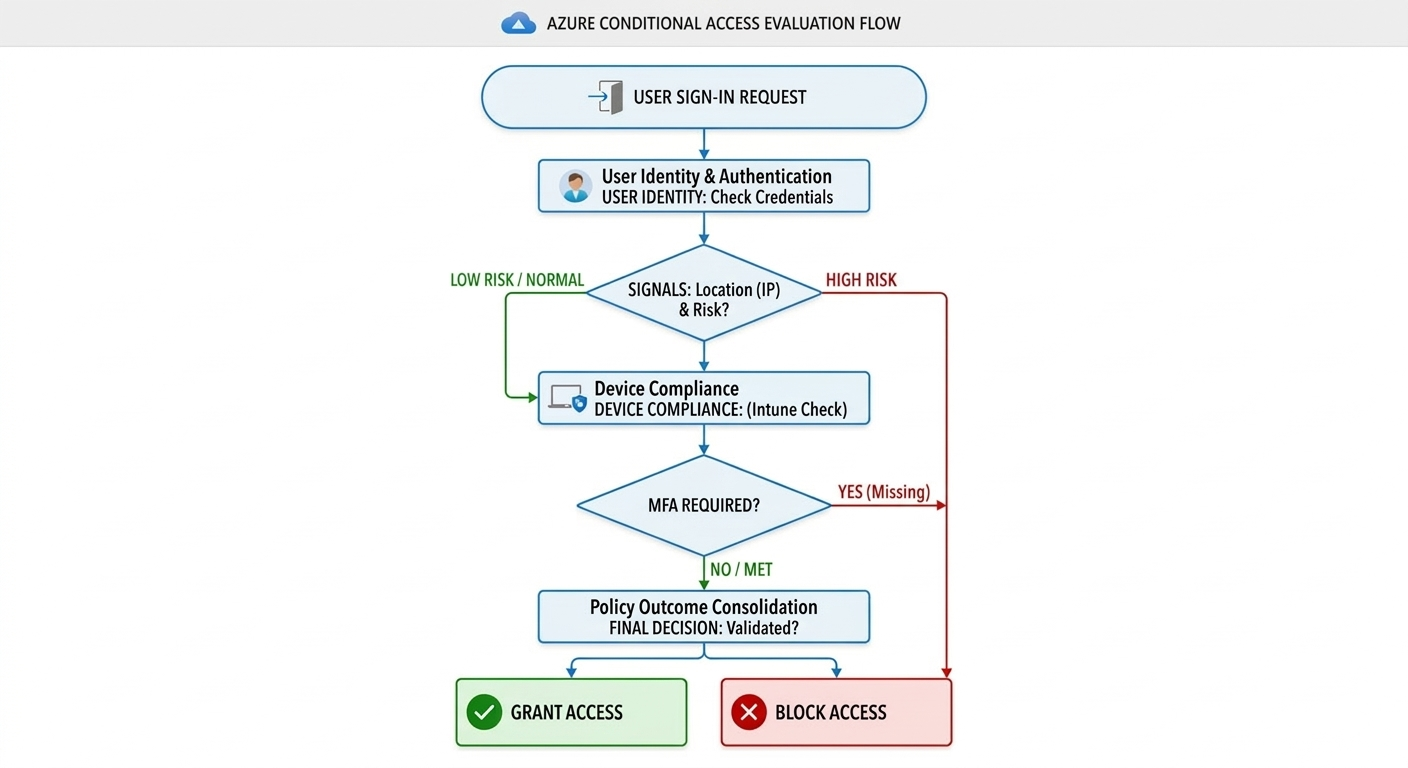
Azure Conditional Access is a policy engine in Microsoft Entra ID that makes access decisions in real time. Depending on policy logic, it can:
- Allow access
- Require MFA
- Require compliant device state
- Require app protection policy
- Restrict session behavior
- Block access entirely
This approach helps prevent risky sign-ins, unmanaged device access, and policy bypass patterns in Microsoft 365 and connected cloud apps.
Why Conditional Access Matters for Zero Trust
Zero Trust assumes breach and enforces continuous verification. Conditional Access operationalizes this by evaluating:
- User identity and group membership
- Sign-in risk and context (location, device, app)
- Device compliance state
- Authentication strength (MFA/passwordless)
When enforced correctly, Conditional Access becomes the practical decision layer between identity and resource access.
How Intune + Entra ID Work Together
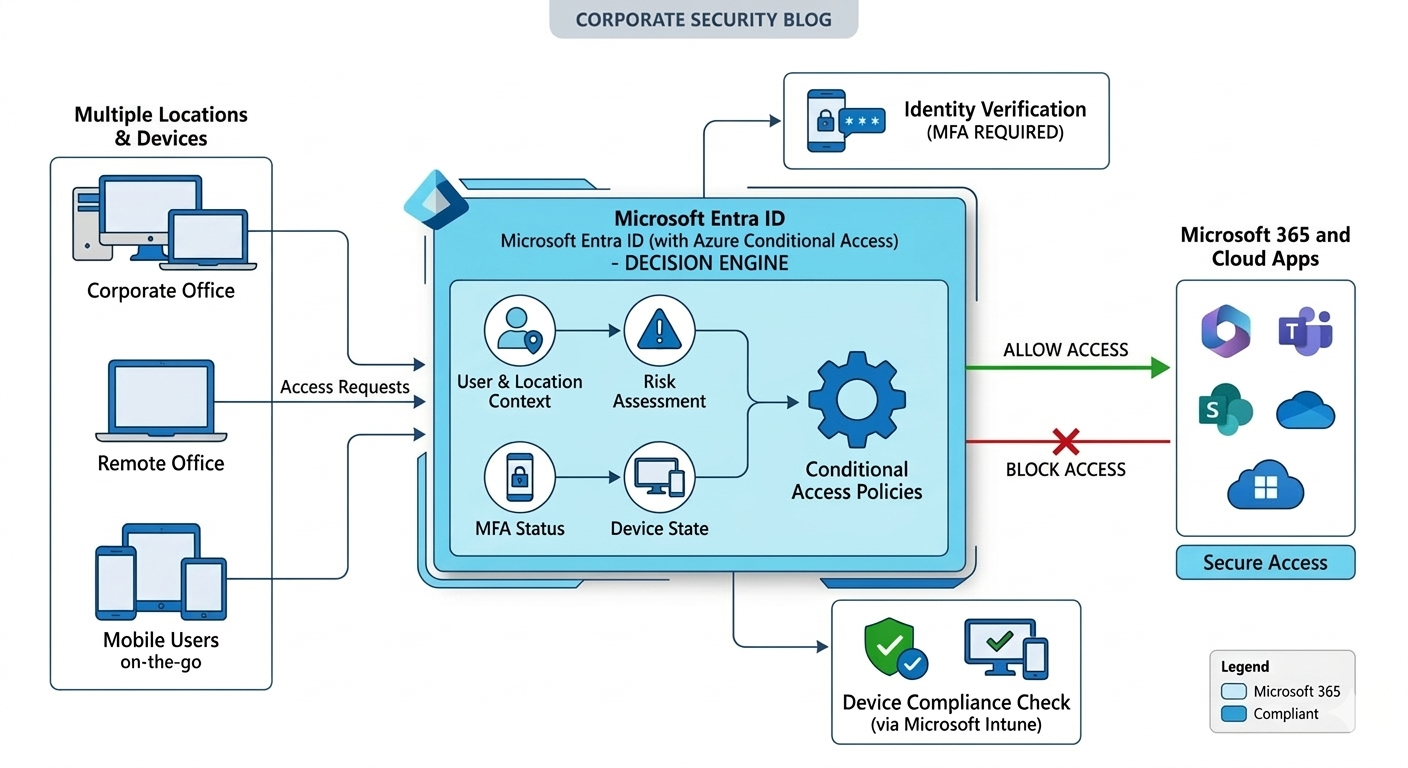
Conditional Access is strongest when identity and endpoint trust are combined:
- Entra ID evaluates user risk, context, and authentication status
- Intune validates device compliance and security posture
- Policy engine grants access only when both identity and device conditions pass
This model reduces false trust assumptions and closes common credential-only attack paths.
Core Components of a Conditional Access Policy Framework
| Component | What It Controls |
|---|---|
| Users / Groups | Which identities are in scope |
| Cloud Apps | Which resources are protected |
| Conditions | Location, device platform, client app, risk |
| Grant Controls | MFA, compliant device, app protection, block |
| Session Controls | Browser/session restrictions and token behavior |
| Report-Only Mode | Impact simulation before enforcement |
A structured framework prevents policy sprawl, overlap, and accidental lockouts.
Step-by-Step: Build Conditional Access the Right Way
| Step | Focus | Outcome |
|---|---|---|
| Step 1: Prepare IAM Baseline | Identify critical groups, apps, break-glass accounts | Safer policy rollout foundation |
| Step 2: Deploy Baseline Policies | Admin MFA, block legacy auth, high-risk sign-ins | Immediate risk reduction |
| Step 3: Add Intune Compliance Gates | Require compliant devices for sensitive apps | Endpoint-aware access control |
| Step 4: Validate in Report-Only | Analyze sign-in impact and policy conflicts | Lower disruption before enforcement |
| Step 5: Enforce and Govern | Turn policies on, monitor logs, tune exceptions | Sustainable long-term control |
Step 1: Build a Clean Identity Foundation
Start by classifying high-risk identities and high-value apps. Create emergency access accounts and exclude them from strict policies while monitoring them closely.
Step 2: Implement High-Value Baseline Controls
Deploy low-friction, high-impact controls first:
- Require MFA for admin roles
- Block legacy authentication protocols
- Restrict risky sign-ins
Step 3: Connect Device Trust with Intune
Define device compliance requirements (encryption, OS level, password controls, risk checks) and enforce access only from compliant endpoints.
Step 4: Use Report-Only Before Enforcement
Review sign-in logs and failure trends to identify gaps in enrollment, app compatibility, and user flows before turning policies fully on.
Step 5: Operationalize Governance
Assign policy ownership, establish review cadence, and maintain exception workflows to avoid uncontrolled growth in policy complexity.
Common Conditional Access Policy Scenarios
- Admin access: Require MFA + compliant device
- Microsoft 365 user access: Require MFA for risk-based sign-ins
- BYOD mobile access: Require app protection policy
- High-risk regions: Block or require stronger controls
- Sensitive apps: Require both compliant device and MFA
These scenario templates balance protection strength with business usability.
Business Value for Leadership
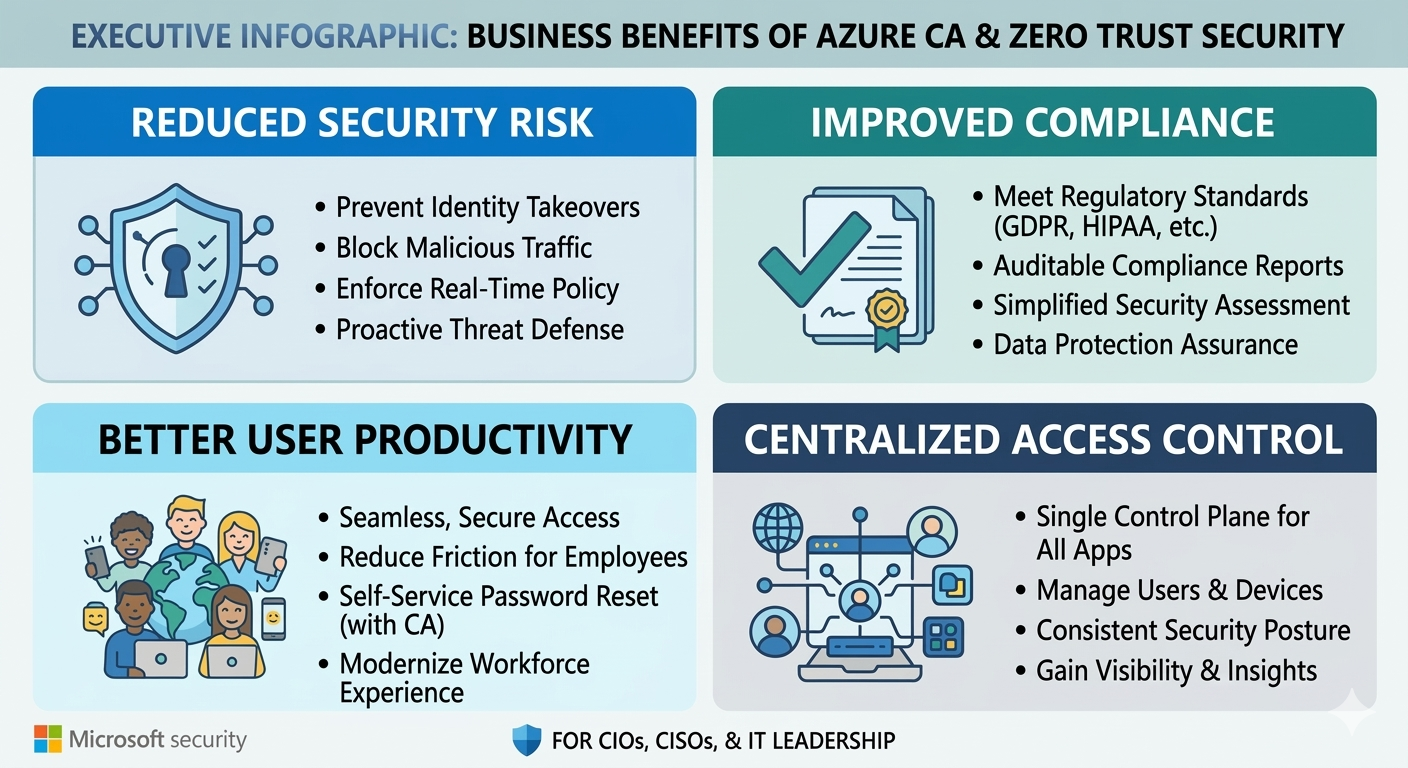
- Reduced security risk from identity takeovers and unmanaged access
- Improved compliance posture with policy-based, auditable enforcement
- Better user productivity through adaptive controls instead of blanket friction
- Centralized access governance across users, devices, and applications
- Lower incident impact with conditional, context-driven access decisions
Governance Best Practices
- Start in report-only mode before enforcement
- Protect privileged roles first
- Keep naming conventions and ownership clear
- Review policy overlap quarterly
- Maintain tested break-glass accounts
- Monitor sign-in and failure telemetry continuously
Frequently Asked Questions
What is Azure Conditional Access?
Azure Conditional Access is a policy engine in Entra ID that grants, restricts, or blocks access based on identity, device state, app, and risk context.
Why should Conditional Access be paired with Intune?
Intune adds device compliance signals, ensuring access decisions are based on both who the user is and whether the endpoint meets your security requirements.
What is the safest rollout method?
Deploy policies in report-only mode, validate log outcomes, then enforce in phases using pilot groups before broad rollout.
How does this support Zero Trust architecture?
Conditional Access applies continuous verification with adaptive controls, enforcing least-privilege and risk-aware decisions instead of static trust assumptions.
Conclusion
Conditional Access done right is not just a security setting, it is a business control plane for identity and endpoint trust. With Intune + Entra ID integration, organizations can enforce Zero Trust principles in a way that protects data, supports productivity, and scales with governance.
If your organization is exploring Conditional Access modernization, ARC can help with strategy, implementation, governance, and optimization.
Work with Al Rafay Consulting: explore our identity management services to put this into practice, or book a free assessment.
Frequently Asked Questions
What is Microsoft Intune?
Microsoft Intune is a cloud-based endpoint management service that manages mobile devices, desktop computers, and applications — enforcing security policies and enabling secure access to corporate resources.
What devices can Intune manage?
Intune manages Windows, macOS, iOS, iPadOS, Android, and Linux devices. It supports both corporate-owned devices and BYOD (Bring Your Own Device) scenarios with appropriate policy controls.
How does Intune support Zero Trust security?
Intune is a core component of Zero Trust architecture — verifying device health and compliance before granting access to corporate resources through conditional access policies.
Can Intune replace SCCM (Configuration Manager)?
For cloud-first organizations, yes. Many organizations use co-management during transition, running both Intune and SCCM while gradually shifting workloads to cloud-native management.
How quickly can Intune be deployed?
Basic Intune setup takes 2-4 weeks. Full enterprise deployment with conditional access, compliance policies, app protection, and device enrollment typically takes 6-12 weeks.

Al Rafay Consulting
ARC Team
AI-powered Microsoft Solutions Partner delivering enterprise solutions on Azure, SharePoint, and Microsoft 365.
LinkedIn Profile