Power Apps for Property Management: Complete Guide (2026) | ARC
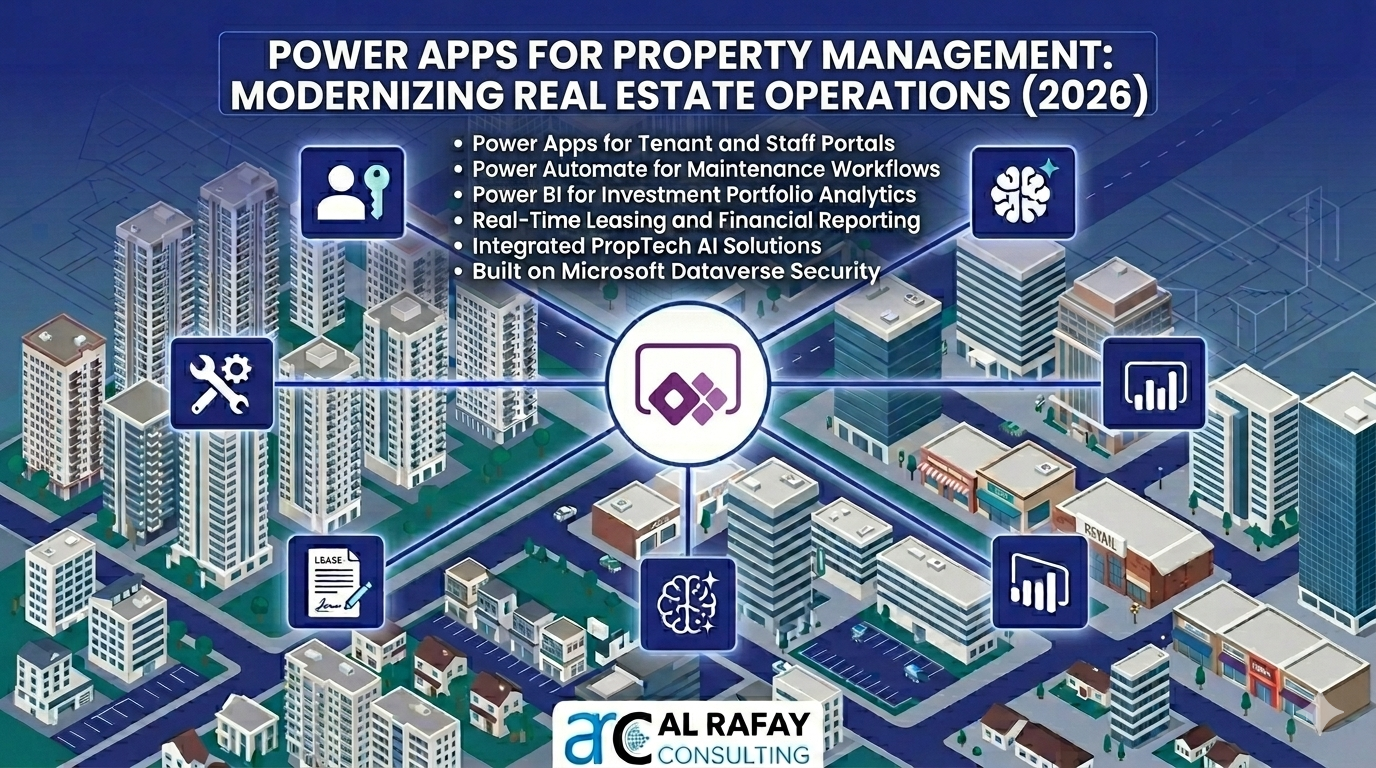
Power Apps for property management is Microsoft's low-code platform approach to building custom real estate operations software — tenant portals, maintenance systems, lease automation, and owner dashboards — natively integrated with Microsoft 365, Dataverse, and AI Copilot, without traditional software development.
Discover how Microsoft Power Apps transforms property management in 2026. Tenant portals, maintenance workflows, rent tracking, AI Copilot, owner dashboards & ROI vs off-the-shelf — complete low-code real estate guide.
Al Rafay Consulting
· Updated June 11, 2026 · Microsoft Power Platform Specialists
Organizations looking to strengthen this area can work with commercial property management software.
Property management is one of the most operationally complex disciplines in commercial real estate. Leasing agents juggle tenant applications and lease renewals. Maintenance teams race between work orders. Finance teams chase rent payments and reconcile vendor invoices. And portfolio owners demand real-time dashboards that legacy spreadsheets and disconnected point solutions simply cannot deliver.
Microsoft Power Apps — the low-code development platform within Microsoft Power Platform — gives property management organizations a single, integrated toolkit to build custom applications that automate manual workflows, unify scattered data, and surface actionable insights. Organizations that have made the switch are reporting 70% reductions in manual processes and annual efficiency savings exceeding $250,000. This guide covers everything you need to modernize real estate operations with Power Apps in 2026: use cases, architecture, AI and Copilot features, build-vs-buy analysis, governance, and a practical implementation roadmap.
1. The Property Management Challenge: Why Legacy Tools Are Failing
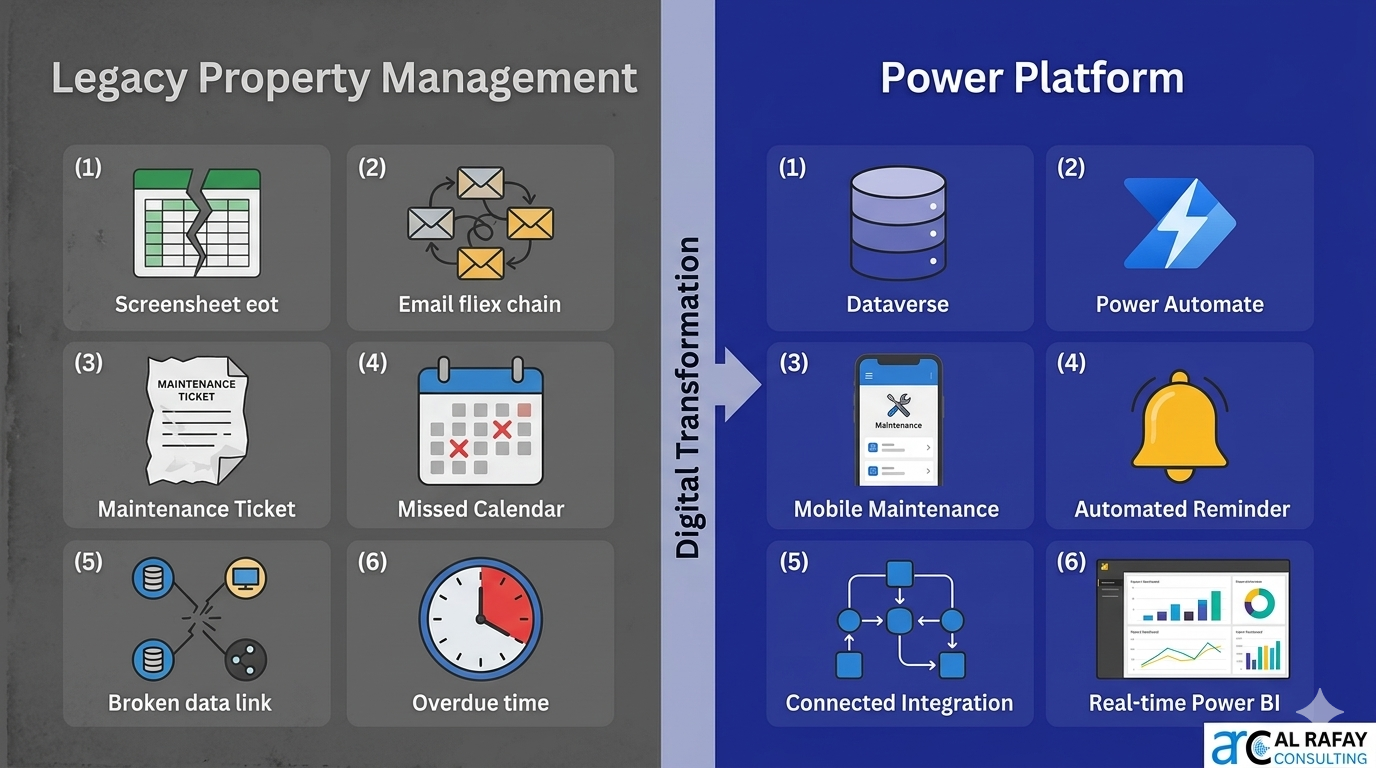
The property management industry is under mounting pressure to digitize. But most firms are stuck between two inadequate options: fragmented spreadsheets that cannot scale, or expensive off-the-shelf systems that are too rigid to fit their unique workflows. The pain is real and measurable:
| Challenge | Business Impact | Power Platform Solution |
|---|---|---|
| Disconnected systems (CRM, spreadsheets, email, accounting) | No single source of truth; data duplication; error-prone reconciliation | Dataverse unified data model connecting all property entities |
| Manual, paper-based workflows | Slow lease processing, lost maintenance tickets, missed renewals | Power Automate flows automating triggers, approvals, and notifications |
| No real-time owner or investor reporting | Delayed decisions; limited portfolio visibility | Power BI dashboards embedded in Power Apps / Power Pages owner portals |
| Field teams disconnected from office systems | Maintenance techs use phone calls and paper; errors and delays | Canvas apps with offline support for inspections and work orders |
| Tenant experience expectations rising | High churn; competitive disadvantage | Power Pages self-service portals: applications, payments, maintenance requests |
| Scaling across multiple portfolios or entities | Governance sprawl; inconsistent data quality | ALM-governed, role-based multi-environment Power Platform architecture |
2. Why Power Apps and Power Platform Are Purpose-Built for Property Management
Unlike generic productivity tools or rigid industry software, the Microsoft Power Platform was designed to address precisely the challenges property management teams face. Seven capabilities make it uniquely well-suited:
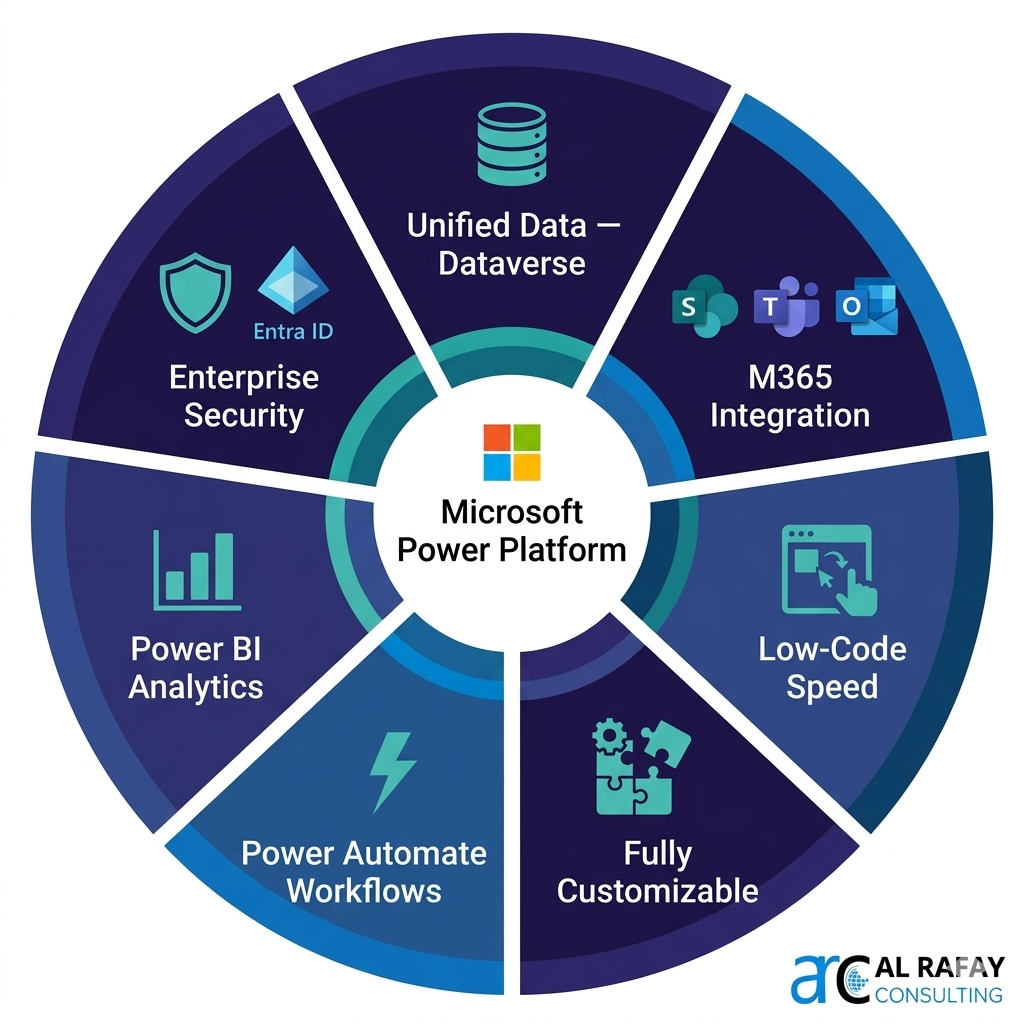
Single Source of Truth — Unified Data Backbone
Power Apps leverages Microsoft Dataverse — the Power Platform’s cloud-native relational data service — to unify all property data in one place: tenants, leases, units, maintenance tickets, payments, vendor records, and inspection results. Every application, workflow, and report draws from the same authoritative dataset, eliminating the reconciliation overhead of fragmented systems.
Deep Integration with Microsoft 365 & Dynamics 365
Power Apps is not an island — it integrates natively with the tools property teams already use: SharePoint for document management, Outlook for communications, Teams for collaboration and approvals, and Dynamics 365 for financial management. This means no duplicate data entry and no swivel-chair between disconnected systems.
Low-Code Development Speed
Power Apps’ drag-and-drop designer and 900+ pre-built connectors allow property management teams to prototype and deploy working applications in days rather than months. Business analysts and tech-savvy property managers can build their own tools, reducing dependency on IT for routine workflow automation.
Fully Customizable & Scalable
Unlike off-the-shelf property management software that forces your processes to fit its design, Power Apps solutions are built around your exact workflows — whether residential, commercial, mixed-use, or industrial portfolios. As your portfolio grows, the platform scales with you without license-per-unit pricing surprises.
Automation & Efficiency with Power Automate
Power Automate — the workflow automation layer of Power Platform — connects directly to Power Apps to automate the routine, repetitive processes that consume property management time: lease renewal reminders, maintenance ticket routing, vendor payment approvals, compliance document expiry alerts, and investor report distribution.
Analytics & Insight with Power BI
Power BI integrates seamlessly with Dataverse and SharePoint to deliver real-time interactive dashboards for occupancy rates, rental income, maintenance KPIs, tenant satisfaction scores, and capital expenditure tracking. Decision-makers go from waiting weeks for reports to having live portfolio intelligence at their fingertips.
Enterprise Security & Role-Based Access
Power Platform is secured by Microsoft Entra ID (Azure AD), providing role-based access control so each user — leasing agent, maintenance technician, property manager, owner — sees only the data and functions relevant to their role. Multi-factor authentication, Conditional Access policies, and DLP governance are all inherited from the Microsoft 365 security stack.
3. Key Property Management Scenarios & Power Platform Solutions
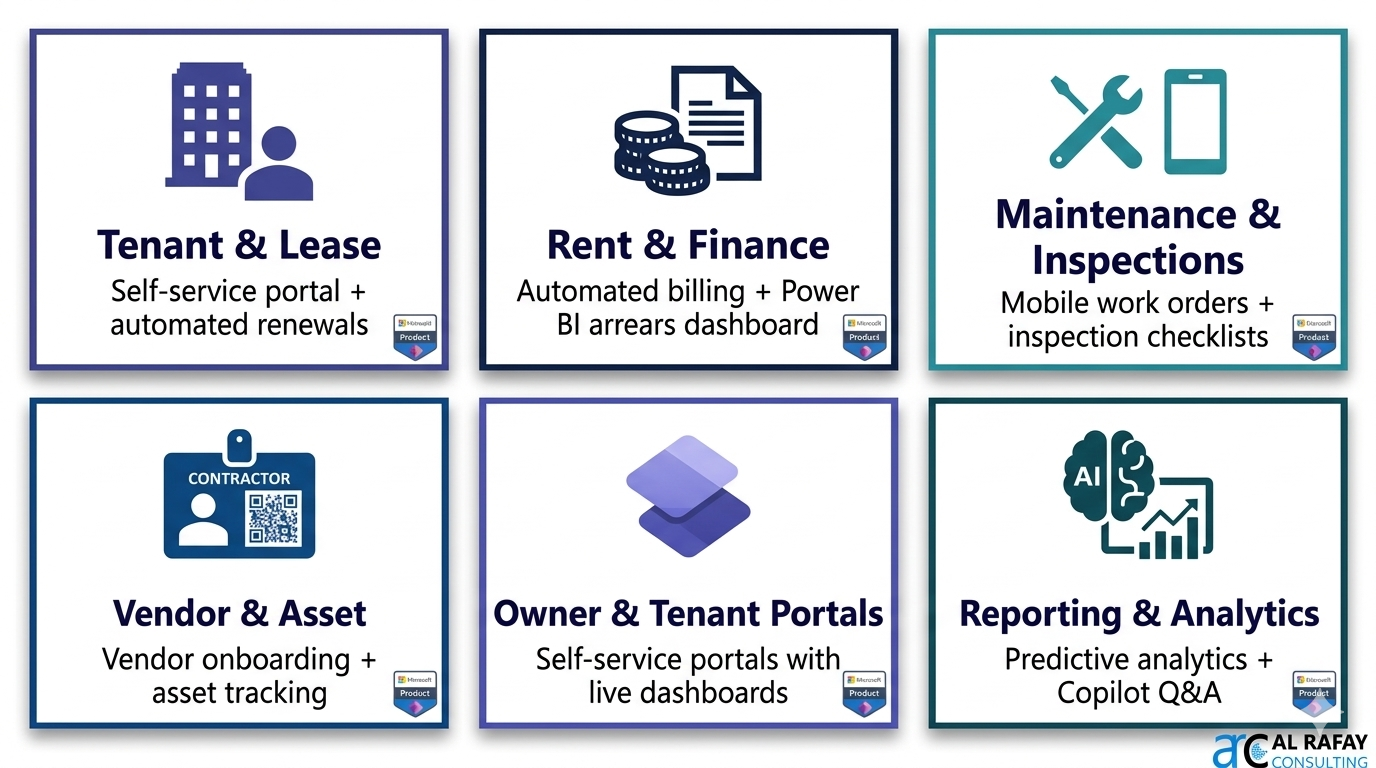
Power Platform addresses every major operational domain in property management. Here are the six core scenarios with implementation details and real-world outcomes:
Scenario 1: Tenant & Lease Management App
What it does: A Tenant & Lease Management app stores all tenant profiles, lease terms, rent schedules, renewal dates, and associated documents in Dataverse. Power Automate sends automated renewal alerts 90, 60, and 30 days before lease expiry — escalating to the leasing manager if no action is taken.
Key features: Tenant application intake form → automated screening workflow → digital lease generation → e-signature routing (DocuSign/Adobe Sign) → Dataverse record creation.
Self-service portal: Power Pages tenant portal allows prospects to apply online, existing tenants to view lease terms, request renewals, and download documents — in multiple languages.
Real-world outcome: A property firm launched a multilingual tenant portal with Power Apps/Power Pages; application processing time dropped 40% and paper-based intake was eliminated entirely.
Scenario 2: Rent, Payments & Financial Tracking
What it does: A Rent Management app logs rental charges, tracks payment status, and sends automated reminders to tenants on payment due dates. Integrates with Dynamics 365 Finance or external accounting systems for full financial reconciliation.
Key features: Rent schedule generation from lease data → automated payment reminder flows → overdue escalation → payment receipt confirmation → integration with accounting GL codes.
Analytics: Power BI dashboards surface real-time rent collection rates, arrears by property or unit, and month-over-month variance for finance managers and owners.
Real-world outcome: A property firm replaced manual Excel rent sheets with a Power Apps solution; automated reminders reduced late payments by 35% in the first quarter.
Scenario 3: Maintenance Requests & Property Inspections
What it does: A Maintenance Request app allows tenants and staff to log issues (HVAC, plumbing, electrical) via a mobile canvas app or Power Pages portal. Work orders are automatically assigned to the right technician based on skill and location, with real-time status tracking.
Key features: Issue submission with photo capture → automatic categorization and priority scoring → technician assignment via Power Automate → scheduling integration → completion sign-off → tenant notification.
Inspection app: Mobile canvas app guides inspectors through move-in/move-out checklists; photos are tagged to specific rooms and automatically linked to the property record in Dataverse.
Real-world outcome: A facilities management team replaced a manual spreadsheet-based scheduling system with Power Apps + Power Automate; maintenance resolution time dropped by 40%.
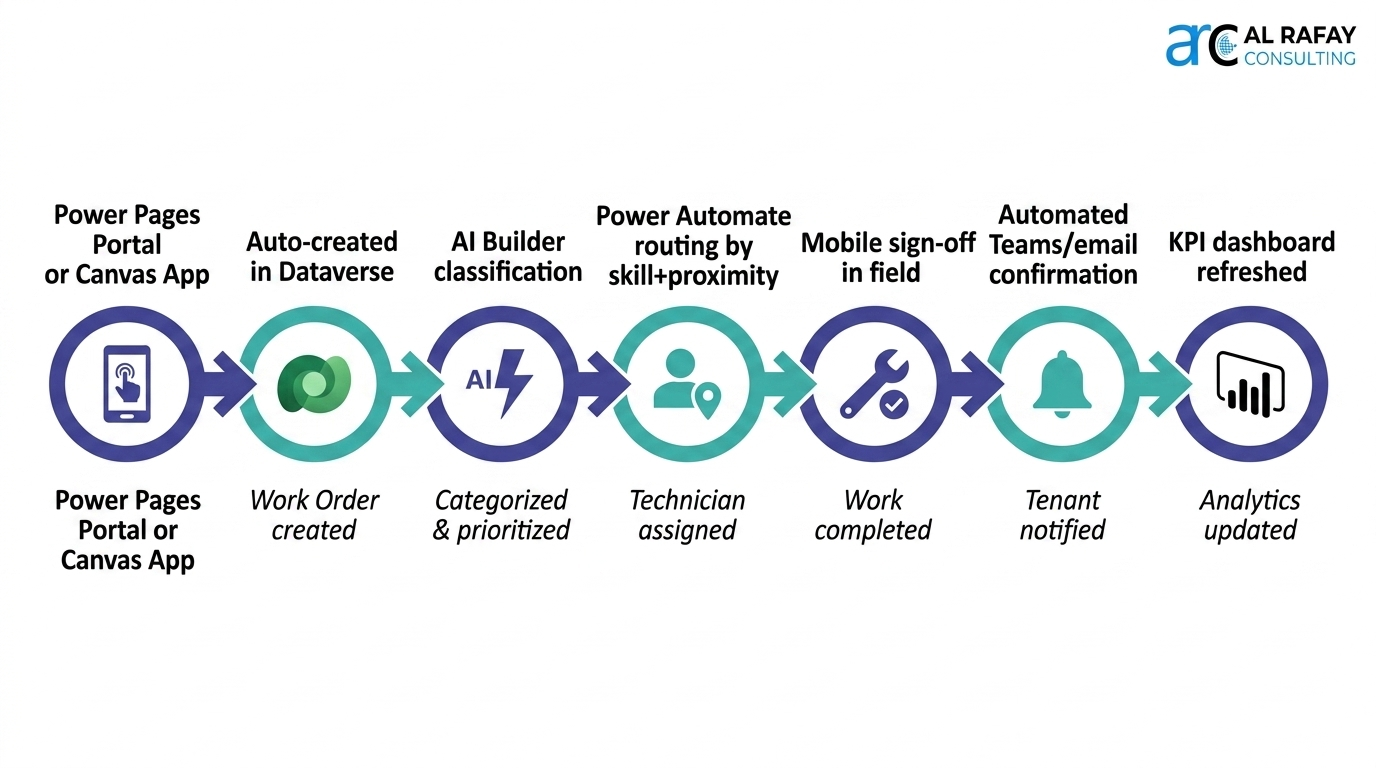
Scenario 4: Vendor Management & Asset Tracking
What it does: A Vendor & Asset Management app maintains approved vendor lists, tracks vendor contracts and insurance certificate expiry dates, manages purchase orders and invoice approvals, and tracks physical assets (equipment, appliances, access systems) across the portfolio.
Key features: Vendor onboarding portal (Power Pages) → contract expiry alert flows → PO approval workflow (Power Automate) → invoice tracking → lien waiver management for construction projects.
Asset tracking: QR code scanning in a canvas app allows maintenance techs to update asset records in the field. IoT integration via Azure Event Hubs can feed real-time equipment telemetry directly into Dataverse.
Real-world outcome: A real estate developer implemented a Development Invoice Manager using SharePoint + Power Automate; invoice processing time was cut by 60% and manual tracking errors were eliminated.
Scenario 5: Resident & Owner Portals (Power Pages)
What it does: Power Pages provides secure, branded web portals for two audiences: (1) Tenant portals — residents submit maintenance requests, view lease documents, make payments, and access building communications; (2) Owner portals — investors see live Power BI dashboards with occupancy, rent collection, maintenance KPIs, and property-level financial performance.
Key features: Role-based content (owners only see their portfolio; tenants only see their unit) → Power BI Embedded reports → document library access → mobile-responsive design → Entra ID authentication.
Real-world outcome: A property management company launched an Owner Insight Portal with Power Pages; owners shifted from monthly PDF reports to self-serve real-time dashboards — reducing investor relations call volume by 50%.
Scenario 6: Portfolio Reporting & Predictive Analytics
What it does: Power BI connected to Dataverse produces portfolio-wide dashboards covering: occupancy rates, rent roll analysis, maintenance cost trends, tenant satisfaction scores, CapEx tracking, and NOI by property. Predictive analytics — using AI Builder or Azure ML — can forecast tenant churn, predict equipment failure, and flag arrears risk.
Key features: Automated report distribution (Power Automate sends weekly PDF snapshots to owners via email) → natural language Q&A in Power BI for ad-hoc queries → embedded dashboards in Power Apps and Power Pages.
Real-world outcome: An organization combined IoT building sensors with Power Platform for predictive HVAC maintenance — reducing emergency repair costs by 30% by catching anomalies before failure.
4. Automation, AI & Copilot: The Next Frontier for Property Management
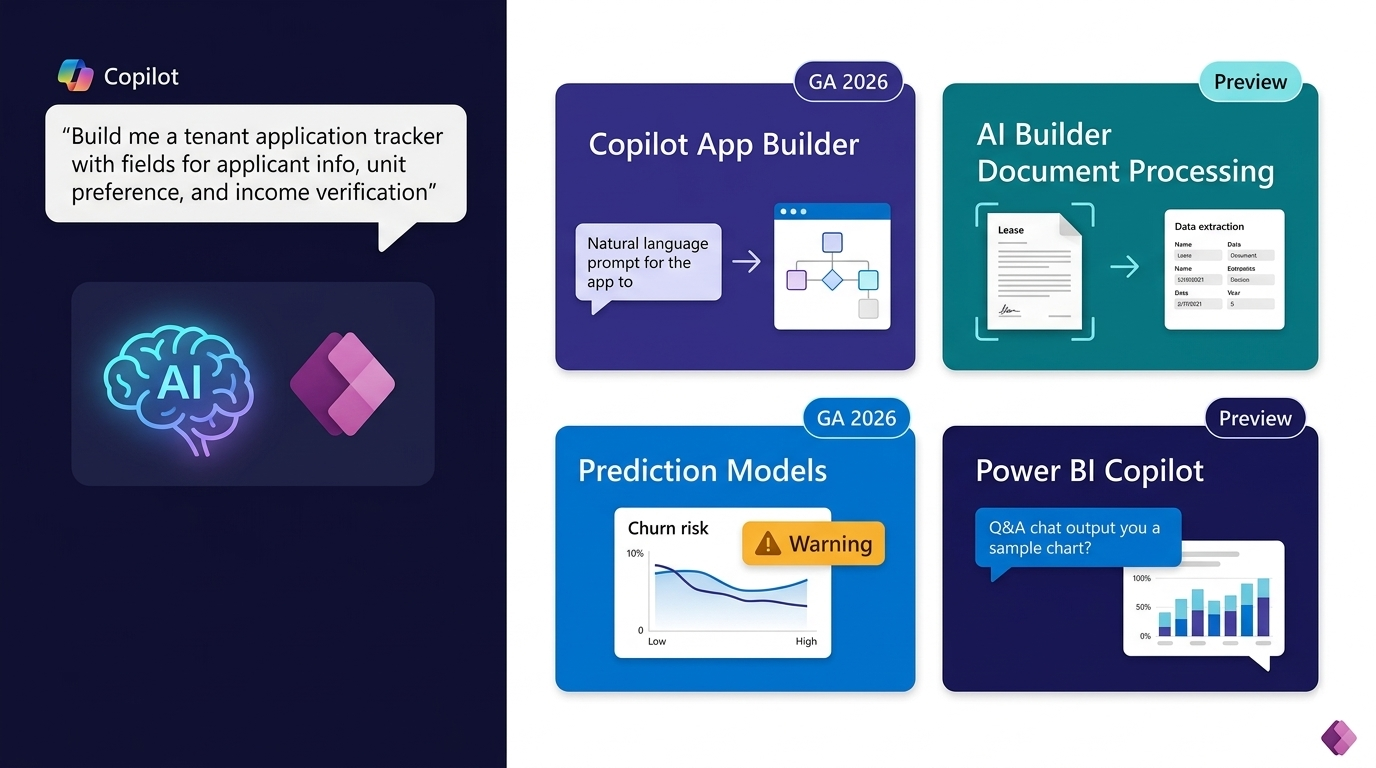
Microsoft’s 2025–2026 investment in AI across the Power Platform is fundamentally changing how property management apps are built and used. AI is no longer a future roadmap item — it is available today and delivering measurable value.
Power Automate Copilot
Property managers can now describe a workflow in plain English — “Send a lease renewal reminder 60 days before expiry; if not responded to in 14 days, escalate to the leasing manager and copy the property director” — and Copilot generates the complete Power Automate flow. This reduces flow-building time from hours to minutes and makes automation accessible to non-technical property staff.
Power Apps Copilot
Describe an app in natural language — “I need an app to track rental applications with fields for applicant info, desired unit, references, and income verification” — and Power Apps Copilot generates the data model, screens, and basic navigation. Developers refine and extend; citizen developers can run with the generated baseline. App development cycles that took weeks now take days.
AI Builder for Property Intelligence
Document processing — automatically extract data from leases, vendor invoices, or applicant ID documents, populating Dataverse records without manual data entry. Scanned lease agreements can self-populate tenant name, rent amount, start/end date, and unit details.
Prediction models — predict tenant churn risk (non-renewals) based on payment history, maintenance request frequency, and lease term patterns; forecast equipment failure from IoT sensor data; flag arrears risk early for proactive collection action.
Image processing — object detection in inspection photos automatically identifies compliance items (fire extinguisher presence, emergency exit signage) and flags missing or damaged assets without manual review.
Text sentiment analysis — analyze tenant feedback forms and online reviews to surface satisfaction trends and emerging issues before they escalate to complaints or churn.
Copilot in Power BI
Portfolio managers and owners can ask natural-language questions of their data — “Which properties had the highest maintenance cost per unit last quarter?” or “Show occupancy trends for the industrial portfolio since January” — and receive instant visual answers. This democratizes analytics across the organization, removing the bottleneck of waiting for scheduled reports.
5. Architecture, Security & Governance Considerations
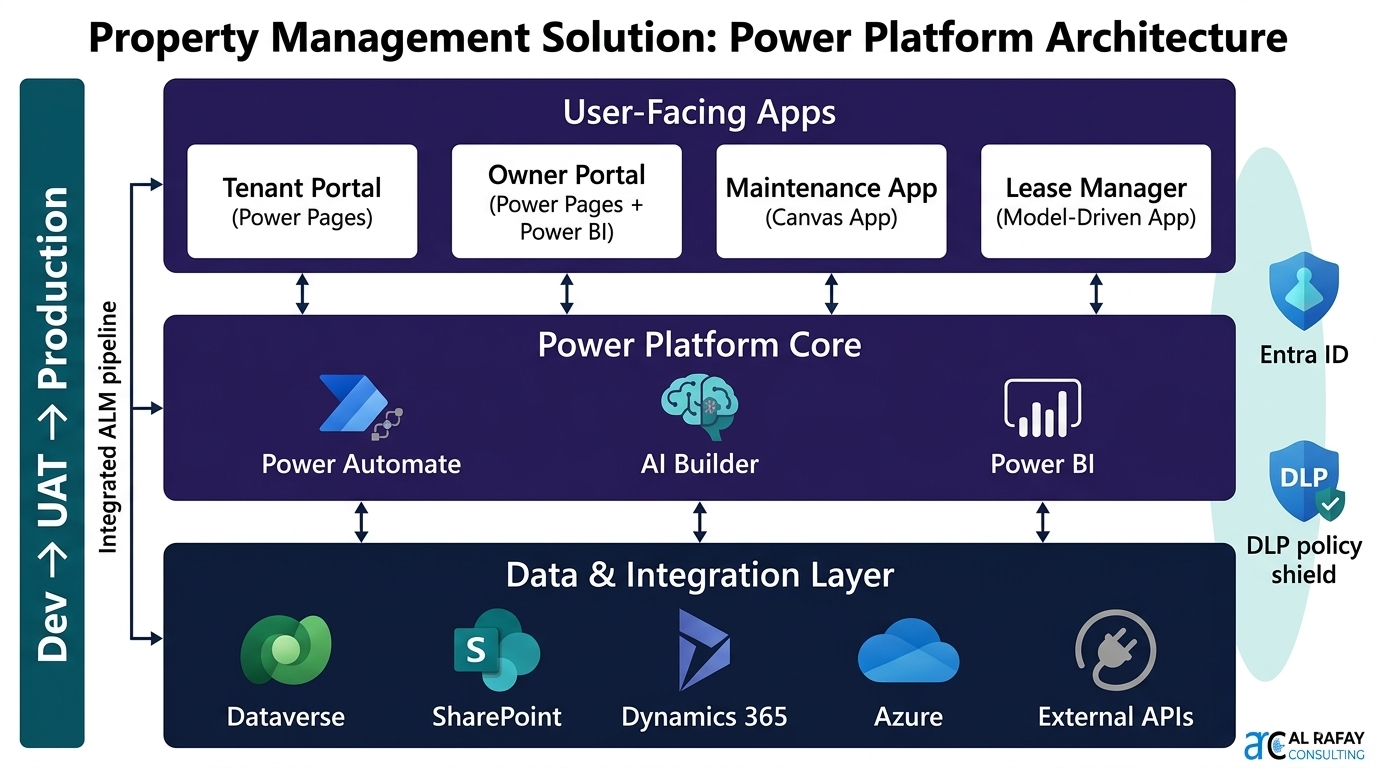
Building a property management platform on Power Platform is an enterprise undertaking. Getting the architecture right from the start prevents the technical debt and governance failures that plague poorly planned deployments.
Data Model Design
Design your Dataverse data model before building a single screen. Core entities for property management include: Properties, Units, Tenants, Leases, Work Orders, Invoices, Vendors, Inspections, Assets, and Payments. Define the relationships between entities carefully — a Unit belongs to a Property; a Lease connects a Tenant to a Unit; a Work Order is raised for a Unit and assigned to a Vendor. A well-designed Dataverse model becomes the durable backbone that all apps, flows, and reports build upon.
Environment Strategy
| Environment | Purpose | Access Policy |
|---|---|---|
| Development | Build and unit-test new apps and flows; no live tenant or financial data | Power Platform developers + IT architects only |
| UAT / Staging | Business user acceptance testing with anonymized representative data | IT team + selected property managers and leasing staff |
| Production | Live operations — all tenant, lease, maintenance, and financial data | All end users (role-based); makers cannot edit Production directly |
| Sandbox | Training, demos, and proof-of-concept for new scenarios | Training coordinators + new staff onboarding |
Security & Role-Based Access
Define Dataverse security roles for each user type: Leasing Agent (read/write own records), Property Manager (read/write all records for assigned properties), Maintenance Technician (work orders only), Finance Manager (financial records), Owner/Investor (read-only, own portfolio), Global Admin (full access).
Use column-level security in Dataverse to restrict sensitive financial fields (e.g., owner yield rates, cap rates) to Finance and Owner roles only. Implement Entra ID Conditional Access policies: field staff access via compliant mobile devices only; finance and admin roles require MFA. Apply Power Platform DLP policies to prevent data from regulated connectors (Dataverse with tenant PII) from flowing to unclassified external connectors.
Application Lifecycle Management (ALM)
- Package all apps and flows in Dataverse Solutions — never deploy unpackaged apps to Production.
- Use Power Platform Pipelines for gate-controlled Dev → UAT → Production promotion with mandatory IT review at each gate.
- Maintain solution history in Azure DevOps or GitHub — treat Power Platform solutions as enterprise software subject to version control.
- Deploy the Microsoft Power Platform Center of Excellence (CoE) Starter Kit from day one — it provides usage telemetry, app catalog, orphan app detection, and governance dashboards at no additional cost.
6. Power Apps vs. Off-the-Shelf Property Management Software
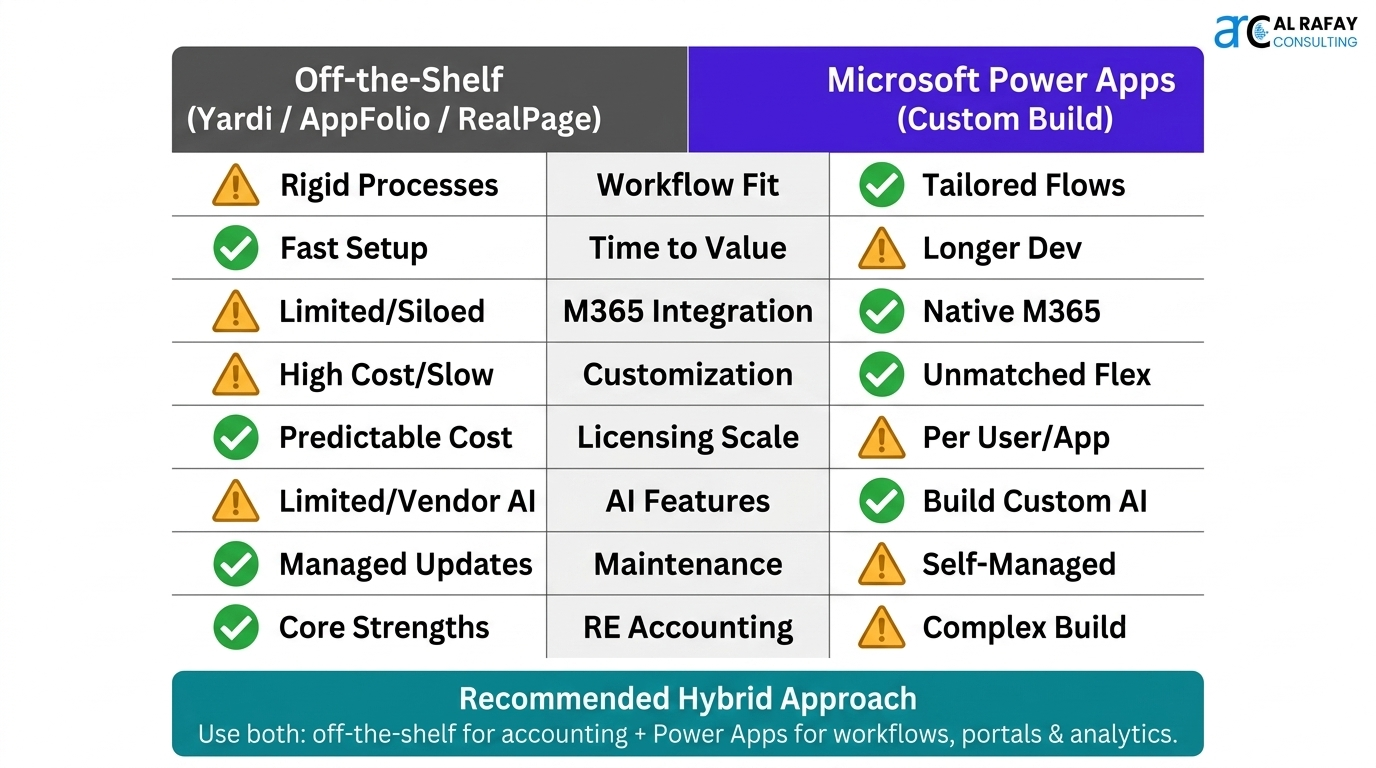
The build-versus-buy question is central to every property management technology decision. Here is an honest assessment of where Power Apps wins, where off-the-shelf solutions win, and what the real-world ROI picture looks like:
| Dimension | Power Apps (Custom Build) | Off-the-Shelf (Yardi, AppFolio, RealPage) |
|---|---|---|
| Fit to your workflows | Built exactly for your processes; no compromise | You adapt to the software’s processes |
| Time to first value | Weeks to months for initial deployment | Days to weeks for standard deployment |
| Integration with M365 | Native — SharePoint, Teams, Outlook, Power BI | Requires API integration; often limited or costly |
| Customization depth | Unlimited — any workflow, any data structure | Configuration-limited; custom dev is expensive |
| Scalability & licensing | Per-user or per-app; scales without per-unit fees | Often per-unit pricing; high cost for large portfolios |
| AI & Copilot features | Copilot, AI Builder, Power BI Copilot — all included | AI features vary; may require additional modules |
| Ongoing maintenance | Requires internal admin or partner support | Vendor maintains the software |
| Specialized RE features (e.g., CAM, stacking plans) | Must be built; mature real estate features not pre-built | Deep out-of-the-box real estate functionality |
7. Licensing & Cost Considerations
Power Platform licensing is one of the most common areas of confusion for property management organizations evaluating the platform. Here is a practical breakdown:
| License | What It Covers & When to Use It |
|---|---|
| M365 / O365 (included) | Power Apps for Teams (basic canvas apps running inside Teams only), standard Power Automate flows, basic SharePoint integration. Suitable for simple internal tools with no Dataverse or premium connectors. |
| Power Apps Premium (per user, ~$20/user/month) | Full Power Apps with Dataverse, all premium connectors (SQL, SAP, Dynamics 365, AI Builder), Power Pages. Required for any serious property management app using Dataverse as the data backbone. |
| Power Apps per App (~$5/user/app/month) | A single user can run one specific app. Useful when only a subset of staff needs a specific tool (e.g., maintenance technicians using only the work order app). |
| Power Automate Premium (per user, ~$15/user/month) | Unlimited flow runs, premium connectors, Dataverse triggers. Required for complex multi-step approval workflows connecting to external systems. |
| Power Pages (~$200/site/month + $4/authenticated user) | Secure external-facing portals for tenant self-service and owner investor portals. Authentication can use Entra ID (internal) or external identity providers (B2C). |
| AI Builder credits | Required for document processing, prediction models, and image analysis. Included in bundles; additional credits purchasable. Model complexity determines credit consumption rate. |
| Power BI Pro (~$10/user/month) | Required for publishing and sharing reports to Power Apps / Power Pages dashboards. Pro licenses are needed for all users viewing embedded reports outside the Power BI service. |
For a mid-size property management firm (50 internal staff, 2 tenant/owner portals, full Dataverse data model), a realistic monthly budget for Power Platform is $3,000–$6,000/month in licenses — significantly less than comparable off-the-shelf platforms at scale, and with the advantage of full customization to your workflows.
8. Best Practices & Pitfalls to Avoid
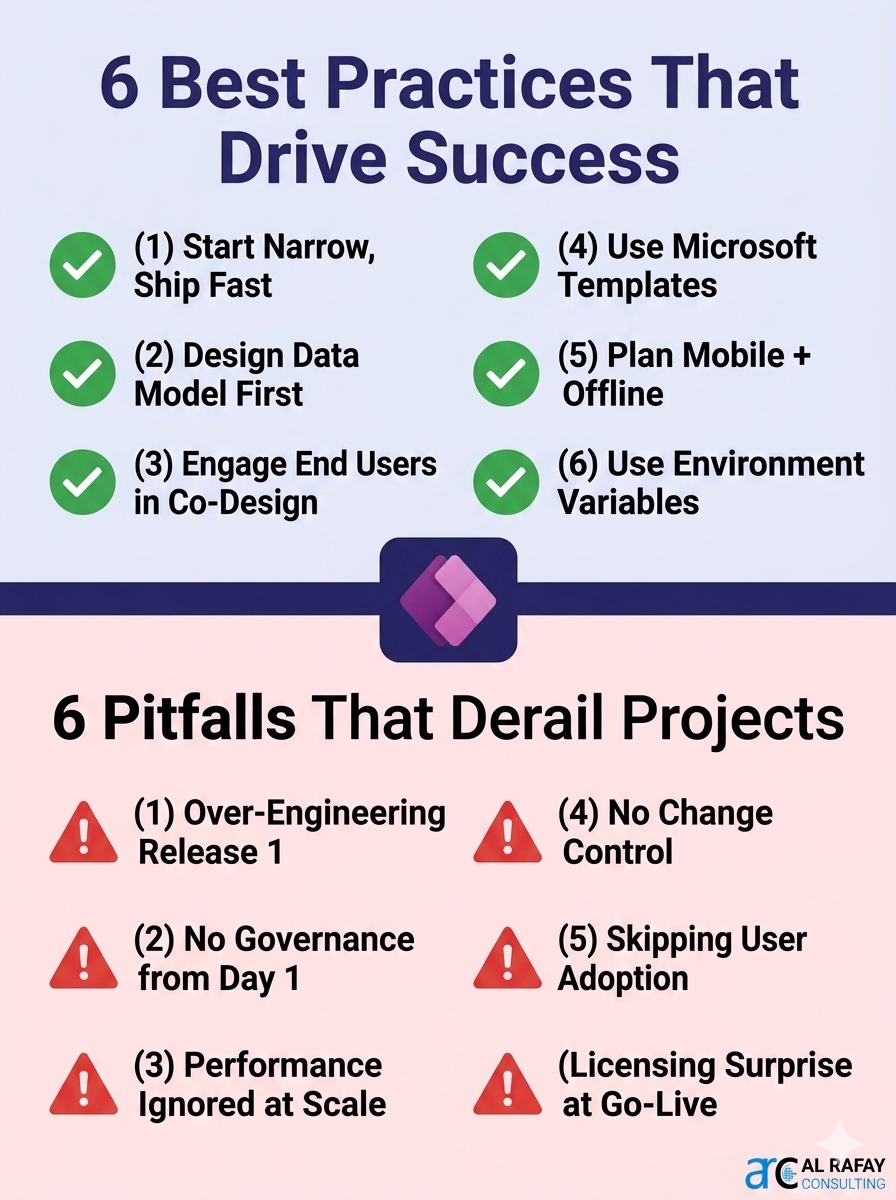
Implementation success with Power Apps in property management hinges as much on process discipline as on technical excellence. These best practices separate high-performing deployments from stalled or abandoned projects:
Best Practices That Drive Success
- Start narrow, ship fast — target the #1 pain point (e.g., maintenance tracking or lease renewals) for your first app. Deliver visible ROI in 6–8 weeks before expanding.
- Design the data model first — invest 1–2 weeks in Dataverse entity design before building screens. A sound data architecture prevents rebuilds later.
- Engage end users in co-design — involve property managers, leasing staff, and maintenance techs in app design sessions. Adoption is won in the design phase, not the training room.
- Leverage Microsoft templates and the Contoso Real Estate sample — don’t rebuild from scratch. Community solutions and Microsoft’s industry templates are mature starting points.
- Plan for offline and mobile from day one — maintenance technicians and inspectors work in buildings with variable connectivity. Canvas apps support offline-first design; test it early.
- Use Environment Variables and Connection References — never hardcode site URLs or credentials. This makes promoting from Dev to Production reliable and repeatable.
Pitfalls That Derail Property Management Projects
- Over-engineering the first release — trying to replicate a full-featured property management system in one project is the #1 cause of failure. Phase the build.
- Neglecting governance from the start — ungoverned citizen development leads to 50+ disconnected apps with inconsistent data models. Deploy the CoE Starter Kit on Day 1.
- Ignoring performance at scale — large Dataverse datasets without proper indexing, delegation, and filtered queries create slow apps. Test with production-volume data before launch.
- Building without change control — undocumented changes to production apps break trust with users. Implement ALM pipelines and maintain a change log from the first release.
- Underestimating training and adoption — a powerful app that no one uses delivers no ROI. Allocate at least 20% of project budget to user enablement and champions programs.
- Ignoring licensing until go-live — licensing surprises (Dataverse requiring Premium licenses) discovered at deployment create delays. Model licensing requirements in week one.
9. Implementation Roadmap: From Pilot to Full Portfolio Platform
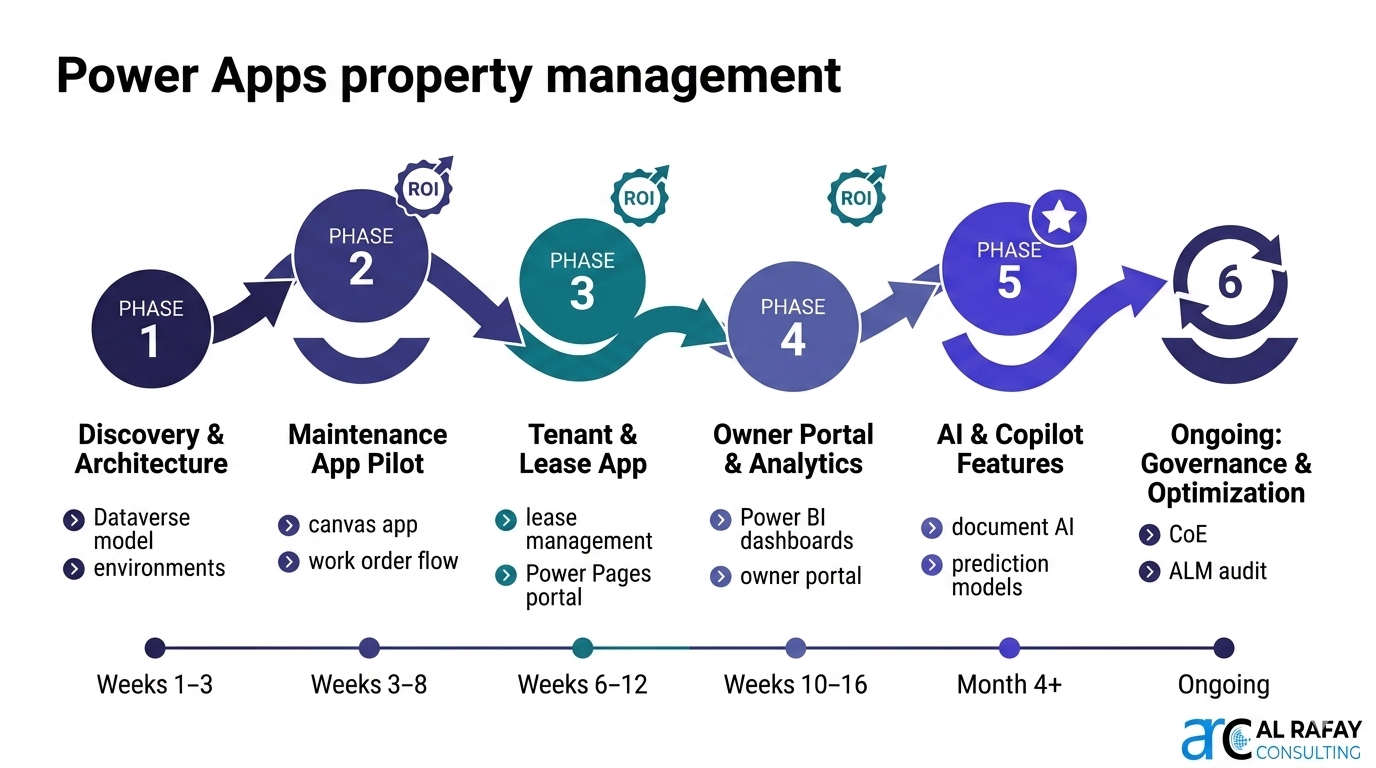
A structured phased approach is the most reliable path from initial Power Apps pilot to a full-portfolio property management platform. Here is the proven roadmap:
| Phase & Timeline | Deliverables & Goals |
|---|---|
| Phase 1: Discovery & Architecture (Weeks 1–3) | Process mapping of top 3 pain points; Dataverse entity design (Properties, Units, Tenants, Leases, Work Orders); environment strategy (Dev/UAT/Prod) setup; DLP policy configuration; CoE Starter Kit deployment |
| Phase 2: Pilot Build — Maintenance App (Weeks 3–8) | Canvas app for maintenance request submission and work order management; Power Automate routing and notification flows; Entra ID role-based security; UAT with maintenance team; production deployment |
| Phase 3: Tenant & Lease App (Weeks 6–12) | Lease management app in Dataverse; renewal reminder flows; Power Pages tenant portal (application intake, document access); e-signature integration; Power BI occupancy and arrears dashboard |
| Phase 4: Owner Portal & Financial Reporting (Weeks 10–16) | Power Pages owner portal with embedded Power BI; rent roll and financial KPI dashboards; automated weekly owner report distribution via Power Automate; role-based portfolio filtering |
| Phase 5: AI, Copilot & Advanced Features (Month 4+) | AI Builder document processing for lease extraction; churn prediction model; AI Builder invoice processing; Copilot-assisted workflow creation; IoT integration for predictive maintenance (where applicable) |
| Ongoing: Governance & Optimization | Monthly CoE dashboard review; quarterly ALM pipeline audit; annual user access review; continuous improvement backlog prioritized by business value |
Need Expert Help Building Your Property Management Platform?
Al Rafay Consulting designs and delivers Microsoft Power Platform solutions for property management and commercial real estate organizations — from Dataverse data model architecture to fully deployed tenant portals, maintenance systems, and owner analytics dashboards.
We deliver:
- Power Apps canvas and model-driven app development
- Dataverse data architecture and migration from spreadsheets/legacy systems
- Power Pages tenant and owner portal design and deployment
- Power Automate approval and notification workflow development
- AI Builder integration — document processing, prediction models, image analysis
- Power Platform governance — CoE setup, ALM pipelines, DLP policies
For broader Microsoft 365 and Power Platform strategy, see Microsoft 365 Consulting Services.
Final Takeaway
Power Apps for property management is not just a technology upgrade — it is an operational transformation. Organizations that combine a sound Dataverse architecture with phased delivery, strong governance, and genuine user adoption achieve outcomes that no off-the-shelf system can match: workflows built exactly for their business, real-time portfolio intelligence for owners and investors, and an AI-ready platform that grows with them.
If your property management operations still depend on disconnected spreadsheets, manual email workflows, or rigid point solutions, now is the right time to plan a phased Power Platform program aligned with your Microsoft 365 investment and long-term AI readiness goals.
Frequently Asked Questions
Can Power Apps replace Yardi, AppFolio, or RealPage for property management?
Power Apps can replace off-the-shelf systems for many mid-size property management firms — particularly those that find these platforms too rigid, too expensive at scale, or poorly integrated with their Microsoft 365 environment. However, mature off-the-shelf platforms offer deep out-of-the-box functionality for complex scenarios like CAM reconciliation, stacking plans, and accounting compliance that Power Apps requires you to build. The most successful organizations adopt a hybrid strategy: specialized software for financial accounting where the off-the-shelf advantage is greatest, and Power Platform for operational workflows, portals, and analytics where customization and integration matter most.
What Microsoft 365 license is needed to build a Power Apps property management solution?
For a full property management platform using Dataverse, Power Apps Premium per-user licenses (~$20/user/month) are required for all internal users. Power Pages (~$200/site/month + $4/authenticated user) is needed for external tenant and owner portals. Power Automate Premium (~$15/user/month) is needed for users running premium connector flows. Power BI Pro (~$10/user/month) is required for users accessing shared reports and dashboards. For a 50-person property management team with 2 portals, total monthly licensing typically runs $3,000–$6,000.
How does Power Apps handle offline scenarios for maintenance technicians in the field?
Power Apps canvas apps support offline mode through a built-in offline data caching mechanism. Designers use the SaveData and LoadData functions to store Dataverse or collection data locally on the device when the app is used without connectivity. When connectivity is restored, the app syncs changes back to Dataverse. This means maintenance technicians can complete work order updates, inspection checklists, and photo capture in basements, parking structures, or remote buildings without connectivity — and sync automatically when they return to a connected area.
How long does it take to build a Power Apps property management solution?
A focused pilot — typically a maintenance request app or lease management app — can be designed, built, tested, and deployed in 6–8 weeks with an experienced Power Platform developer. A full-featured property management platform covering maintenance, lease management, a tenant portal, owner dashboards, and financial reporting typically takes 4–6 months for the core build, with ongoing enhancement cycles thereafter. Copilot-assisted development is further compressing initial build timelines in 2026.
Can Power Pages support external tenant portals with thousands of concurrent users?
Yes. Power Pages is built on Azure infrastructure with autoscaling capabilities. Microsoft's SLA for Power Pages is 99.9% uptime, and the platform is designed for high-concurrency external user scenarios. For large residential portfolios with thousands of tenants, Power Pages capacity licensing should be reviewed. Authentication can be managed via Entra External ID for anonymous external users, or via organizational Entra ID for owner portals. Multi-language support is built in.
How does Power Platform handle data security for sensitive tenant and financial information?
Power Platform's security architecture is enterprise-grade. Dataverse provides column-level security, record-level sharing, and field-level encryption for sensitive data. Microsoft Entra ID enforces authentication; Conditional Access policies restrict access to compliant corporate devices. DLP policies prevent sensitive data from flowing to unauthorized connectors. All data in Dataverse is encrypted at rest (AES-256) and in transit (TLS 1.2+). Microsoft holds ISO 27001, SOC 2 Type II, and GDPR compliance certifications for the Power Platform infrastructure.
What AI Builder capabilities are most valuable for property management?
Three AI Builder capabilities deliver the highest ROI: (1) Document processing — automatically extracts structured data from leases, vendor invoices, maintenance contracts, and tenant applications, eliminating manual data entry. (2) Prediction models — forecast tenant non-renewal risk, equipment failure likelihood from IoT or maintenance history, and arrears risk from payment patterns, enabling proactive intervention. (3) Object detection in inspection images — automatically validates inspection photo results without manual review of each photo.
How should we approach Power Platform governance as our app portfolio grows?
Deploy the Microsoft Power Platform Center of Excellence (CoE) Starter Kit from day one — it is free and provides immediate visibility into all apps, flows, and makers in your environment. Establish a governance policy covering who can create apps, how apps are promoted to production, naming conventions, data classification, and review cycles. Assign a Power Platform Champion responsible for reviewing new apps, enforcing standards, and supporting citizen developers. Schedule quarterly environment audits to identify orphaned apps, unused flows, and over-privileged connections.
What is the future of Power Platform in property management?
The convergence of low-code platforms, generative AI, and IoT will make Power Platform-based property management solutions increasingly powerful. Microsoft's 2025–2026 roadmap emphasizes deeper Copilot integration across Power Apps, Power Automate, and Power BI. IoT integration with smart building systems — feeding sensor data from HVAC, elevators, and access control directly into Dataverse via Azure Event Hubs — will enable true predictive asset management. Organizations building on Power Platform today are investing in a platform with a strong, AI-accelerated roadmap.

Al Rafay Consulting
ARC Team
AI-powered Microsoft Solutions Partner delivering enterprise solutions on Azure, SharePoint, and Microsoft 365.
LinkedIn Profile