Automate M365 with Power Automate: 10 Flows You Can Deploy Now
Automate M365 with Power Automate is automate Microsoft 365 with 10 practical Power Automate flow examples for productivity, approvals, forms, and hybrid desktop workflows.
Automate Microsoft 365 with 10 practical Power Automate flow examples for productivity, approvals, forms, and hybrid desktop workflows.
ARC Team
· Updated April 19, 2026 · ARC Team

Repetitive updates, approvals, reminders, and data entry still consume a large part of admin and operations time in Microsoft 365. Microsoft Power Automate helps teams remove that friction by converting recurring tasks into reliable workflows.
Organizations looking to strengthen this area can work with Power Automate services.
This guide covers 10 practical Power Automate flow examples you can implement quickly across Outlook, Teams, SharePoint, Forms, and desktop apps. The goal is simple: reduce manual effort, improve consistency, and create visibility across high-volume business processes.
Why Power Automate Matters in Microsoft 365
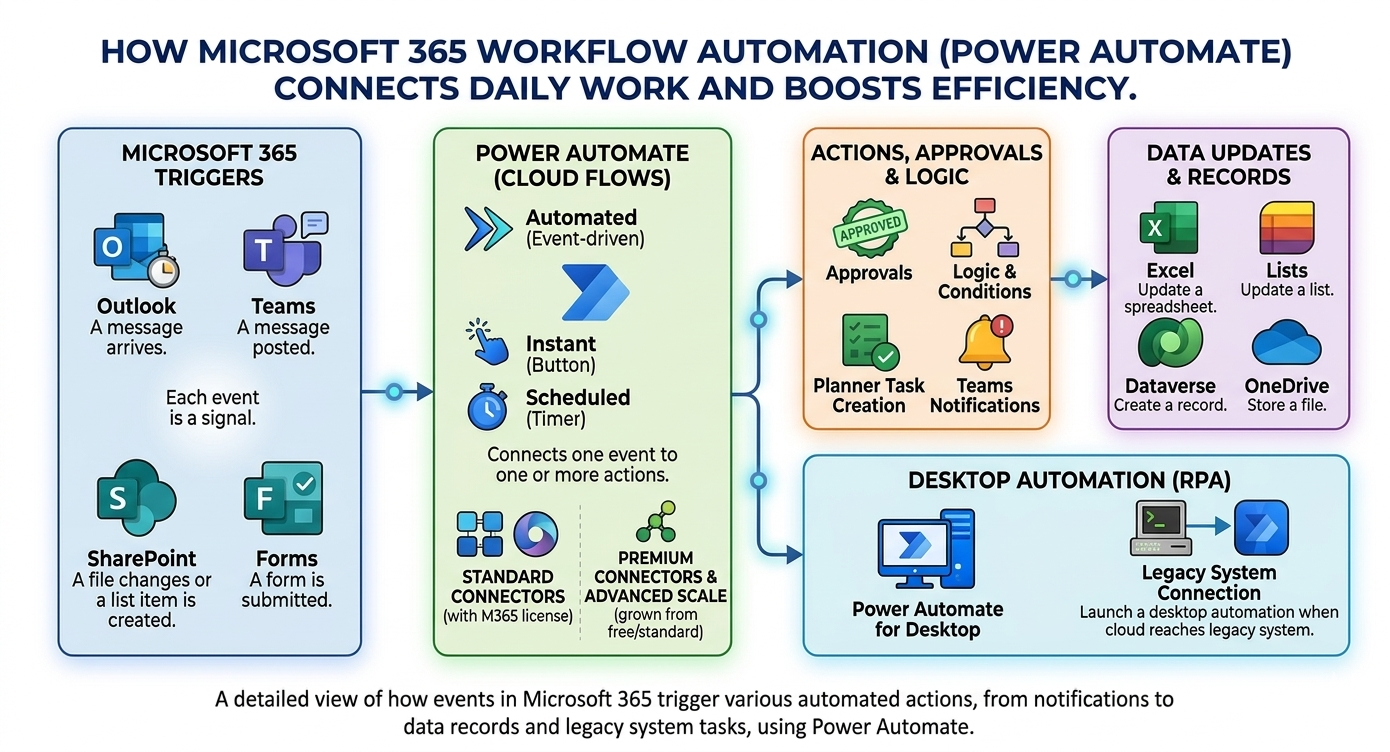
Everyday Microsoft 365 activity creates automation signals: an email arrives, a form is submitted, a file changes, or a list item is created. A Power Automate flow can use those events to trigger actions like notifications, task creation, approvals, and data updates.
For IT and business teams, this creates a more predictable operating model. Instead of chasing status in inboxes and chat threads, teams can move work through one trackable workflow with less manual follow-up.
10 Power Automate Flows to Deploy Now
The fastest wins usually come from workflows that are frequent, rules-based, and currently handled through manual coordination.
- Auto-save shared mailbox attachments to SharePoint.
- Convert flagged emails to Planner or To Do tasks.
- Send scheduled document review reminders.
- Convert Forms responses into structured list records.
- Route leave requests through manager approval.
- Build conditional expense approvals by amount.
- Manage policy sign-off acknowledgments and reminders.
- Create service desk workflows from Forms submissions.
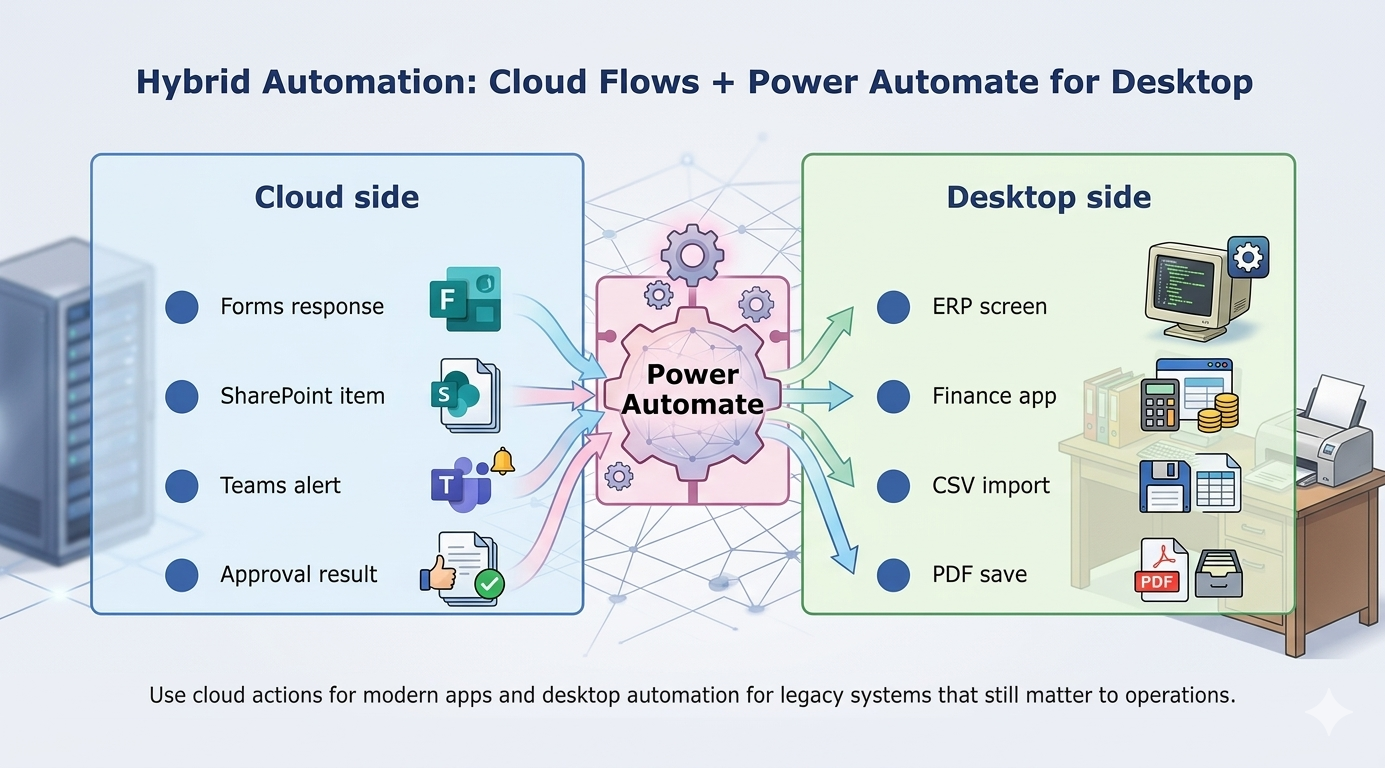
- Use Power Automate for desktop for legacy system entry.
- Run new joiner onboarding checklists across teams.
Approval and Admin Workflows That Scale
Approval workflows are often the highest-value use cases because they remove delays caused by email chains and unclear ownership. A strong pattern is simple: one intake path, one approval route, one system of record.
This pattern works well for HR leave requests, procurement approvals, expense routing, policy acknowledgments, and service escalations. It also improves auditability by documenting who approved what and when.
Step-by-Step Framework for M365 Workflow Automation
| Phase / Step | Focus | Outcome |
|---|---|---|
| Step 1: Prioritize High-Volume Use Cases | Identify repeat tasks with measurable delay or error cost | Faster path to visible wins |
| Step 2: Build and Pilot Core Flows | Implement cloud and approval workflows with clear ownership | Reduced manual effort and cleaner handoffs |
| Step 3: Scale with Governance and Templates | Standardize naming, support model, and exception handling | Reliable cross-team automation at scale |
Phase 1: Find the Right First Process
Choose one process with high volume and clear rules. Good starting points include leave approvals, shared mailbox processing, and request intake from Forms.
Phase 2: Pilot with Business Owners
Run a focused pilot, test success and failure paths, and track cycle-time improvements. Keep notifications in plain language so users trust the workflow.
Phase 3: Expand with Control
Before broad rollout, define connector governance, change control, ownership, and support responsibilities. Successful pilots often fail at scale without these controls.
Key Benefits for Business Leaders
- Faster cycle times: Requests move with less inbox dependency.
- Lower manual error rates: Structured intake and routing improve quality.
- Better operational visibility: Teams see status and ownership in one place.
- Scalable admin model: Automation absorbs workload growth without adding headcount at the same rate.
Core Capabilities to Prioritize
- Cloud flows for Microsoft 365 triggers and actions
- Approval patterns for HR, finance, and operations
- Forms-to-List workflows for structured intake
- Hybrid cloud + desktop automation for legacy systems
Frequently Asked Questions
What is a Power Automate flow?
Which Power Automate examples are best for admin teams?
When should we use Power Automate for desktop?
How should we start an automation program?
Conclusion
Power Automate gives Microsoft 365 teams a practical path from repetitive manual work to reliable process automation. Start with one clear use case, measure impact, and scale the patterns that reduce friction while improving control.
If your organization is exploring Microsoft 365 automation, ARC can help with strategy, implementation, governance, and optimization.
Frequently Asked Questions
What is Power Automate?
Power Automate is Microsoft's workflow automation platform that connects apps and services to automate repetitive tasks, business processes, and approvals without writing code.
Do I need coding experience to use Power Automate?
No. Power Automate provides a visual drag-and-drop designer for building flows. Advanced scenarios can leverage expressions and custom connectors, but most automations are no-code.
What can Power Automate automate?
Common automations include approval workflows, email notifications, data synchronization between systems, document processing, social media monitoring, and scheduled reporting tasks.
How does Power Automate integrate with Microsoft 365?
Power Automate has deep native integration with SharePoint, Teams, Outlook, Excel, OneDrive, Dataverse, and all Microsoft 365 services — plus 1,000+ third-party connectors.
Is Power Automate included in Microsoft 365?
Basic Power Automate capabilities are included in Microsoft 365 licenses. Premium features like custom connectors, RPA (desktop flows), and AI Builder require additional Power Automate licensing.

ARC Team
ARC Team
AI-powered Microsoft Solutions Partner delivering enterprise solutions on Azure, SharePoint, and Microsoft 365.
LinkedIn Profile