Azure Data Factory: Pipelines 101 — What It Is, How It Works, and Where Fabric Fits
Azure Data Factory is a managed cloud data integration service used to orchestrate ETL and ELT pipelines across cloud, on-premises, and SaaS systems.
Learn what Azure Data Factory is, how pipelines work, how it compares with Fabric Data Factory, and how to design reliable cloud data orchestration.
Al Rafay Consulting
· Updated July 15, 2026 · ARC Team
Somewhere in your organization right now, someone is manually exporting a CSV, emailing it to another team, and hoping the numbers still match by the time it lands in a dashboard. Multiply that across ten systems, three departments, and a weekly reporting cycle, and you get what most data teams live with: stale dashboards, broken refreshes, and a growing sense that the data is wrong again.
Azure Data Factory exists to fix exactly this problem. It is Microsoft’s managed cloud service for building pipelines, meaning automated workflows that move and transform data between systems so your reports, dashboards, and AI tools are working with current data.
This guide is a plain-English Pipelines 101: what Azure Data Factory is, how its core pieces fit together, what a real pipeline looks like in practice, and where Data Factory in Microsoft Fabric picks up where classic ADF leaves off.
Moving from ADF fundamentals to execution planning? Explore ARC’s Microsoft Fabric Services to define migration waves, target architecture, and governance before rollout.
What Is Azure Data Factory?
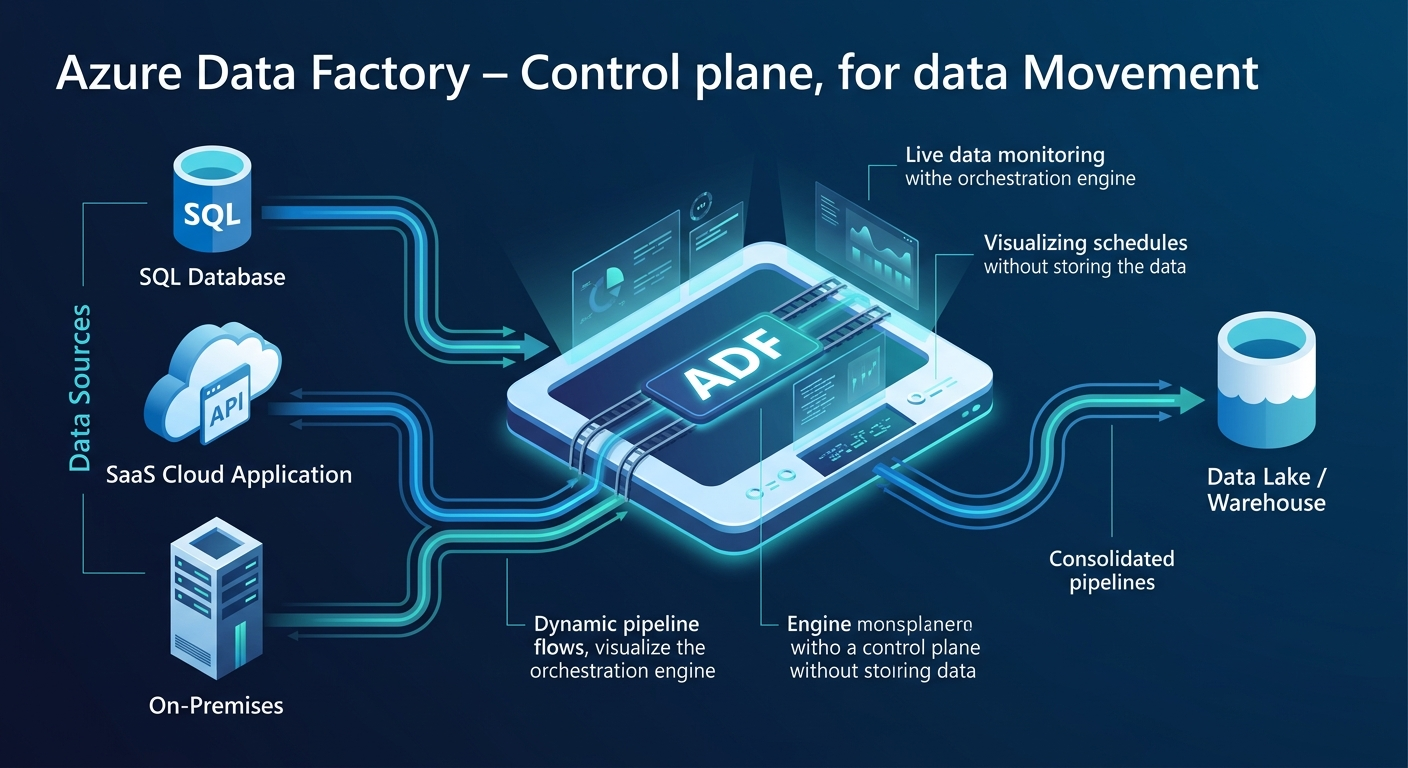
Azure Data Factory is a managed cloud data integration service used to orchestrate ETL and ELT pipelines. It connects to cloud, on-premises, and SaaS sources, moves data between them, and transforms it along the way without requiring you to manage the underlying servers.
Think of ADF as the control plane for data movement. It does not store your data. It tells data where to go, when to move, and what to become on the way.
ETL vs ELT
ADF supports both:
| Approach | What Happens | Where Transformation Occurs | When You’d Use It |
|---|---|---|---|
| ETL | Data is extracted, transformed in-flight, then loaded | Within the pipeline itself | Smaller datasets or legacy warehouse patterns |
| ELT | Data is extracted and loaded raw, then transformed later | Inside the target platform | Large-scale, cloud-native analytics |
What Is an Azure Data Factory Pipeline?
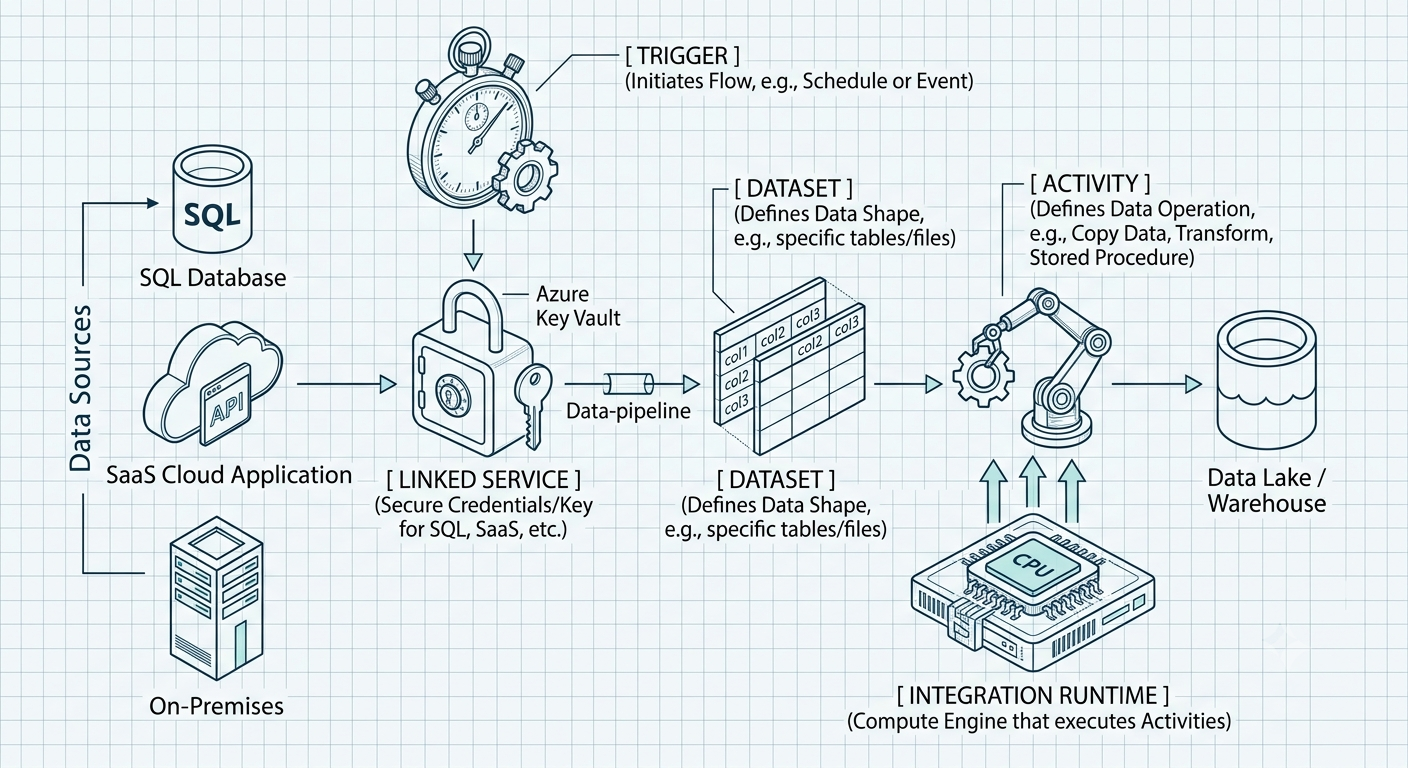
A pipeline is a logical grouping of activities that together perform a task such as copying yesterday’s sales data from an on-prem SQL Server into Azure Data Lake and notifying the team on completion.
The Building Blocks
| Component | What It Is | Analogy |
|---|---|---|
| Pipeline | The overall workflow container | The recipe |
| Activity | A single step of work | An instruction in the recipe |
| Dataset | The shape and location of the data | The ingredient |
| Linked Service | The connection to a source or destination | The delivery address |
| Integration Runtime | The compute that executes the activity | The kitchen |
| Trigger | The condition that starts the pipeline | The alarm clock |
Triggers and Pipeline Runs
ADF supports schedule triggers, tumbling window triggers, and event-based triggers. Every execution is logged as a pipeline run, which becomes critical for troubleshooting.
ADF Pipeline Components Explained
Linked Services
Linked services answer the question: where do I connect?
Datasets
Datasets answer the question: what does the data look like, and where does it live?
Activities
Activities answer the question: what work needs to happen?
Integration Runtime
Integration Runtime answers the question: what compute actually does the work?
| IR Type | Purpose |
|---|---|
| Azure IR | Fully managed cloud compute for cloud-to-cloud movement |
| Self-Hosted IR | Installed on-premises or in a VM for private-network access |
| SSIS IR | Runs SQL Server Integration Services packages in Azure |
A Simple Pipeline Example
- Source: an on-prem SQL Server table containing daily sales transactions
- Copy activity: moves the new rows into Azure Data Lake Storage
- Sink: the destination folder in the data lake
- Monitor: ADF logs the run, flags failures, and optionally sends an alert
This pattern, connect, define dataset, add activity, trigger, monitor, is the backbone of most production pipelines.
Common Azure Data Factory Use Cases
- On-premises to cloud migration
- Data warehouse or lakehouse ingestion
- API and SaaS ingestion
- Incremental loads and change data capture
Azure Data Factory vs Fabric Data Factory
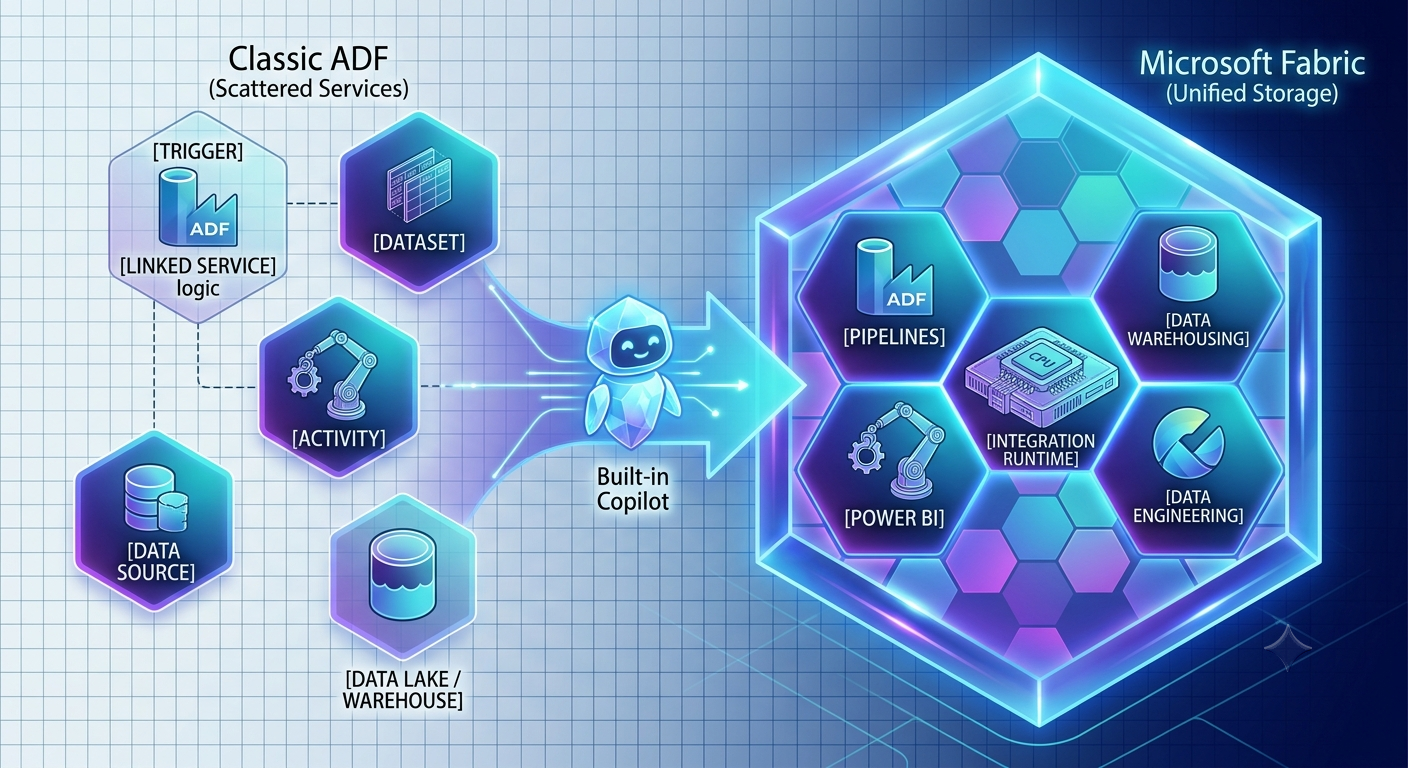
Microsoft describes Fabric Data Factory as the next generation of Azure Data Factory and recommends new users start there.
What Stays Familiar
Pipeline concepts, activities, and orchestration logic carry over directly.
What Changes in Fabric
| Area | Azure Data Factory | Data Factory in Microsoft Fabric |
|---|---|---|
| Storage model | Separate services | Unified via OneLake |
| Connections | Separate datasets and linked services | Simplified unified connections |
| Publishing | Explicit publish step | No separate publish step |
| Monitoring | ADF monitoring pane | Fabric monitoring hub |
| Transformation tooling | Mapping Data Flows | Dataflow Gen2 and Mapping Data Flow support |
| AI integration | Limited | Built-in Copilot assistance |
Best Practices
- Parameterize everything
- Design for retries
- Monitor proactively
- Secure credentials with Key Vault
- Build CI/CD into your workflow
- Track data lineage
- Start with the smallest viable pipeline
Common Challenges and How to Avoid Them
| Challenge | Why It Happens | How to Avoid It |
|---|---|---|
| Pipelines break silently | No alerting configured | Set up automated alerts tied to run status |
| Costs creep up | Compute left running or inefficient flows | Monitor usage and right-size compute |
| It works on one table but not at scale | No parameterization | Design metadata-driven pipelines |
| On-prem connectivity issues | Self-Hosted IR misconfigured | Size and monitor the host properly |
| No one can explain the pipeline | Missing documentation | Standardize naming and document purpose |
| Governance gaps | No lineage or cataloging | Integrate governance tools early |
| Migration anxiety around Fabric | Uncertainty about compatibility | Start with a Fabric readiness assessment |
Cost Basics
Azure Data Factory pricing is usage-based and typically driven by activity runs, Integration Runtime hours, data flow execution, and orchestration operations.
Future Trends
- Convergence toward Fabric
- AI-native orchestration
- Semantic layers as core infrastructure
- Stronger governance built into pipeline design
- Clearer business ROI from unified data platforms
Key Takeaways
- Azure Data Factory is the orchestration layer that keeps data moving reliably between systems.
- A pipeline is built from activities, datasets, linked services, integration runtimes, and triggers.
- Reliability comes from parameterization, retries, monitoring, secure credentials, and CI/CD.
- Microsoft is actively steering new projects toward Fabric Data Factory.
- The payoff is fresher dashboards, less manual firefighting, and data ready for BI and AI.
Where This Leads
Understanding pipelines is the first step. The harder work is designing pipelines that stay reliable as your data sources multiply and your analytics platform evolves.
If you want help mapping the right ADF or Fabric architecture around your current pipelines, explore ARC’s data engineering services or book a contact review.
Frequently Asked Questions
What is Azure Data Factory in simple terms?
Azure Data Factory is a managed cloud service that automates moving and transforming data between systems so reports and analytics tools always work with current data.
Is Azure Data Factory ETL or ELT?
ADF supports both ETL and ELT. It can transform data mid-pipeline or load data raw and let the destination system handle transformation.
What is a pipeline in Azure Data Factory?
A pipeline is a logical grouping of activities that together complete a data movement or transformation task.
What is Integration Runtime in ADF?
Integration Runtime is the compute that executes pipeline activities, available as Azure IR, Self-Hosted IR, or SSIS IR.
What is the difference between Azure Data Factory and Fabric Data Factory?
Fabric Data Factory simplifies connections, monitoring, and publishing, while preserving the core pipeline and activity concepts from ADF.
Should new projects use ADF or Fabric?
Microsoft recommends starting with Fabric Data Factory for new projects because it is positioned as the next generation of ADF.

Al Rafay Consulting
ARC Team
AI-powered Microsoft Solutions Partner delivering enterprise solutions on Azure, SharePoint, and Microsoft 365.
LinkedIn Profile