Document Retention for Life-Sciences REITs: SharePoint | ARC
Document retention for life-sciences REITs is the practice of preserving corporate, financial, and life-sciences records for regulator-mandated periods using Microsoft SharePoint Online and Microsoft Purview to automatically enforce retention schedules, lock records, run disposition reviews, and produce audit-ready trails across SEC, SOX, FDA 21 CFR Part 11, HIPAA, and GDPR obligations.
How life-sciences REITs meet SEC, SOX, FDA 21 CFR Part 11 & GDPR document retention requirements using Microsoft SharePoint and Purview. Schedules, policies & expert tips.
Al Rafay Consulting
· Updated June 9, 2026 · Microsoft 365 Compliance & Records Management Specialists

Organizations looking to strengthen this area can work with document management system.
What Makes Life-Sciences REITs Uniquely Challenging for Document Retention?
Life-sciences Real Estate Investment Trusts (REITs) occupy a rare intersection of two heavily regulated industries. As publicly traded real estate companies, they are subject to the full weight of SEC disclosure rules, Sarbanes-Oxley (SOX) financial record mandates, and IRS tax documentation requirements. Simultaneously, because their properties serve pharmaceutical R&D centers, biotech laboratories, and medical manufacturing facilities, they are deeply entangled with FDA regulation, GxP data integrity standards, and global data privacy frameworks including GDPR.
Most organizations sit under one major regulatory umbrella. Life-sciences REITs sit under several simultaneously — and the retention periods conflict, overlap, and in some cases span decades. A lease for a biosafety lab, for example, may carry document obligations that outlive the lease term by ten years. A board resolution authorizing a property acquisition may need to be held permanently.
Getting retention wrong in this environment carries concrete consequences. Morgan Stanley was fined $13 million for deleting records too early. FDA enforcement actions for missing GxP documentation have derailed clinical programs. GDPR violations for over-retaining personal data carry fines of up to 4% of global annual revenue. The stakes demand a systematic, technology-enforced approach — not a spreadsheet and good intentions.
Microsoft SharePoint Online, governed by Microsoft Purview — Microsoft’s unified compliance platform — provides exactly that system. This guide explains what life-sciences REITs must retain, for how long, and precisely how SharePoint and Purview enforce it.
For organizations that need this model implemented in a live environment, ARC’s SharePoint consulting services can help design the records model, retention labels, and governance workflow in SharePoint and Purview.
The Dual Compliance Landscape: Corporate + Life-Sciences Regulations

Corporate & Financial Obligations
As public companies, life-sciences REITs must satisfy several federal frameworks governing financial records and corporate governance:
- Sarbanes-Oxley Act (SOX): Requires retention of financial statements, audit workpapers, and internal control documentation for a minimum of 7 years. SOX Section 802 specifically criminalizes the destruction of audit-related records — making systematic, defensible retention a legal obligation, not merely a best practice.
- SEC Rules (17a-4, Regulation S-P): Mandate preservation of corporate disclosures, proxy filings, 10-K and 10-Q reports, and investor communications in tamper-proof, retrievable formats. The SEC has penalized firms heavily for failures in electronic record-keeping.
- IRS Retention: Tax returns and supporting documents (invoices, general ledger entries, payroll records) should be retained a minimum of 7 years to cover the IRS audit window, which extends to 6 years for substantial understatements and indefinitely for fraud.
- FINRA / REIT Distribution Records: Investor distribution records, shareholder communications, and related correspondence require specific retention periods and must be readily producible for regulatory examination.
Life-Sciences & Healthcare Regulatory Obligations
Operating in proximity to — or in support of — FDA-regulated facilities introduces a second layer of retention obligations:
- FDA 21 CFR Part 11 (Electronic Records & Signatures): Requires that electronic records are created, stored, retrieved, and retained as reliably as paper records. Systems must maintain secure, time-stamped audit trails. Records must remain accessible for their full retention period and protected from alteration.
- GxP (Good Laboratory/Clinical/Manufacturing Practices): Records generated in GLP studies (21 CFR 58) must be retained for the longer of 2 years after FDA approval of the drug or 5 years after study completion. GMP records (21 CFR 211) must be kept at least 1 year beyond product expiry.
- HIPAA: Covers any protected health information (PHI) that a REIT may encounter through tenant operations or facility health screenings. Privacy policies and PHI-related records must be retained for 6 years from creation or last effective date.
- GDPR & State Privacy Laws: The ‘storage limitation’ principle prohibits retaining personal data beyond its stated purpose. Life-sciences REITs processing EU data subjects’ personal information (tenant staff, visitors, clinical trial participants) must define and enforce maximum retention periods — and delete data automatically when those periods expire.
- EU Annex 11 & ICH E6 (Good Clinical Practice): For REITs whose tenants conduct clinical trials on-site, essential clinical records must be retained for at least 15 years after study completion in the EU. The REIT’s own facility records connected to those trials may carry the same obligation by association.
Document Retention Schedule: Life-Sciences REITs

The table below presents a recommended retention schedule tailored to the specific document types generated by life-sciences REITs. These periods reflect a conservative synthesis of regulatory minimums and industry best practices. Organizations should engage legal counsel to validate periods against their specific regulatory profile.
| Document Type | Retention Period | Disposition | Regulation | Recommended SharePoint Label |
|---|---|---|---|---|
| Board & Governance Records (Board minutes, charters, bylaws, REIT trust docs) | Permanent | Archive permanently | Corporate law; SEC; investor transparency | Governance-Permanent (Record) |
| SEC Filings & Financial Reports (10-K, 10-Q, annual reports, auditor workpapers) | 7+ years (often permanent) | Archive or disposition review | SOX Section 802; SEC Rules 17a-4 | Financial-7yr (Record) |
| Tax Records & General Ledger (Tax returns, invoices, depreciation schedules) | 7 years | Secure deletion after 7 years | IRS audit window (3–6 yrs); 7yr safety standard | Tax-7yr |
| Leases & Property Contracts (Tenant leases, purchase agreements, maintenance contracts) | Lease term + 6–10 years | Disposition review before deletion | Statutes of limitation (6+ yrs); contract law | Contract-PostExpiry-7yr (Record) |
| Lab & Facility Records (Equipment calibration, environmental monitoring, safety inspections) | 5–10 years (per regulation) | Disposition review before deletion | OSHA; EPA; FDA facility data; GxP | Facility-10yr |
| GxP & Quality Documents (SOPs, validation protocols, CAPA records, GMP batch records) | 5 yrs or product life +1 yr (whichever is longer) | Disposition review — archive for regulatory access | FDA 21 CFR 211, 58; GxP guidelines | GxP-Quality (Regulatory Record) |
| Clinical / R&D Data (Tenant-linked trial facility records) | 15–25 years or per protocol | Archive — do not auto-delete | ICH E6; EU Annex 11; FDA 21 CFR 312 | ClinicalData-25yr (Regulatory Record) |
| HIPAA-Related Documents (Privacy policies, PHI access logs, breach notifications) | 6 years from creation or last effective date | Secure deletion with audit | HIPAA Privacy Rule 45 CFR 164.530 | HIPAA-6yr |
| Contracts & Legal Agreements (Non-lease contracts, major vendor agreements) | 7–10 years post-expiry | Archive or disposition review | Statutes of limitation; business need | LegalContract-10yr |
| Employee & HR Files (Payroll, benefits, termination records) | 7 years after termination | Secure deletion with audit trail | EEOC, FLSA, state laws; 7yr safety standard | HR-7yr |
| Emails & Collaboration Content (Exchange, Teams chats, SharePoint drafts — not formal records) | 3–5 years | Auto-delete unless under hold | Company policy; eDiscovery needs; data minimization | Email-5yr (auto-delete) |
| Personal Data / GDPR-Subject Content (Visitor logs, EU personal data in any form) | Purpose-limited (typically 1–3 years) | Auto-delete on expiry; no archive | GDPR Art. 5(1)(e) storage limitation principle | PersonalData-GDPR-2yr (auto-delete) |
Implementing Document Retention in SharePoint Using Microsoft Purview

Microsoft Purview’s Data Lifecycle Management tools — integrated natively into SharePoint Online — transform the retention schedule above from a policy document into an automatically enforced system. Here is how each capability maps to your compliance requirements. If you are still moving content off legacy drives, start with our guide to migrating file shares to SharePoint Online.
1. Retention Labels & Policies
Retention labels are the core mechanism. Each label defines a retention period, the trigger for that period (creation date, event date, or modification date), and the action at expiry (delete, begin disposition review, or archive). Labels are created in the Microsoft Purview compliance portal and published to specific SharePoint sites, libraries, or even auto-applied based on content queries.
- Example: Create a label ‘Financial-7yr’ that triggers from the date of creation, retains for 7 years, then routes to a disposition review workflow. Publish this label to all SharePoint sites used by the Finance and Accounting teams.
- Example: Create a label ‘GxP-Quality-Record’ that marks content as an immutable record, triggers from the date of last modification, retains for the longer of 5 years or product life + 1 year, and requires disposition review before any action.
- Auto-labeling: Configure keyword-based or trainable classifier-based auto-labeling so that documents containing phrases like ‘validation protocol’, ‘CAPA’, or ‘batch record’ are automatically assigned the GxP label — reducing reliance on users to classify correctly.
2. Records Declaration & Immutability
For documents that must be protected from alteration — final contracts, GMP batch records, SOX audit workpapers — Purview retention labels can declare content as a formal record. Declared records become immutable:
- End users cannot edit, move, or delete a declared record during its retention period
- Regulatory records (the highest protection level) cannot be modified even by SharePoint or tenant administrators
- Any attempt to delete triggers an error; SharePoint copies the original to a hidden Preservation Hold Library before processing any permitted action
This directly satisfies FDA 21 CFR Part 11’s requirement that electronic records be protected from alteration and erasure, and SEC Rule 17a-4’s requirement for tamper-evident, non-rewritable preservation.
3. Preservation Hold Library
SharePoint’s Preservation Hold Library is an invisible safety net. When a retention policy is active on a library and a user modifies or deletes a file:
- SharePoint silently copies the original version to the site’s Preservation Hold Library before allowing the change
- The original content is held there until the retention period expires — even if the user’s visible copy has been deleted or overwritten
- eDiscovery searches automatically include Preservation Hold content, ensuring regulators and legal counsel can always retrieve the original
Combined with SharePoint’s document versioning (which must be enabled on all compliance-critical libraries), every version of every document is retrievable for the full retention period.
4. Event-Based Retention
Many life-sciences REIT retention triggers are not calendar dates but business events — lease termination, product approval, employee departure, contract expiry. Purview’s event-based retention starts the retention clock only when a defined event occurs:
- Lease termination → triggers a 7-year retention clock on all lease-related documents
- FDA product approval → triggers the post-approval retention period on associated facility records
- Employee departure → triggers the 7-year HR record retention period
Event-based retention eliminates the manual tracking of individual document timelines. A Power Automate flow can write the trigger event to a SharePoint list, which Purview monitors to start the relevant retention clock automatically.
5. Disposition Review Workflow
For high-risk content — regulated records, legal agreements, GxP documentation — automated deletion at retention expiry may itself be a compliance risk. Disposition reviews add a human checkpoint:
- When a retained record’s time expires, Purview notifies designated reviewers (e.g., the General Counsel for legal contracts, the QA Manager for GxP records)
- Reviewers can approve deletion, extend retention by a specified period, or reclassify the record for permanent archival
- All disposition decisions are logged in a tamper-evident audit trail, creating documented proof of defensible deletion
6. Legal Holds & eDiscovery
Retention policies operate as a standing defense against premature deletion. Legal holds go further — they freeze specific content regardless of whether retention has expired, in anticipation of litigation or regulatory investigation:
- A compliance officer can place an eDiscovery hold on specific SharePoint sites, user mailboxes, or content matching search queries within minutes
- Held content is immutable and cannot be deleted by any user action or retention expiry until the hold is released
- Microsoft Purview eDiscovery exports held content in court-admissible formats with full chain-of-custody documentation
This combination — retention policies that prevent premature deletion, plus legal holds that override retention expiry — gives life-sciences REITs a complete defensible preservation framework.
7. Audit Logs & Compliance Reporting
Proving compliance requires documentation of what happened, when, and by whom. Microsoft Purview’s unified audit log captures every content action across SharePoint, Exchange, and Teams — including:
- Who accessed, modified, or deleted a document
- When retention labels were applied or changed
- When disposition reviews were triggered and what decision was made
- Any attempts to circumvent retention (e.g. users trying to delete protected content)
For FDA 21 CFR Part 11 compliance, the audit log must be retained for the full duration of the records it covers. Organizations should extend the default audit log retention (90 days for standard plans) using Microsoft Purview Audit (Premium) — which extends retention up to 10 years — or by exporting logs to a long-term archive such as Azure Monitor Logs.
Special Considerations: FDA 21 CFR Part 11 Compliance in SharePoint

21 CFR Part 11 is the FDA regulation governing electronic records and electronic signatures in pharmaceutical and biotech contexts. Meeting it in SharePoint requires configuration beyond the defaults.
| 21 CFR Part 11 Requirement | SharePoint / Purview Capability | Additional Action Required |
|---|---|---|
| System validation — software must be validated for its intended use | Microsoft provides SOC, ISO 27001, and SSAE 18 compliance documentation | Your IT/QA team must validate your specific SharePoint configuration. Document IQ/OQ/PQ protocols. |
| Audit trails — time-stamped, user-attributed, secure, retained for record lifetime | Unified audit log captures all content actions with timestamp and user ID | Extend audit log retention to match record lifetime using Purview Audit (Premium) or Azure Monitor export. |
| Record security — protection from alteration and erasure | Regulatory records label creates fully immutable records; Preservation Hold Library protects all retained content | Apply Regulatory Record label (not just standard Record) to highest-sensitivity GxP documents. |
| Access controls — system access limited to authorized individuals | Azure AD MFA, Conditional Access policies, SharePoint permissions | Implement MFA for all users accessing GxP-relevant SharePoint sites. Enable Conditional Access. Regular access reviews. |
| Electronic signatures — linked to record, non-transferable | SharePoint does not provide Part 11-compliant e-signatures natively | Integrate DocuSign, Adobe Sign, or Validated Cloud with SharePoint for e-signature capture. Capture signer name, date/time, and meaning of signature. |
| Record retrievability — accessible throughout retention period | SharePoint cloud platform provides 99.9%+ uptime SLA; geo-redundant storage | Test retrieval of archived records periodically. Document retrieval procedures in your validation protocol. |
| Computer system controls — system clock accuracy and access audit | Microsoft Azure infrastructure maintains synchronized UTC time for all audit events | Document the time zone standard in your validation. Ensure audit log exports preserve UTC timestamps. |
Governance Model: Roles, Responsibilities & Operating Structure

Technology enforces retention. People and governance make it defensible. Life-sciences REITs need a clear records management operating model with defined accountability.
| Role | Responsibilities | Key Tasks in SharePoint / Purview |
|---|---|---|
| General Counsel / Chief Compliance Officer | Owns the retention policy. Interprets regulatory requirements. Approves retention schedule. Authorizes disposition of sensitive records. | Approves Purview retention label definitions. Reviews disposition reports. Authorizes legal holds. |
| Records Management / Information Governance Team | Designs and maintains the retention schedule. Maps record types to labels. Monitors compliance. Coordinates cross-departmental governance. | Configures retention labels in Purview. Publishes labels to SharePoint sites. Runs periodic label audit reports. Manages disposition review workflows. |
| M365 / SharePoint Administrator | Implements retention configurations. Manages SharePoint permissions. Monitors system health. Enforces governance policies. | Creates and deploys Purview retention policies. Configures Preservation Hold Library. Extends audit log retention. Manages auto-labeling rules. |
| Business Unit Records Coordinators (Real Estate, Finance, Legal, Facilities, QA) | Classify documents within their department. Apply retention labels to content that requires manual classification. Participate in disposition reviews. | Label documents in SharePoint libraries. Respond to disposition review notifications. Report misclassified or unlabeled content. |
| IT Security / Azure AD Team | Manages identity and access. Configures MFA and Conditional Access policies. Ensures system security for Part 11-regulated sites. | Configures Azure AD Conditional Access for sensitive SharePoint sites. Manages access reviews. Monitors Purview DLP alerts. |
Governance Committee & Ongoing Oversight
Establish a cross-functional Records Governance Committee meeting quarterly, comprising Legal, Compliance, IT, Finance, and the Real Estate team. This committee should:
- Review the retention schedule annually and update for regulatory changes
- Review Purview audit reports and disposition summaries — confirming records were retained and disposed as required
- Address anomalies: unauthorized deletion attempts, improperly labeled content, policy failures on specific sites
- Oversee any changes to SharePoint configuration that could affect retention (site restructuring, migrations, new content types)
- Maintain a Change Log of all retention policy modifications for audit evidence
If you need help establishing this operating model, our Data Security and Governance Services team builds governance frameworks for regulated organizations.
SharePoint + Purview vs. Legacy Retention Approaches

| Capability | Legacy (File Shares / Manual ECM) | SharePoint Online + Microsoft Purview |
|---|---|---|
| Retention enforcement | Manual — users responsible for not deleting; no system controls | Automated — system prevents deletion of retained content regardless of user action |
| Immutability / tamper-protection | None — any user with write access can modify or delete | Regulatory Records label prevents modification by anyone, including admins |
| Audit trail | Minimal or none — file share access logs not tamper-evident | Full, tamper-evident audit log in Purview covering all content actions |
| Legal holds | Manual process — IT must manually isolate and lock content | One-click legal hold in Purview eDiscovery; automatically overrides retention expiry |
| Disposition management | Manual tracking in spreadsheets; high error risk | Automated disposition review workflow with approval routing and documented decisions |
| Multi-regulation support | Separate policy documents; no system enforcement across regulation types | Single label framework covers SOX, SEC, HIPAA, GDPR, GxP — all enforced in one platform |
| GDPR auto-deletion | No automated deletion — manual cleanup required, prone to over-retention | Retention labels auto-delete personal data at expiry — enforces storage limitation principle |
| Cross-content-type coverage | Documents only; emails and Teams chats unmanaged | Unified policy across SharePoint, Exchange email, Teams chats, and OneDrive |
| Cost | Hidden costs: IT labor, storage, third-party archive tools, fines risk | Included in Microsoft 365 E3/E5; consolidates multiple compliance tools into one platform |
Common Pitfalls & Best Practices for Life-Sciences REIT Retention Programs
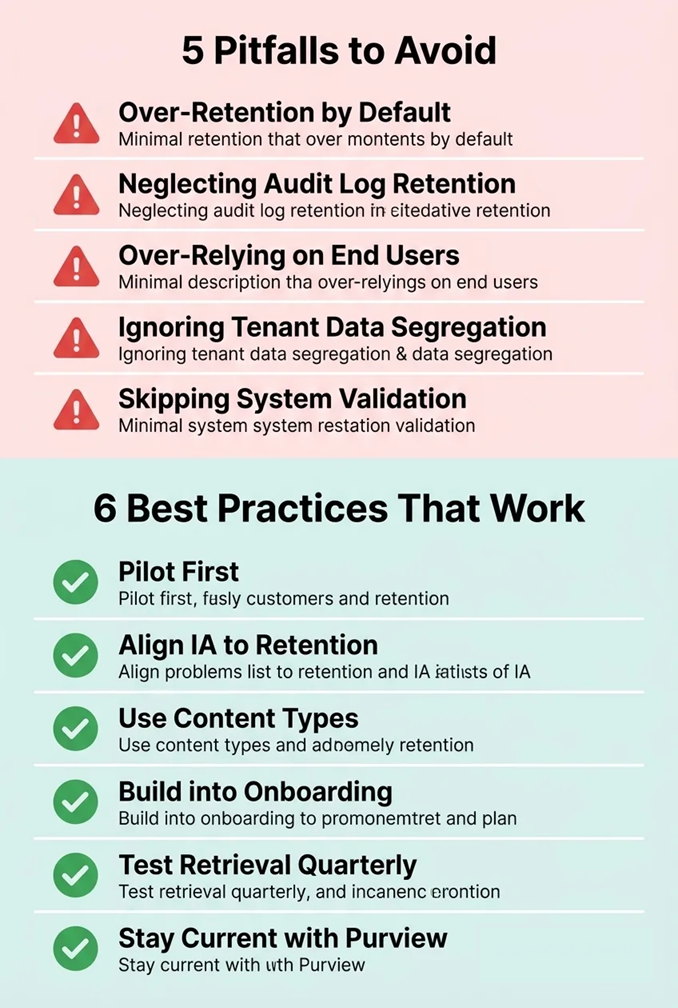
Pitfalls to Avoid
- Over-retention by default: Keeping everything forever is not a retention strategy — it is a liability strategy. The more data you hold, the larger your eDiscovery surface area and the greater your breach exposure. Deploy auto-deletion labels on non-record content (emails, drafts, collaboration files) to actively shrink your data footprint.
- Neglecting audit log retention: SharePoint’s unified audit log defaults to 90 days on standard plans. If your GxP or SOX records are retained for 7–25 years, a 90-day audit trail is worthless for compliance evidence. Extend audit log retention to match record lifetimes — this is non-negotiable for Part 11 and SOX.
- Over-relying on end-user labeling: Users will mislabel or forget to label documents. Auto-labeling policies based on keywords, metadata, or trainable classifiers dramatically reduce mis-classification risk. Audit label coverage periodically (monthly for high-risk libraries).
- Ignoring tenant data segregation: Life-sciences campuses often host multiple tenants. Maintain separate SharePoint sites with unique permissions for each tenant’s records. Do not allow co-mingling of records that carry different regulatory obligations. Tenant lease termination agreements should specify record handover or destruction procedures.
- Failing to validate the system: Using SharePoint for GxP records without formal system validation (IQ/OQ/PQ documentation) exposes the organization to FDA 483 observations. Validation is a process, not a product — it requires documented testing of your specific configuration.
Best Practices That Work
- Pilot before full deployment: test your retention labels and policies on one non-critical site first. Confirm records are being immutably locked, drafts are deletable, and the disposition workflow routes correctly before rolling out organization-wide.
- Align SharePoint information architecture to the retention schedule: one SharePoint site or library per major record category makes label assignment straightforward and reduces governance complexity. Avoid dumping all document types into one library with inconsistent labeling.
- Use content types to drive auto-labeling: define SharePoint content types (Board Minute, Lease Agreement, Batch Record) that automatically inherit the correct retention label upon content creation. This removes the classification burden from end users entirely.
- Build retention into onboarding: new employees handling records should receive retention training before their first day of content creation. SharePoint champions in each department reinforce good classification habits through peer guidance.
- Test retrieval, not just preservation: run quarterly retrieval tests — pick 10 random retained records and verify they can be fully retrieved, opened, and are in their original state. Document the test results. This is a standard expectation in FDA and SEC audits.
- Stay current with Purview updates: Microsoft is actively evolving its compliance platform. Key changes — such as the 2026 deprecation of legacy in-place records management features in favor of unified Purview retention — require proactive migration of existing policies. Subscribe to the Microsoft 365 roadmap and Message Center to stay ahead of these changes.
Need Expert Help Building Your Retention Program on SharePoint?
Al Rafay Consulting helps life-sciences REITs and regulated organizations design, configure, and validate document retention programs on Microsoft SharePoint Online and Microsoft Purview — from initial retention schedule development through full Purview deployment and user adoption.
We deliver:
- Retention schedule development aligned to SEC, SOX, FDA, HIPAA, and GDPR
- Microsoft Purview retention label design, configuration, and deployment
- 21 CFR Part 11 gap assessment for SharePoint-based records management
- Disposition review workflow design and automation via Power Automate
- Governance framework, roles, training, and ongoing compliance monitoring
For broader platform support, see our Microsoft 365 Consulting Services.
Final Takeaway
For life-sciences REITs, document retention is not a single-regulation problem — it is the overlapping weight of SEC, SOX, IRS, FDA 21 CFR Part 11, GxP, HIPAA, and GDPR obligations, with periods ranging from a few years to permanent. Manual processes cannot make this defensible.
Microsoft SharePoint Online, governed by Microsoft Purview, turns your retention schedule into an automatically enforced system: labels that lock records, Preservation Hold that protects originals, event-based triggers, disposition reviews, legal holds, and tamper-evident audit trails. Built on a validated configuration and a clear governance model, it gives compliance officers, General Counsel, and CIOs a single platform to prove — not just promise — defensible retention.

Frequently Asked Questions
How long must a life-sciences REIT retain its financial records?
Under Sarbanes-Oxley (SOX), financial statements, audit workpapers, and internal control documentation must be retained for a minimum of 7 years. SEC rules require similar 7-year minimums for corporate filings and investor communications. IRS requirements cover 3–7 years depending on the type of tax document. Most life-sciences REITs adopt a 7-year standard for all financial records as the safe default covering all applicable windows. Key corporate governance documents — board minutes, bylaws, REIT charters — should be retained permanently.
Does SharePoint Online comply with FDA 21 CFR Part 11?
SharePoint Online can support FDA 21 CFR Part 11 compliance when properly configured, but it is not Part 11-compliant out of the box. Meeting Part 11 requirements in SharePoint involves: (1) formally validating your SharePoint configuration with documented IQ/OQ/PQ protocols; (2) extending audit log retention to match record lifetimes using Purview Audit (Premium); (3) applying Regulatory Record labels to lock GxP documents from any modification; (4) integrating a Part 11-compliant e-signature solution (DocuSign, Adobe Sign) for documents requiring authenticated signatures; and (5) restricting access to GxP content via Azure AD Conditional Access and MFA. Microsoft provides SOC, ISO 27001, and FedRAMP documentation as a compliance starting point, but your organization bears responsibility for validating its specific configuration.
What are Microsoft Purview retention labels and how do they work in SharePoint?
Retention labels are policy tags created in the Microsoft Purview compliance portal that define how long content should be kept, what triggers the retention clock (document creation date, modification date, or a business event), and what happens when the period ends (auto-delete, disposition review, or permanent archive). Labels are published to SharePoint sites, libraries, or users — and can also be auto-applied based on keywords, metadata, or AI trainable classifiers. Once a label is applied to a SharePoint document, the system enforces the policy automatically: it prevents deletion during the retention period, routes the document to a reviewer at expiry, and creates an immutable audit trail of all actions.
How does GDPR affect document retention for life-sciences REITs?
GDPR's 'storage limitation' principle (Article 5(1)(e)) prohibits retaining personal data longer than necessary for its original purpose. This creates a tension with the long retention periods required by SOX, FDA, and other regulations for records that may contain personal data. The resolution is to apply the longest applicable retention period where regulations require it, and to implement automatic deletion for personal data that no longer has a legal basis — for example, visitor logs, tenant staff contact data, or HR records of former employees. Microsoft Purview retention labels can enforce these auto-deletion schedules on SharePoint content, ensuring GDPR compliance without manual intervention.
What is the Preservation Hold Library in SharePoint and why does it matter for compliance?
The Preservation Hold Library is a hidden document library that SharePoint creates automatically on any site where a retention policy or label is active. When a user edits or deletes a retained document, SharePoint silently copies the original version to the Preservation Hold Library before processing the change. This means the original content is always retrievable — even if the user's visible version has been modified or deleted — for the full duration of the retention period. eDiscovery searches automatically include Preservation Hold content. For regulated industries, this mechanism ensures that the original version of every record is preserved exactly as required by SOX, SEC Rule 17a-4, and FDA 21 CFR Part 11.
Should life-sciences REITs use SharePoint or a specialized EDMS like Veeva Vault for GxP records?
The answer is typically both — used for different content categories. Veeva Vault and similar validated Electronic Document Management Systems (EDMS) are purpose-built for GxP compliance with out-of-the-box Part 11 validation, e-signature workflows, and audit capabilities. They are the right choice for highly regulated GxP content at organizations deeply embedded in pharmaceutical development. SharePoint Online, properly configured with Purview, is more cost-effective and better suited for the majority of a REIT's records — corporate governance, financial, lease, HR, and facility documents. A hybrid model — SharePoint for corporate and operational records, a validated EDMS for clinical and GxP records — is the most practical and cost-effective approach for most life-sciences REITs.
What happens to tenant document records when a life-sciences REIT terminates a lease?
Lease termination does not automatically end document retention obligations. Facility records, safety inspection logs, equipment calibration certificates, and any records connected to FDA-regulated activities on-site may carry retention obligations that extend well beyond the lease term — sometimes 10–15 years. Best practice is to include explicit records retention and handover provisions in tenant lease agreements: specifying which party retains which records, for how long, and what format. SharePoint event-based retention can automatically trigger the post-termination retention clock on lease-related documents when the termination event is recorded — ensuring no critical records are inadvertently deleted during tenant offboarding.
How should audit logs be retained for Part 11 and SOX compliance in SharePoint?
The audit log must be retained for at least as long as the records it covers. For SOX-related content retained 7 years, the audit log should cover the same 7-year window. For GxP records retained 10–25 years, the audit log must match. SharePoint's standard unified audit log retains only 90 days on E1/E3 plans. Organizations with compliance requirements should upgrade to Microsoft Purview Audit (Premium), which extends audit log retention to 1 year by default and up to 10 years with add-on licenses. For retention periods exceeding 10 years, export audit logs to Azure Monitor Logs, Azure Storage, or a SIEM system for long-term archival. Document the audit log retention configuration in your SOX controls documentation and Part 11 validation records.

Al Rafay Consulting
ARC Team
AI-powered Microsoft Solutions Partner delivering enterprise solutions on Azure, SharePoint, and Microsoft 365.
LinkedIn Profile