Embedded Analytics Software: A Guide for Microsoft-Powered Businesses
Embedded analytics software integrates dashboards, reports, and data exploration directly into operational applications so users can act on insights without leaving their workflow.
Learn how embedded analytics software works with Power BI Embedded, Microsoft Fabric, and governed security architecture for enterprise apps.
Al Rafay Consulting
· Updated July 16, 2026 · ARC Team
Your users should not need to leave your product to understand their own data. But in many organizations, analytics still lives in a separate BI destination, forcing context switching and slowing decisions.
Embedded analytics software solves this by placing dashboards and interactive insights directly into applications, portals, and operational workflows.
This guide explains the architecture, security model, and implementation path for Microsoft-first teams using Power BI Embedded and Fabric.
What Is Embedded Analytics Software?
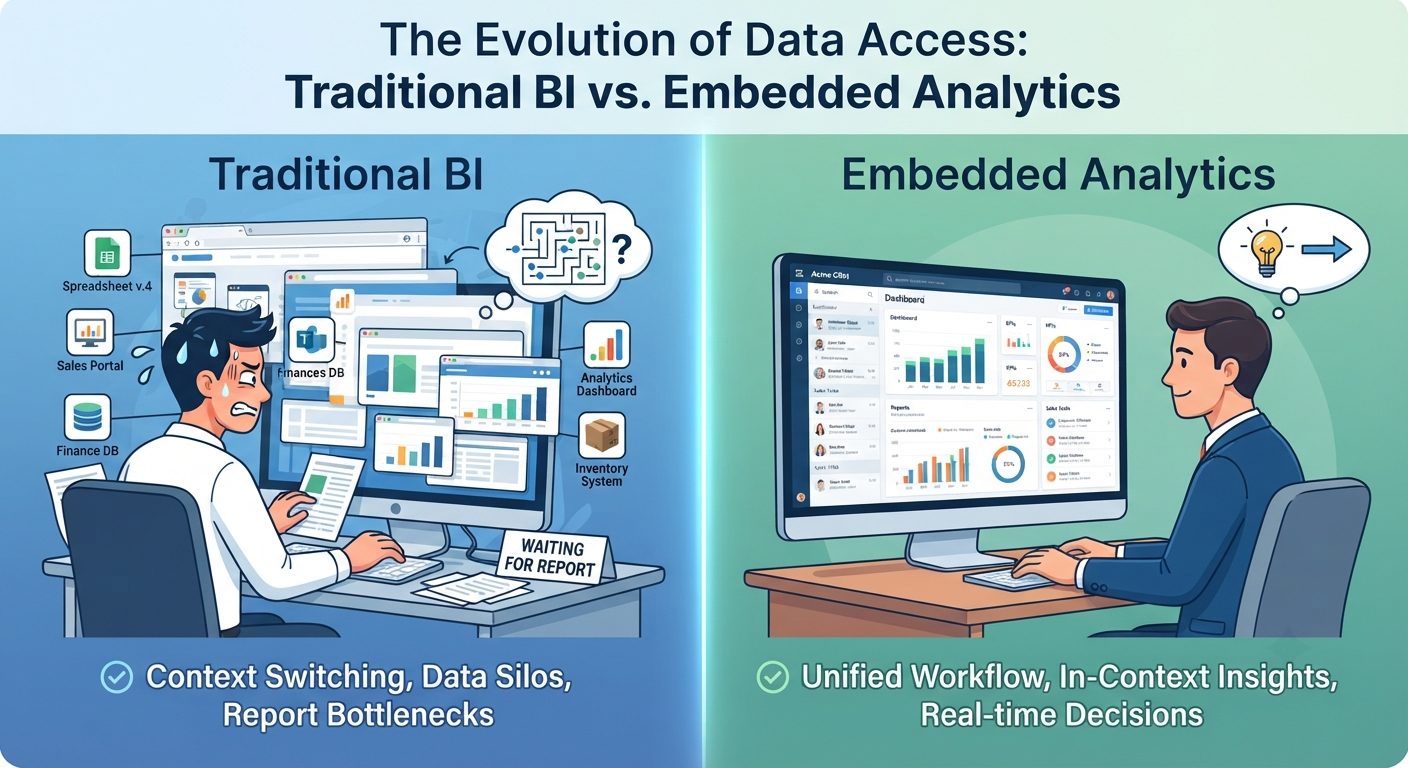
Embedded analytics software integrates reports, dashboards, and data exploration directly into a host application rather than requiring users to open a separate BI tool.
Embedded analytics vs traditional BI
| Area | Traditional BI | Embedded Analytics |
|---|---|---|
| Access model | Separate analytics portal | Native in-app experience |
| Typical audience | Internal analysts and power users | Product users, partners, customers |
| UX pattern | Tool switching | In-context decisions |
| Licensing model | Per-user licensing | Usually capacity-based embedding |
Microsoft-First Architecture
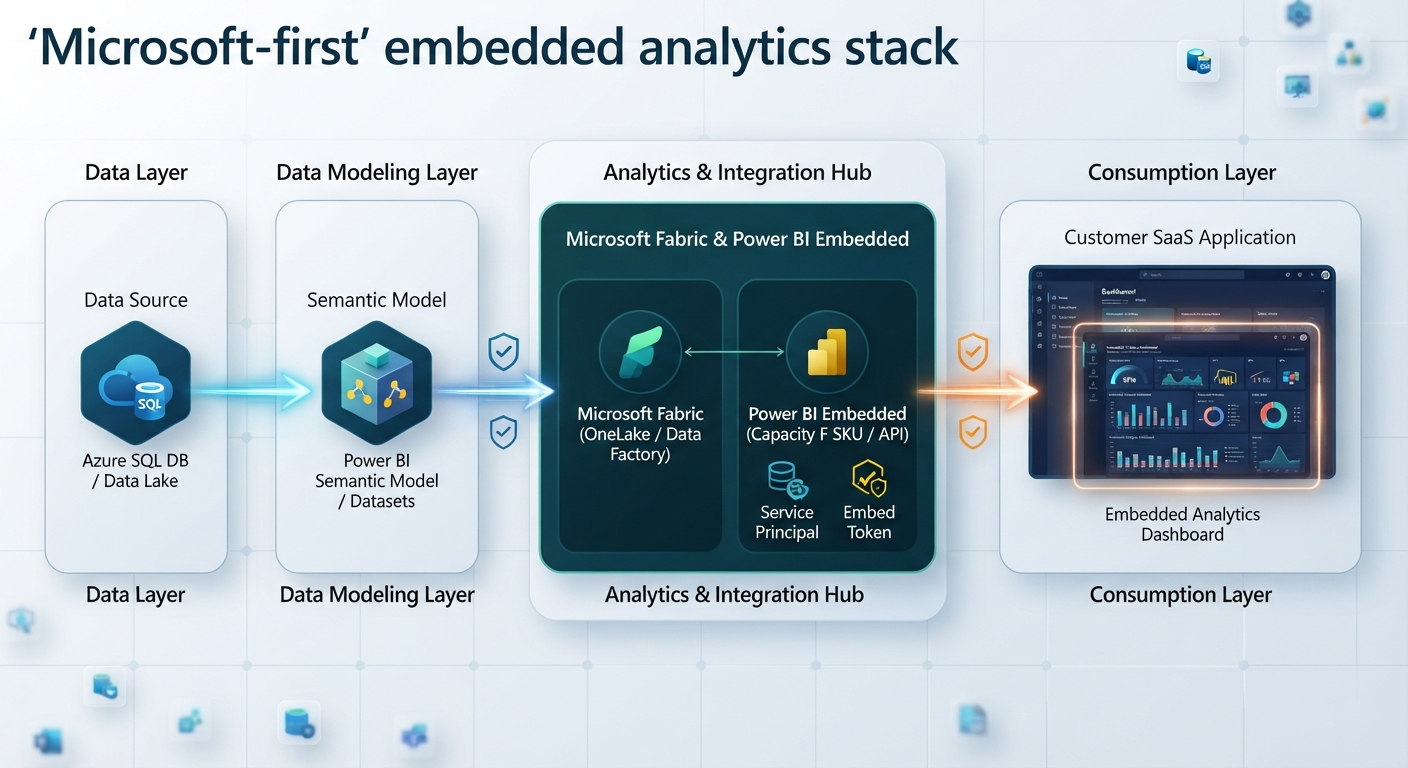
For Microsoft-powered businesses, the core implementation typically combines:
- Power BI Embedded for rendering and application integration
- Fabric capacity and OneLake for unified data and scale
- Governance controls including RLS, OLS, service principals, and tenant isolation
For rollout planning, teams often pair Power BI consulting with Microsoft Fabric governance and a reliable Microsoft Fabric data pipeline.
Use Cases That Deliver ROI
Embedded analytics is most effective when linked to measurable product workflows:
- SaaS account dashboards and customer usage portals
- In-app KPI and operations reporting for ERP and CRM systems
- Partner portals with tenant-isolated insights
- Financial reporting experiences for executive and client stakeholders
A common high-value pattern is a financial analytics portal where embedded analytics is integrated directly in the workflow instead of redirecting users into a separate reporting stack.
For adjacent implementation references, review related case studies and financial analytics implementation examples in the ARC knowledge base.
Security and Multi-Tenant Design
Strong security architecture determines whether embedded analytics scales safely:
- RLS for row-level data segmentation
- OLS for object-level restrictions
- Service principal authentication for app-based access
- Workspace isolation patterns for high-scale tenant separation
Weak isolation creates compliance and trust risk, especially in external-facing products.
Build vs Buy vs Partner-Led Delivery
| Path | Best for | Risk |
|---|---|---|
| Build in-house | Mature data and platform teams | Slow time-to-value |
| Buy standalone tool | Fast launch for non-Microsoft stacks | Fragmented governance |
| Microsoft-first with consulting | Azure/Fabric-oriented enterprises | Requires partner depth |
When speed and governance both matter, many teams combine productized deployment with advisory support from Power BI consulting and Azure consulting.
How Al Rafay Consulting Helps
ARC helps teams move from dashboard concept to secure productized delivery by aligning semantic model design, capacity planning, and governance controls.
For teams wanting a faster path, ARC provides Microsoft-first embedded analytics implementation services to accelerate rollout while maintaining enterprise guardrails.
Key Takeaways
- Embedded analytics creates in-context decision experiences that improve adoption.
- Microsoft-first architecture combines Power BI Embedded, Fabric capacity, and governance layers.
- Security and semantic model quality determine long-term scale and trust.
- Capacity planning should be done before customer-facing rollout.
- Product teams should treat embedded analytics as an ongoing capability, not a one-time project.
Ready to Embed Analytics Into Your Product Experience?
A strong rollout depends on architecture choices made early: security model, capacity, semantic layer, and UX integration.
Book an Embedded Analytics AssessmentFrequently Asked Questions
What is embedded analytics software?
Embedded analytics software integrates dashboards, reports, and data exploration directly into an operational application, portal, or product, so users can act on insights without switching to a separate BI tool.
How is embedded analytics different from business intelligence?
Traditional BI typically lives in a standalone tool users must visit separately, while embedded analytics is built directly into the application or workflow the user is already using - reducing context switching and improving adoption.
What is the difference between embedded analytics and customer-facing analytics?
Customer-facing analytics is a specific use case of embedded analytics, where the embedded dashboards are shown to external customers rather than internal users - often requiring stronger tenant isolation, white-labeling, and licensing considerations.
What are the best embedded analytics tools for Microsoft users?
Organizations already invested in the Microsoft data ecosystem typically get the most value from Power BI Embedded paired with Microsoft Fabric, since it integrates directly with existing Azure infrastructure, semantic models, and governance tools like Microsoft Entra ID and Purview.
Can Power BI be embedded into a custom application?
Yes. Power BI can be embedded into custom applications using the Power BI REST API and JavaScript SDK, typically under either the App Owns Data or User Owns Data model depending on the audience.
What is Power BI Embedded?
Power BI Embedded is Microsoft's capacity-based offering for integrating Power BI reports, dashboards, and semantic models into custom applications, commonly used by ISVs and SaaS companies to deliver analytics to end users without requiring individual Power BI licenses.
What is the difference between App Owns Data and User Owns Data?
App Owns Data authenticates through a service principal so end users don't need individual Power BI licenses - ideal for customer-facing products. User Owns Data requires each user to authenticate with their own licensed identity, typically used for internal enterprise scenarios.
Do end users need Power BI licenses for embedded reports?
Under the App Owns Data model with appropriate embedding capacity (an A/EM/P SKU or Fabric F SKU), end users do not need individual Power BI licenses. Under User Owns Data, individual licenses are required.
How does Microsoft Fabric support embedded analytics?
Microsoft Fabric unifies Power BI with data engineering and data science capabilities on a shared OneLake foundation, and its F SKU capacity tiers support embedding Power BI items - making it a single governed platform for both the data layer and the embedded analytics layer.
How do RLS and OLS secure embedded analytics?
Row-Level Security (RLS) restricts which rows of data a user or tenant can see, while Object-Level Security (OLS) restricts visibility of entire tables or columns based on role - together forming a core layer of tenant and user-level data protection in embedded reports.
What is the best architecture for multi-tenant SaaS analytics?
For most multi-tenant SaaS scenarios, a combination of RLS/OLS with the App Owns Data model is sufficient; for large-scale or highly sensitive multi-tenant deployments, workspace isolation with service principal profiles provides stronger tenant separation.
How much does embedded analytics software cost?
Cost depends heavily on the model chosen - capacity-based pricing (like Power BI Embedded/Fabric F SKUs) scales with usage and concurrency rather than per-user licensing, while other platforms may charge per end user or per feature tier. Total cost should also account for implementation, semantic modeling, and ongoing governance effort.
Should we build or buy embedded analytics?
Building in-house makes sense with mature engineering resources and highly custom requirements; buying (or using Power BI Embedded/Fabric with a consulting partner) is typically faster and lower-risk for organizations that want to focus engineering effort on their core product rather than analytics infrastructure.
What are the biggest implementation mistakes?
The most common mistakes are skipping semantic model governance, underestimating capacity needs, relying on RLS alone for high-scale multi-tenant security, and treating embedded analytics as a one-time technical integration rather than an ongoing product with its own adoption plan.
How can Al Rafay Consulting help implement embedded analytics?
ARC provides end-to-end embedded analytics implementation on Microsoft Fabric and Power BI Embedded - architecture, semantic modeling, security design, dashboard UX, and ongoing support - along with InsightArc as a productized starting point for teams that want a faster path to a Microsoft-native embedded analytics solution.

Al Rafay Consulting
ARC Team
AI-powered Microsoft Solutions Partner delivering enterprise solutions on Azure, SharePoint, and Microsoft 365.
LinkedIn Profile