Microsoft 365 Admin Center: Top Tips for IT Pros in 2026
Microsoft 365 Admin Center is master the Microsoft 365 admin center with practical tips for roles, security, monitoring, tenant management, and governance in 2026.
Master the Microsoft 365 admin center with practical tips for roles, security, monitoring, tenant management, and governance in 2026.
ARC Team
· Updated April 18, 2026 · ARC Team

The Microsoft 365 admin center is the daily control room for modern IT teams. Whether you manage 50 users or 5,000, it now sits at the center of productivity, security, licensing, reporting, and service updates.
In this guide, you will learn practical ways to use the Microsoft 365 admin center more strategically. We cover user and role management, security and monitoring, tenant operations, and governance practices that scale as your business grows.
Why the Microsoft 365 Admin Center Matters for IT Operations
The Microsoft 365 admin portal centralizes user management, billing, reports, service health, support requests, and global settings. Teams that treat it as an operational dashboard, not just a troubleshooting page, save time and reduce reactive work.
For an m365 administrator, the biggest benefit is context. Instead of switching between disconnected tools, teams can track users, licenses, roles, notices, and incidents in one place. That improves response speed and gives leadership a clearer picture of platform health.
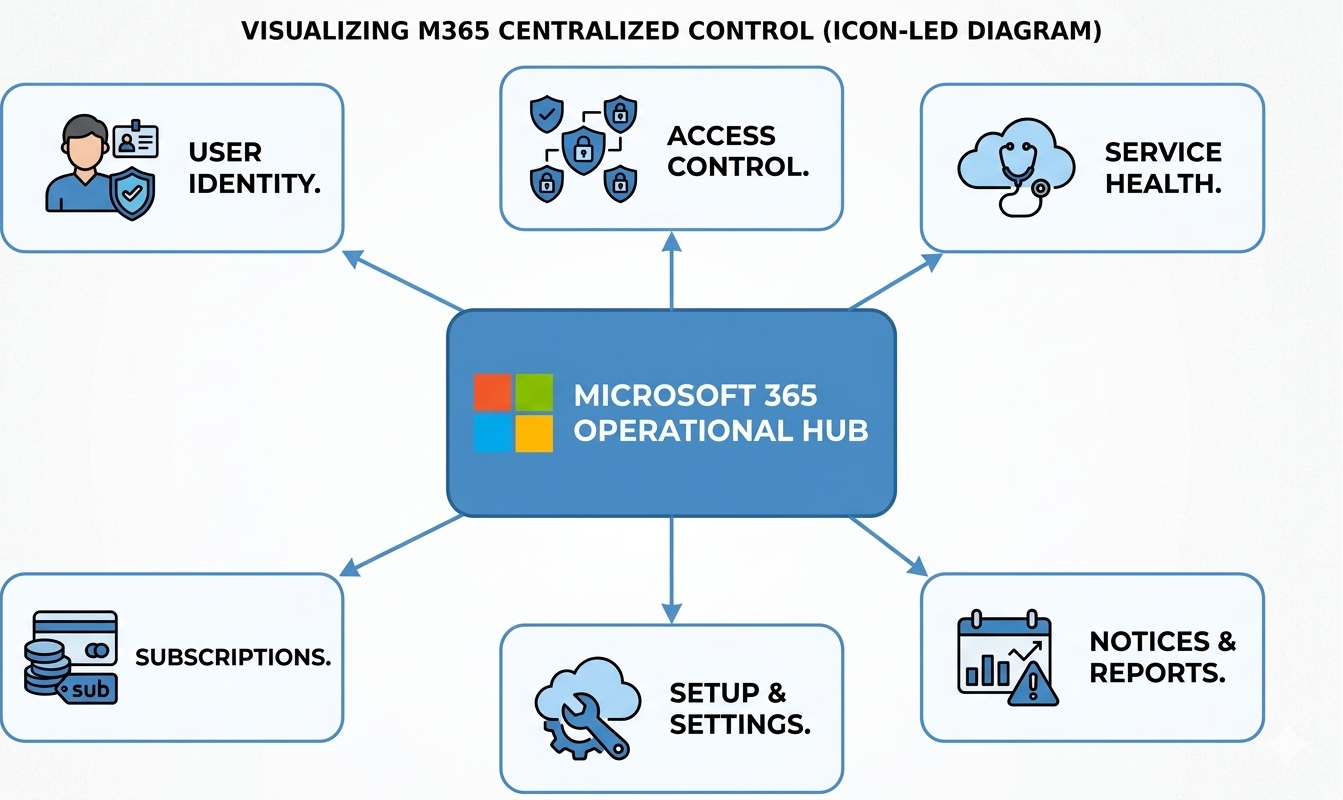
Smart User Management and Role Delegation
High-performing teams build repeatable joiner, mover, and leaver workflows. For joiners, create accounts and assign licenses correctly. For movers, review access and role changes together. For leavers, remove access quickly and reclaim licenses.
Role design is equally important. Use least privilege by default and map routine tasks to specialized roles instead of concentrating power in one or two global admins. This reduces risk, improves auditability, and keeps support work moving.
As environments grow, policy-driven administration becomes essential. Group-based licensing, scheduled role reviews, and naming standards make Microsoft 365 tenant management cleaner and far more scalable.
Security, Monitoring, and Response as a Continuous Cycle
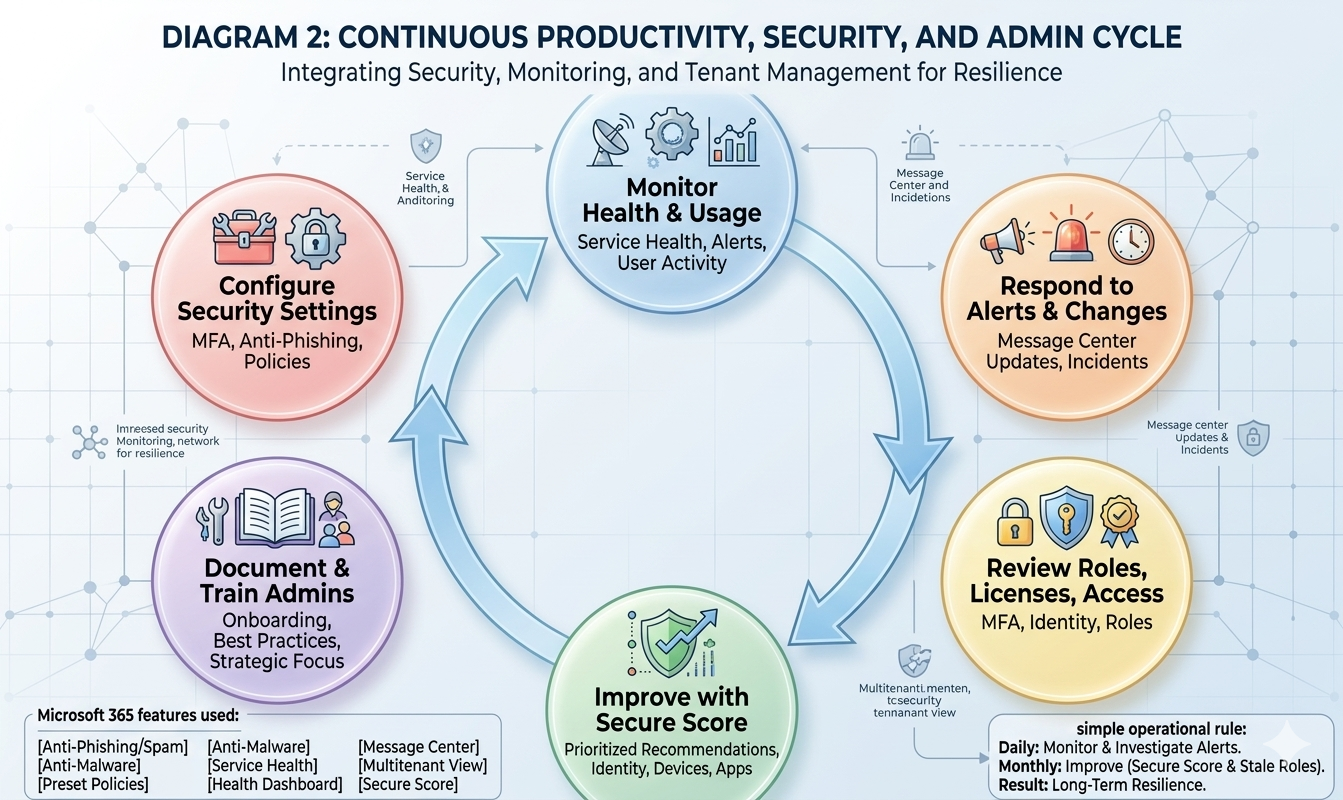
Microsoft 365 security settings should be handled as an operating rhythm, not a one-time project. Start with MFA and admin account protection, then expand anti-phishing, anti-malware, and policy controls across the tenant.
Service health, Health dashboard, and Message center should be reviewed daily. This gives teams early warning on incidents, upcoming service changes, and tenant-level actions. Secure Score then turns hardening work into a prioritized monthly roadmap.
Practical Microsoft 365 Governance That Scales
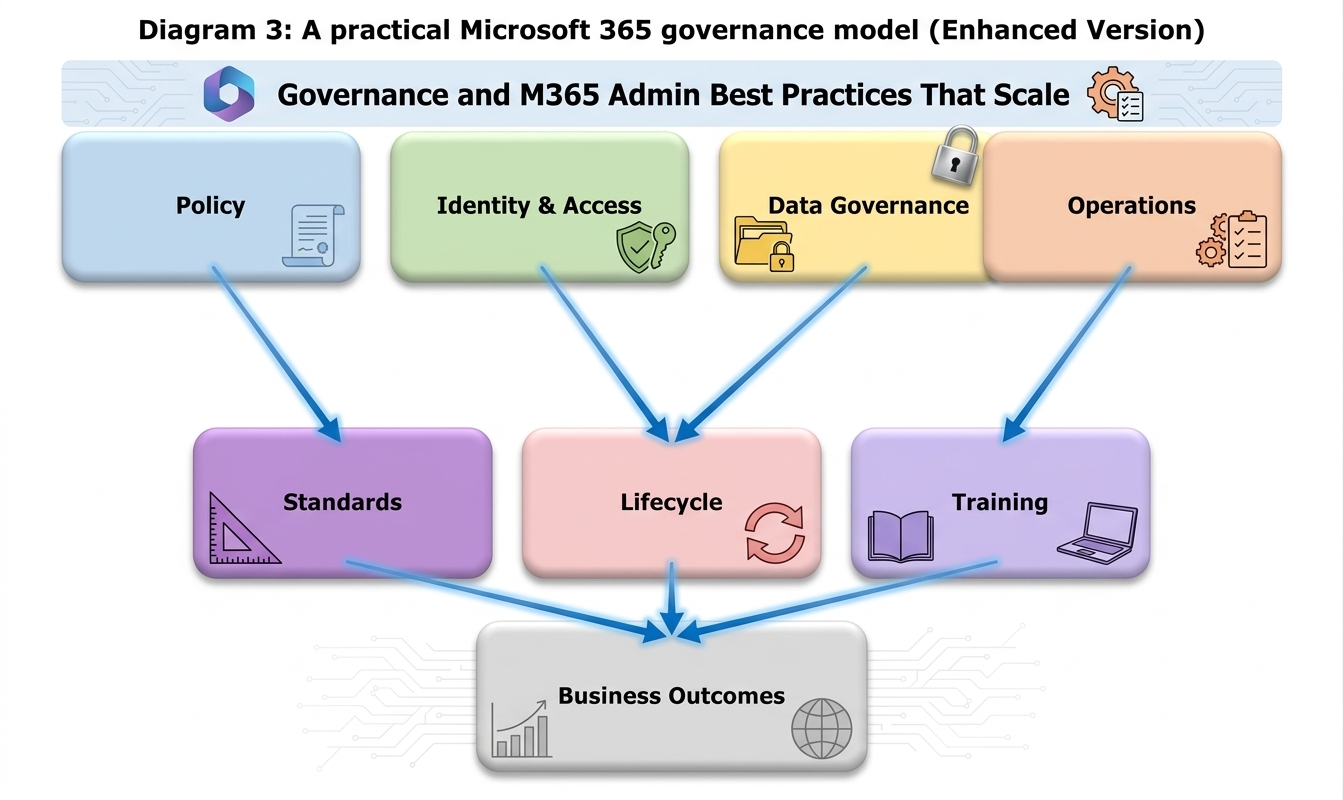
Strong Microsoft 365 governance is about consistent decisions: who can create collaboration spaces, how data is shared, what gets reviewed, and how changes are rolled out. Without these rules, support load and risk both rise over time.
A scalable governance model links policy, identity and access, data controls, operations, lifecycle standards, and training. Governance becomes practical when it is visible in day-to-day administration and connected to business outcomes.
Step-by-Step Framework for M365 Admin Excellence
| Phase / Step | Focus | Outcome |
|---|---|---|
| Step 1: Standardize Admin Baseline | User lifecycle, roles, default views, onboarding playbooks | Faster onboarding, fewer manual errors |
| Step 2: Establish Security and Monitoring Rhythm | MFA, service health checks, message center triage, secure score reviews | Lower risk and faster incident response |
| Step 3: Scale Governance and Training | Naming standards, lifecycle reviews, release management, admin enablement | Predictable growth with stronger compliance |
Phase 1: Standardize Daily Administration
Pin high-traffic areas in the admin center and document a standard daily routine. Define what must be checked each morning, who handles notices, and how exceptions are escalated.
Phase 2: Build Security and Change Visibility
Create a lightweight response model for incidents and updates. Pair daily monitoring with monthly improvement work so the tenant steadily gets more secure and more resilient.
Phase 3: Operationalize Governance Across Teams
Publish a concise internal admin guide with role design, lifecycle practices, support ownership, and change-control standards. Pair policy with short, role-specific admin training.
Key Business Benefits for Decision Makers
- Faster onboarding and offboarding: Users get access sooner and former accounts are closed more reliably.
- Lower operational risk: Least-privilege roles and recurring reviews reduce avoidable exposure.
- Better service continuity: Health monitoring and message center discipline reduce surprise disruptions.
- Improved license efficiency: Usage visibility helps leaders align spend with real business demand.
Core Admin Capabilities to Prioritize
- Service health and health dashboard monitoring
- Message center change tracking and impact summaries
- Secure Score-driven security improvement roadmap
- Role and access governance with lifecycle reviews
Frequently Asked Questions
What is the Microsoft 365 admin center?
It is the main portal for managing users, licenses, admin roles, security settings, service health, billing, reports, and support across Microsoft 365.
Which Microsoft 365 admin roles should be reviewed first?
Start with Global Administrator assignments, password or helpdesk roles, license administration roles, and any workload-specific elevated permissions.
What monitoring tools should admins check daily?
Review Service health, Health dashboard, and Message center every day to track incidents, usage concerns, and planned platform changes.
Why is Microsoft 365 governance important for productivity?
Governance reduces confusion in access, sharing, naming, and lifecycle decisions, so teams spend less time fixing preventable issues and more time delivering work.
What is the best way to improve Microsoft 365 security settings over time?
Secure admin accounts first, then run a monthly cadence to review Secure Score actions, stale roles, and policy gaps as part of routine operations.
Conclusion
The Microsoft 365 admin center is more than a settings page. It is where productivity, access, service reliability, and governance decisions meet. Teams that use it intentionally gain faster execution, stronger control, and fewer surprises.
If your organization is improving Microsoft 365 administration, ARC can help with strategy, implementation, governance, and optimization.
Work with Al Rafay Consulting: explore our Microsoft 365 admin center services to put this into practice, or book a free assessment.
Frequently Asked Questions
What is Zero Trust security?
Zero Trust is a security framework that assumes no user or device should be trusted by default — requiring continuous verification of identity, device health, and access permissions for every request.
How does Microsoft implement Zero Trust?
Microsoft Zero Trust uses Entra ID for identity, Intune for device compliance, Defender for threat protection, Purview for data protection, and Conditional Access for policy enforcement.
What compliance certifications does Microsoft support?
Microsoft cloud services hold SOC 1/2/3, ISO 27001/27018, HIPAA, FedRAMP, GDPR, PCI DSS, and 90+ other compliance certifications across industries and regions.
How do you assess security posture?
We evaluate Microsoft Secure Score, conduct gap analyses against frameworks like NIST and CIS, review configurations, test access controls, and provide prioritized remediation recommendations.
Can you help with regulatory compliance?
Yes. We implement Microsoft Purview compliance solutions including data classification, retention policies, eDiscovery, audit logging, and information barriers for regulated industries.

ARC Team
ARC Team
AI-powered Microsoft Solutions Partner delivering enterprise solutions on Azure, SharePoint, and Microsoft 365.
LinkedIn Profile