What Is Microsoft AI Foundry? Why do companies want it Fast?
Microsoft AI Foundry is microsoft AI Foundry—Azure's unified platform for building enterprise AI agents. Compare Classic vs New, explore features, pricing, APIs, and SDKs.
Discover Microsoft AI Foundry—Azure's unified platform for building enterprise AI agents. Compare Classic vs New, explore features, pricing, APIs, and SDKs.
ARC Team
· Updated April 6, 2026 · ARC Team

If you build AI apps on Azure, you may have seen Microsoft AI Foundry. This guide explains what it is, what it does, and why teams should use it. In short, Microsoft AI Foundry is Azure’s all-in-one platform. It helps you build, deploy, and manage enterprise AI agents and apps. You do not need to connect many services by hand. It brings agents, models, tools, monitoring, and governance into one interface.
Organizations looking to strengthen this area can work with custom AI app development.
What is Microsoft AI Foundry?
Microsoft AI Foundry is Azure’s all-in-one platform for building and running AI agents and apps. It also helps you manage enterprise-grade AI solutions.
Microsoft’s official documentation says the platform brings agents, models, tools, monitoring, and governance together. It does this under one Azure resource provider.
At its core, Microsoft AI Foundry is a single command center. Agents, models, and tools work together in one place. They are not spread across separate Azure services.
Core Capabilities:
- Production-grade infrastructure that scales automatically
- Built-in tracing, monitoring, and evaluation tools
- Unified role-based access control (RBAC) across all AI assets
- A single Azure resource provider namespace for simplified governance
- Developer-friendly interfaces so teams focus on building, not managing servers
Why Enterprises Are Adopting Microsoft AI Foundry Now
Enterprise AI is beyond early tests. Organizations now face more pressure to deploy AI agents. They must do it securely, at scale, and with strong governance.
Traditional Azure AI setups often require many connected services. Teams must manage separate access controls and build custom monitoring pipelines. This slows delivery and increases operational risk.
Microsoft AI Foundry addresses this shift. It offers one Azure platform for AI. It brings together AI models, agent orchestration, tools, monitoring, and governance in one managed experience. This helps enterprises standardize how they build and run AI. It reduces architectural complexity and speeds up time-to-value. It also supports security and compliance requirements.
For organizations planning AI initiatives in 2026, adopting a unified platform is no longer optional. Microsoft AI Foundry enables teams to move faster today — without creating longterm technical or governance debt tomorrow.
Foundry Classic vs. Foundry (New): What is the Difference?
Microsoft Foundry offers two portal experiences. Users can switch between them using the toggle in the portal banner.
| Feature | Foundry Classic | Foundry (New) |
|---|---|---|
| Resource Types | Multiple resource types, including Azure OpenAI, hub-based projects | Multi-agent applications with a modern, streamlined experience |
| Project Visibility | Visible projects | All resource types, including hub-based projects; Foundry projects only (default project per resource) |
| Experience | Comprehensive; supports all legacy configurations | Modernized UI with faster load times and dynamic prefetching |
Note: Links to Microsoft Foundry always open the version used most recently. Users may switch between versions at any time using the portal toggle.
Key Features of Microsoft AI Foundry
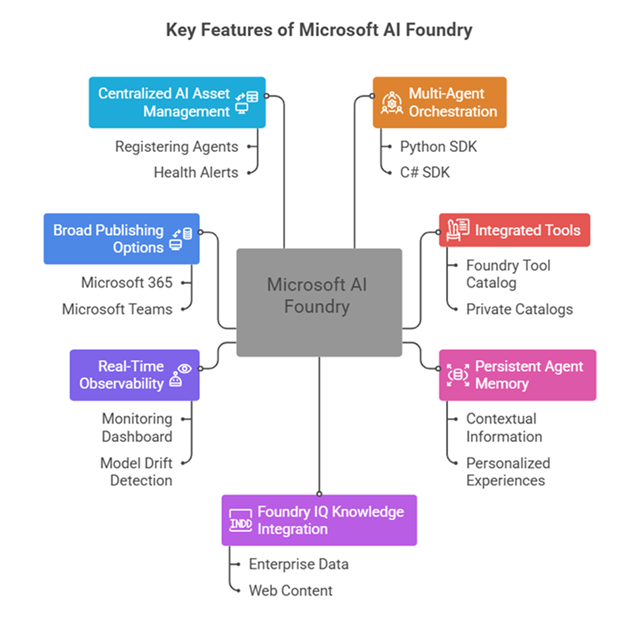
Multi-Agent Orchestration
Foundry enables advanced automation workflows where many AI agents work together on complex tasks. It supports Python and C# SDKs, letting teams build agents that hand off tasks and share context. Agents can also run in parallel.
1,400+ Integrated Tools
Through the Foundry Tool Catalog (now in preview), developers can access a public library of over 1,400 tools. They can also create private catalogs for internal tools. This greatly cuts the time needed to connect AI agents to real-world systems.
Persistent Agent Memory
Rather than treating each interaction as independent, Foundry agents can retain and recall contextual information across sessions. This enables more personalized and consistent user experiences without requiring users to repeat information.
Foundry IQ Knowledge Integration
Agents connect to a knowledge base powered by Foundry IQ. This grounds responses in real enterprise data or web content. It delivers citation-backed answers. This is valuable for compliance-focused industries like finance, legal, and healthcare.
Real-Time Observability and Monitoring
Foundry includes a built-in monitoring dashboard for tracking agent performance, detecting model drift early, and configuring continuous evaluations. Enterprise teams get governance-level visibility without building custom dashboards.
Broad Publishing and Deployment Options
Agents built in Foundry can be published to Microsoft 365, Microsoft Teams, BizChat, and containerized environments. This gives teams the flexibility to reach users across platforms without extra integration work.
Centralized AI Asset Management
The Operate section of Foundry (New) allows teams to manage all AI assets from a single view, including registering agents from other cloud providers, receiving health alerts, and maintaining oversight as the organization’s AI portfolio grows.
Microsoft Foundry API and SDK Support
Microsoft Foundry is built on a developer-first API architecture. Developers can explore SDKs, APIs, implementation guides, and architectural concepts in the Microsoft Foundry documentation.
The Foundry API gives one standard way to work with different AI models. This means teams can change or use multiple models without rebuilding their integrations.
Supported Programming Languages:
- Python — fully supported
- C# — fully supported
- JavaScript / TypeScript — preview
- Java — preview
Microsoft also provides a Foundry extension for Visual Studio Code. Developers can explore AI models and build AI agents directly inside VS Code, without switching tools.
Microsoft AI Foundry Pricing — Is It Free?
Microsoft AI Foundry is free to access and explore. You are not charged for browsing the platform or reviewing features.
You only pay when you deploy and use resources, such as:
- AI models (for example GPT-4 or custom models)
- Compute power for running AI agents
- Storage and connected data services
Each service has its own pricing, so costs depend on what you use.
Summary: You can test and prototype for free. You only pay when you go live and consume resources.
Managing Projects in Microsoft AI Foundry
The new Foundry portal is designed to be clean and easy to use.
- Your current project is shown at the top left
- You can switch projects from the project dropdown
- You can see all projects by selecting “View all projects”
- The new portal shows only the default project for each resource (For advanced or older projects, users can switch to Foundry Classic)
This keeps the new experience simple, while Classic supports large and complex environments.
Enterprise Controls and Preview Features
For production systems, stability and control are critical. Microsoft Foundry lets organizations manage which features are available.
Key Controls Include:
- RBAC — limit preview features based on user roles
- Azure Tags — hide preview features using tags
- GA Gates — allow only fully approved features in production
These controls are especially important for regulated industries that require strong compliance and audit controls.
Who Should Use Microsoft AI Foundry?
Microsoft AI Foundry is ideal for:
- Enterprise teams building internal or customer-facing AI solutions
- Data and ML teams that need strong monitoring and governance
- Startups and software companies building AI-powered products
- DevOps and platform teams managing security, access, and costs
Organizations can experiment for free before deciding on a full production setup.
Business Benefits Summary
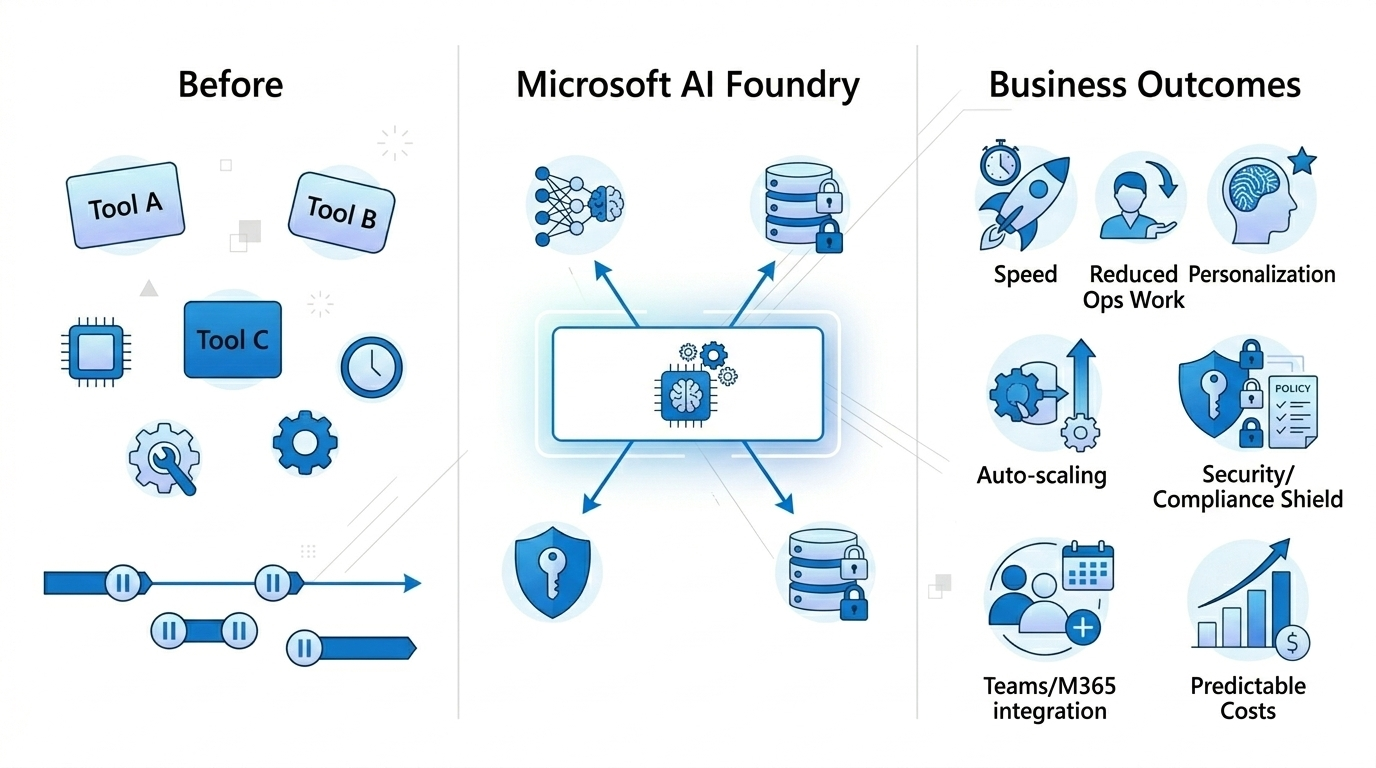
The Problem It Solves: Building AI solutions used to require many tools, high expertise, and long timelines. Microsoft AI Foundry brings everything together into one managed platform.
What Your Organization Gains:
- Faster delivery of AI solutions
- Less manual IT and operational work
- More personalized user experiences
- Automatic scaling as demand grows
- Strong enterprise security and compliance
- Easy integration with Microsoft Teams and Microsoft 365
- Clear and predictable costs
Frequently Asked Questions
What is the difference between Azure AI Foundry and Microsoft AI Foundry?
Azure AI Foundry has been rebranded to Microsoft AI Foundry. The underlying platform, capabilities, and APIs remain completely unchanged, only the product name has changed.
Is Microsoft AI Foundry free to use?
The platform is free to access and explore. Charges apply only when resources such as AI model APIs, compute, or storage are deployed. You pay only for what you consume.
Can I use Microsoft AI Foundry without deep Azure expertise?
Yes. The new Foundry portal is designed to be developer-friendly with simplified navigation and fast load times. A foundational understanding of core Azure concepts such as resource groups and RBAC will be beneficial as usage scales.
What AI models can I use with Microsoft Foundry?
Foundry provides a consistent API contract for working across multiple model providers, including Microsoft’s own models and third-party models available on Azure. You can switch or combine models without changing your core application logic.
How does Microsoft AI Foundry handle enterprise security and compliance?
Foundry includes unified RBAC, Azure Policy integration, AI gateway support, and MCP/A2A authentication protocols. Preview features can also be disabled via RBAC or Azure tags for tighter production environment controls.
How do I implement Microsoft AI Foundry for my business if I don’t have an in-house Azure team?
This is where a certified Microsoft Solutions Partner comes in. A qualified partner handles the architecture, environment setup, RBAC configuration, custom agent development, and integration with your existing Microsoft stack, so your team can focus on business outcomes rather than infrastructure. Al Rafay Consulting specializes in exactly this, with over 10 years of Microsoft implementation experience across enterprise and mid-market clients.
Can Microsoft AI Foundry agents integrate with Microsoft 365, SharePoint, and Teams?
Yes, and this is one of Foundry’s most powerful practical applications. Agents built in Foundry can be published directly to Teams, Microsoft 365, and BizChat. For organizations that want these integrations configured properly alongside their existing SharePoint and Power Platform environment, working with a Microsoft Solutions Partner ensures a seamless rollout.
Conclusion
Microsoft AI Foundry is a big step forward for building and running AI in enterprises. It brings agents, models, tools, monitoring, and governance into one platform. This reduces infrastructure complexity and helps AI teams move faster. The free entry point makes it easy to test before choosing a deployment approach. Its wide set of features can support organizations as their AI goals grow.
Get Started
- Visit the Microsoft Foundry portal at ai.azure.com
- Consult the official documentation at learn.microsoft.com/azure/foundry
- Contact Al Rafay Consulting for expert guidance on implementation and adoption
Work with Al Rafay Consulting: explore our Azure AI Foundry services to put this into practice, or book a free assessment.
Frequently Asked Questions
What is Microsoft AI Foundry?
Microsoft AI Foundry is an enterprise AI platform that unifies model access, agent orchestration, development tools, monitoring, and governance controls in one managed environment for building and deploying AI solutions at scale.
Who should use Microsoft AI Foundry?
Enterprise organizations looking to move beyond AI pilots into production-scale AI systems. It is ideal for teams needing centralized governance, multi-model access, and integrated observability.
How does AI Foundry differ from Azure OpenAI Service?
Azure OpenAI provides model API access, while AI Foundry is the full platform layer that includes orchestration, agent frameworks, evaluation tools, deployment options, and governance — with Azure OpenAI as one of its model providers.
What models are available in AI Foundry?
AI Foundry offers GPT-4o, GPT-4, GPT-3.5 Turbo, open-source models like Llama and Mistral, plus specialized models for embeddings, vision, and speech processing.
Is AI Foundry suitable for regulated industries?
Yes. AI Foundry includes enterprise-grade security, RBAC, audit logging, content filtering, and compliance certifications making it suitable for healthcare, financial services, and government use cases.

ARC Team
ARC Team
AI-powered Microsoft Solutions Partner delivering enterprise solutions on Azure, SharePoint, and Microsoft 365.
LinkedIn Profile