Migrate Google Workspace to M365 Without Pain
Migrate Google Workspace to M365 Without Pain refers to the process of a practical migration roadmap for moving from Google Workspace to Microsoft 365 with lower risk, stronger governance, and smoother user adoption.
A practical migration roadmap for moving from Google Workspace to Microsoft 365 with lower risk, stronger governance, and smoother user adoption.
ARC Team
· Updated April 16, 2026 · ARC Team

If your migration is also reshaping how teams store and govern files, our SharePoint consulting services can help you design the target SharePoint and OneDrive structure before cutover begins.
Migrating from Google Workspace to Microsoft 365 is not just an email move. It affects identity, collaboration workflows, file governance, endpoint readiness, and user behavior.
The most successful migrations use a phased roadmap with clear technical checkpoints and strong adoption planning.
Why Migration Projects Struggle
Many migration efforts run into avoidable issues: unclear cutover design, poor data classification, limited pilot testing, and insufficient user enablement. A structured plan reduces these risks significantly.
Migration Roadmap
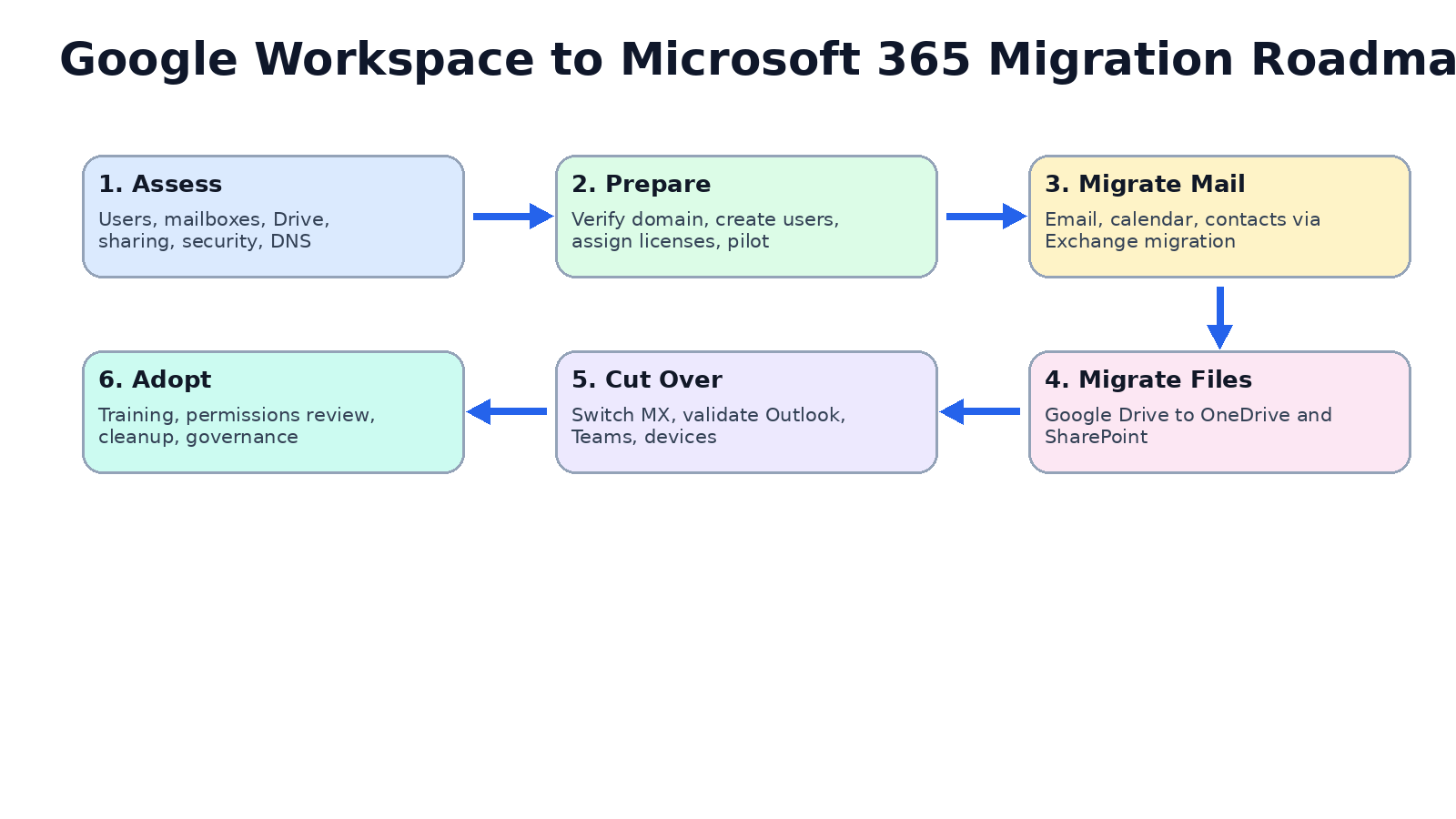
| Phase | Focus | Outcome |
|---|---|---|
| Phase 1 | Assess and design | Validated migration blueprint |
| Phase 2 | Prepare and pilot | Risk-controlled readiness |
| Phase 3 | Migrate and optimize | Stable post-migration operations |
Phase 1: Assess and Design
Inventory users, mailbox sizes, Drive structures, permissions, and compliance requirements. Confirm target identity and tenant architecture.
Phase 2: Prepare and Pilot
Set up users, license mapping, coexistence controls, and migration tooling. Run pilot migrations for representative teams before broad rollout.
Phase 3: Migrate and Optimize
Execute staged migration waves for mail and files, validate access and policy enforcement, and optimize security and adoption after cutover.
What to Migrate and In What Order
Email, Calendar, and Contacts
Prioritize communication workloads first with clear coexistence and cutover windows.
Files and Collaboration Content
Map Google Drive structures to OneDrive and SharePoint with ownership and permissions cleanup.
Security and Governance Policies
Apply Microsoft 365 security, access, and compliance policies as part of migration, not as an afterthought.
Business Benefits
- Stronger Security Controls: Improved policy consistency and identity governance.
- Unified Collaboration Stack: Better alignment across Teams, SharePoint, and OneDrive.
- Operational Predictability: Structured wave-based migration lowers disruption.
- Long-Term Governance: Better compliance and reporting foundations.
Common Mistakes to Avoid
- Migrating without pilot validation
- Preserving broken permission models as-is
- Treating migration as purely technical with no adoption plan
- Skipping post-migration governance optimization
Frequently Asked Questions
How long does a typical migration take?
Timelines depend on user count, data volume, and complexity, but phased programs typically run from weeks to a few months.
Can we migrate without full downtime?
Yes. Most organizations use staged coexistence and controlled cutover windows to minimize disruption.
What happens to shared drives and permissions?
They should be mapped deliberately to SharePoint and OneDrive structures with cleanup and governance alignment.
How do we reduce user friction?
Use pilot groups, role-based training, and clear communication on what changes and when.
Conclusion
Google Workspace to Microsoft 365 migration succeeds when technical execution, governance, and user adoption are planned together. A phased strategy helps reduce risk while improving long-term operational maturity.
If your organization is preparing for migration, ARC can support strategy, implementation, and optimization end to end.
Frequently Asked Questions
How long does a typical migration take?
Timelines depend on user count, data volume, and complexity, but phased programs typically run from weeks to a few months.
Can we migrate without full downtime?
Yes. Most organizations use staged coexistence and controlled cutover windows to minimize disruption.
What happens to shared drives and permissions?
They should be mapped deliberately to SharePoint and OneDrive structures with cleanup and governance alignment.
How do we reduce user friction?
Use pilot groups, role-based training, and clear communication on what changes and when.

ARC Team
ARC Team
AI-powered Microsoft Solutions Partner delivering enterprise solutions on Azure, SharePoint, and Microsoft 365.
LinkedIn Profile