Migrate to SharePoint Online Before You Regret It
Migrate to SharePoint Online Before You Regret It refers to the process of delaying SharePoint Online migration increases operational, security, and governance risk. Learn a structured migration approach for enterprise outcomes.
Delaying SharePoint Online migration increases operational, security, and governance risk. Learn a structured migration approach for enterprise outcomes.
ARC Team
· Updated May 5, 2026 · ARC Team

Legacy file servers and on-premises SharePoint often seem stable until growth, audits, and hybrid collaboration expose hidden risk.
If your organization is planning a SharePoint modernization strategy, our SharePoint consulting services can help you assess migration scope, governance, and business readiness before you commit.
Delaying migration usually does not fail in one dramatic event. It fails slowly through rising support load, inconsistent permissions, and weak governance visibility.
Why Delays Become Expensive
- Infrastructure overhead keeps increasing.
- Security and compliance reviews become harder.
- Users bypass official tools with shadow workflows.
- IT spends more time maintaining legacy systems than enabling progress.
Modernization Requires More Than File Copy
Migrating to SharePoint Online is not a lift-and-shift exercise. It should include:
- Information architecture redesign.
- Permission model cleanup.
- Governance and lifecycle controls.
- Adoption planning and post-migration optimization.
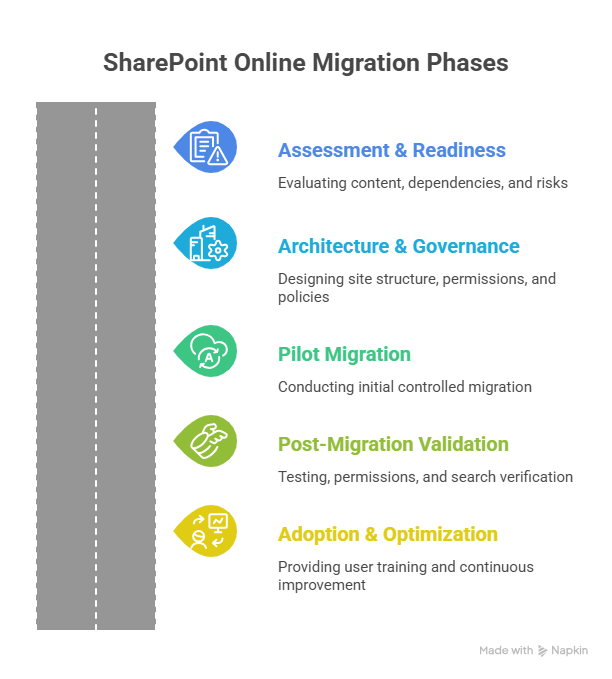
Structured Migration Framework
| Phase | Focus | Outcome |
|---|---|---|
| Readiness | Content inventory, risk analysis | Defined migration scope |
| Architecture | IA, permissions, governance | Clean target environment |
| Pilot | Limited wave validation | Reduced migration risk |
| Scale | Phased rollout with monitoring | Predictable delivery |
| Validation | Permissions and completeness checks | Operational stability |
| Adoption | Training and optimization | Sustainable ROI |
Frequently Asked Questions
How long does SharePoint Online migration take?
Should we migrate everything as-is?
What is the biggest migration mistake?
Frequently Asked Questions
What is SharePoint Online?
SharePoint Online is a cloud-based platform for document management, intranet portals, team collaboration, and business process automation — included in Microsoft 365 Business and Enterprise plans.
How does SharePoint integrate with Microsoft Teams?
Every Teams channel has a SharePoint site behind it for file storage. SharePoint powers the document libraries, wiki pages, and list functionality within Teams.
Can SharePoint handle enterprise-scale content?
Yes. SharePoint Online supports millions of documents per library with enterprise search, metadata navigation, AI-powered classification, and compliance features built in.
Is SharePoint secure for sensitive documents?
Yes. SharePoint includes granular permissions, sensitivity labels, DLP policies, audit logging, conditional access, and retention policies to protect sensitive and regulated content.
How long does a SharePoint implementation take?
Simple team sites take 1-2 weeks. Enterprise intranet projects typically take 6-12 weeks including information architecture, design, development, content migration, and user training.

ARC Team
ARC Team
AI-powered Microsoft Solutions Partner delivering enterprise solutions on Azure, SharePoint, and Microsoft 365.
LinkedIn Profile