Nearshore vs Offshore Software Development: Which Model Fits Your Roadmap?
Nearshore software development uses nearby time zones for high collaboration, while offshore development prioritizes lower rates with more asynchronous workflows.
Compare nearshore vs offshore software development across cost, collaboration, security, and Microsoft-stack delivery fit.
Al Rafay Consulting
· Updated July 14, 2026 · ARC Team
Your roadmap will not pause for hiring delays. If delivery pressure is rising and Microsoft platform work is expanding, the next strategic choice is often nearshore vs offshore software development.
This guide compares both models in practical terms: cost, collaboration, time-zone overlap, security governance, and Microsoft delivery fit across Azure, .NET, Power Platform, and Dynamics 365.
If your team is deciding how development and long-term operations should work together, start by reviewing our Managed IT Services solutions.
Quick Answer: Nearshore vs Offshore
| Factor | Nearshore | Offshore |
|---|---|---|
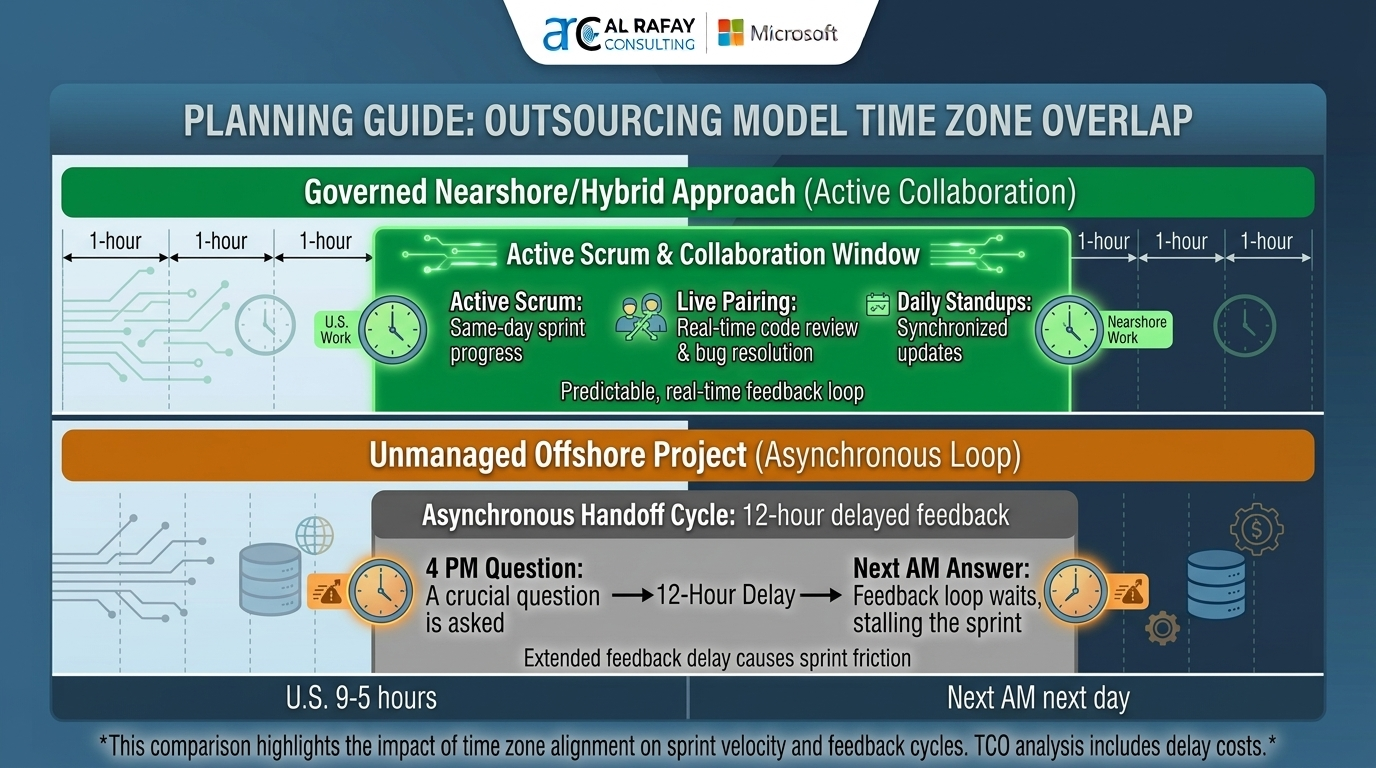
| Time-zone overlap | High, often same-day collaboration | Low, usually async-first workflows |
| Hourly cost | Moderate | Lower |
| Agile feedback speed | Strong | Variable |
| Best for | Evolving, high-collaboration roadmaps | Well-scoped, execution-heavy work |
| Management overhead | Lower to moderate | Moderate to high |
What Nearshore and Offshore Actually Mean
Nearshore software development means outsourcing to teams in nearby regions with meaningful overlap in business hours. For U.S.-based organizations, this is commonly Latin America.
Offshore software development means outsourcing to more distant regions with larger time-zone differences, commonly India, Vietnam, Eastern Europe, and the Philippines.
Both models can work. The right choice depends on collaboration intensity, requirement stability, and governance maturity.
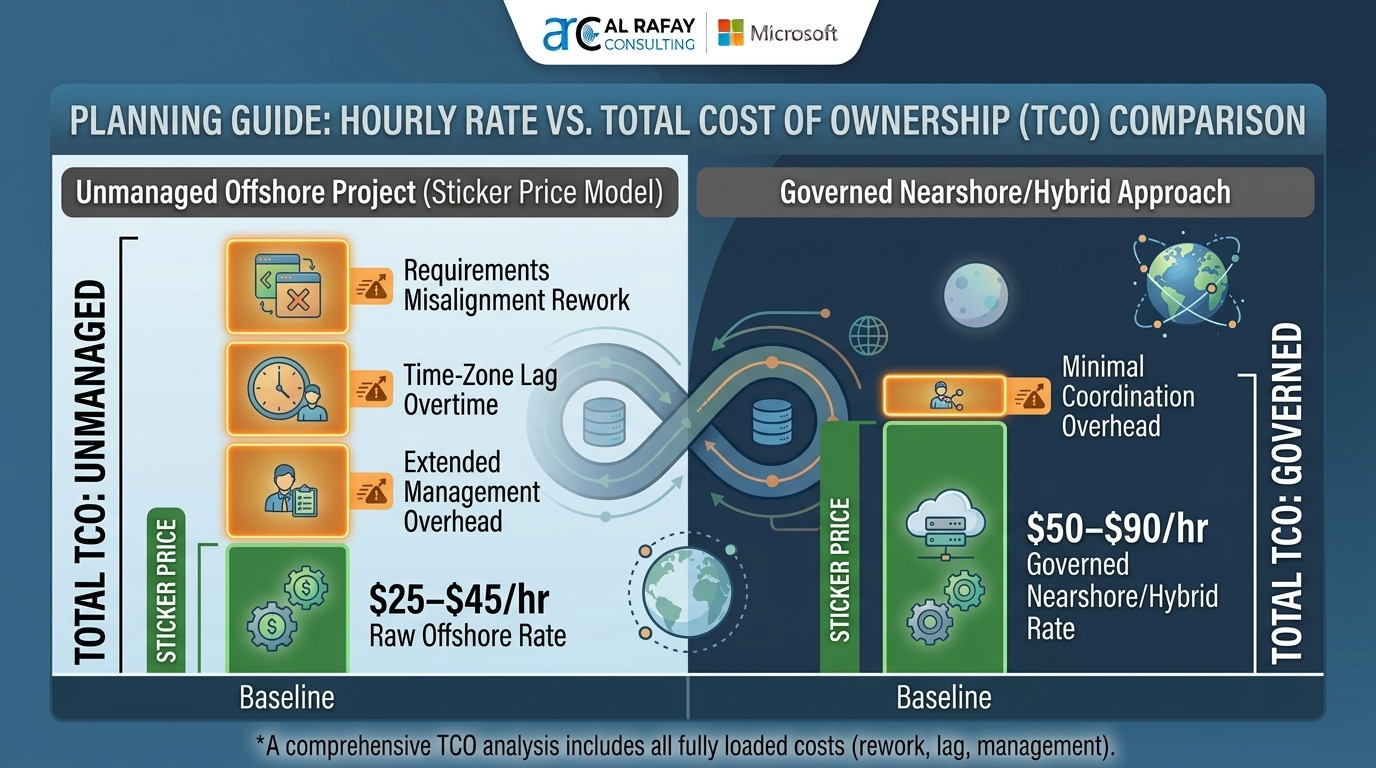
Cost vs Total Cost of Ownership
Hourly rate is only one line item. Real delivery cost includes:
- Rework from requirement gaps
- Escalation and incident response delays
- Coordination overhead across time zones
- QA and governance effort for distributed teams
Offshore usually wins on raw rate. Nearshore often wins when fast feedback loops and fewer handoff delays reduce total rework.
Collaboration and Sprint Velocity
Nearshore models typically support real-time standups, backlog refinement, and same-day issue resolution. That is critical for evolving product decisions.
Offshore models perform best when backlog items are explicit, acceptance criteria are tight, and async handoffs are disciplined.
Use this rule: when requirements are still moving, optimize for overlap; when requirements are stable, optimize for scale and rate.
Microsoft Stack Fit: Where Teams Commonly Succeed
- Azure and .NET modernization with active architecture decisions: nearshore or hybrid
- Power Platform delivery with frequent business-user feedback: nearshore
- Dynamics 365 backlogs following Success by Design: nearshore or hybrid
- Stable execution streams with fixed acceptance criteria: offshore can scale efficiently
When to Choose Nearshore
- Product requirements change frequently
- Leadership needs daily engineering interaction
- Live workshops and rapid iteration drive outcomes
- Security and compliance reviews need real-time coordination
When to Choose Offshore
- Scope is well defined with clear acceptance criteria
- Work can be decomposed into async handoffs
- Cost efficiency is a primary objective
- Team scaling speed is more important than same-day collaboration
When Hybrid Is Best
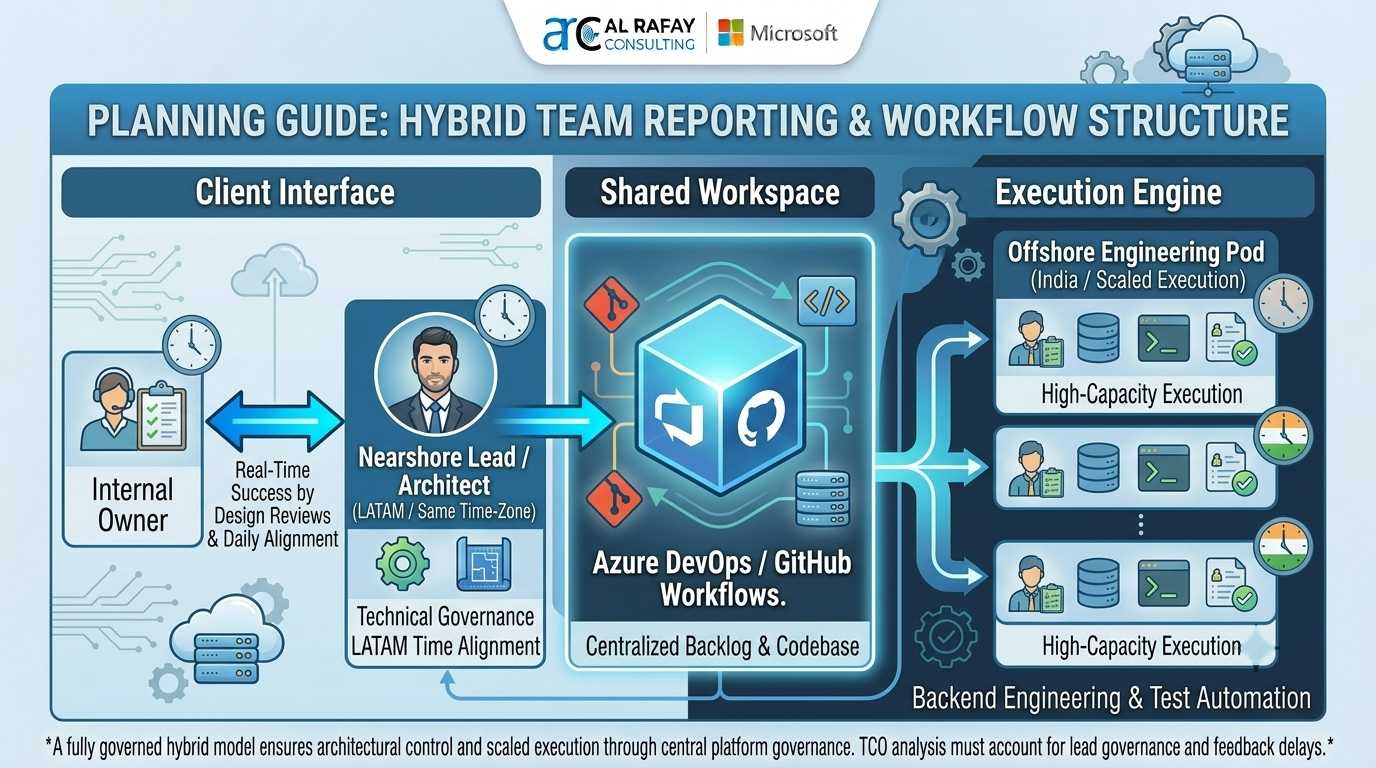
A hybrid model usually combines nearshore leadership and offshore execution. This often works well when you need both governance speed and cost-efficient scale.
Typical structure:
- Nearshore architect or technical lead
- Offshore engineering pods for build throughput
- Shared QA and DevOps guardrails in Azure DevOps or GitHub
Vendor Evaluation Checklist
- Interview the engineers who will actually be assigned
- Verify Microsoft-specific capability (.NET, Azure, Power Platform, Dynamics 365)
- Confirm IP assignment and NDA terms in writing
- Validate SOC 2 or ISO 27001 status where relevant
- Enforce least-privilege access through Microsoft Entra ID
- Define KPIs before kickoff: velocity, defect rate, SLA adherence
- Document transition criteria from build phase to managed operations
Common Risks and Controls
| Risk | Why it happens | Control |
|---|---|---|
| Slow sprint velocity | Low overlap for unresolved questions | Use nearshore or hybrid for high-ambiguity work |
| Hidden cost overrun | Hourly-rate focus without TCO controls | Track rework, delays, and management overhead from sprint one |
| Security gaps | Weak onboarding and access discipline | Enforce Entra ID least-privilege and audited access reviews |
| Quality inconsistency | No shared delivery governance | Use unified workflows in Azure DevOps or GitHub |
| No support handoff | Build team exits without ops ownership | Define managed-services transition plan before go-live |
Best Practices
- Select delivery model by collaboration intensity, not rate alone
- Evaluate total cost of ownership, not hourly benchmarks in isolation
- Standardize delivery workflows across repos, pipelines, and release controls
- Require Microsoft-platform governance from day one
- Plan the operational handoff before implementation is complete
Conclusion
Nearshore and offshore are not better-or-worse choices. They are different operating models for different delivery constraints.
Nearshore is usually stronger for high-collaboration, fast-changing roadmaps. Offshore can be effective for stable, execution-driven streams. Hybrid often provides the best balance for Microsoft-centric programs that need both responsiveness and scale.
To align your delivery model with long-term operational stability, review our Managed IT Services solutions and map your transition path before production risk increases.
Ready to Choose the Right Model?
Al Rafay Consulting helps organizations evaluate nearshore, offshore, and hybrid delivery models for Microsoft ecosystems with clear governance, measurable KPIs, and practical support handoff strategies.
Frequently Asked Questions
What is nearshore software development?
Nearshore software development is outsourcing engineering work to teams in nearby countries, usually within one to four time zones, so collaboration can happen during overlapping business hours.
What is offshore software development?
Offshore software development is outsourcing engineering work to distant countries with larger time-zone differences, usually to reduce hourly cost and access larger talent pools.
What is the main difference between nearshore and offshore models?
The main differences are time-zone overlap, collaboration speed, and cost structure. Nearshore improves real-time communication, while offshore often lowers hourly rates but requires stronger async discipline.
Is offshore always cheaper than nearshore?
Offshore rates are often lower, but total cost of ownership can rise if rework, communication delays, and management overhead are not controlled.
What is a hybrid nearshore-offshore model?
A hybrid model combines nearshore leadership for real-time collaboration with offshore execution capacity for cost-efficient scaling.
How do we transition from outsourced development to managed support?
Plan the handoff during implementation by defining operational ownership for monitoring, patching, backup, and security before production stabilization.

Al Rafay Consulting
ARC Team
AI-powered Microsoft Solutions Partner delivering enterprise solutions on Azure, SharePoint, and Microsoft 365.
LinkedIn Profile