Property Management Software Buyer's Guide: How to Choose the Right Platform for Your Portfolio
Property management software is a centralized system for leasing, accounting, maintenance, communication, and reporting across residential, commercial, or mixed-use portfolios.
Learn how to evaluate property management software by portfolio type, feature fit, integration depth, and total cost, with a practical framework for real estate teams.
Al Rafay Consulting
· Updated July 14, 2026 · ARC Team

Most property management software guides start with vendor lists. The real problem starts earlier: many teams evaluate software before defining what their portfolio actually needs.
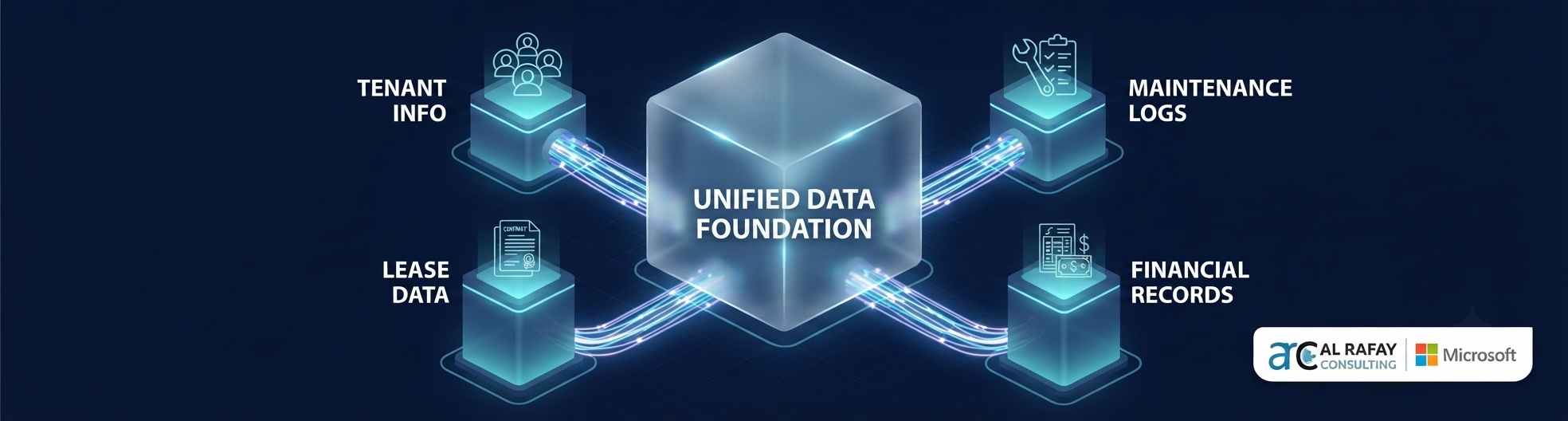
When leasing, accounting, maintenance, tenant communication, and reporting run in separate tools, operations slow down and risk increases. Teams lose time to manual reconciliation, miss key renewal windows, and struggle to produce consistent investor-ready reporting.
This guide explains how to choose the right property management software with a practical evaluation framework: portfolio fit, feature depth, integration requirements, governance, implementation planning, and total cost of ownership.
If your team is evaluating options now, review our real estate technology solutions to compare off-the-shelf and Microsoft-native implementation paths.
What Is Property Management Software?
Property management software is a platform that centralizes daily real estate operations into one system: lease records, tenant workflows, payments, maintenance coordination, and performance reporting.
It is not just storage for documents or a rent collection portal. At scale, it becomes the operating layer that connects property teams, finance, leadership, and investors.
Portfolio Type Matters Before Vendor Selection
A tool that works for one portfolio type can underperform badly in another.
- Residential portfolios usually prioritize tenant onboarding, lease renewal, payment workflows, and service request handling.
- Commercial portfolios require support for CAM reconciliation, NNN terms, escalations, and multi-entity financial reporting.
- Mixed-use portfolios need both models in one operating view.
- Enterprise portfolios need stronger governance, workflow controls, role-based approvals, and BI-grade reporting.
Core Capabilities to Evaluate
| Capability | Why it matters | What to ask |
|---|---|---|
| Lease and tenant management | Reduces fragmented records and missed dates | How are critical dates and renewal alerts handled? |
| Accounting and rent operations | Lowers reconciliation overhead | Does it replace accounting or integrate with ours? |
| Maintenance and vendor workflows | Improves service reliability | How are work orders tracked and escalated? |
| Tenant and owner portals | Reduces routine inbound requests | What can tenants and owners self-serve? |
| Reporting and analytics | Improves decision quality | Can we customize reports by property and entity? |
| Security and auditability | Supports compliance and investor trust | What RBAC and audit logging are included? |
| Integrations and APIs | Prevents new data silos | Which systems are supported natively? |
Why Teams Replace Legacy Tools
Most organizations do not switch due to one missing feature. They switch because operating friction compounds over time.
Common triggers include:
- Duplicate data entry across disconnected systems
- Slow approvals and inconsistent contract workflows
- Limited reporting confidence at portfolio level
- Poor integration with ERP or BI tools
- Migration and governance issues that become harder to fix later
Off-the-Shelf vs Microsoft-Native Approach
| Approach | Strength | Trade-off |
|---|---|---|
| Off-the-shelf PMS | Faster deployment for standard workflows | Customization depth depends on vendor roadmap |
| Microsoft-native build (Power Platform, Dynamics 365, Power BI, Azure) | Flexible process design and deep enterprise integration | Requires implementation expertise and governance discipline |
For Microsoft 365-heavy organizations, a tailored architecture can be a better long-term fit when portfolio complexity exceeds default platform templates.
AI in Property Management: Practical Use Cases
AI can provide measurable value when paired with clean data and workflow governance.
Current high-value use cases:
- Lease abstraction and metadata extraction
- Work order triage and prioritization
- Tenant communication drafting and routing
- Portfolio anomaly detection and trend analysis
Use caution with fully autonomous decisioning in legal or financial workflows without human review and audit checkpoints.
Implementation Roadmap
- Document actual current workflows across leasing, maintenance, and finance.
- Audit data quality before migration planning.
- Build a weighted vendor scorecard based on your portfolio requirements.
- Validate integration design with accounting, ERP, and BI stakeholders.
- Pilot with one segment before full rollout.
- Run role-based training and adoption support.
- Track KPIs and optimize configuration every quarter.
Common Mistakes Buyers Make
- Choosing based on popularity instead of portfolio fit
- Underestimating migration and data cleanup effort
- Ignoring integration depth until after purchase
- Treating training as optional
- Comparing license price without total cost of ownership
Buyer Checklist
- Portfolio complexity documented (residential, commercial, mixed-use)
- Workflow map completed across leasing, accounting, and maintenance
- Data audit completed for lease and tenant records
- Integration requirements validated with finance and IT
- Security and governance controls defined
- Vendor scoring model weighted to real priorities
- Pilot plan approved before full rollout
- Post-go-live KPI baseline defined
Conclusion
The best property management software is the one that fits your portfolio structure, reporting needs, and operational model, not the one with the largest feature matrix.
A strong evaluation process focuses on fit, integration, governance, and adoption from day one. When those foundations are clear, implementation risk drops and long-term value increases.
If you are deciding between platform options, explore PropertArc for commercial property management to map your current-state gaps and define the right rollout path for your portfolio.
Frequently Asked Questions
What is property management software?
Property management software is a platform that centralizes leasing, tenant communication, maintenance, accounting, and reporting into one connected operating system for real estate portfolios.
What is the difference between residential and commercial property management software?
Residential tools focus on screening, rent collection, and renewal workflows, while commercial tools require support for CAM reconciliation, NNN lease terms, escalations, and deeper financial reporting.
Does property management software include accounting?
Many platforms include core accounting such as GL, AP, AR, and rent roll functions, but teams should validate whether it replaces existing accounting tools or integrates with them.
Can property management software integrate with Microsoft tools?
Yes. Many modern implementations integrate with Microsoft 365, Power Platform, Power BI, and Dynamics 365 for workflow automation, analytics, and enterprise governance.
How long does implementation usually take?
A phased rollout often starts with one property type or business unit and can begin showing value in 6 to 12 weeks, depending on data quality, integration scope, and training readiness.
What KPIs should buyers track after implementation?
Common KPIs include lease cycle time, work order turnaround, renewal capture rate, rent collection timeliness, reporting cycle time, and staff adoption across workflows.

Al Rafay Consulting
ARC Team
AI-powered Microsoft Solutions Partner delivering enterprise solutions on Azure, SharePoint, and Microsoft 365.
LinkedIn Profile