RTO vs RPO: How to Plan Recovery Time, Data Loss, and Azure Disaster Recovery
RTO defines how quickly systems must recover, while RPO defines how much data loss is acceptable, and both should be mapped to workload-level recovery architecture.
RTO vs RPO explained: definitions, examples, and how to map targets to Azure Backup and Site Recovery. Plan smarter disaster recovery today.
Al Rafay Consulting
· Updated July 16, 2026 · ARC Team
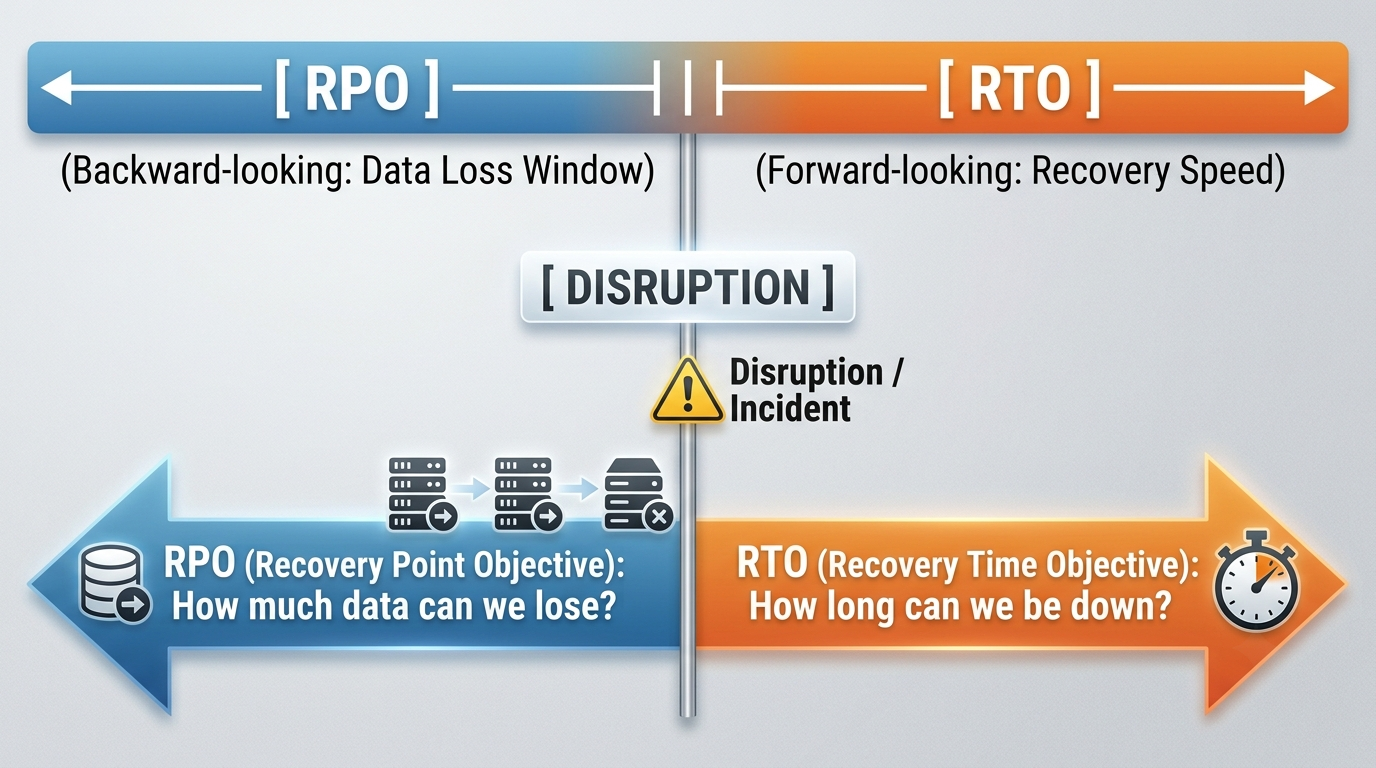
When a critical system goes down, two questions decide how much the outage actually costs your business: how long can operations stay offline, and how much data can your business afford to lose?
That is the core of RTO vs RPO. Most teams know the textbook definitions, but many have not translated those definitions into workload-level targets, validated them through testing, or mapped them to practical Azure architecture.
This 2026 guide explains RTO and RPO in plain language, shows how to set targets by workload tier, and maps those targets to Azure services such as Azure Backup and Azure Site Recovery.
What RTO and RPO Mean
RTO (Recovery Time Objective)
RTO is the maximum downtime the business can tolerate before consequences become unacceptable.
If your order platform has an RTO of 2 hours, recovery has to happen within that window or the business impact becomes too expensive.
RPO (Recovery Point Objective)
RPO is the maximum acceptable data loss, measured in time.
If your RPO is 15 minutes, your backup and replication strategy must ensure no more than 15 minutes of data is at risk.
Quick Mental Model
RTO looks forward from an incident. RPO looks backward from an incident.
- RTO: how fast you recover operations
- RPO: how much historical data you may lose
RTO vs RPO at a Glance
| Aspect | RTO | RPO |
|---|---|---|
| Core question | How long can we be down? | How much data can we lose? |
| Timeline direction | Forward-looking | Backward-looking |
| Primary concern | Service restoration speed | Data loss window |
| Typical driver | Failover design and automation | Backup/replication cadence |
| Missed target impact | Downtime and SLA risk | Data integrity and compliance risk |
Why This Matters to Leadership
RTO and RPO are not only technical settings. They are business risk thresholds with direct financial and contractual impact.
- Downtime drives revenue loss, idle teams, and SLA penalties.
- Data loss drives rework, reporting issues, and trust erosion.
- Regulated industries may face audit and legal exposure when recovery objectives fail.
How to Set Targets That Actually Work
1) Run a Business Impact Analysis
Quantify the cost of downtime and data loss by system.
2) Tier Workloads by Criticality
Set different targets for mission-critical, business-critical, operational, and non-critical systems.
3) Map Dependencies
Application recovery often depends on identity, database, network, and third-party integrations.
4) Get Business Sign-Off
Final RTO/RPO values should be approved by business stakeholders, not IT alone.
Typical RTO and RPO by Workload Tier
| Tier | Example Systems | Typical RTO | Typical RPO |
|---|---|---|---|
| Mission-critical | Payments, patient records | Minutes | Seconds to minutes |
| Business-critical | ERP, CRM, order systems | 1 to 4 hours | 15 to 60 minutes |
| Operational | Internal ticketing, collaboration | 4 to 24 hours | Several hours |
| Non-critical | Archives, sandboxes | 1+ day | 24+ hours |
Mapping RTO and RPO to Azure Services
Once targets are defined, architecture must match those targets.
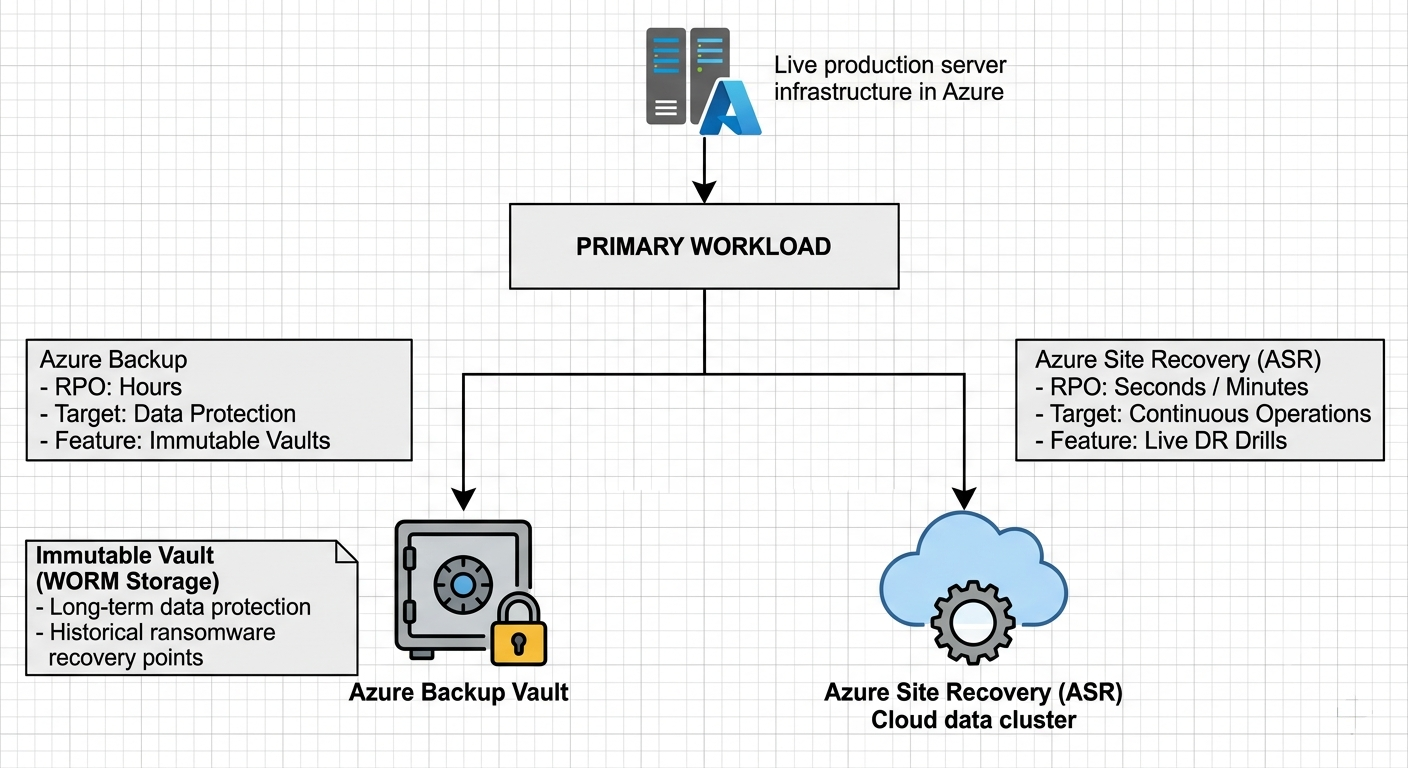
Azure Backup
Best for data protection and retention when longer recovery windows are acceptable.
Azure Site Recovery
Best for lower RTO scenarios where workloads must fail over quickly.
Recommended Combined Pattern
For most business-critical workloads, combine backup and disaster recovery:
- use Azure Backup for resilient restore points
- use Azure Site Recovery for failover and operational continuity
- include immutable backup design for ransomware recovery scenarios
Need a full cloud architecture review? Explore Azure cloud services.
Backup vs Disaster Recovery vs DRaaS
| Approach | Protects | Typical RTO | Best Use |
|---|---|---|---|
| Backup | Data | Hours | Recovery points, retention, compliance |
| Disaster recovery | Application availability | Minutes | Fast continuity during outages |
| DRaaS | End-to-end managed resilience | Minutes | Teams needing managed recovery operations |
For deeper context, read DRaaS Explained.
Common Mistakes
- Treating backup as equivalent to disaster recovery
- Assigning one RTO/RPO target across all workloads
- Skipping failover testing
- Missing dependency mapping
- Underestimating ransomware impact on recovery timelines
Recovery Testing Checklist
- Define test scope by workload tier
- Run non-disruptive failover tests on schedule
- Measure actual vs target RTO/RPO each test cycle
- Validate app dependencies and sequence
- Capture evidence and assign remediation owners
Ransomware Changes Recovery Planning
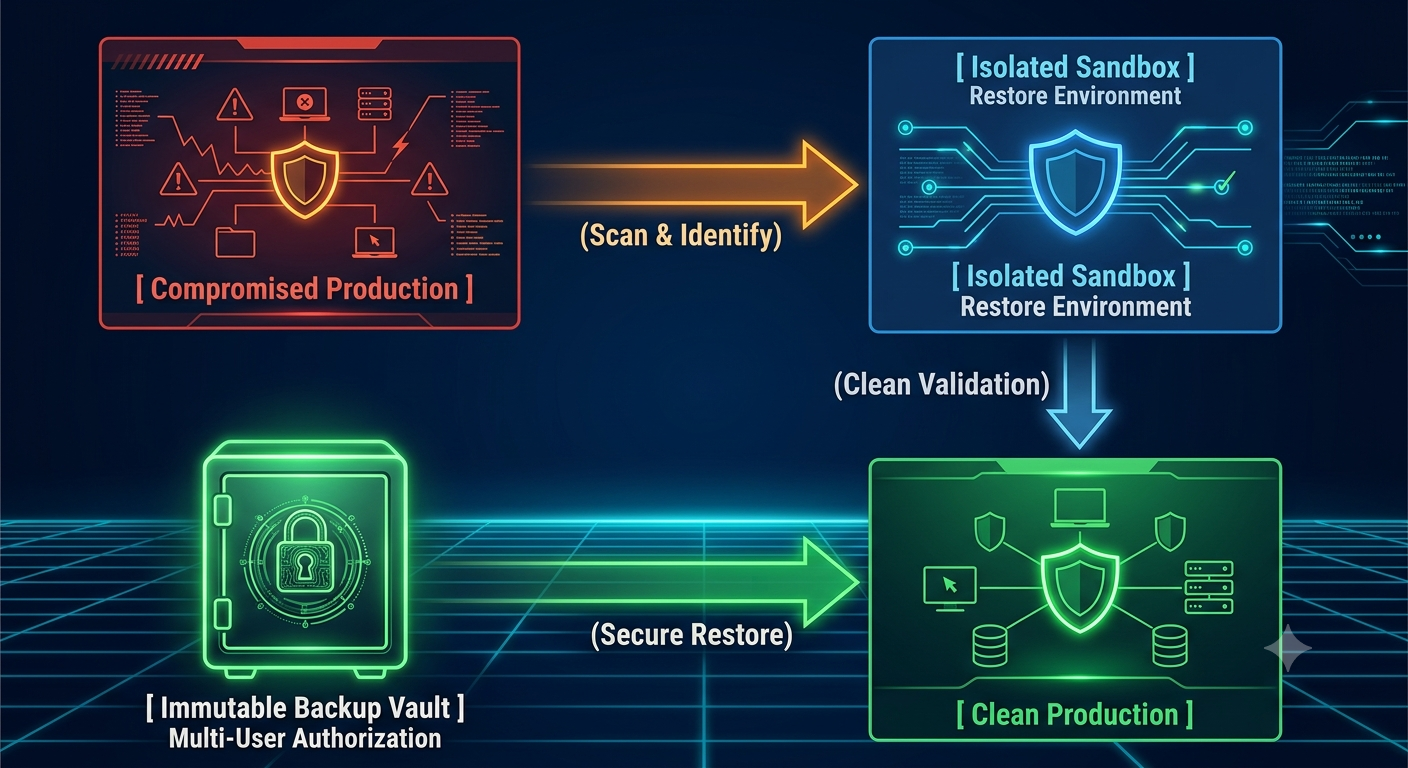
Ransomware recovery often requires more than restoring the latest backup.
- identify a clean recovery point
- validate in an isolated restore environment
- use immutable and air-gapped backup patterns
- enforce approval controls for destructive backup actions
If ransomware resilience is a top concern, include a dedicated Ransomware Recovery on Azure track in your plan.
Best Practices
- Set objectives by workload, not company-wide defaults
- Tie targets to Business Impact Analysis outputs
- Design for automation to reduce manual recovery risk
- Keep backup and DR architectures aligned with business priorities
- Revalidate objectives after major platform changes
Key Takeaways
- RTO measures acceptable downtime; RPO measures acceptable data loss.
- Effective targets are workload-specific, not one-size-fits-all.
- Backup alone is not disaster recovery for most critical systems.
- Azure Backup and Azure Site Recovery should be mapped to business tolerance by tier.
- Testing is what turns recovery planning into operational capability.
Ready to Validate Your Recovery Targets?
Most organizations discover recovery gaps during a real incident. A proactive assessment lets you close those gaps first.
Book a Backup & DR Readiness AssessmentFrequently Asked Questions
What is the difference between RTO and RPO?
RTO is the maximum acceptable downtime before a system must be restored. RPO is the maximum acceptable data loss, measured in time. RTO looks at recovery speed; RPO looks at how far back your last usable data point can be.
What does RTO stand for?
RTO stands for Recovery Time Objective - the target maximum duration a system can be unavailable after a disruption.
What does RPO stand for?
RPO stands for Recovery Point Objective - the target maximum amount of data loss an organization can tolerate, measured in time.
Is RTO more important than RPO?
Neither is universally more important - it depends on the workload. A payment system may prioritize a near-zero RPO (can't lose transactions) while tolerating a slightly longer RTO. A public-facing website may prioritize a very short RTO to avoid visible downtime while tolerating a longer RPO.
Can RTO and RPO be the same?
They can be numerically similar, but they measure different things (recovery speed vs. data loss window), so they should be set independently based on business impact - not assumed to match.
Should RPO be lower than RTO?
Not necessarily - it depends on the system. In many cases RPO is shorter because data loss tolerance is stricter than downtime tolerance, but this varies by workload and should be driven by business impact, not a general rule.
How do you calculate RTO and RPO?
Both are derived from a Business Impact Analysis: quantify the cost of downtime and data loss over increasing time intervals, then identify the point at which that cost becomes unacceptable to the business. That threshold becomes your target.
What is a good RTO and RPO?
There's no universal answer - it depends entirely on workload criticality. Mission-critical systems often target RTOs of minutes and RPOs of seconds to minutes, while non-critical systems may tolerate RTOs of days and RPOs of 24 hours or more.
What is RTO vs RPO vs MTTR?
RTO is the target time to restore a system; MTTR (Mean Time to Repair/Recover) is the actual average time it takes based on historical incidents. RPO addresses data loss, not repair time. MTTR is a measured outcome; RTO is a planning target.
What is RTO vs RPO vs SLA?
An SLA (Service Level Agreement) is a contractual commitment to a level of service, which may reference or be built around RTO/RPO targets, but SLAs typically cover broader service quality metrics beyond just recovery.
What is RTO vs RPO in Azure?
In Azure, RTO is largely addressed through disaster recovery and failover capabilities (like Azure Site Recovery), while RPO is largely addressed through backup and replication frequency (like Azure Backup and ASR's replication cadence, which can be as frequent as 30 seconds for Hyper-V workloads).
Is Azure Backup enough for disaster recovery?
Not on its own for most critical workloads. Azure Backup protects data, but doesn't keep an application running during an outage. For workloads requiring continuous availability, Azure Site Recovery (or a combination of both services) is typically needed.
When should I use Azure Site Recovery instead of Azure Backup?
Use Azure Site Recovery when the RTO requires the application itself to remain operational or fail over quickly - not just have its data protected. Use Azure Backup when the priority is data protection and retention, and longer recovery windows are acceptable.
How often should RTO/RPO be tested?
At minimum, quarterly for critical systems, with additional testing after any significant architecture change. Many organizations lack a formal cadence entirely - Forrester/DRJ research found fewer than 40% of organizations felt very or extremely prepared for a site failure, in part due to infrequent failover testing.
How do ransomware attacks change RTO and RPO planning?
Ransomware requires identifying a clean recovery point that predates infection (rather than simply the most recent backup), restoring into an isolated environment to avoid re-infection, and relying on immutable, air-gapped backups that attackers can't delete or encrypt - all of which extend and complicate the standard recovery timeline.

Al Rafay Consulting
ARC Team
AI-powered Microsoft Solutions Partner delivering enterprise solutions on Azure, SharePoint, and Microsoft 365.
LinkedIn Profile