SharePoint Info Architecture for Multi-Property Portfolios | ARC
Design a scalable SharePoint information architecture for multi-property portfolios. Hub sites, metadata models, permissions, governance & Copilot-ready tips.
Al Rafay Consulting
SharePoint Information Architecture for Multi-Property Portfolios: The 2026 Complete Guide
Organizations looking to strengthen this area can work with enterprise document management.
Managing multiple properties — whether commercial real estate, residential communities, or facility portfolios — generates an enormous volume of documents, records, leases, vendor contracts, and operational data.
Without a deliberate information architecture (IA), SharePoint Online quickly becomes an unmanageable tangle of folders, duplicate sites, and orphaned content.This guide delivers a practitioner-grade blueprint for designing a scalable SharePoint information architecture tailored to multi-property portfolios.
From hub site hierarchies and metadata models to governance policies and Microsoft 365 Copilot readiness, every layer is covered so your team can find the right information at the right time — regardless of portfolio size.
For organizations that need this framework implemented in production, our SharePoint consulting services can help design the site architecture, metadata model, governance plan, and rollout for multi-property portfolios.
QUICK ANSWER — Featured Snippet
A SharePoint information architecture for multi-property portfolios uses a hub-and-spoke model: one tenant-level intranet home, regional or portfolio hub sites, individual property team sites, and enterprise functional sites.
Managed metadata (term store) classifies documents by property, lease type, vendor, and asset category.
Flat site structures with consistent navigation, group-based permissions, and site templates ensure the IA scales as the portfolio grows.
Microsoft 365 Copilot surfaces relevant content only when this foundation is in place.
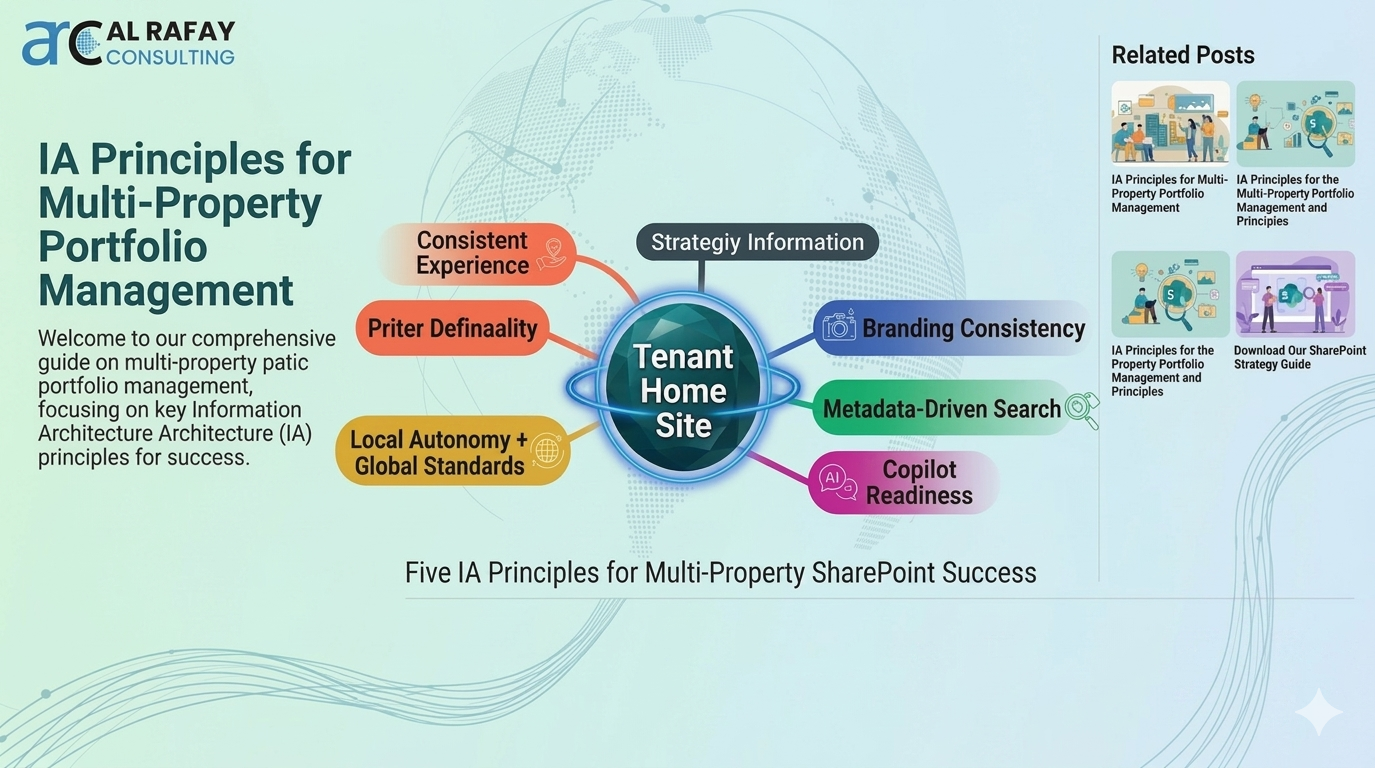
IA Principles for Multi-Property Portfolio Management
The foundation of any multi-property SharePoint deployment is a small set of modern IA principles that emphasise flat, flexible structures over hierarchical folder trees.
In a portfolio context, these principles translate directly into design decisions:Design for consistent experiences: Every property site should follow a standard template for site structure, navigation elements, and content libraries.
Consistency reduces cognitive load when users move between properties and accelerates onboarding for new team members.Balance local autonomy with global standards: Property managers need the flexibility to manage their own content, but within an enterprise framework that enforces naming conventions, metadata schemas, and compliance settings.Enforce branding consistency: Hub-level branding applied across all associated sites reinforces organisational identity and helps users orient themselves instantly.Enhance search via taxonomy: A well-governed managed metadata term store turns SharePoint from a file repository into a context-rich knowledge platform where documents can be discovered by meaning, not just by location.Design for Copilot readiness: Microsoft 365 Copilot surfaces content from SharePoint through Microsoft Graph.
Consistent metadata, proper permissions, and descriptive page titles are prerequisites for reliable AI-assisted discovery.
Ready to Assess Your Current IA?
Most portfolios are fragmented across disconnected SharePoint sites. Get a free assessment from an Inc. 5000 Microsoft Solutions Partner.
Schedule Your Free Assessment →Site Hierarchy Patterns: Tenant, Hubs, Property & Functional Sites
A multi-property SharePoint architecture spans multiple layers.
Organising these layers correctly is the single most impactful architectural decision you will make:Tenant-level (Global) layer: The tenant-wide intranet home — typically a Communication Site set as the SharePoint Home Site — provides global navigation linking to all hub sites and key resources.
This is the ‘lobby’ of your digital workplace.Hub sites: SharePoint Hub sites group related property sites under a shared scope for navigation, search, and branding.
A hub does not enforce permissions, but it does unify visual identity and allows scoped search across all associated sites.
Best practice is to create hubs per region or asset class (e.g., ‘North-East Portfolio’, ‘Industrial Assets’).Property sites: Each property gets its own SharePoint Team Site or Communication Site.
This encapsulates all content for that property — leases, floor plans, vendor contracts, maintenance logs, and project files — while remaining part of the regional hub.Functional sites: Enterprise functions such as Finance, Legal, HR, and Asset Management often need portfolio-wide sites not tied to a single property.
These can be hub-associated or standalone, depending on access requirements.The table below compares common site hierarchy models to help you select the right pattern:Site ModelBest ForFlat: All property sites peer-to-peer under one tenant homeSmall portfolios (<10 properties) with minimal regional groupingHub-based: Regional or asset-class hubs grouping property sitesMid-to-large portfolios needing scoped navigation and searchMulti-hub: Multiple hubs (regional + functional) with cross-associationEnterprise portfolios with >50 properties and complex governanceTeams-first: Each property Team auto-provisions a SharePoint siteCollaboration-heavy portfolios where Teams is the primary Interface
Build Your Metadata Foundation
Without managed metadata, SharePoint becomes a filing cabinet. Get expert guidance on designing a taxonomy that scales with your portfolio.
Get Your Metadata Blueprint →Hub-based architectures are recommended for any portfolio with more than five properties.
They provide unified navigation and scoped search out of the box without requiring custom development.
Get Your Hub Architecture Designed & Built
Hub-based architecture is the highest-ROI investment in SharePoint governance. Get a free design consultation from our architects.
Request Your Hub Design →Metadata Model & Content Types for Properties, Leases, Vendors, and Assets
s & Content Types for Properties, Leases, Vendors, and AssetsMetadata is the linchpin of a scalable SharePoint IA.
A robust metadata strategy ensures property-related documents are classified consistently across all sites, enabling powerful search, automated retention, and portfolio-wide reporting.Core Entities to ModelProperties: Site column capturing the property name or code, ideally sourced from a managed metadata term set so renames propagate automatically across all libraries.Leases: Content type with fields for Tenant Name, Lease Start/End Dates, Lease Type (NNN, Gross, Modified Gross), Annual Rent, and Renewal Options.Vendors & Contractors: Content type with Vendor Category, Contract Value, Contract Expiry, and Service Area (aligned to a property or portfolio-wide).Assets: Content type for physical assets (HVAC, lifts, fire suppression) with Asset ID, Location, Last Inspection Date, and Next Service Due.Incidents & Work Orders: Operational content type linking incidents to a property, asset, and assigned vendor.Term Store GovernanceManaged metadata term sets should be designed at the tenant level so the same terms (e.g., property names, regions, asset classes) are reused across all sites.
Appoint a Taxonomy Manager role responsible for term set governance.
When a property is acquired or sold, updating the term in the central term store reflects the change across every library that uses it — no manual column updates required.EntityRecommended Content Type FieldsGovernance OwnerPropertyProperty Name (managed metadata), Region, Asset Class, PortfolioPortfolio AdminLease AgreementTenant, Lease Start, Lease End, Lease Type, Annual Rent, StatusLegal / Asset ManagementVendor ContractVendor, Category, Contract Value, Expiry, Property (managed metadata)ProcurementPhysical AssetAsset ID, Location, Category, Last Inspection, Next ServiceFacilities ManagementIncident / Work OrderIncident Type, Priority, Property, Asset, Assigned Vendor, StatusOperations Manager
Navigation Strategies & Findability at Scale
In a multi-property portfolio, navigation must help users locate relevant information quickly among many sites and thousands of documents.
A three-layer navigation strategy — global, hub, and site-level — addresses this at scale:Phase 1: Global Navigation (Tenant Home / App Bar)Expose hub sites and key functional areas in the SharePoint app bar or global navigation of the Home Site.Use audience targeting to show property managers their regional hub and hide irrelevant portfolio hubs.Pin the global search bar prominently — Microsoft Search scoped from the Home Site queries the entire tenant.Phase 2: Hub Navigation (Regional or Asset-Class Hub)List property sites grouped by sub-region or asset class in the hub navigation menu.Link to shared functional resources: Lease Templates, Vendor Directory, Compliance Policies.Ensure the hub logo and theme are consistent with the global brand.Phase 3: Site-Level Navigation (Property Site)Organise left navigation around document types: Leases, Vendor Contracts, Floor Plans, Maintenance Records, Projects.Use promoted links or quick launch widgets to surface the most-accessed libraries.Embed a search refinement web part on the property site home page filtered to that site’s metadata.Additional findability tactics include implementing page-level metadata on all site pages (tagging news articles with the relevant property name and topic), enabling vertical search (e.g., a ‘Leases’ vertical scoped to the Leases content type), and using Viva Connections to surface property-specific news cards in Teams.
Unlock Search Relevance & Discovery
Users can’t find what they need? 90% of the time, it’s broken search scoping and missing metadata. Let us optimize your search experience.
Transform Your Search Experience →Security & Permissions Across Properties and Regions
Security design is inseparable from IA design.
Each SharePoint site collection is a security boundary, meaning each property site can have independent access controls — a critical requirement when portfolio stakeholders must not cross-access sensitive property data.Permissions Model Best PracticesGroup-based permissions: Define three standard roles per property site — Owners (property and IT admins), Members (property management team), Visitors (read-only stakeholders).
Assign Azure AD security groups to these roles, never individual users.Regional grouping: Regional directors or asset managers who need access across a set of property sites should be added to a security group that is then assigned to each relevant site’s Members role.
Avoid creating custom permission levels.External sharing: Vendors, contractors, and tenants who require access should be directed to dedicated sharing sites or secure document libraries with expiry-linked guest access — never granted broad site membership.Information barriers and sensitivity labels: For transactions involving sensitive property deals or regulated regions, apply Microsoft Purview sensitivity labels to documents and, where necessary, information barriers to prevent cross-group content access.Common Permission MistakeHub site membership ≠ permissions.
Associating a property site with a regional hub grants that site unified navigation and search within the hub, but does NOT grant hub site visitors any access to the property site.
Permissions on each property site must be managed independently.
Failure to understand this leads to either over-permissioning (accidental access) or under-permissioning (users unable to reach content they should see).
Governance, Lifecycle Management & Scalability
Governance is what separates a SharePoint deployment that ages well from one that devolves into navigation chaos within 18 months.
For multi-property portfolios, governance must address site provisioning, content lifecycle, and portfolio evolution:Phase 1: Controlled Site ProvisioningCentralise site provisioning through a Power Platform request process or SharePoint Admin Centre templates.When a new property is acquired, a standardised provisioning workflow creates the property site with pre-built libraries, navigation, and hub association.Automated provisioning eliminates ad-hoc site creation and ensures every site conforms to the IA blueprint from day one.Phase 2: Templates & Hub AlignmentUse SharePoint site templates to pre-configure property sites with standard document libraries (Leases, Contracts, Floor Plans, Maintenance), lists (Work Orders, Incident Log), pages (Property Dashboard), and navigation.Include hub association in the provisioning template so new sites are automatically connected to the correct regional hub.Phase 3: Content Lifecycle & ArchivingWhen a property is sold or a lease expires, trigger an archival workflow: move the site to a read-only archive hub, apply a retention hold, and remove it from active navigation.Use Microsoft Purview retention labels on Leases and Contracts to enforce mandatory retention periods (e.g., 7 years post-expiry) before disposal.Maintain a Property Register list at the tenant level tracking active, archived, and disposed properties.Phase 4: Scalability GuardrailsSharePoint Online supports up to 2 million site collections per tenant and 25 TB per site — far beyond most portfolio needs.The real scalability limit is governance: ungoverned sites accumulate faster than IT can manage.
Enforce a quarterly site review process.Monitor hub association counts (max 500 sites per hub) and plan additional hubs as the portfolio grows.
Audit Your Governance & Risk Posture
Uncontrolled site sprawl is the #1 cause of SharePoint failures. Get a comprehensive audit with remediation roadmap from our experts.
Start Your Governance Review →Integration with Teams, Power Platform, Search, and AI (Copilot)A well-designed SharePoint IA multiplies in value when integrated with the broader Microsoft 365 ecosystem:Microsoft TeamsEach property team typically has a Microsoft Team for day-to-day communication.
Teams auto-provisions a connected SharePoint Team Site for file storage.
Align the Team’s SharePoint site with your IA: apply the standard property site template, add it to the regional hub, and ensure the document libraries follow the same metadata schema as non-Teams property sites.Power Platform (Power Apps & Power Automate)SharePoint lists and libraries serve as an excellent data backbone for property management solutions built with Power Apps and Power Automate.
Common integrations include:Canvas App for work order submission and tracking, reading/writing to a SharePoint Work Orders list.Power Automate approval flows for lease renewals, triggered by a status change on the Leases library.Automated vendor onboarding flows that create a vendor folder in the correct property site and notify the property manager.Power BI reports connected to SharePoint lists for portfolio-wide lease expiry dashboards and vendor spend analysis.Microsoft 365 CopilotCopilot uses Microsoft Graph to surface relevant content.
A well-structured SharePoint IA dramatically improves Copilot accuracy because:Consistent metadata allows Copilot to scope responses to a specific property or asset class when prompted (e.g., ‘Summarise all active leases for the North-East portfolio’).Proper permissions ensure Copilot respects security trimming — users only receive AI-assisted summaries of content they are authorised to see.Descriptive file names and page titles improve Copilot’s ability to cite the correct source documents.Microsoft 365 ToolSharePoint IA Integration PointTeamsAuto-provisioned site added to regional hub; standard metadata appliedPower AppsCanvas Apps reading Work Orders and Leases lists; model-driven formsPower AutomateLease renewal approvals, vendor onboarding, document routing workflowsPower BIPortfolio dashboards connected to SharePoint list dataMicrosoft SearchVerticals and result types scoped to property metadata columnsCopilot (M365)Graph-indexed content surfaced with security trimming; metadata-filtered responsesMicrosoft PurviewSensitivity labels and retention policies applied at library and site level
Common Pitfalls and Anti-Patterns in Real-World Implementations
Even well-intentioned SharePoint deployments fail due to predictable anti-patterns.
Recognising them early is the most cost-effective governance action you can take:Uncontrolled site creation: Business users creating sites ad hoc leads to overlapping structures, duplicate property sites, and unclear ownership.
Solution: enforce site provisioning through a governed request process — disable self-service site creation in SharePoint Admin.Overuse of subsites or deep folders: Building subsites per property or nesting 5-level folder trees buries content and makes future migration extremely difficult.
Solution: use flat site hierarchies with metadata classification instead of folders.Treating hub membership as a permissions model: Hub association manages navigation and search scope only.
Admins who assume hub members automatically have access to associated sites create either gaps or breaches.
Solution: manage permissions at the individual site level using security groups.No metadata standards: Relying on folder structure alone — without managed metadata — undermines search relevance and governance.
Solution: define a tenant-level term store before provisioning any property sites.Inconsistent branding: Sites with different themes and navigation confuse users who move between properties.
Solution: apply hub-level branding universally and restrict site-level theme customisation to permitted colour variations only.Orphaned sites after property disposal: Sold or closed properties whose sites remain active and visible in navigation create noise and compliance risk.
Solution: automate an archival workflow triggered by property status changes.Tactical Recommendations & Decision FrameworkUse this step-by-step framework when designing or auditing a multi-property SharePoint IA:Inventory existing sites: Export a SharePoint site usage report from the SharePoint Admin Centre.
Identify which sites map to which properties and flag orphaned, duplicate, or non-standard sites.Define hub structure: Map your portfolio into logical hub groupings (regions, asset classes, or business units).
Plan a hub for each grouping and identify the sites to be associated.Design the metadata model: Workshop with property, legal, procurement, and operations teams to enumerate core entities and their attributes.
Draft content type specifications before creating any columns.Build the term store: Create managed metadata term sets for Properties, Regions, Asset Classes, Lease Types, and Vendor Categories in the SharePoint Admin Centre term store.Create the site template: Build a reference property site with standard libraries, lists, navigation, and metadata columns applied.
Save it as a SharePoint site template.Automate provisioning: Build a Power Platform solution (Power Apps request form + Power Automate flow) to provision new property sites from the template, associate them with the correct hub, and register them in the Property Register list.Configure search: Define custom verticals (e.g., Leases, Contracts, Floor Plans), result types with managed property refiners, and acronyms in Microsoft Search Admin.Establish governance cadence: Appoint a SharePoint IA Owner.
Schedule quarterly site reviews, annual metadata model reviews, and a bi-annual hub structure review.
Frequently Asked Questions
What is the recommended SharePoint site hierarchy for a multi-property portfolio?
Use a hub-and-spoke model: one tenant-level Home Site for global navigation, regional or asset-class Hub Sites grouping related properties, individual property Team Sites, and portfolio-wide functional Communication Sites (Finance, Legal, HR). This flat, hub-based structure provides unified navigation and search while keeping security boundaries at the site level.
Should each property have its own SharePoint site?
Yes, for any portfolio with more than a handful of properties. Giving each property its own site collection provides a clean security boundary, independent lifecycle management, and a focused collaboration space. Associate each property site with a regional hub to retain portfolio-wide navigation and search.
How do SharePoint Hub Sites work for property portfolios?
Hub sites group related property sites under a shared navigation menu, search scope, and visual theme. When a user searches from a hub site’s search box, results are scoped to all sites associated with that hub - ideal for regional portfolio search. Hubs do not manage permissions; site-level access must be configured separately.
What metadata columns are most important for property management in SharePoint?
The highest-value metadata columns are: Property Name (managed metadata term), Region, Asset Class, Document Category (Lease / Contract / Floor Plan / Maintenance), Status (Active / Expired / Archived), and Effective Date. These five columns support 80% of search, filtering, and automated retention scenarios.
How do I manage permissions when vendors and tenants need access to SharePoint?
Isolate external sharing to dedicated document libraries or project sites with time-limited guest access. Enable SharePoint external sharing at the site level only for sites that explicitly require it. Use Azure AD B2B guest accounts rather than anonymous sharing links. Set access expiry dates on all external shares and audit quarterly.
How does Microsoft 365 Copilot use SharePoint information architecture?
Copilot queries Microsoft Graph to retrieve content relevant to a user’s prompt. It respects security trimming - users only receive summaries of content they can access - and benefits from consistent metadata (enabling scoped responses like “all leases expiring in Q4 for the North-East portfolio”). A well-structured IA with descriptive titles, consistent metadata, and correct permissions is a prerequisite for reliable Copilot output.
What governance policies are needed for a multi-property SharePoint environment?
Essential governance policies include: (1) controlled site provisioning (no self-service creation), (2) mandatory site template adherence, (3) managed metadata term store governance, (4) quarterly site activity reviews, (5) archival process for disposed properties, (6) external sharing policy, and (7) retention and sensitivity labelling via Microsoft Purview.
How do I prevent SharePoint sprawl as the property portfolio grows?
Disable self-service site creation in SharePoint Admin and route all new site requests through a Power Platform provisioning workflow. Enforce site naming conventions and hub association at creation time. Set up a monthly report of sites with zero activity in 90+ days and assign site owners accountable for lifecycle decisions.
Can Power Apps and Power Automate integrate with a multi-property SharePoint IA?
Yes - SharePoint lists and libraries are the native data source for Power Apps Canvas Apps and Power Automate flows. Common integrations include work order submission apps, lease renewal approval workflows, vendor onboarding automations, and portfolio dashboards in Power BI connected to SharePoint list data. The key is ensuring the SharePoint metadata model is defined before building Power Platform solutions, so apps consume the same term sets and content types as manual document management.

Al Rafay Consulting
ARC Team
AI-powered Microsoft Solutions Partner delivering enterprise solutions on Azure, SharePoint, and Microsoft 365.
LinkedIn Profile