SharePoint vs OneDrive vs Teams: Decide Now
SharePoint and OneDrive vs Teams are compared here based on their capabilities, pricing, integrations, and enterprise fit — helping organizations choose the right solution for their specific requirements and existing technology stack.
Compare SharePoint, OneDrive, and Microsoft Teams so your organization stores files in the right place with clear ownership and governance.
ARC Team
· Updated May 1, 2026 · ARC Team

Most Microsoft 365 environments do not fail because of missing tools. They fail because teams use the right tools in the wrong way.
If your team is clarifying the right place for shared content and governance, our SharePoint consulting services can help you define a practical Microsoft 365 structure that works in real operations.
If shared documents live in personal OneDrive folders, or finalized policies are trapped in Teams channels, collaboration slows down and governance breaks.
The Core Difference in Plain Language
- SharePoint: Team and organizational content that needs structure, lifecycle, and compliance.
- OneDrive: Personal work-in-progress and individual productivity.
- Teams: Real-time communication and collaboration workspace.
These tools are integrated by design, but they are not interchangeable.
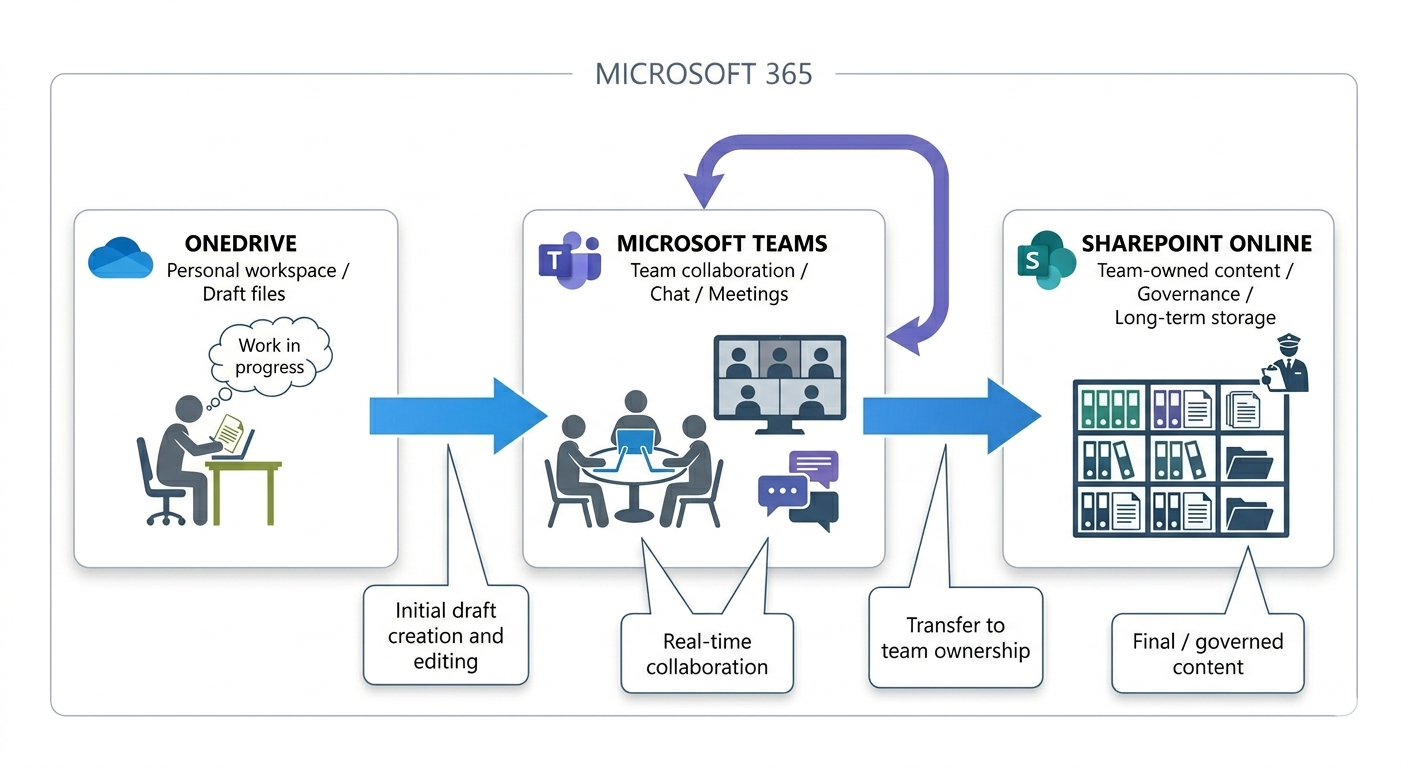
Quick Comparison
| Area | SharePoint | OneDrive | Teams |
|---|---|---|---|
| Primary purpose | Document and knowledge management | Personal file storage | Chat, meetings, teamwork |
| Ownership | Team / department | Individual | Team / channel |
| Governance strength | High | Moderate | Inherited via SharePoint |
| Best for | Policies, records, portals | Drafts, private work files | Active collaboration |
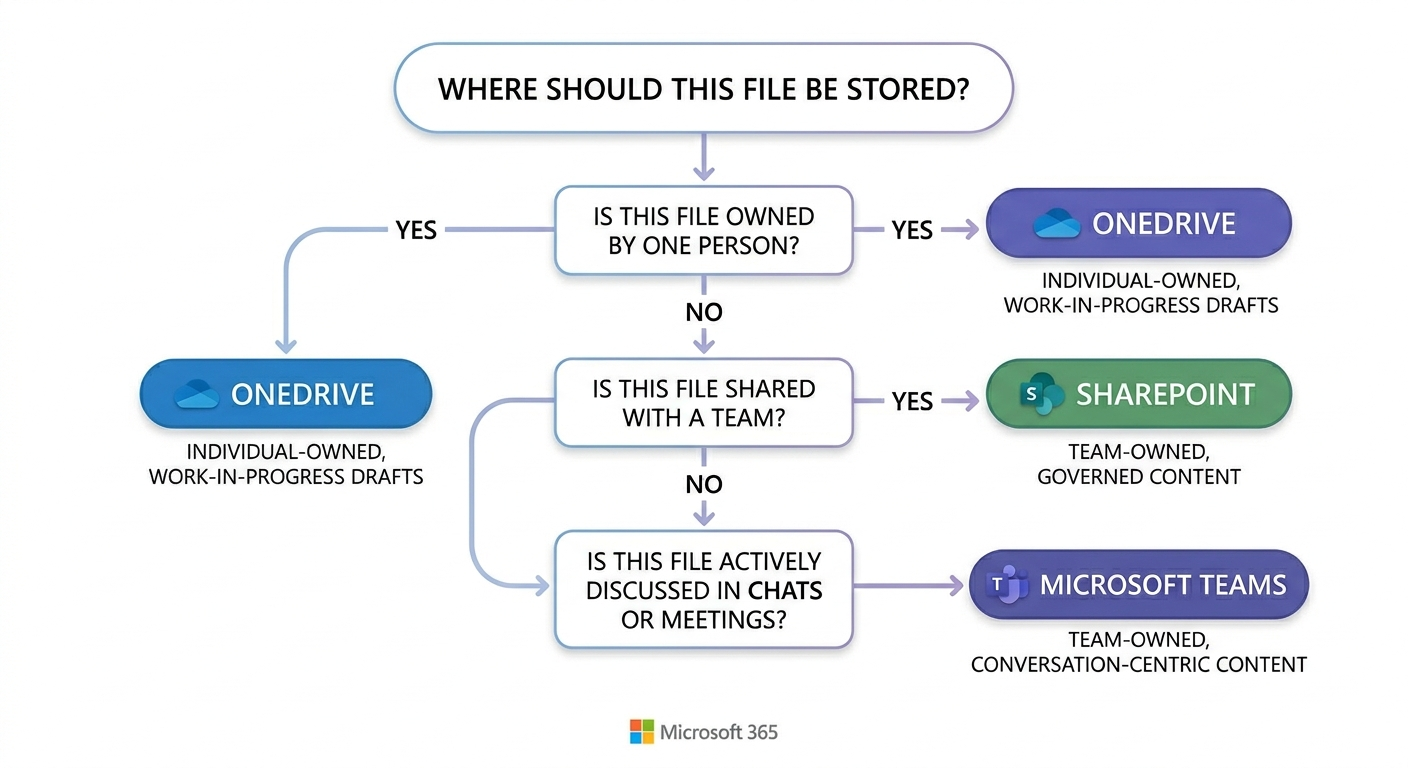
Step-by-Step Decision Model
- Identify ownership.
- Define lifecycle (draft vs governed record).
- Check collaboration style (conversation-first or documentation-first).
- Apply compliance requirements.
If a file must survive role changes, audits, and long-term reuse, it belongs in SharePoint-backed locations.
Business Value of Clear Tool Boundaries
- Less duplication and fewer lost files.
- Cleaner permissions and reduced oversharing.
- Better search outcomes and faster retrieval.
- Higher user confidence in Microsoft 365.
Frequently Asked Questions
Can Teams replace SharePoint?
When should OneDrive be used?
How can we reduce user confusion between these tools?
Frequently Asked Questions
What is SharePoint Online?
SharePoint Online is a cloud-based platform for document management, intranet portals, team collaboration, and business process automation — included in Microsoft 365 Business and Enterprise plans.
How does SharePoint integrate with Microsoft Teams?
Every Teams channel has a SharePoint site behind it for file storage. SharePoint powers the document libraries, wiki pages, and list functionality within Teams.
Can SharePoint handle enterprise-scale content?
Yes. SharePoint Online supports millions of documents per library with enterprise search, metadata navigation, AI-powered classification, and compliance features built in.
Is SharePoint secure for sensitive documents?
Yes. SharePoint includes granular permissions, sensitivity labels, DLP policies, audit logging, conditional access, and retention policies to protect sensitive and regulated content.
How long does a SharePoint implementation take?
Simple team sites take 1-2 weeks. Enterprise intranet projects typically take 6-12 weeks including information architecture, design, development, content migration, and user training.

ARC Team
ARC Team
AI-powered Microsoft Solutions Partner delivering enterprise solutions on Azure, SharePoint, and Microsoft 365.
LinkedIn Profile