Summarize Every Meeting with Teams Copilot Now
Summarize Every Meeting with Teams Copilot Now is teams Copilot creates AI meeting summaries, recap notes, and actionable follow-ups with step-by-step setup and governance guidance.
Learn how Teams Copilot creates AI meeting summaries, recap notes, and actionable follow-ups with step-by-step setup and governance guidance.
ARC Team
· Updated April 23, 2026 · ARC Team

Most organizations do not struggle with scheduling meetings. They struggle with preserving outcomes: decisions are forgotten, tasks are scattered, and people who missed the call lose time catching up.
Organizations looking to strengthen this area can work with Teams rollout services.
Teams Copilot closes this gap by turning discussion into structured recap outputs. This guide shows how to enable and use Teams Copilot meeting summaries in a way that is practical, consistent, and governance-ready.
What Teams Copilot Meeting Summary Delivers
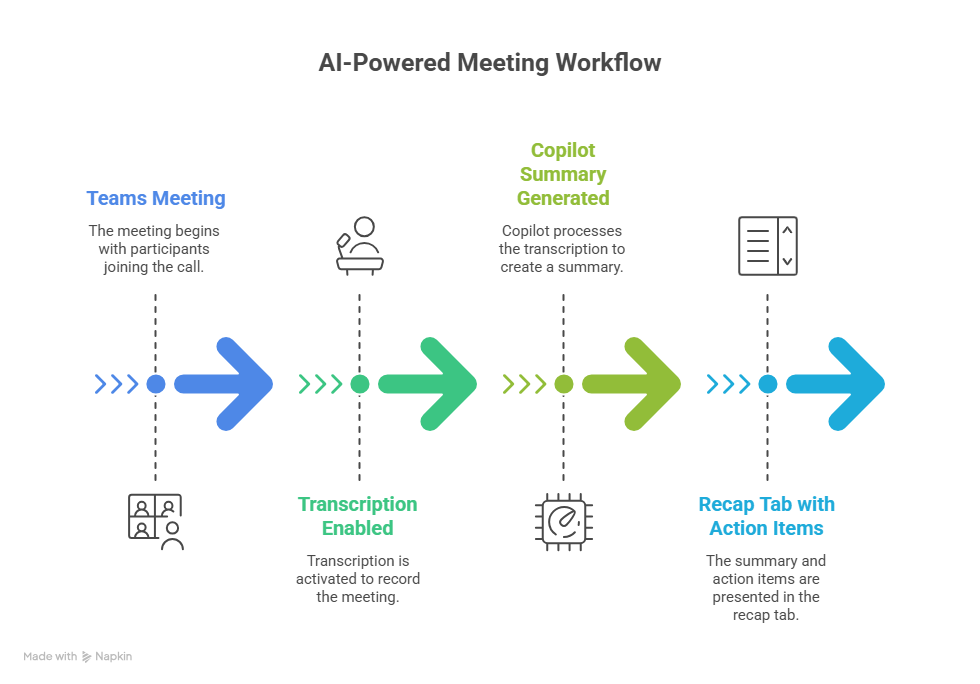
Teams Copilot can summarize discussions, highlight decisions, suggest action items, and answer recap questions during and after meetings. Instead of rewatching long recordings, users can access the recap experience and focus on next actions.
Combined with transcription and recording policies, this creates a stronger meeting operating model for leadership reviews, project checkpoints, sales calls, and cross-functional execution.
How Teams Copilot Summary Works
Copilot quality depends on meeting context signals: transcript, chat, recording, and timeline events. The more complete these inputs are, the better the resulting summary and action extraction.
In practical terms, this means organizers should set meeting options consistently and start transcription early for meetings where recap quality matters.
Step-by-Step Setup and Usage Framework
| Phase / Step | Focus | Outcome |
|---|---|---|
| Step 1: Configure Admin and Policy Baseline | Licensing, transcription, recording, and Copilot controls | Stable and compliant foundation |
| Step 2: Standardize Organizer Workflow | Meeting options, transcript start, recap handoff process | Consistent summary quality |
| Step 3: Scale with Templates and Governance | Recap templates, ownership model, and review standards | Repeatable enterprise meeting outcomes |
Phase 1: Admin Readiness
Confirm Copilot licensing and Teams policy settings for recording, transcription, captions, and recap behavior. Define where AI summary is allowed and where restrictions apply.
Phase 2: Organizer Execution
During each meeting, start transcription and use Copilot prompts for decisions and task clarity. After the meeting, publish recap to stakeholders as the single source of follow-up.
Phase 3: Operationalize at Scale
Use recap templates for executive summaries, project updates, and speaker-focused outputs. Build a repeatable cadence so recap quality does not depend on individual habits.
Key Business Benefits
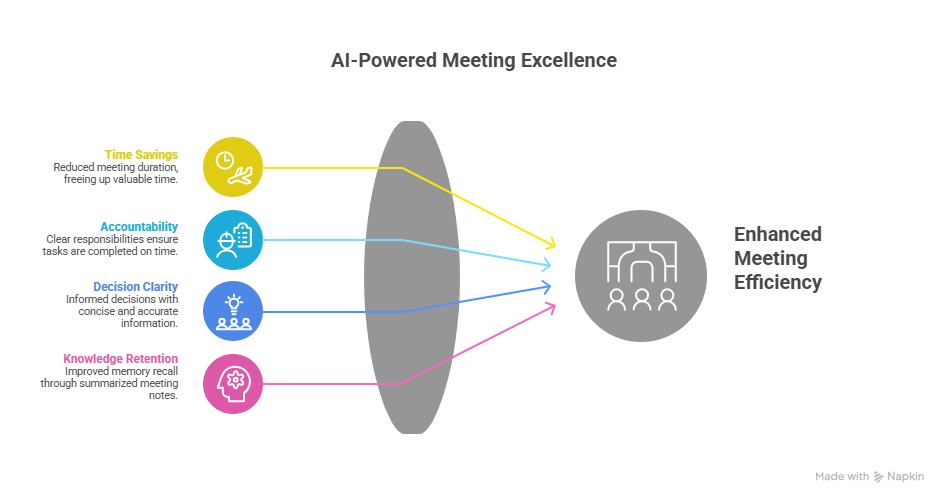
- Faster decision clarity: Stakeholders understand outcomes without replaying full meetings.
- Stronger execution tracking: Action owners and deadlines become visible immediately.
- Better hybrid collaboration: Late joiners and absentees can catch up quickly.
- Lower administrative overhead: Teams spend less effort producing manual meeting notes.
Core Recap Capabilities to Use
- AI summary and question-answer prompts during meetings
- Intelligent Recap with searchable timeline and transcript context
- AI-generated meeting notes and task extraction
- Custom recap templates for role-specific reporting formats
Frequently Asked Questions
What is a Teams Copilot meeting summary?
Do we need transcription for better summary quality?
Where do users access recap after a meeting?
How should enterprises roll out Teams Copilot recap?
Conclusion
Teams Copilot meeting summary capabilities can turn meeting-heavy workflows into outcome-focused execution systems when paired with clear policy and consistent usage patterns.
If your organization is exploring Teams Copilot recap adoption, ARC can help with strategy, implementation, governance, and optimization.
Frequently Asked Questions
How can this help my business?
This solution addresses key business challenges by improving efficiency, reducing manual effort, enhancing collaboration, and providing actionable insights that drive better decision-making and measurable outcomes.
What is the typical implementation timeline?
Implementation timelines depend on scope and complexity. Most projects range from 4-12 weeks including discovery, configuration, testing, training, and go-live support.
Do you provide ongoing support after implementation?
Yes. We offer post-implementation support packages including monitoring, optimization, user training, and managed services to ensure sustained success and continuous improvement.
What industries do you serve?
We serve enterprises across financial services, healthcare, manufacturing, real estate, technology, and professional services — adapting solutions to industry-specific requirements and compliance needs.
How do you measure project success?
We define success metrics during discovery including adoption rates, efficiency gains, cost savings, and user satisfaction. Regular reporting and quarterly reviews ensure ongoing value delivery.

ARC Team
ARC Team
AI-powered Microsoft Solutions Partner delivering enterprise solutions on Azure, SharePoint, and Microsoft 365.
LinkedIn Profile