Teams Premium: Is the Upgrade Worth It Today?
Teams Premium adds, where it overlaps with Copilot, and how to decide the right upgrade path for meeting-heavy organizations.
Understand what Teams Premium adds, where it overlaps with Copilot, and how to decide the right upgrade path for meeting-heavy organizations.
ARC Team
· Updated April 25, 2026 · ARC Team

If your organization already runs on Microsoft Teams, the upgrade question is no longer theoretical. Leaders want to know whether Teams Premium solves real meeting friction or whether standard Teams is still enough.
This guide explains what Teams Premium is, how it differs from Microsoft 365 Copilot, and when the upgrade produces measurable business value.
What Teams Premium Actually Adds
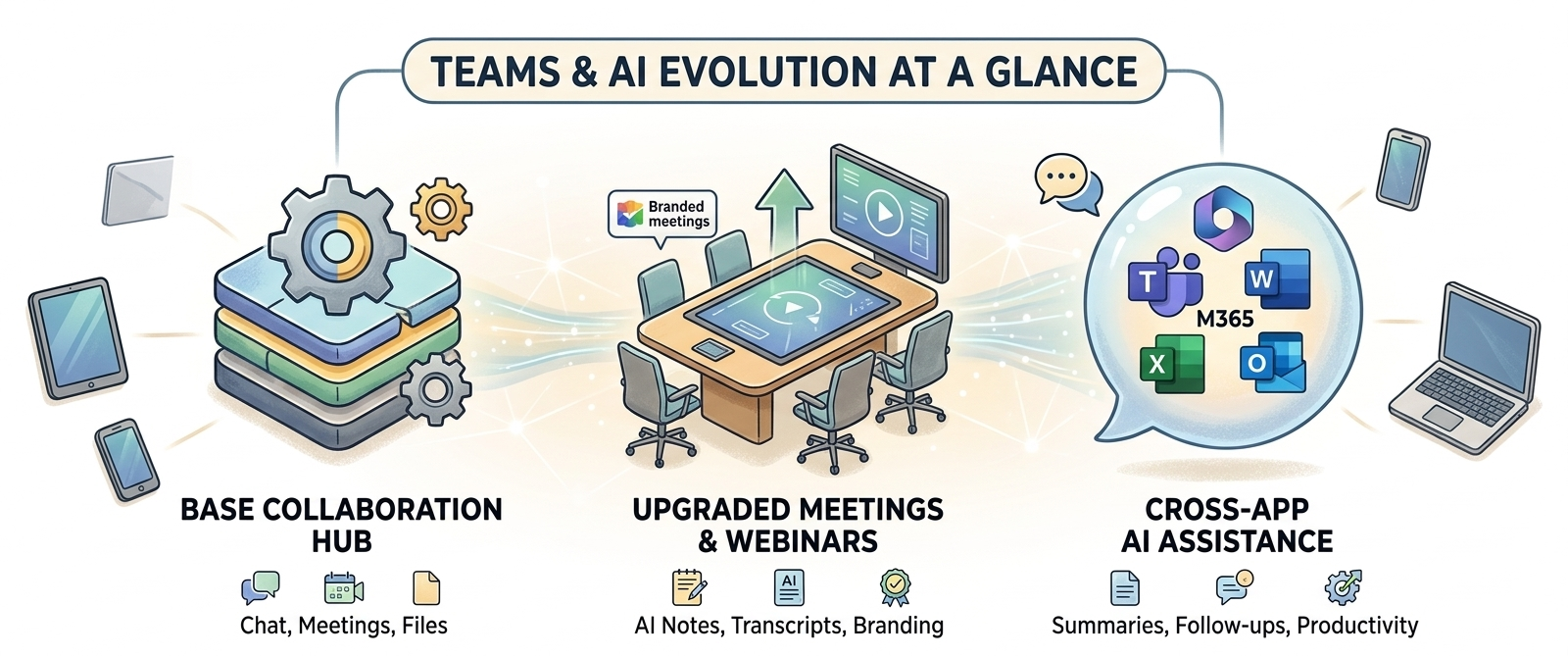
Teams Premium is a focused meeting-layer upgrade on top of standard Teams. It is designed for organizations that need better recap quality, stronger controls, and more polished meeting experiences without changing collaboration platforms.
High-impact additions include:
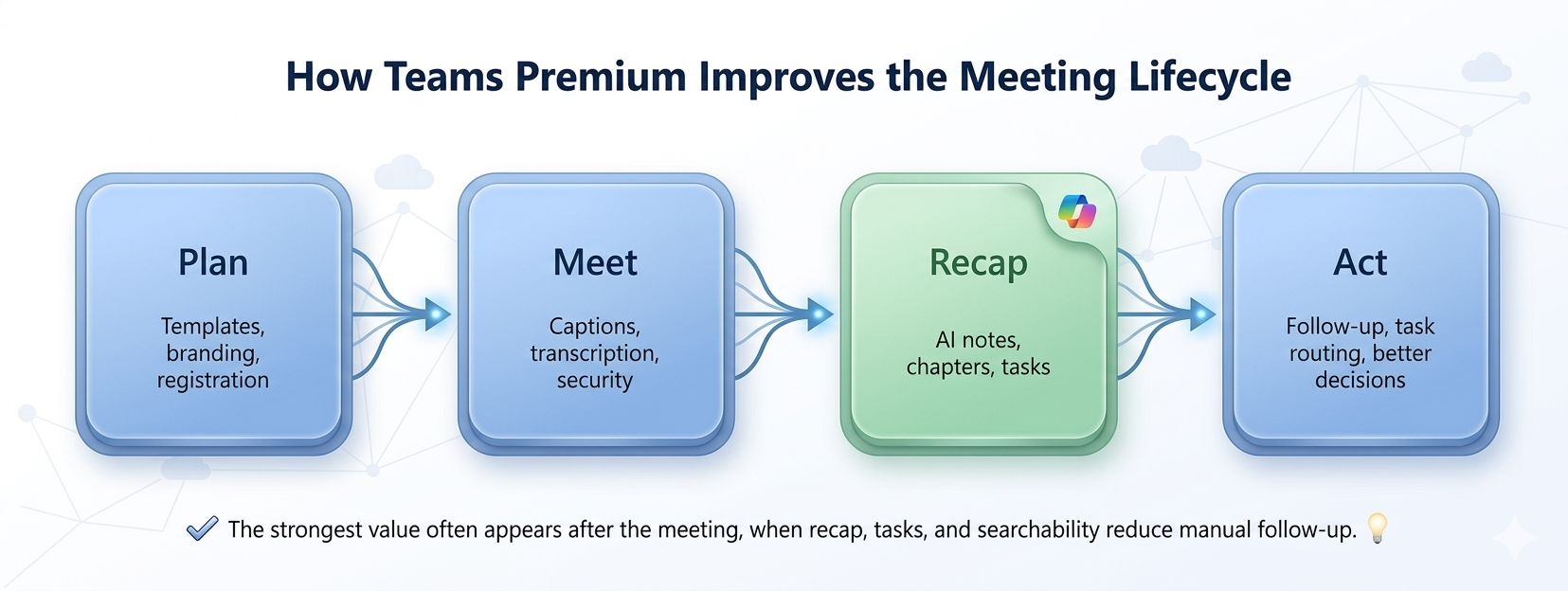
- Intelligent recap with AI notes, tasks, and chapters.
- Advanced webinar and virtual appointment experiences.
- Branded meetings and templates for consistent client-facing interactions.
- Additional protection controls for sensitive sessions.
- Multilingual support enhancements for global teams.
Standard Teams remains the collaboration foundation. Teams Premium improves what happens before, during, and after meetings.
Teams Premium vs Copilot: The Most Common Confusion
Both products can improve meetings, but they are not interchangeable.
| Capability Focus | Teams Premium | Microsoft 365 Copilot |
|---|---|---|
| Primary scope | Teams meeting experience | Cross-app AI assistant |
| Best for | Better meetings, recap, events, and controls | Broader AI workflows across Teams, Outlook, Word, Excel, and PowerPoint |
| Typical first step when pain is… | Meeting overload and weak follow-through | Cross-functional productivity transformation |
| Licensing strategy | Focused meeting upgrade | Wider AI investment |
A practical sequence for many organizations is to deploy Teams Premium first for meeting-heavy users, then expand with Copilot where cross-app AI workflows show strong business value.
Decision Path: Should You Upgrade Now?
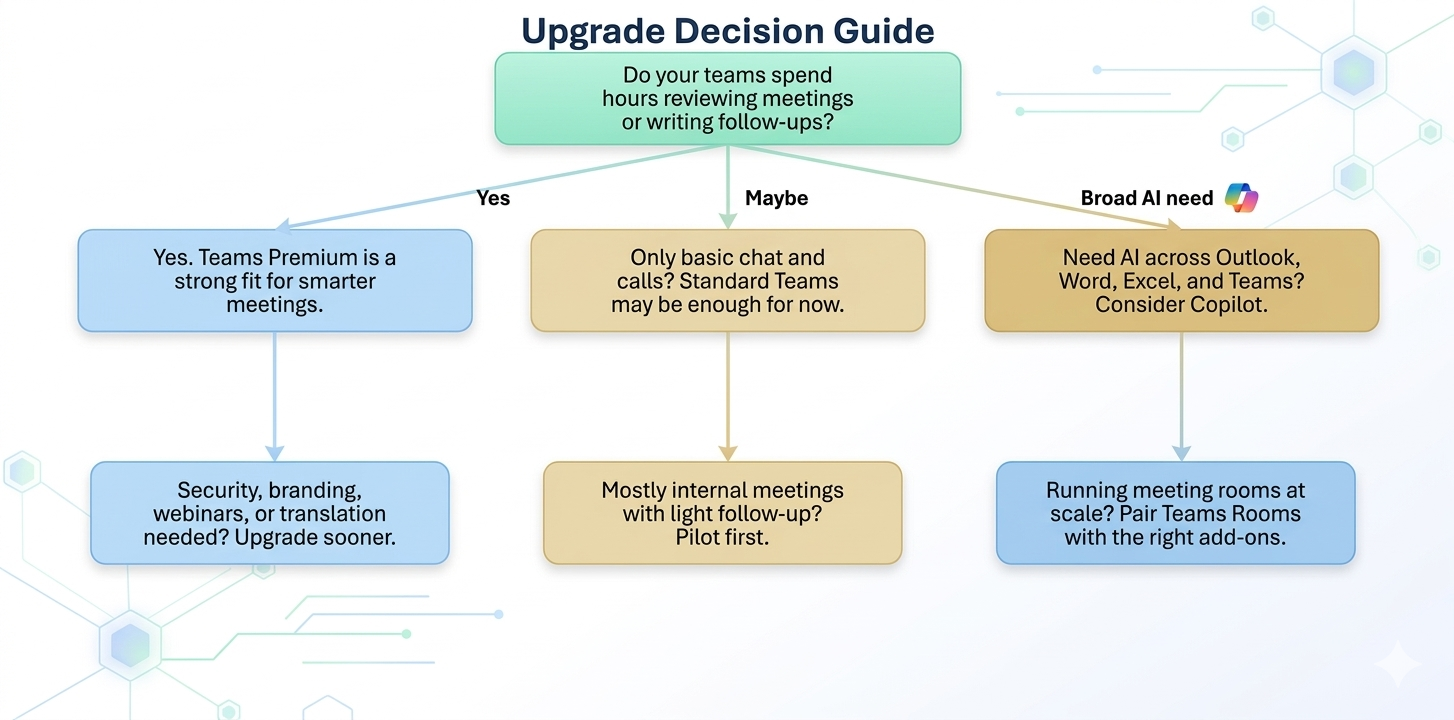
Use this quick model:
- If teams spend large amounts of time reviewing meetings and writing follow-ups manually, prioritize Teams Premium.
- If collaboration is mostly basic chat and calls, stay on standard Teams and run a small pilot first.
- If broad AI across Teams, Outlook, Word, and Excel is required, evaluate Copilot alongside Premium.
Step-by-Step Upgrade Framework
| Phase / Step | Focus | Outcome |
|---|---|---|
| Step 1: Identify Meeting Friction by Role | Measure time spent on recap, follow-up, and missed actions | Upgrade targets based on real pain points |
| Step 2: Pilot Premium with High-Impact Teams | Executives, project managers, client-facing teams | Early proof of value and adoption patterns |
| Step 3: Scale and Sequence with Copilot | Expand where cross-app workflows justify broader AI spend | Optimized licensing and stronger ROI |
Phase 1: Assess
Start with departments where meetings directly impact delivery, customer outcomes, or compliance visibility.
Phase 2: Pilot
Track recap usage, follow-up speed, and action completion before and after Premium activation.
Phase 3: Optimize
Expand by measured outcomes, not by blanket licensing.
Best Use Cases for Teams Premium
- Leadership and steering meetings that require accurate recap and task ownership.
- Client-facing webinars and appointments that need polished branding and control.
- Multilingual teams that benefit from translated captions and transcript support.
- Regulated environments where meeting protection and policy consistency matter.
Business Value Snapshot
- Less meeting drag: Faster recap and less manual note consolidation.
- Higher decision velocity: Clearer actions and accountability after each session.
- Stronger professionalism: Better branded meeting and webinar experiences.
- Improved governance alignment: More consistent control in sensitive collaboration scenarios.
Frequently Asked Questions
What is Teams Premium in simple terms?
Is Teams Premium the same as Microsoft 365 Copilot?
Who should get Teams Premium first?
How can we prove upgrade value quickly?
Conclusion
Teams Premium is worth it when meetings are a core operating workflow and poor follow-through is creating hidden cost. If your current challenge is meeting quality, start with Premium. If your target is full AI transformation across work apps, sequence Premium and Copilot together.
If your organization is exploring Teams Premium, ARC can help with strategy, implementation, governance, and optimization.
Frequently Asked Questions
How does Microsoft Copilot compare to Google Gemini?
Microsoft Copilot integrates deeply with Microsoft 365 apps and enterprise data, while Google Gemini is optimized for Google Workspace. Copilot excels in enterprise environments with Microsoft-centric tooling.
Which AI assistant is better for businesses?
For organizations using Microsoft 365, Copilot provides superior integration with existing workflows, security models, and compliance frameworks. Google Gemini is better suited for Google Workspace environments.
Can I use both Copilot and Gemini?
Yes, though most organizations choose the assistant that aligns with their primary productivity suite. Using both adds licensing costs and may create inconsistent user experiences.
Is Microsoft Copilot more secure than alternatives?
Copilot inherits Microsoft 365 enterprise security — RBAC, DLP, encryption, and compliance certifications. It does not send data outside your tenant, which is a key differentiator for regulated industries.
What about ChatGPT vs Microsoft Copilot?
ChatGPT is a general-purpose AI assistant, while Microsoft 365 Copilot is enterprise-focused with direct access to your organizational data, permissions, and business context within familiar Office apps.

ARC Team
ARC Team
AI-powered Microsoft Solutions Partner delivering enterprise solutions on Azure, SharePoint, and Microsoft 365.
LinkedIn Profile