Viva Engage vs Yammer: What Changed & What to Do
Viva Engage and Yammer are compared here based on their capabilities, pricing, integrations, and enterprise fit — helping organizations choose the right solution for their specific requirements and existing technology stack.
Understand the evolution from Yammer to Microsoft Viva Engage, key features, and how to migrate your organization's communication strategy.
Al Rafay Consulting
· Updated July 3, 2026 · ARC Team
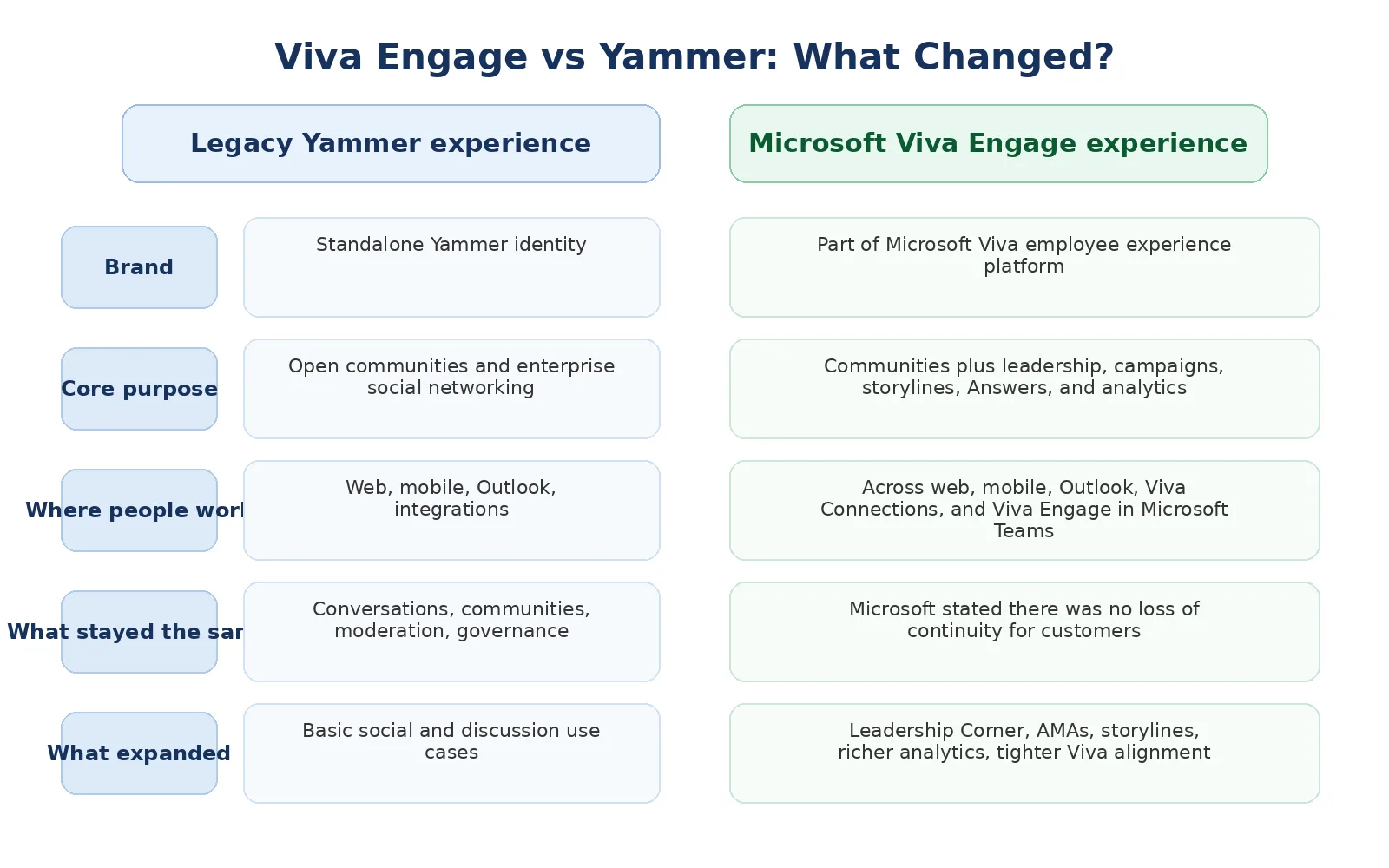
Microsoft completed one of its most significant workplace communication transitions when Yammer was officially retired at the end of 2024. For organizations still managing the aftermath of that shift — or those who have moved to Viva Engage but haven’t fully adopted its newer capabilities — understanding the full scope of what changed is essential to staying competitive and keeping teams genuinely connected.
This guide walks you through what Yammer was, what Viva Engage is today, the key differences, and a practical roadmap for making the most of the platform in 2026.
Yammer: The Foundation
Yammer was Microsoft’s enterprise social network, launched in 2012. It brought social collaboration to the workplace, enabling employees to connect across departments, share ideas, and build communities around common interests. For over a decade, Yammer served as a communication backbone for thousands of organizations worldwide.
However, as workplace dynamics evolved — especially with the rise of remote and hybrid work — organizations needed more integrated, AI-driven tools that worked seamlessly within their existing Microsoft ecosystem. Microsoft retired Yammer on December 31, 2024, completing a multi-year transition to Viva Engage as the sole platform for enterprise communities and social communication within Microsoft 365.
Microsoft Viva Engage in 2026
Microsoft Viva Engage represents the next generation of workplace communication. Built natively into Microsoft 365 and integrated with Teams, Viva Engage combines the best of Yammer with new capabilities designed for modern workforces. Organizations planning rollout, governance, and adoption can accelerate outcomes with microsoft viva consulting.
Key Differences: Yammer vs Viva Engage
| Feature | Yammer | Viva Engage | Impact |
|---|---|---|---|
| Platform Integration | Standalone social network | Native to Teams & Microsoft 365 | Seamless workflow, unified interface |
| AI Capabilities | Limited | Copilot-powered content, Answers in Viva AI Q&A | Smarter discovery, faster answers |
| Mobile Experience | Separate app | Integrated in Teams mobile | Always accessible, simplified navigation |
| Leadership Tools | Basic announcements | Leadership Corner, AMAs, Campaigns | Structured executive communication at scale |
| Community Support | Human-centered | AI + human support blend | Faster resolution, proactive solutions |
| Analytics | Dashboard stats | Advanced insights & engagement trending | Data-driven communication strategy |
| Status | Retired December 2024 | Actively developed, 2026 roadmap | Viva Engage is the only supported path |
What’s New in Viva Engage (2025–2026)
1. Native Teams Integration
Viva Engage lives within Microsoft Teams, eliminating context switching. Employees access communities, announcements, and conversations without leaving their primary collaboration hub. This integration drives usage and keeps communication in one place.
2. Copilot in Viva Engage
Microsoft 365 Copilot is now embedded directly in Viva Engage. Communicators can use Copilot to draft posts, suggest relevant communities, summarize long threads, and recommend content based on employee roles and interests. This dramatically reduces the effort required to keep communities active and well-moderated.
3. Answers in Viva
Answers in Viva is an AI-powered Q&A experience built into Viva Engage. Employees ask questions, and Copilot surfaces relevant answers from existing community posts, SharePoint content, and organizational knowledge — with the option to escalate to a human expert when AI alone isn’t sufficient. This replaces a significant portion of repetitive internal FAQ traffic.
4. Leadership Corner
Leadership Corner gives executives a dedicated, structured space within Viva Engage to communicate at scale. Town halls, AMAs (Ask Me Anything sessions), leadership updates, and executive Q&As are easier to create, manage, and measure. Employees can follow leadership content, ask questions directly, and receive AI-curated highlights from leadership posts.
5. Campaigns
The Campaigns feature allows communicators to run structured, time-bound internal communication initiatives — open enrollment drives, safety campaigns, culture initiatives, or product launch awareness programs. Campaign analytics show reach, engagement, and participation across communities and departments.
6. AI-Powered Storylines
Storylines give individual employees a personal highlight feed — a curated view of updates from colleagues they follow, leadership posts, and trending community content. AI surfaces the most relevant content based on each employee’s role, location, and interests, reducing the noise of a global network.
7. Community-Focused Experience
Viva Engage emphasizes structured communities over individual networks. Organizations build intentional groups around departments, projects, initiatives, or shared interests — improving focus and collaboration quality.
If You Haven’t Fully Adopted Viva Engage Yet
For organizations that made the switch from Yammer but haven’t unlocked Viva Engage’s full feature set, here is a practical activation roadmap.
Phase 1: Assessment & Cleanup (Weeks 1-2)
- Audit which Viva Engage communities migrated from Yammer and which are still active
- Identify unused or dormant communities and archive them
- Review community ownership — reassign orphaned communities to active owners
- Define success metrics: adoption rate, active community count, engagement frequency
Phase 2: Feature Activation (Weeks 3-4)
- Enable Answers in Viva for your tenant
- Set up Leadership Corner and brief executive stakeholders on how to use it
- Plan your first Campaign (a time-bound initiative is the easiest starting point)
- Enable Copilot in Viva Engage for licensed users
Phase 3: Adoption Push (Weeks 5-8)
- Designate community champions in each department
- Run an internal awareness campaign highlighting what’s new in Viva Engage vs. the old Yammer experience
- Launch an AMA with senior leadership to model executive engagement
- Provide role-based guidance for employees, managers, and communicators
Phase 4: Optimization (Weeks 9+)
- Review engagement analytics monthly
- Retire communities that never gained traction
- Use Copilot suggestions to identify content gaps
- Expand use of Campaigns for recurring communication programs
Making the Transition Smooth
1. Leadership Buy-In: Ensure executives participate in Viva Engage communities — particularly through Leadership Corner — to model engagement and demonstrate commitment.
2. Community Champions: Designate power users in each department to guide peers and maintain engagement momentum.
3. Change Communication: Create a multi-channel awareness campaign explaining the benefits of Viva Engage features that weren’t available in Yammer.
4. Training & Resources: Provide role-based training covering Copilot in Viva Engage, Answers in Viva, and Campaigns — the features most employees won’t discover on their own.
5. Celebrate Wins: Highlight active communities, successful AMAs, and high-engagement campaigns to inspire broader participation.
Common Questions Answered
Is Yammer completely gone?
Yes. Microsoft retired Yammer on December 31, 2024. All Microsoft 365 subscribers are now on Viva Engage. Organizations that haven’t completed their transition should audit their current Viva Engage setup and begin activating its full feature set.
Can we keep our Yammer data?
Organizations that exported Yammer data prior to retirement can archive and reference it. Viva Engage retains community content that was migrated during the transition period. For specific data retention or export questions, Microsoft’s data export documentation covers available options.
How does adoption compare to Yammer?
Viva Engage’s integration with Teams significantly boosts adoption compared to standalone Yammer. Organizations that actively enable features like Answers in Viva, Leadership Corner, and Copilot-assisted posting report higher ongoing engagement because communities are accessible within employees’ primary collaboration tool and AI reduces the friction of participation.
Next Steps
The retirement of Yammer and the maturation of Viva Engage represent a genuine opportunity to reimagine how your organization communicates at scale. With Copilot-powered intelligence, Answers in Viva, Leadership Corner, Campaigns, and seamless Teams integration, Viva Engage in 2026 is a materially more capable platform than anything Yammer offered.
Ready to get the most out of Viva Engage? ARC can help you audit your current setup, activate the right features, and build an adoption plan that drives lasting engagement across your workforce.
Frequently Asked Questions
What is Microsoft Viva?
Microsoft Viva is an employee experience platform integrated into Microsoft Teams that brings together communications, learning, knowledge management, goals tracking, and workplace insights.
Which Viva modules are available?
Microsoft Viva includes Viva Engage (communities), Viva Insights (wellbeing analytics), Viva Learning (training), Viva Goals (OKRs), Viva Connections (company portal), and Viva Amplify (communications).
Is Viva included in Microsoft 365 licenses?
Basic Viva features are included in Microsoft 365 plans. Premium capabilities like advanced analytics, third-party learning content, and Viva Goals require additional licensing.
How does Viva protect employee privacy?
Viva uses aggregation and differential privacy. Individual data is never visible to managers. Personal insights are private to each user, and organizational analytics use anonymized, aggregated data only.
Can Viva integrate with non-Microsoft HR tools?
Yes. Viva connects with SAP SuccessFactors, Workday, LinkedIn Learning, Cornerstone OnDemand, and other HR platforms through pre-built connectors and APIs.

Al Rafay Consulting
ARC Team
AI-powered Microsoft Solutions Partner delivering enterprise solutions on Azure, SharePoint, and Microsoft 365.
LinkedIn Profile