Azure Logic Apps: Integration 101 for Workflow Automation and Enterprise Integration
Azure Logic Apps is a cloud integration and workflow orchestration service that connects systems, apps, and data using triggers, actions, and connectors.
Learn what Azure Logic Apps is, how it works, and when to use it for enterprise integration, B2B/EDI, and workflow automation.
Al Rafay Consulting
· Updated July 16, 2026 · ARC Team
Every growing business eventually hits the same wall: CRM, ERP, APIs, and partner systems do not exchange data reliably, and manual handoffs become the hidden integration layer.
Azure Logic Apps solves this with cloud-native orchestration for workflows, connectors, and enterprise integrations. Instead of writing and maintaining brittle point-to-point scripts, teams can automate business processes through governed, monitored workflows.
This guide explains what Azure Logic Apps is, how it works, when to use it, and where it fits across enterprise integration, B2B/EDI, and automation programs.
If you are evaluating implementation support, explore ARC’s integration services or Azure consulting.
What Is Azure Logic Apps?
Azure Logic Apps is a cloud platform for building automated workflows that connect apps, services, and data with low-code tooling and enterprise controls.
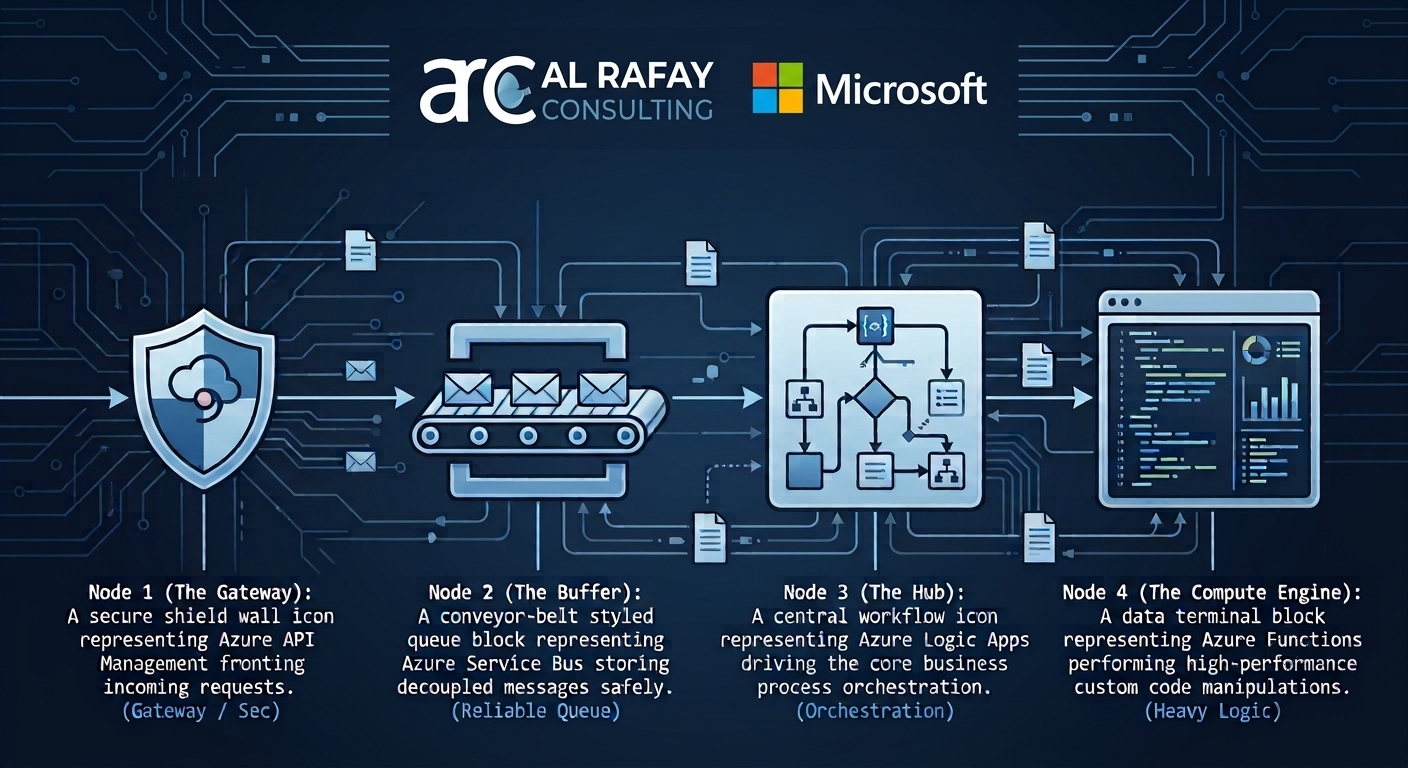
In most enterprise architectures, Logic Apps works as the orchestration layer inside Azure Integration Services, commonly alongside API Management, Service Bus, Event Grid, and Azure Functions.
For teams modernizing process automation, this often complements Power Automate/Power Platform workflows rather than replacing them.
How Azure Logic Apps Works
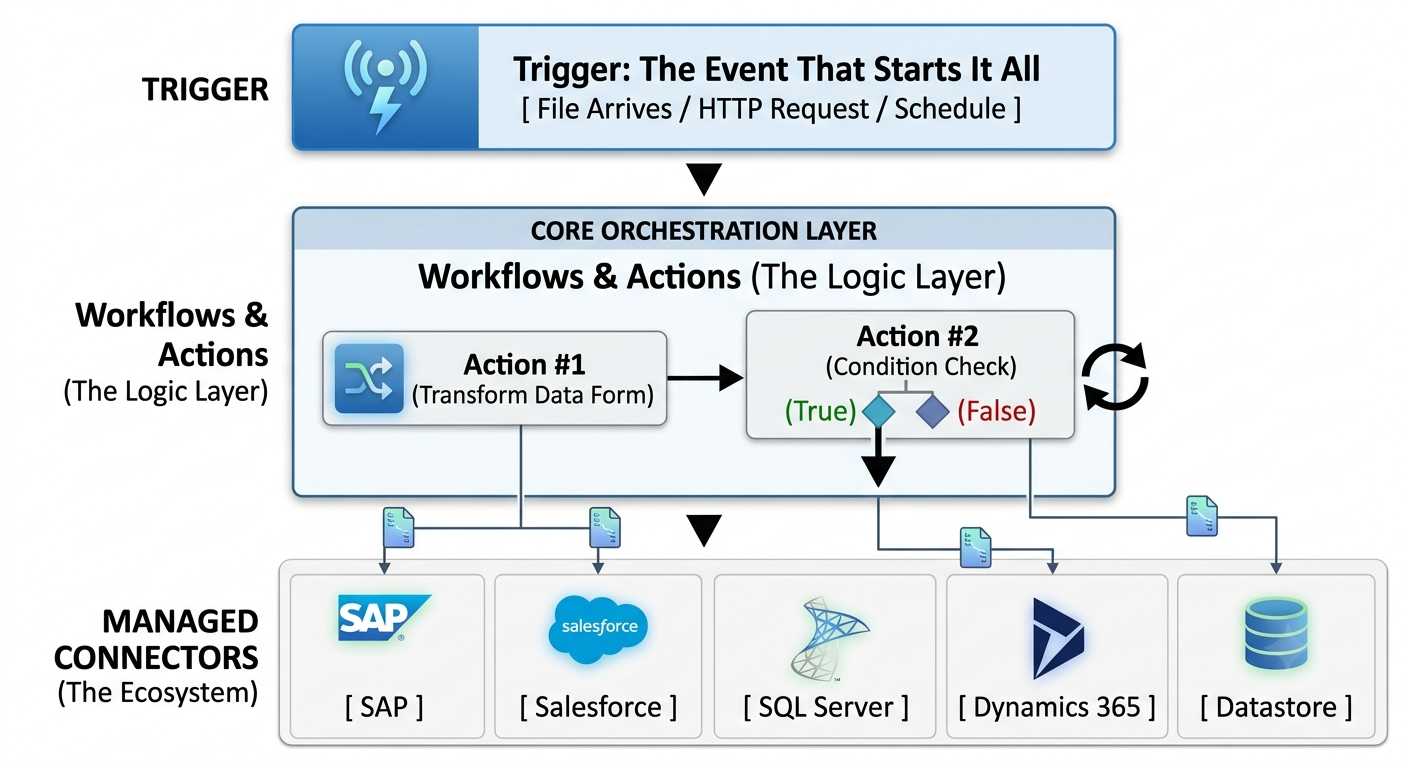
A Logic App runs through four core elements:
- Trigger: the event that starts the workflow
- Actions: steps executed after the trigger
- Connectors: managed or built-in integrations to external systems
- Workflow definition: the end-to-end process including conditions, loops, and branching
Each execution is logged in run history, which supports troubleshooting, performance monitoring, and governance.
Consumption vs Standard: Which Model Fits?
| Area | Consumption | Standard |
|---|---|---|
| Hosting | Multi-tenant serverless | Single-tenant dedicated |
| Pricing | Per trigger/action execution | Hosting plan plus connector usage |
| Best fit | Variable or low-volume automations | High-throughput or governance-heavy enterprise workflows |
| Networking | Limited isolation options | Stronger VNET/private networking support |
Cost planning should include action volume, connector type, run history storage, and B2B integration account usage.
Enterprise Use Cases
Common Azure Logic Apps scenarios include:
- ERP and CRM synchronization
- File and API integration automation
- Approval and notification orchestration
- SaaS system orchestration
- B2B document exchange and partner onboarding
For deep system integrations, teams often pair Logic Apps with API Integration Services and ERP/CRM integration.
Logic Apps for B2B and EDI
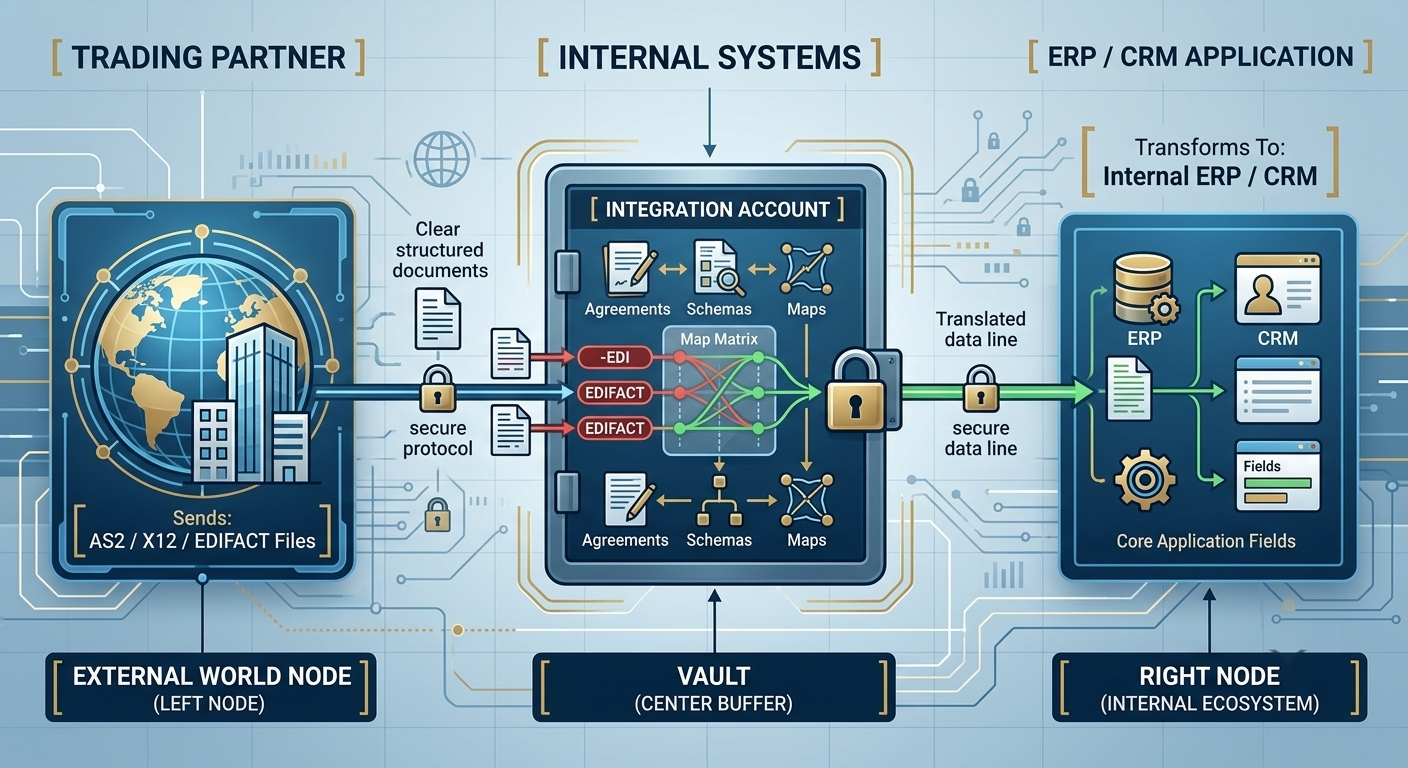
Logic Apps supports enterprise B2B requirements through Integration Accounts, partner agreements, schemas, and maps.
Supported standards include AS2, X12, EDIFACT, and RosettaNet, making Logic Apps a practical modernization path for legacy B2B middleware.
If B2B architecture is your current priority, browse related B2B resources in the ARC blog.
Logic Apps vs Power Automate vs Azure Functions
- Use Logic Apps for IT-governed integration and orchestration across enterprise systems.
- Use Power Automate for business-user workflows and departmental automation.
- Use Azure Functions for custom code and advanced transformation logic.
Mature enterprise architectures typically combine these tools by role rather than forcing one tool into every use case.
Common Risks and Best Practices
Common risks
- Point-to-point sprawl without integration governance
- Silent workflow failures due to missing alerting
- Credential risk from personal connector auth
- Underestimated managed connector costs
- Complex transformations forced into low-code actions
Best practices
- Standardize monitoring with run history, Azure Monitor, and Application Insights
- Use managed identities for production connector auth
- Define retry and failure handling patterns early
- Keep orchestration in Logic Apps and heavy transformations in code where needed
- Adopt CI/CD for production workflow deployment
When to Bring in an Integration Partner
Bring in specialist help when you need B2B onboarding, legacy middleware migration, enterprise-grade governance, or reliable cross-system architecture at scale.
ARC can support planning, implementation, and optimization through integration services and Azure consulting.
Key Takeaways
- Azure Logic Apps is a strong orchestration layer for enterprise integrations.
- Consumption and Standard should be selected by workload and governance requirements.
- Logic Apps can handle B2B/EDI workflows with Integration Accounts and partner agreements.
- Governance, monitoring, and identity patterns are critical to production reliability.
- Most enterprise teams combine Logic Apps with API Management, messaging, and code services.
Ready to Plan Your Logic Apps Integration Roadmap?
Manual integrations and fragmented automation increase operational risk over time. A structured assessment helps you prioritize architecture, cost control, and phased rollout.
Book a Free Azure Integration AssessmentFrequently Asked Questions
What is Azure Logic Apps?
Azure Logic Apps is a cloud-based platform for building and running automated workflows that connect applications, data, and services using low-code/no-code tooling, prebuilt connectors, and enterprise-grade integration capabilities.
How does Azure Logic Apps work?
A workflow starts with a trigger (an event), then runs a sequence of actions that move, transform, and route data using connectors to external systems, with every execution logged in run history for monitoring.
What are triggers and actions in Logic Apps?
A trigger is the event that starts a workflow (e.g., a file arriving, a scheduled time, an HTTP request). Actions are the steps that execute after the trigger fires, such as calling an API or writing to a database.
What are Logic Apps connectors?
Connectors are prebuilt integrations to specific systems and services - built-in connectors run natively, managed connectors connect to external SaaS/enterprise systems, and custom connectors can be built for proprietary systems.
What is the difference between Azure Logic Apps Consumption and Standard?
Consumption is a fully multi-tenant, pay-per-execution serverless model best for variable or lower-volume workloads. Standard is single-tenant with dedicated hosting capacity, offering better networking, local development, and extensibility for high-throughput enterprise workflows.
How much does Azure Logic Apps cost?
Consumption is metered per trigger and action execution; Standard is billed based on hosting capacity plus managed connector calls billed separately. Additional costs include storage for run history and integration account tiers for B2B/EDI capabilities.
Is Azure Logic Apps serverless?
The Consumption model is fully serverless, with automatic scaling and pay-per-execution billing. The Standard model uses dedicated hosting capacity, offering more control at the tradeoff of a different billing structure.
When should I use Logic Apps instead of Power Automate?
Use Logic Apps when you need to connect enterprise systems (ERP, databases, trading partners) with IT-governed, auditable workflows. Power Automate is typically better suited for business-user-led, departmental automations within Microsoft 365 and the Power Platform.
When should I use Logic Apps instead of Azure Functions?
Use Logic Apps for orchestration, connector-driven integration, and workflow logic; use Azure Functions when you need complex custom code or data transformations that are difficult to express in low-code actions. Many enterprise architectures use both together.
Can Azure Logic Apps connect to on-premises systems?
Yes. Logic Apps supports hybrid connectivity to on-premises systems through gateways and virtual network integration, particularly with the Standard hosting model.
Can Azure Logic Apps process EDI?
Yes. Logic Apps supports B2B/EDI integration through Integration Accounts, trading partners, agreements, schemas, and maps, with native support for AS2, X12, EDIFACT, and RosettaNet standards.
What is an Integration Account in Azure Logic Apps?
An Integration Account is a container for B2B artifacts - trading partners, agreements, schemas, and maps - that Logic Apps workflows reference when processing B2B/EDI transactions.
How do you monitor Logic Apps?
Logic Apps workflows are monitored through run history (per-execution logs of triggers and actions) combined with Azure Monitor and Application Insights for centralized alerting, performance tracking, and failure analysis across workflows.
What are common Logic Apps implementation risks?
Common risks include point-to-point integration sprawl, unmonitored silent failures, connectors authenticated with personal credentials, underestimated connector costs, and forcing complex data transformations into low-code actions instead of offloading them to code.
When should a company hire Azure integration services?
When integration needs go beyond simple workflows - such as B2B/EDI trading partner onboarding, legacy middleware migration, multi-system enterprise architecture, or governance and security requirements - bringing in experienced Azure integration services helps avoid costly rework and design mistakes.

Al Rafay Consulting
ARC Team
AI-powered Microsoft Solutions Partner delivering enterprise solutions on Azure, SharePoint, and Microsoft 365.
LinkedIn Profile