CLM Software Comparison: How to Choose the Right Contract Lifecycle Management Solution
CLM software comparison is the structured evaluation of contract lifecycle management options based on lifecycle coverage, workflow depth, integration fit, governance, and total cost of ownership.
Compare CLM software the right way: evaluation criteria, vendor categories, a scorecard, and when Microsoft-native CLM beats a standalone platform.
Al Rafay Consulting
· Updated July 14, 2026 · ARC Team
Search “best CLM software” and you will get exactly what you would expect: a dozen listicles ranking the same ten vendors, a review directory with 150 plus listings, and no clear answer to the question you actually came with, which one fits you.
That is the real problem with most CLM software comparisons. They optimize for breadth instead of fit. If your organization already runs on Microsoft 365, the right answer may not be a standalone platform.
This guide is a decision framework, not another ranked list. We will cover what contract lifecycle management software actually needs to do, categories of solutions, a practical scorecard, and when Microsoft-native CLM makes more sense than buying another platform.
What Is CLM Software?
CLM software manages contracts through their full lifecycle: intake, authoring, negotiation, approval, execution, storage, obligation tracking, and renewal. It is different from simply storing signed files.
CLM vs Contract Management vs E-Signature vs Document Management
| Category | What It Covers | What It Is Missing On Its Own |
|---|---|---|
| CLM Software | Full lifecycle: intake, authoring, approval, execution, obligations, renewal, reporting | Broadest category, umbrella for the other tools |
| Contract Management (general term) | Often used for post-signature administration or full lifecycle | Ambiguous scope unless defined clearly |
| E-Signature Software | Electronic execution of a document | No upstream drafting or downstream obligation tracking |
| Document Management System | General document storage and version control | No contract-specific workflows, clause libraries, or renewal alerts |
If your process still relies on drives and inboxes, a governed document management system is a minimum baseline, but CLM requires lifecycle automation beyond storage.
Why Companies Compare CLM Software
Most companies begin evaluation because of recurring operational pain:
- Approval bottlenecks without clear routing or escalation
- Missed renewals and accidental auto-renew terms
- Poor portfolio visibility across legal, procurement, and sales
- Compliance exposure due to weak audit trails
If two or more are true in your environment, formal comparison is overdue.
CLM Software Comparison: Key Evaluation Criteria
1. Lifecycle Coverage
Confirm whether the solution covers intake through renewal, or only selected stages.
2. Repository and Search
Assess whether contracts are centralized with mandatory metadata and fast retrieval. If your repository strategy depends on Microsoft 365, validate the approach with SharePoint consulting services before finalizing your CLM design.
3. Workflow Automation
Check if approval logic can be configured by contract type, value, and risk tier, including sequential and parallel paths. If workflow maturity is a top priority, evaluate Power Platform workflow automation capabilities early.
4. AI and Contract Intelligence
Evaluate AI support for drafting, extraction, obligation monitoring, and risk identification. For Microsoft-centric teams, this often overlaps with intelligent document processing capabilities.
5. E-Signature and Collaboration
Review execution method, collaboration quality, redlining support, and notification flows.
6. Obligation and Renewal Management
Verify automatic alerts before key dates and escalation for non-response.
7. Reporting and Analytics
Ensure leadership can answer portfolio-level questions without manual spreadsheet effort.
8. Security and Compliance
Check RBAC, SSO, audit logging, retention labels, and certification alignment.
9. Integrations
Prioritize CRM, ERP, and collaboration integrations to prevent data silos.
10. Adoption and Support
Score usability for legal and non-legal users, plus implementation support quality.
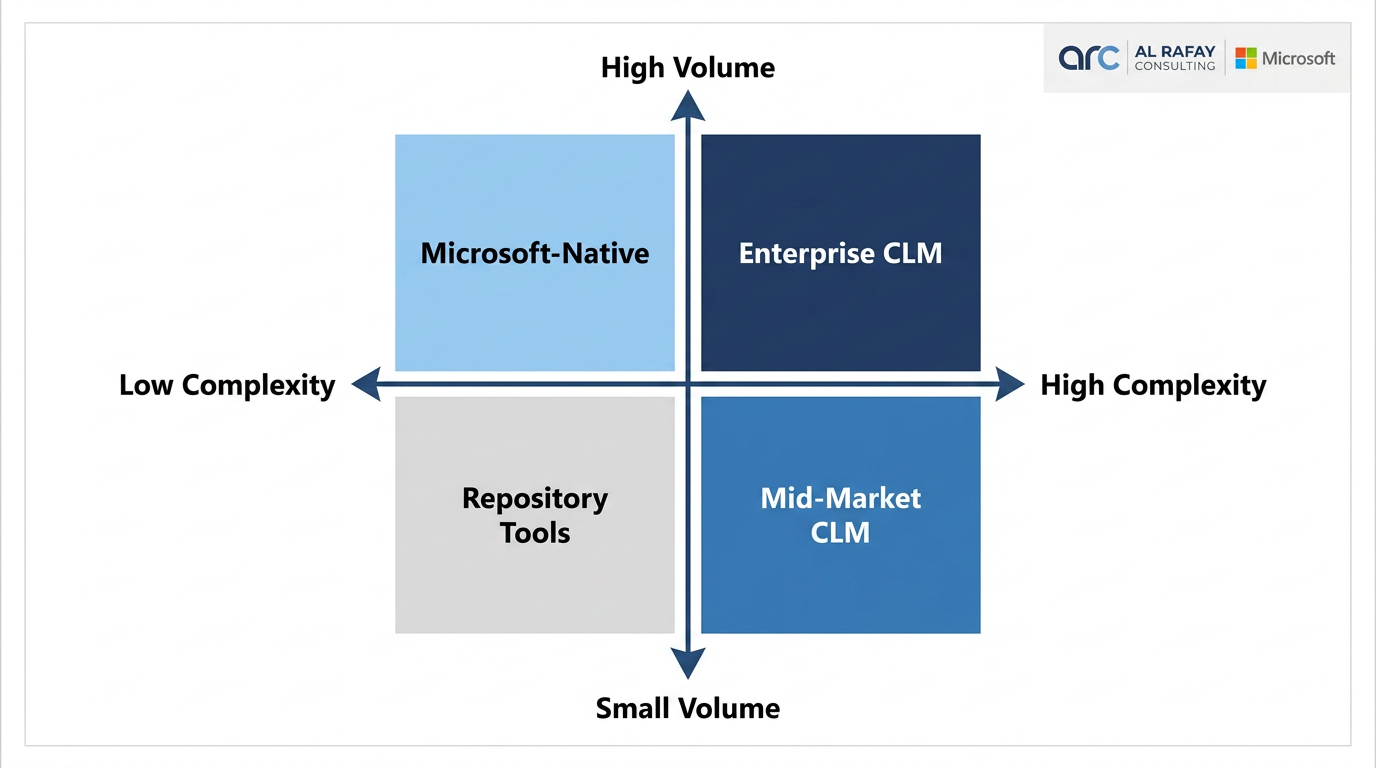
Top CLM Software Categories
| Category | Best Fit | Trade-Offs |
|---|---|---|
| Enterprise CLM | High-volume organizations with complex approval hierarchies | Higher cost and longer implementation |
| Mid-Market CLM | Growing companies needing structure without heavy overhead | May limit advanced customization |
| Repository Tools | Teams that mainly need centralized storage and basic tracking | Limited lifecycle depth |
| Microsoft-Native CLM | Microsoft 365-heavy organizations | Requires solid architecture and implementation expertise |
Vendor Comparison Table
| Platform | Known Strength | Best Fit | Consideration |
|---|---|---|---|
| DocuSign CLM | E-signature depth expanded to lifecycle use | Teams already standardized on DocuSign | CLM depth varies by edition and setup |
| Icertis | Enterprise-scale contract intelligence | Large, complex global organizations | Cost and implementation effort are significant |
| Ironclad | Strong legal workflow usability | Legal-led process standardization | May need extensions for broader operations |
| Agiloft | High configurability | Teams needing tailored workflows | Requires disciplined implementation design |
| Conga CLM | Salesforce ecosystem alignment | Sales-centric Salesforce organizations | Less native fit for Microsoft-first stacks |
| LinkSquares | Analytics and AI insights | Legal teams focused on intelligence | Broader workflow depth may require integrations |
| Sirion | Strong post-signature governance | Performance and obligation-heavy programs | Validate upstream authoring needs carefully |
| Microsoft-Native CLM | Deep Microsoft 365 integration | Microsoft-first organizations | Outcomes depend heavily on architecture quality |
In sales-driven operating models where contracting intersects opportunity pipelines, teams often evaluate CLM workflows alongside Deal Tracker Software requirements.
Microsoft 365 CLM Option
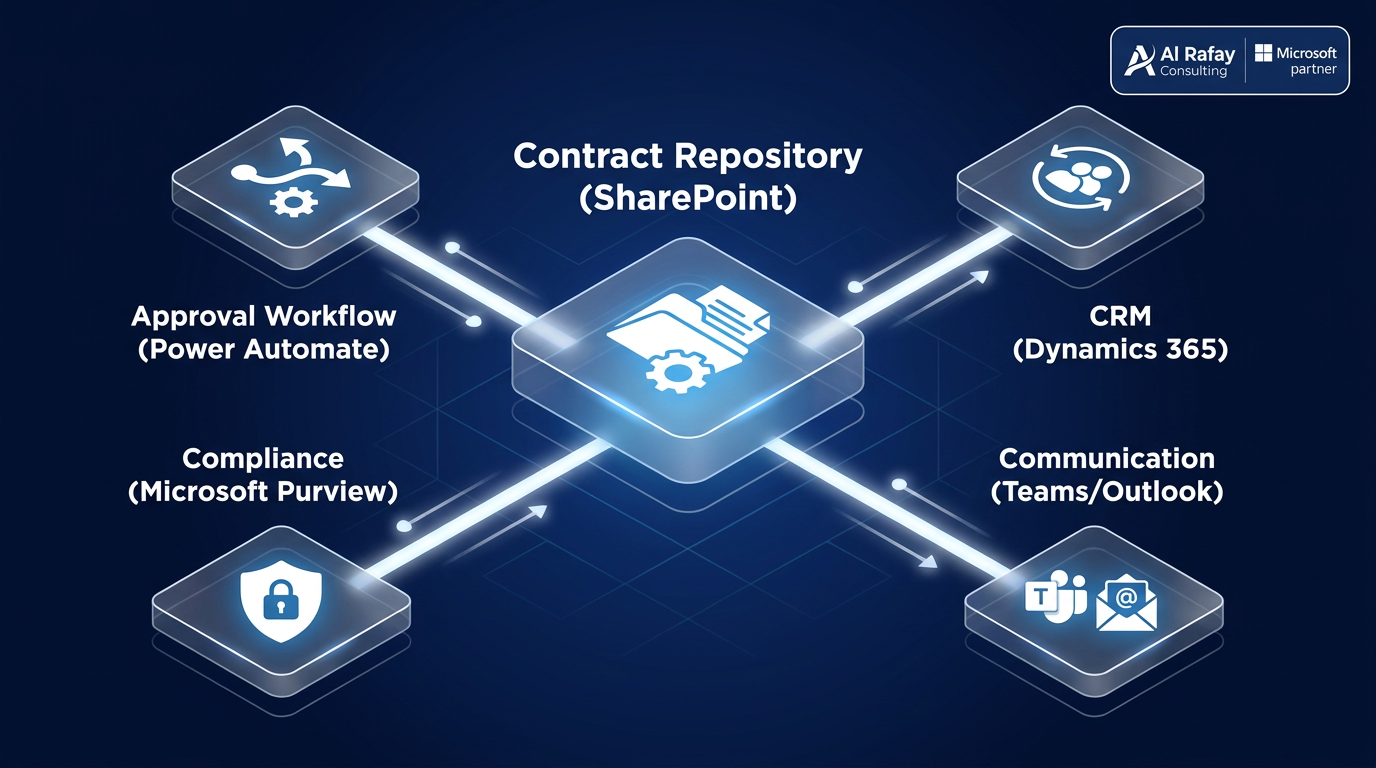
For Microsoft 365-heavy organizations, this is a strategic option, not a fallback. A Microsoft-native contract lifecycle management architecture can be built with:
- SharePoint as the contract repository
- Power Automate for approvals and routing logic
- Teams and Outlook for negotiation communication
- Microsoft Purview for retention and governance
- Dynamics 365 integration for CRM and supply-chain contexts
If your organization needs implementation support, include SharePoint consulting services in your evaluation alongside software vendors.
A key nuance: Dynamics 365 Supply Chain Management includes a CLM integration framework, but it is not a complete CLM system by itself for advanced authoring, redlining, negotiation, and amendment workflows.
How to Choose CLM Software: Practical Framework

- Audit your current lifecycle and identify real bottlenecks.
- Translate pain points into weighted requirements.
- Build and use a consistent vendor scorecard.
- Run demos with your real templates and approval chains.
- Validate integrations end to end before purchase.
- Roll out in phases, starting with one contract type.
CLM Vendor Scorecard Template
| Criteria | Weight | Vendor A | Vendor B | Microsoft-Native |
|---|---|---|---|---|
| Lifecycle coverage | ||||
| Repository and search | ||||
| Workflow automation | ||||
| AI and contract intelligence | ||||
| E-signature and collaboration | ||||
| Obligation and renewal management | ||||
| Reporting and analytics | ||||
| Security and compliance | ||||
| Integrations | ||||
| Adoption and support | ||||
| Total (weighted) |
Common Challenges and How to Avoid Them
| Challenge | Why It Happens | How To Avoid It |
|---|---|---|
| Choosing from feature lists only | Breadth is marketed more than fit | Use your weighted scorecard in every demo |
| Migration chaos | Source data lacks clean metadata | Define metadata model before migration |
| Low post-go-live adoption | Stakeholders excluded early | Include legal, procurement, sales, and finance in design |
| Over-customization | Teams try to model every exception up front | Start with baseline workflows and iterate |
| Governance gaps | Security and retention considered too late | Treat RBAC, SSO, and retention as core criteria |
Proof and Implementation Reality
Many programs underperform for avoidable reasons: underestimated migration effort, weak cross-functional buy-in, and over-customized launch scope. ARC has implemented these patterns in live environments, including the CAMP contract automation case study for production-grade contract workflow outcomes.
Conclusion
The best CLM software is the option that matches your process reality, governance needs, and technology baseline. For many Microsoft-first organizations, a Microsoft-native approach can deliver enterprise-grade outcomes without introducing another disconnected platform.
If you want a practical fit assessment, start with a scorecard and review options side by side. Then choose the architecture, not the hype.
Frequently Asked Questions
What is CLM software?
CLM software manages contracts through their full lifecycle, including intake, authoring, negotiation, approval, execution, storage, obligation tracking, and renewal, rather than only storing signed documents.
What is the difference between CLM and contract management?
CLM specifically refers to the full end-to-end process from initiation through renewal or termination, while contract management is often used more loosely and can refer to just post-signature administration.
What is the difference between CLM and e-signature software?
E-signature software handles only the electronic execution of a document, while CLM covers the entire process before and after signing, including drafting, approval routing, and obligation tracking.
How do I compare CLM software vendors?
Build a weighted scorecard based on your specific requirements, covering lifecycle coverage, workflow automation, AI capabilities, security, integrations, and adoption support, and evaluate every vendor consistently against it using demos with your own contracts.
What is the best CLM software for Microsoft 365 users?
Organizations heavily invested in Microsoft 365 should evaluate a Microsoft-native CLM architecture built on SharePoint, Power Automate, and Microsoft Purview alongside standalone platforms, since it can deliver comparable functionality at a lower total cost of ownership.
Can SharePoint be used for contract lifecycle management?
Yes. Microsoft Learn documents a contract management architecture built on SharePoint lists, document processing, Teams, and Power Automate, making it a genuinely supported approach rather than a workaround.
Does Dynamics 365 include CLM?
Not fully. Dynamics 365 Supply Chain Management includes a CLM integration framework, but it requires integration with an external or Microsoft-native CLM system for advanced functions like authoring, redlining, and negotiation.

Al Rafay Consulting
ARC Team
AI-powered Microsoft Solutions Partner delivering enterprise solutions on Azure, SharePoint, and Microsoft 365.
LinkedIn Profile