What Are Managed IT Services? A Complete Buyer's Guide for Modern Businesses
Managed IT services are proactive, SLA-based outsourced IT operations that cover support, monitoring, security, cloud administration, and governance.
Managed IT services explained: what MSPs do, pricing models, and how to choose the right provider. A complete buyer's guide.
Al Rafay Consulting
· Updated July 14, 2026 · ARC Team

Your servers went down at 2 a.m. again. Your internal IT guy is stretched across help desk tickets, security patches, and a cloud migration he never had time to plan properly. Meanwhile, ransomware attacks are climbing, your Microsoft 365 licenses are half-configured, and leadership wants to know why the technology budget keeps growing without anyone being able to explain what it’s actually buying.
If this sounds familiar, you’re not alone — and you’re exactly who this guide is for.
Managed IT services have become the default way growing and mid-market organizations solve a problem that used to require an ever-expanding internal team: how do you get enterprise-grade IT operations, security, and cloud management without the cost, hiring headaches, and skills gaps of building it all in-house?
This guide goes beyond the basic “what is an MSP” explainer you’ll find elsewhere. You’ll get a real buying framework: what managed IT services actually include, how pricing works, when managed IT makes sense (and when it doesn’t), how to evaluate providers using a structured scorecard, and what to expect from a modern, Microsoft-centered managed services engagement. Whether you’re comparing managed IT against outsourcing, staff augmentation, or a break-fix arrangement, by the end of this guide you’ll have a clear, defensible path to a decision.
What Are Managed IT Services?
Managed IT services are the practice of outsourcing the ongoing monitoring, management, and support of your IT infrastructure and systems to a third-party provider — a Managed Service Provider (MSP) — under a contracted, typically fixed-fee agreement.
Instead of waiting for something to break and then calling for help (the old “break-fix” model), a managed IT services provider proactively monitors your network, servers, endpoints, cloud environments, and security posture around the clock. The goal isn’t just to fix problems — it’s to prevent them.
A working definition you can use:
Managed IT services are the ongoing, proactive management of an organization’s IT infrastructure, systems, and security — delivered by a specialized provider under a defined service level agreement (SLA) — covering areas like network monitoring, help desk support, cybersecurity, cloud administration, and backup and disaster recovery.
The model has grown well beyond simple server monitoring. Modern managed IT services increasingly overlap with managed security, managed cloud (especially Microsoft Azure and Microsoft 365), and strategic IT advisory — reflecting how deeply technology now touches every part of a business.
Why the Model Exists
Three forces are driving the shift toward managed IT:
- Complexity — hybrid cloud, SaaS sprawl, and multi-platform environments are harder to manage internally than ever before
- Security risk — the threat landscape now requires 24/7 monitoring most internal teams can’t sustain
- Talent scarcity — specialized skills in cloud architecture, cybersecurity, and platform administration are expensive and hard to hire, and even harder to retain
How Managed IT Services Work
A managed IT engagement typically follows a structured lifecycle rather than an ad-hoc arrangement:
- Assessment — the MSP audits your current environment: network, endpoints, cloud tenants, security posture, and existing documentation
- Onboarding — monitoring agents, remote management tools, and ticketing systems are deployed across your environment
- Proactive monitoring — infrastructure, endpoints, and cloud services are watched continuously for performance issues, vulnerabilities, and anomalies
- Help desk and support — end users get a defined channel (phone, portal, chat) for support requests, governed by response-time SLAs
- Patch and update management — operating systems, applications, and firmware are kept current on a defined cadence
- Security operations — threat detection, endpoint protection, and incident response are handled continuously, often through a SOC (Security Operations Center)
- Reporting and strategic review — regular business reviews translate technical activity into business language: uptime, ticket trends, security posture, and roadmap recommendations
This is the core distinction between managed IT and break-fix support: managed IT is a relationship, governed by SLAs and reporting cadence, not a series of transactions.
What Is a Managed Services Provider (MSP)?
A Managed Service Provider (MSP) is a company that remotely manages a client’s IT infrastructure and end-user systems, typically on a subscription basis. MSPs range from small local providers offering help desk and network support, to large, specialized firms — often Microsoft Solutions Partners — that manage complex cloud environments, security operations, and digital transformation initiatives.
Not all MSPs are created equal. The market includes:
- Generalist MSPs — broad IT support, often strongest with smaller, simpler environments
- Security-focused MSPs (MSSPs) — specialize in threat detection, SOC-as-a-service, and compliance
- Cloud and platform specialists — deep expertise in a specific ecosystem (e.g., Microsoft Azure, AWS, Google Cloud)
- Vertical-specific MSPs — tailored to industries like healthcare, financial services, or manufacturing, with compliance expertise built in
For organizations already invested in Microsoft 365, Azure, or Dynamics 365, working with an MSP that holds Microsoft Solutions Partner designations is a meaningful trust signal — it indicates verified expertise, not just familiarity.
Managed IT Services vs. Break-Fix Support
Break-fix is the traditional, reactive model: something breaks, you call a technician, you pay for the fix. It sounds simpler and can look cheaper on paper — until you account for downtime, unpredictable costs, and the total absence of proactive security.
| Factor | Managed IT Services | Break-Fix Support |
|---|---|---|
| Approach | Proactive monitoring and prevention | Reactive, only after failure |
| Cost structure | Predictable, fixed monthly fee | Variable, billed per incident |
| Security posture | Continuous monitoring and patching | Minimal, incident-driven |
| Downtime risk | Lower, issues caught early | Higher, issues surface as outages |
| Relationship | Ongoing, SLA-governed | Transactional, no SLA |
| Best for | Ongoing operations, growing businesses | Very small, low-complexity environments |
Break-fix isn’t inherently wrong — but for any organization with meaningful digital dependency (which is nearly everyone today), it’s a high-risk way to manage technology.
Managed IT vs. IT Outsourcing
“Outsourcing” is often used loosely, but it typically refers to handing off an entire IT function or project — such as application development or a specific implementation — to an external team, often without the ongoing operational and support relationship an MSP provides.
Managed IT services differ in three ways:
- Scope — outsourcing is often project-bound; managed IT is continuous operational support
- Governance — managed IT is bound by SLAs covering uptime, response time, and resolution time; outsourcing arrangements are frequently scoped around deliverables, not ongoing service levels
- Integration — an MSP typically becomes an extension of your internal team, embedded in day-to-day operations, rather than a separate execution unit
If you need a piece of software built, that’s an outsourcing (or staff augmentation) conversation. If you need your infrastructure, endpoints, and security managed continuously, that’s a managed IT services conversation.
Managed IT vs. Staff Augmentation
IT staff augmentation means bringing in external specialists — developers, engineers, project managers — to work under your direction, typically to fill a skills gap or scale a team temporarily. The augmented staff work for your internal processes; an MSP runs its own processes on your behalf.
| Factor | Managed IT Services | Staff Augmentation |
|---|---|---|
| Control | MSP manages processes and tooling | Client manages and directs the staff |
| Best for | Ongoing IT operations and support | Temporary skill or capacity gaps |
| Accountability | SLA-based outcomes | Hours/output based |
| Team integration | External, operates independently | Embedded within client’s team |
| Typical duration | Long-term, continuous | Project-based or fixed-term |
Many organizations use both models simultaneously — managed IT services for day-to-day operations and security, with staff augmentation layered in for specific projects, like a Microsoft 365 migration or custom application build. If you’re deciding between the two, our guide on IT staff augmentation vs. hiring breaks down when each model fits best.
Types of Managed IT Services
Managed IT is not a single service — it’s a portfolio. Most MSP engagements combine several of the following.
Help Desk Support
Frontline support for end users, typically available via phone, chat, or a ticketing portal, governed by defined response-time SLAs (e.g., critical issues acknowledged within 15 minutes).
Network Monitoring
Continuous, automated monitoring of network infrastructure — routers, switches, firewalls, bandwidth utilization — to catch performance degradation and outages before they impact users.
Endpoint Management
Centralized management of laptops, desktops, and mobile devices, including patching, configuration, and security policy enforcement — often delivered through platforms like Microsoft Intune Services.
Cybersecurity Services
Layered security services including endpoint protection, threat detection, vulnerability management, and often Managed Detection and Response (MDR) or SOC-as-a-Service for continuous monitoring and incident response.
Microsoft 365 Management
Administration of mailboxes, licensing, security policies, Teams, SharePoint, and compliance settings within the Microsoft 365 Services environment — an increasingly critical service as organizations centralize productivity and collaboration in the platform.
Azure Management
Ongoing management of Azure Services cloud infrastructure: cost optimization, governance, identity management (via Microsoft Entra ID), resource monitoring, and security configuration.
Backup & Disaster Recovery
Automated backup of critical systems and data, paired with tested recovery procedures to minimize downtime and data loss in the event of a failure, breach, or disaster.
Compliance & Governance
Support for regulatory and framework alignment — such as ISO 27001, NIST, or CIS Controls — including policy documentation, audit readiness, and data governance, often supported by tools like Data Governance Consulting.
Benefits of Managed IT Services
- Predictable costs — fixed monthly fees replace unpredictable emergency IT spending
- Reduced downtime — proactive monitoring catches issues before they become outages
- Stronger security posture — continuous monitoring, patching, and threat detection reduce breach risk
- Access to specialized expertise — cloud architects, security analysts, and platform specialists without full-time hires
- Scalability — services scale up or down with business growth, without a hiring cycle
- Focus for internal teams — internal IT staff shift from firefighting to strategic projects
- Improved compliance posture — structured documentation and controls support audit readiness
Signs Your Business Needs Managed IT Services
You’re likely a strong candidate for managed IT services if you’re experiencing several of the following:
- Frequent, unresolved IT issues that disrupt daily operations
- No 24/7 monitoring of your network, endpoints, or cloud environment
- Internal IT is a single person (or a small team) managing everything reactively
- Rising cybersecurity concerns without a dedicated security function
- Growing reliance on Microsoft 365 or Azure without dedicated platform management
- Unpredictable, escalating technology spending
- Upcoming compliance requirements your team isn’t prepared to meet
If three or more of these apply, managed IT services are worth actively evaluating — not just as a cost decision, but as a risk-reduction decision.
How Much Do Managed IT Services Cost?
Managed IT pricing varies by scope, environment complexity, and provider — but most contracts follow one of a few common structures.
| Pricing Model | How It Works | Best For |
|---|---|---|
| Per-user pricing | Flat fee per employee/user per month | Organizations with consistent per-employee tech needs |
| Per-device pricing | Flat fee per managed device (laptop, server, etc.) | Environments with many shared or non-user devices |
| Tiered/fixed-fee bundles | Set packages (e.g., Basic, Standard, Premium) with defined service scope | Businesses wanting predictable, simple budgeting |
| Value-based / project pricing | Priced around specific outcomes or transformation projects | Cloud migrations, security overhauls, one-time initiatives |
Factors that influence cost include the number of users and devices, the complexity of your cloud environment, the depth of security services included, compliance requirements, and SLA response-time commitments.
Managed IT vs. Hiring Internal IT: A Cost Perspective
Hiring a single, competent IT generalist involves salary, benefits, training, and tooling costs — and still leaves gaps in specialized areas like cybersecurity or cloud architecture. A managed IT contract typically delivers a broader bench of specialists (help desk, security analysts, cloud engineers) for a comparable or lower total cost than one or two full-time hires, without the hiring risk or ramp-up time. For most small and mid-sized organizations, this is the core financial argument for managed IT — not that it’s “cheap,” but that it converts an unpredictable, gap-filled cost structure into a predictable, comprehensive one.
Fully Managed vs. Co-Managed IT
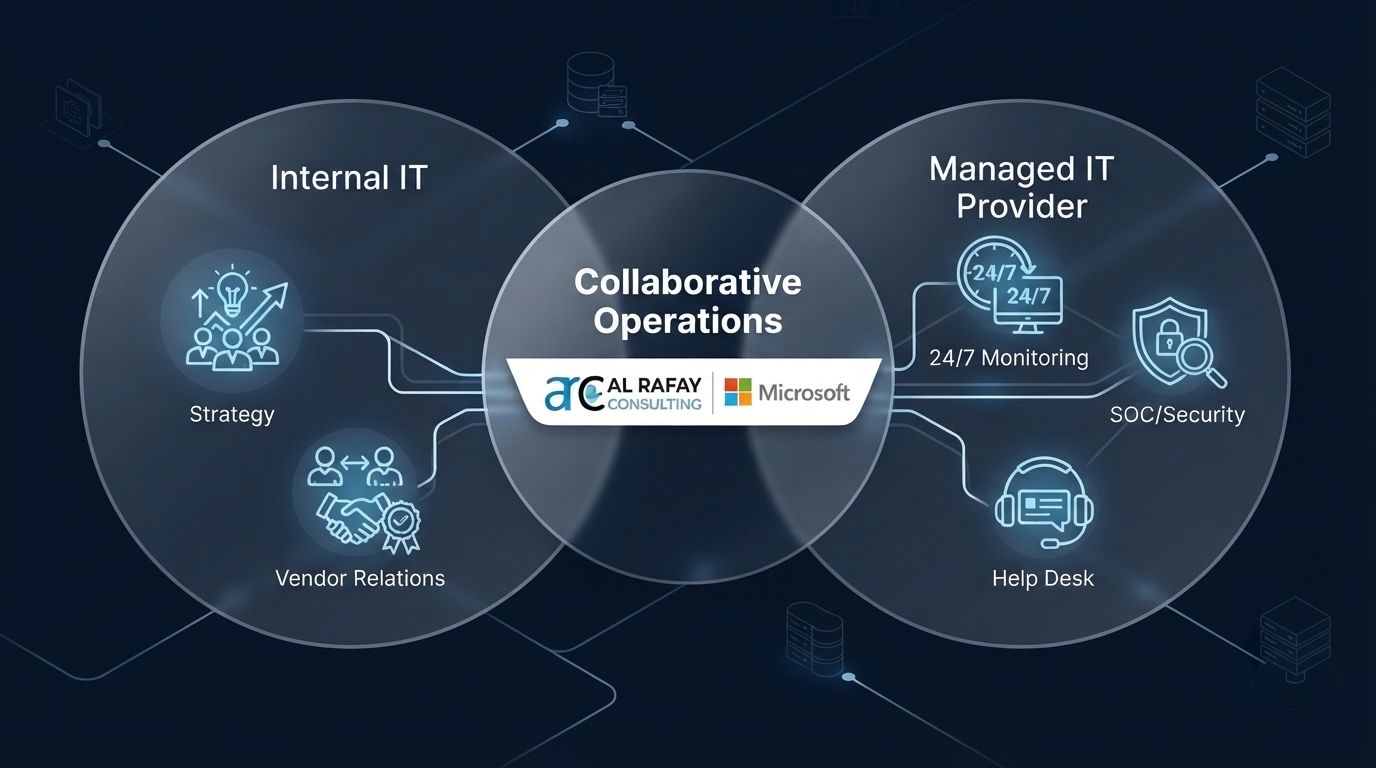
Not every organization needs to hand off IT entirely. Co-managed IT is a hybrid model where an internal IT team retains control of certain functions — often strategy, vendor relationships, or specific applications — while the MSP handles defined areas like security monitoring, help desk overflow, or cloud administration.
| Model | Internal IT Role | MSP Role | Best For |
|---|---|---|---|
| Fully Managed | Minimal to none | Owns all IT operations | Businesses with no internal IT function |
| Co-Managed | Retains strategic/specialized control | Fills specific gaps (security, after-hours support, cloud) | Businesses with an existing IT team needing augmentation |
Co-managed IT is particularly common among mid-market and growing enterprises that have invested in an internal IT function but lack coverage in specific areas — most often cybersecurity and after-hours monitoring.
When You Might NOT Need Managed IT Services (Yet)
Managed IT isn’t universally the right first step. It may not be the priority if:
- Your organization is very small (under 10 employees) with minimal technology dependency
- You have a mature, well-staffed internal IT team already covering monitoring, security, and cloud management effectively
- Your immediate need is a single, bounded project (e.g., a one-time migration) rather than ongoing operations — in which case IT staff augmentation or a project-based engagement may be more cost-effective
- You haven’t yet defined what “success” looks like for outsourced IT, and would benefit from an internal IT maturity assessment first
Being honest about where you sit on this spectrum prevents a mismatched engagement and a frustrating vendor relationship.
How to Choose the Right MSP
Selecting an MSP is a strategic decision, not a procurement checkbox. Use a structured evaluation process rather than choosing based on price alone.
Questions to Ask a Prospective MSP
- What is your average response time for critical issues, and is it contractually guaranteed?
- How do you handle after-hours and weekend support?
- What does your onboarding process look like, and how long does it take?
- Can you provide references from clients in our industry or of similar size?
- What certifications and partner designations does your team hold (e.g., Microsoft Solutions Partner)?
- How do you handle security incidents, and do you offer MDR or SOC-as-a-Service?
- What reporting will we receive, and how often?
- How do you price scope changes or additional projects outside the contract?
- What is your process for offboarding if we choose to leave?
- Can you support our specific compliance requirements?
SLA Checklist
A strong SLA should clearly define:
- Response time by severity level (critical, high, medium, low)
- Resolution time targets
- Uptime guarantees for managed infrastructure
- Escalation procedures
- Reporting cadence and format
- Penalties or remedies for missed SLA targets
- Scope boundaries (what is and isn’t included)
MSP Evaluation Matrix
| Criteria | What to Evaluate | Weight |
|---|---|---|
| Technical expertise | Certifications, platform specialization (e.g., Microsoft) | High |
| Security capability | MDR/SOC offering, incident response process | High |
| SLA clarity | Defined, measurable, enforceable terms | High |
| Industry experience | Relevant case studies or references | Medium |
| Communication | Reporting cadence, account management structure | Medium |
| Pricing transparency | Clear scope, no hidden fees | Medium |
| Scalability | Ability to support growth or added services | Medium |
| Cultural fit | Communication style, responsiveness during sales process | Low–Medium |
Common MSP Red Flags
- Vague or unquantified SLA commitments (“fast response times” with no defined metric)
- Reluctance to provide client references
- No clear security incident response process
- One-size-fits-all pricing with no scoping conversation
- Poor communication or slow responses during the sales process itself
- No documented onboarding or offboarding process
- Lock-in contracts with no clear exit terms
Common Challenges and How to Avoid Them
Challenge: Misaligned expectations on scope. Many managed IT relationships sour because “included” services weren’t clearly defined upfront. Avoid it by insisting on a detailed scope-of-services document, not just a sales deck, before signing.
Challenge: Weak onboarding leading to early friction. A rushed onboarding often means the MSP doesn’t fully understand your environment before assuming responsibility for it. Avoid it by asking for a documented onboarding timeline and an initial environment assessment as a contractual deliverable.
Challenge: Security gaps assumed to be “covered” but aren’t. Not all managed IT packages include real security services like MDR or SOC monitoring — some only cover basic antivirus. Avoid it by explicitly confirming what security capabilities are included versus available as an add-on.
Challenge: Poor communication and reporting. Without regular business reviews, it’s hard to know if the relationship is delivering value. Avoid it by requiring a defined reporting cadence (monthly or quarterly) translating technical activity into business outcomes.
Challenge: Vendor lock-in and difficult offboarding. Some contracts make it difficult to leave, either through unclear data ownership or long notice periods. Avoid it by clarifying data portability and offboarding terms before signing, not after.
Challenge: Treating Microsoft ecosystem management as generic IT. Microsoft 365, Azure, and Intune each have platform-specific governance, licensing, and security nuances. A generalist MSP without deep Microsoft expertise can leave real gaps — misconfigured conditional access policies, unmanaged licensing sprawl, or incomplete Intune enrollment. Avoid it by prioritizing MSPs with verified Microsoft Solutions Partner status for Microsoft-heavy environments.
Best Practices
- Start with an assessment, not a contract. A credible MSP will want to audit your environment before proposing a scope and price.
- Define success metrics upfront — uptime targets, response times, ticket resolution rates — so you have an objective basis for reviewing the relationship.
- Treat the SLA as a living document. Revisit it as your environment and risk profile evolve, especially after growth, acquisitions, or new compliance requirements.
- Maintain a designated internal point of contact, even in a fully managed model, to keep communication and prioritization clear.
- Request regular business reviews, not just technical reports — you want to understand risk posture and roadmap, not just ticket counts.
- Align your MSP’s platform expertise with your actual environment. If you run primarily on Microsoft 365 and Azure, prioritize a Microsoft-focused partner over a generalist.
- Plan for co-management if you have any internal IT capability, rather than defaulting to fully managed or fully in-house.
Why Microsoft-Focused Businesses Need Specialized MSPs
Organizations built on Microsoft 365, Azure, and the broader Microsoft ecosystem face a specific challenge: generalist MSPs often provide surface-level administration without deep platform governance. A specialized Microsoft-focused MSP brings meaningfully different value:
- Microsoft 365 governance — proper configuration of security defaults, conditional access, data loss prevention, and license optimization, rather than default settings left unmanaged
- Azure management — cost governance, resource optimization, and identity management through Microsoft Entra ID, reducing both security risk and wasted cloud spend
- Intune-based endpoint management — consistent device compliance policies across a hybrid or remote workforce
- Defender and Sentinel-based security — threat detection and response built natively into the Microsoft security stack, rather than bolted-on third-party tools that don’t integrate cleanly
- Emerging AI tooling — as Microsoft expands Security Copilot and AI-assisted operations across its ecosystem, MSPs with genuine Microsoft depth are positioned to help clients adopt these capabilities safely and effectively
For organizations already standardized on Microsoft, this platform-specific expertise is often the difference between “IT that works” and “IT that’s optimized.”
Future Trends in Managed IT Services
Security-led growth. Managed security services are consistently identified as the fastest-growing segment of the MSP market, reflecting how central cybersecurity has become to every IT conversation.
A rapidly expanding global market. Industry research estimates the global managed services market now exceeds $400 billion, growing at a strong, sustained pace as organizations continue shifting IT operations to specialized providers.
AI-powered operations. MSPs are increasingly adopting AIOps, predictive monitoring, and automated remediation — using AI to detect and resolve issues before they affect end users, and adopting AI copilots to accelerate technical operations.
Cloud-first, hybrid-aware management. As organizations run more of their operations across Azure, Microsoft 365, and multi-cloud environments, MSPs are being asked to manage genuinely hybrid infrastructure rather than a single on-premises footprint.
Continued talent scarcity. Specialized cloud and security expertise remains difficult and expensive to hire directly, reinforcing outsourced and co-managed models as a practical long-term strategy rather than a stopgap.
Businesses evaluating managed IT today should factor these trends into their provider selection — specifically prioritizing MSPs investing in AI-assisted operations and deep cloud/security capability, not just help desk coverage.
Managed IT Services Buyer Checklist
Before signing with a provider, confirm you can check off each of the following:
- Documented scope of services, not just a sales summary
- Clear, measurable SLA with defined response and resolution times
- Confirmed security capabilities (MDR/SOC, not just antivirus)
- Platform expertise aligned to your environment (e.g., Microsoft Solutions Partner status)
- Transparent, itemized pricing with no hidden fees
- Defined onboarding timeline and process
- Defined offboarding and data portability terms
- Reference clients in your industry or of similar size
- Regular reporting and business review cadence
- Clarity on co-managed vs. fully managed responsibilities, if applicable
For a deeper provider-selection framework, see How to Choose a Managed Services Provider. Related reads: IT Staff Augmentation vs. Hiring: When to Use Each, and Nearshore vs. Offshore Software Development. For Microsoft-heavy organizations, evaluate Microsoft Security Services alongside Azure Services and Microsoft 365 Services.
Conclusion: Key Takeaways and Next Steps
Managed IT services are no longer only a support model. For most growing organizations, they are a risk, resilience, and growth decision. The right provider should improve uptime, tighten security, and give leadership clear operational visibility, not just close tickets.
Ready to Evaluate Your Managed IT Needs?
Every strong managed IT decision starts with an honest assessment of your current environment, risk exposure, and growth plans.
Frequently Asked Questions
What are managed IT services?
Managed IT services are the ongoing, proactive management of an organization's IT infrastructure and systems by a third-party provider (an MSP), under a contracted service level agreement covering monitoring, support, security, and maintenance.
What does an MSP do?
An MSP monitors, maintains, and supports a client's IT environment - including networks, endpoints, cloud platforms, and security - proactively rather than reactively, typically under a fixed monthly contract.
How do managed IT services work?
An MSP assesses your environment, deploys monitoring and management tools, and then continuously monitors, patches, and supports your systems while providing help desk support and regular reporting.
What is included in managed IT services?
Common inclusions are help desk support, network monitoring, endpoint management, cybersecurity, backup and disaster recovery, and often Microsoft 365 or Azure administration, though exact scope varies by provider and contract.
How much do managed IT services cost?
Pricing typically follows per-user, per-device, or tiered fixed-fee models, with cost driven by user/device count, environment complexity, and the depth of security services included.
Do small businesses need managed IT services?
Many small businesses benefit significantly, especially once they lack dedicated internal IT or face growing cybersecurity and compliance demands; very small, low-complexity organizations may not need a full engagement yet.
What is co-managed IT?
Co-managed IT is a hybrid model where an internal IT team retains control of certain functions while an MSP fills specific gaps, such as after-hours monitoring, security, or cloud management.
What is fully managed IT?
Fully managed IT means an MSP takes complete responsibility for an organization's IT operations, typically used by businesses without an internal IT function.

Al Rafay Consulting
ARC Team
AI-powered Microsoft Solutions Partner delivering enterprise solutions on Azure, SharePoint, and Microsoft 365.
LinkedIn Profile