Microsoft 365 Life Sciences Compliance: 21 CFR Part 11 | ARC
Microsoft 365 life sciences compliance is the practice of configuring Microsoft Purview, Microsoft Entra ID, SharePoint Online, and the Power Platform to satisfy FDA 21 CFR Part 11 electronic records and signatures requirements, EU GMP Annex 11, ISO 13485, GxP data integrity standards, HIPAA, and GDPR — through computer system validation, tamper-evident audit trails, controlled document management, and governed low-code workflows across the pharmaceutical, biotech, and medical device sectors.
Complete guide to Microsoft 365 compliance for pharma & biotech in 2026. 21 CFR Part 11, GxP, audit trails, SharePoint SOPs, Purview sensitivity labels, Power Platform CSV — built for FDA & EU GMP requirements.
Al Rafay Consulting
· Updated June 10, 2026 · Microsoft 365 Compliance & Life Sciences Specialists
Organizations looking to strengthen this area can work with Microsoft Purview consulting.
Why Microsoft 365 Is Becoming the GxP Compliance Platform of Choice
Pharmaceutical companies, biotech firms, and medical device manufacturers operate under some of the most demanding regulatory frameworks on the planet — FDA 21 CFR Part 11, EU GMP Annex 11, ISO 13485, HIPAA, and Good X Practice (GxP) guidelines that govern everything from electronic records and signatures to audit trails and data integrity. The question facing every life sciences IT and compliance leader today is not whether to move to the cloud, but how to do it in a fully validated, regulatory-defensible way.
Microsoft 365 — underpinned by Microsoft Purview, Microsoft Entra ID, SharePoint Online, and the Power Platform — offers life sciences organizations an enterprise-grade compliance architecture designed for exactly this challenge.
Microsoft 365 — underpinned by Purview, Entra ID, SharePoint, and the Power Platform — provides life sciences organizations with a pre-certified, configurable GxP compliance architecture
This guide examines every critical compliance layer: identity and electronic signatures, comprehensive audit trails, controlled document management, data protection, Power Platform governance, and the GxP validation roadmap that takes you from pilot to fully qualified production deployment.
If your team needs this designed and deployed in a production Microsoft 365 environment, our SharePoint consulting services can help configure the compliance-ready architecture, governance model, and records framework.
For the records management side of this challenge — retention schedules, disposition reviews, and Preservation Hold — see our Document Retention for Life-Sciences REITs: SharePoint & Purview Guide.
Microsoft 365’s Compliance Architecture for Life Sciences
Microsoft 365’s compliance capability is organized as a layered stack, with each layer building on the one beneath it. Understanding this architecture is essential before designing any GxP-compliant deployment.
| Layer | Components | Life Sciences Relevance |
|---|---|---|
| Platform Foundation | Microsoft data centers, SOC 2 Type II, ISO 27001, FedRAMP High, CSA STAR, HITRUST | Microsoft’s infrastructure is pre-audited — you inherit these certifications. Eliminates the need to validate the underlying cloud infrastructure as a new computer system. |
| Identity & Access | Microsoft Entra ID (Azure AD), MFA, Conditional Access, Privileged Identity Management (PIM) | Enforces unique user identities and role-based access — core 21 CFR Part 11 §11.10(d) requirement. |
| Audit & Monitoring | Microsoft Purview Unified Audit Log, Advanced Audit (E5), Microsoft Sentinel | Captures tamper-evident audit trails for all user and admin activities across all M365 services. |
| Information Governance | Purview Retention Labels, Records Management, Disposition Reviews, Preservation Holds | Enforces document retention schedules aligned to FDA, ICH, and GxP requirements. |
| Data Protection | Purview Sensitivity Labels, DLP Policies, Customer Key Encryption, Communication Compliance | Protects confidential clinical, regulatory, and IP data from unauthorized disclosure. |
| Power Platform Governance | DLP Policies, Managed Environments, ALM Pipelines, CoE Starter Kit | Governs low-code app and automation development in validated GxP workflows. |
| Shared Responsibility | Organization configures, validates, and maintains controls; Microsoft secures the platform | Life sciences organizations must document validation (IQ/OQ/PQ) for their specific M365 configuration. |
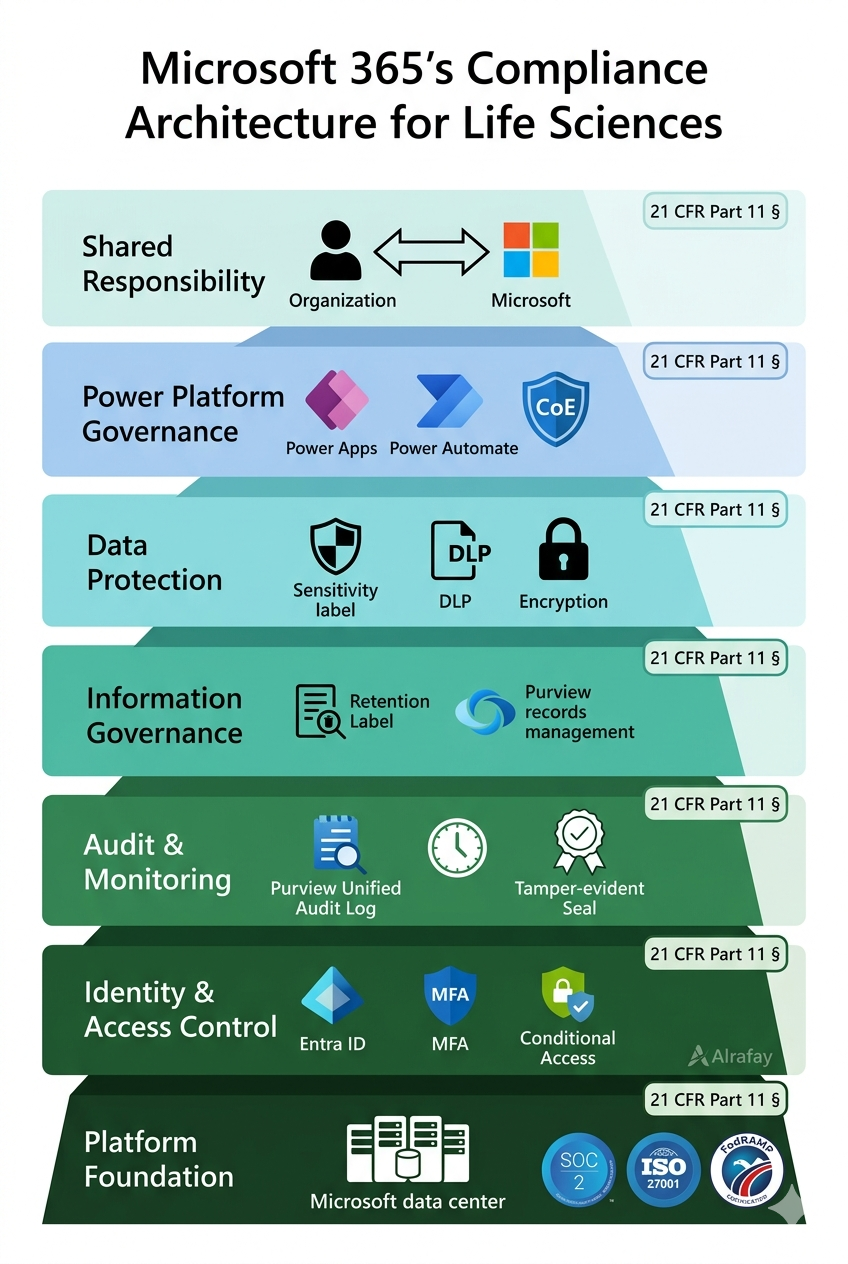
The Microsoft 365 GxP compliance stack — each layer builds on the one beneath it, from Microsoft’s pre-audited infrastructure up to Power Platform governance
Key Architecture Principles
Every GxP application on M365 must have its own Computer System Validation (CSV) package — the platform does not transfer its own certifications to your configuration.
The layered stack means controls at lower layers (identity, platform) support but do not replace controls at higher layers (audit, governance, DLP).
Microsoft’s GxP Guidelines (co-developed with Montrium) provide an approved framework for scoping and structuring your M365 CSV documentation.
The compliance architecture applies across all M365 workloads — SharePoint, Exchange, Teams, Power Platform, and OneDrive — via a unified Purview console.
Identity, Access Control & Electronic Signatures (21 CFR Part 11)
21 CFR Part 11 §11.10(d) requires that system access be limited to authorized individuals. §11.50 and §11.70 mandate that electronic signatures be attributable to a specific individual and that the link between signature and record be unbreakable. Microsoft Entra ID — the identity backbone of Microsoft 365 — is purpose-built to satisfy both requirements.
Microsoft Entra ID Controls for Part 11 Identity Requirements
- Unique user identity — every M365 user has a unique identity linked to a corporate account; shared or generic accounts can be enforced against via Conditional Access policies that block access from non-attributed accounts
- Multi-Factor Authentication (MFA) — required for all users accessing GxP systems; satisfies the Part 11 requirement for identity verification at the point of record creation or signature
- Role-Based Access Control (RBAC) — SharePoint permission groups, M365 roles, and Azure AD groups restrict who can create, edit, approve, or delete regulated records
- Privileged Identity Management (PIM) — time-limited, just-in-time elevation for admin roles, with mandatory MFA and full audit logging of each privilege elevation event
- Conditional Access policies — enforce access only from compliant corporate devices, from approved locations, and only when MFA is satisfied — automatically blocking unauthorized access attempts
Electronic Signatures: What M365 Provides and What It Does Not
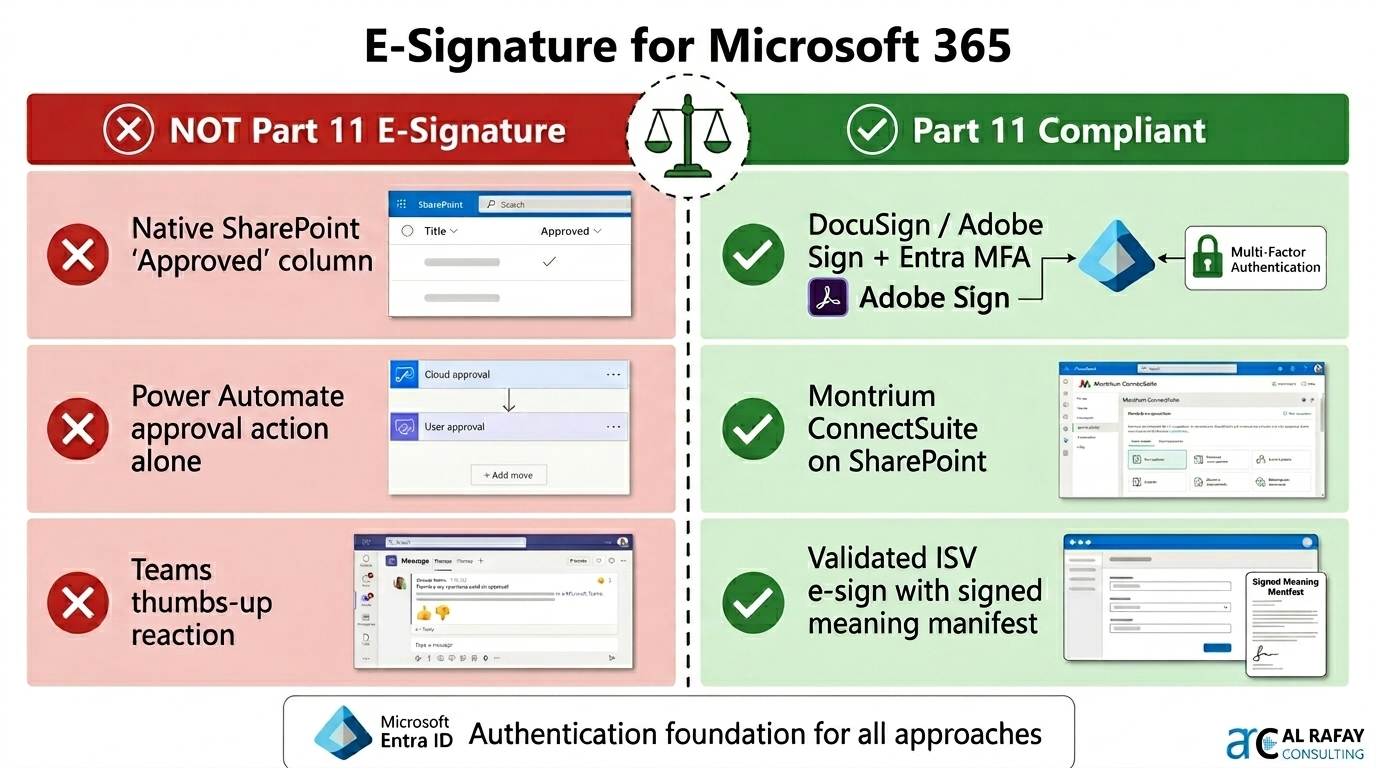
This is the most nuanced area of M365 Part 11 compliance. Native M365 features — SharePoint approval workflows, Power Automate approvals, Teams approvals — provide documented, user-attributed actions backed by Entra ID authentication. However, they are not automatically FDA-compliant electronic signatures under 21 CFR Part 11 §11.50 because they may lack a signed meaning manifest, an explicit signer acknowledgment statement, and a compliant rendering of the signed record at the point of signing.
E-Signature Compliance Matrix: What Satisfies Part 11
Entra ID Authentication + MFA
Satisfies §11.200 identity verification requirement at point of signing
SharePoint / Purview Unified Audit Log
Satisfies §11.10(e) — tamper-evident audit trail for all signature events
Purview Retention Label on Signed Document
Satisfies §11.10(k) — record protection against modification or deletion
Native SharePoint ‘Approved’ Column
NOT a Part 11 e-signature — lacks signed meaning manifest and signer acknowledgment
Power Automate Approval Action (native only)
NOT a Part 11 e-signature without additional controls and documented SOPs
DocuSign / Adobe Acrobat Sign via M365
Part 11-compliant when configured with signed meaning + MFA + signer acknowledgment
Validated ISV E-Signature on SharePoint
Montrium ConnectSuite, Nintex, Veeva Vault integration — pre-validated for Part 11 compliance
Entra ID provides the identity backbone for Part 11 §11.200 — supplemented by validated e-signature solutions (DocuSign, Adobe Sign, or certified ISVs) to satisfy §11.50 signed meaning requirements
Comprehensive Audit Trails & Activity Logging
21 CFR Part 11 §11.10(e) requires operator-independent, computer-generated audit trails that capture the date and time of operator entries and actions that create, modify, or delete electronic records. Microsoft Purview’s Unified Audit Log is the primary mechanism for satisfying this requirement across the entire M365 estate.
| Audit Capability | Technical Detail & Life Sciences Application |
|---|---|
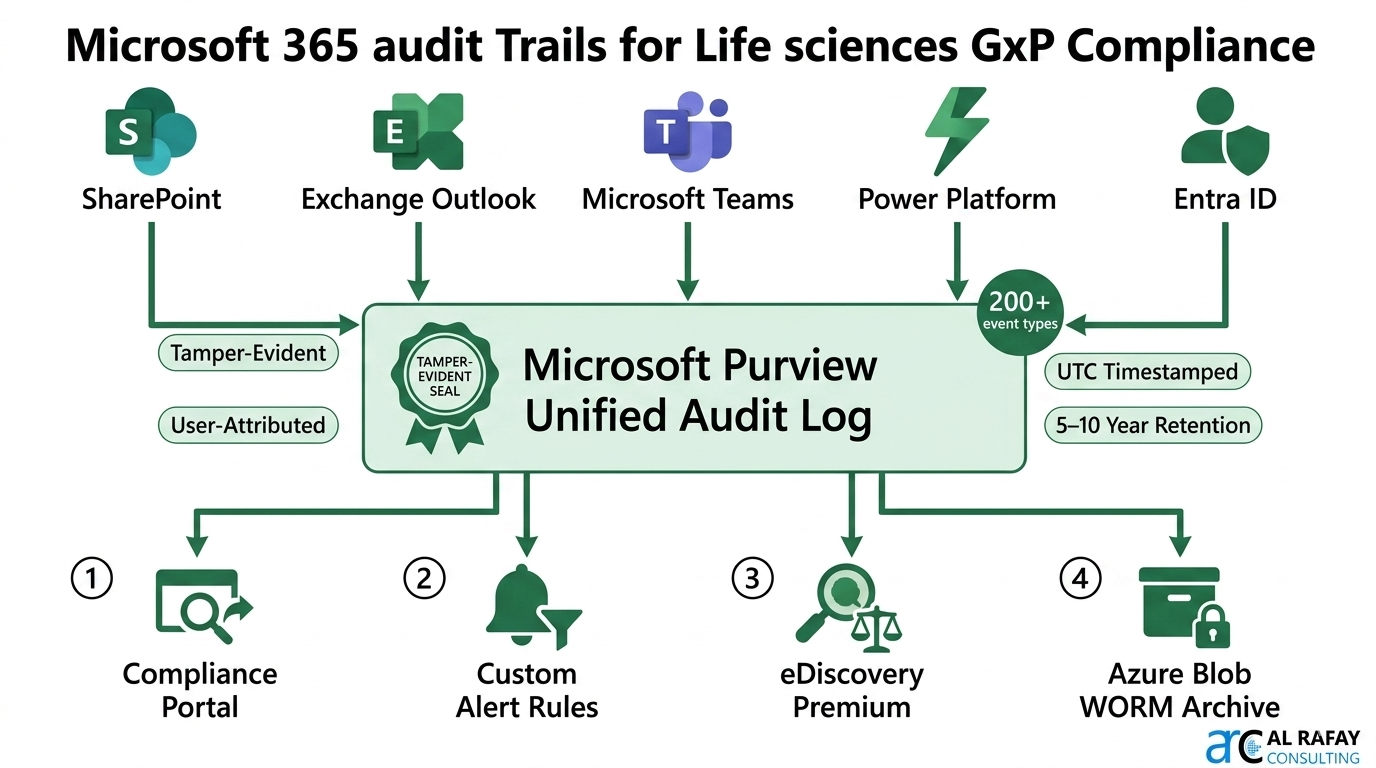
| Unified Audit Log (UAL) | Captures 200+ event types across Exchange, SharePoint, Teams, OneDrive, Power Platform, Entra ID — covering record creation, modification, deletion, access, sharing, sign-in events, and admin configuration changes. |
| Tamper-Evident Logging | UAL events are written to immutable storage by Microsoft — end users and global admins cannot delete or alter audit records. Satisfies Part 11 §11.10(e) operator-independent requirement. |
| Standard Audit (E3) | Included with M365 E3. Audit logs retained 90 days (Exchange/SharePoint) to 180 days for most events. Extendable to 1 year via Purview audit retention policies. |
| Advanced Audit (E5) | Extends audit log retention to 10 years for specific event types. Provides access to high-value audit events (MailItemsAccessed, Send, SearchQueryInitiatedExchange) critical for regulatory investigations. |
| SharePoint Version History | Every document library maintains a complete, user-attributed version history. Each version is timestamped, linked to the editing user’s Entra ID, and immutable once superseded. Directly satisfies lab notebook audit trail requirements. |
| Custom Audit Alerts | Purview Compliance Portal allows real-time alerts for anomalous activities — bulk document deletion, unusual download volumes, or changes to compliance configurations. Supports §11.10(h) revision / change control monitoring. |
| eDiscovery & Legal Hold | Purview eDiscovery (Premium) allows targeted search, collection, and preservation of M365 content for FDA inspections, internal audits, or litigation. Content under legal hold cannot be deleted regardless of retention policy. |
Purview Unified Audit Log captures 200+ event types across all M365 services — tamper-evident, operator-independent, and configurable for 5–10 year retention to satisfy FDA 21 CFR Part 11 §11.10(e) requirements
Controlled Documents, SOPs & Lab Documentation in Microsoft 365
Managing controlled documents — SOPs, work instructions, batch records, validation protocols, lab notebooks, and regulatory submission drafts — is the operational core of GxP compliance. SharePoint Online combined with Microsoft Purview provides a comprehensive document control platform when configured correctly.
SharePoint Online as the GxP Document Repository
- Major/minor versioning — enable major versions (1.0, 2.0) for approved documents and minor versions (1.1, 1.2) for drafts. Only major versions are accessible to general users; minor versions are restricted to document owners during review cycles
- Content types and metadata — implement Document Status (Draft, Under Review, Approved, Superseded, Obsolete), Effective Date, Review Date, Document Owner, and Regulatory Reference as mandatory metadata fields for all controlled document content types
- Check-out / check-in controls — enforce checkout before editing to prevent simultaneous edits and maintain a clean, auditable revision history. Check-in comment fields provide mandatory change description capture
- Approval workflows — Power Automate approval flows route documents through the review and approval cycle with named approvers, timestamps, and comments — all captured in Dataverse and the Unified Audit Log
- Purview Retention Labels — once a document is approved and declared as a record, a retention label locks the document against modification or deletion for the regulatory retention period (e.g., SOPs retained 5 years post-supersession per GxP requirements; batch records 1 year post-expiry or 2 years post-distribution per 21 CFR §211.180)
SharePoint Online as GxP EDMS: major/minor versioning, content types, checkout controls, Power Automate approvals, and Purview retention labels combine to satisfy §11.10(b), §11.10(c), and §11.10(k)
Electronic Lab Notebooks and Batch Records
While dedicated ELN systems (LabArchives, Benchling, SciNote) remain common in pharma R&D, Microsoft 365 provides a viable hybrid approach for organizations that want to consolidate their digital workspace. SharePoint with versioning, combined with Microsoft Lists for structured data capture and OneNote for informal lab notes, can serve as a GxP-adjacent documentation system for processes that do not require the full audit capability of a dedicated ELN.
For batch records and quality event documentation, combining SharePoint (document storage) with Power Apps (structured data entry forms) and Power Automate (routing and approval) creates a configurable, low-code electronic batch record system that integrates natively with the M365 audit infrastructure.
| Document Type | M365 Capability | GxP / Part 11 Control Satisfied |
|---|---|---|
| SOPs & Work Instructions | SharePoint controlled document library + Purview retention labels + Power Automate approval workflow | §11.10(b) accurate copies, §11.10(c) protection of records, §11.10(k) record protection |
| Batch Records | SharePoint + Power Apps structured form + Power Automate routing | §11.10(e) audit trail, §11.10(f) operational system checks, §11.10(i) authority checks |
| Validation Protocols (IQ/OQ/PQ) | SharePoint versioned library + Purview retention (10-year minimum) + eDiscovery hold | 21 CFR §211.68, §211.182 — validated records must be retrievable for product lifetime |
| Lab Notebooks | SharePoint versioned library + Teams/OneNote + Unified Audit Log event logging | GxP data integrity — ALCOA+ principles: Attributable, Legible, Contemporaneous, Original, Accurate |
| Regulatory Submissions (IND, NDA, MAA) | SharePoint + sensitivity labels + MFA access + Purview DLP + Legal Hold | Confidentiality, integrity, access control; supports FDA eCTD submission lifecycle |
| Change Control Records | SharePoint list + Power Automate approval flow + Dataverse audit | §11.10(e) audit trail for changes; GxP change control documentation requirement |
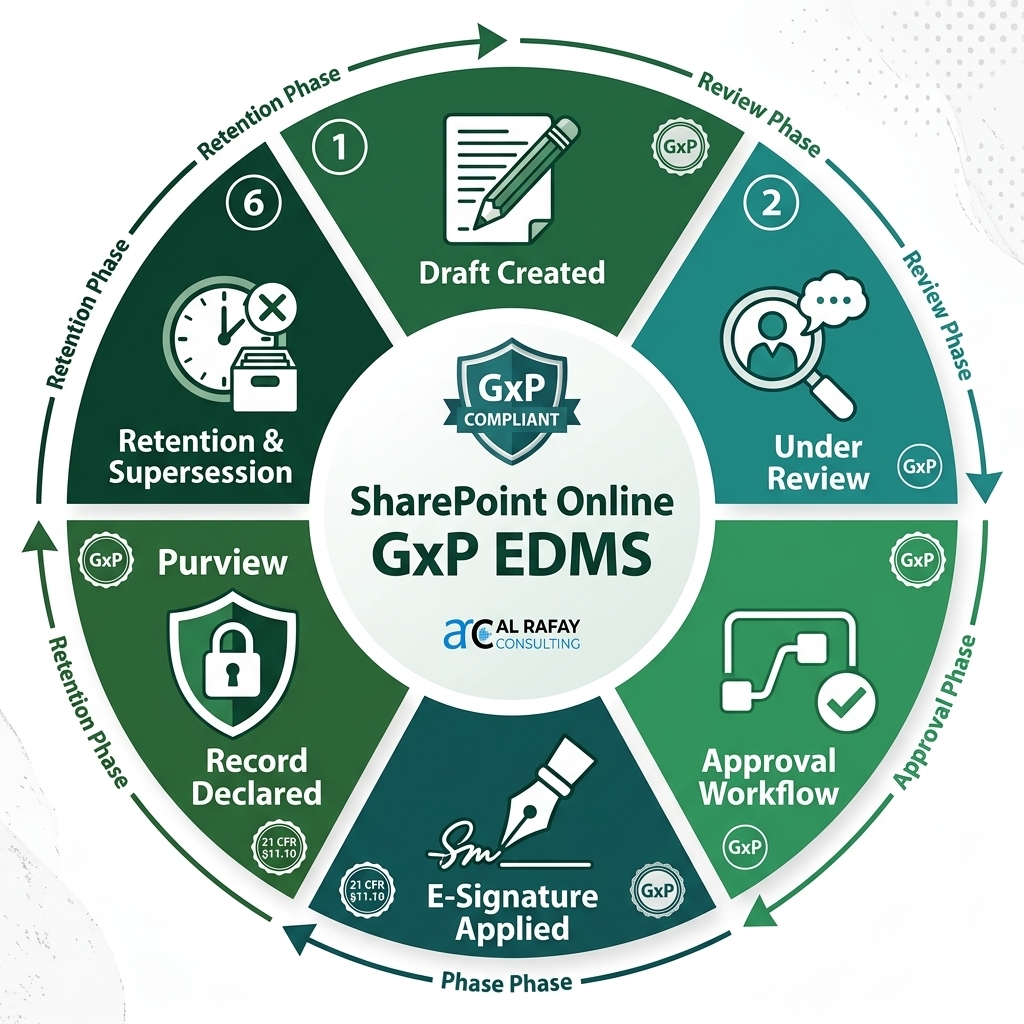
The SharePoint Online GxP EDMS document lifecycle — from draft creation through review, approval, e-signature, record declaration, and retention — fully audited via Purview Unified Audit Log
Information Protection, Data Privacy & DLP
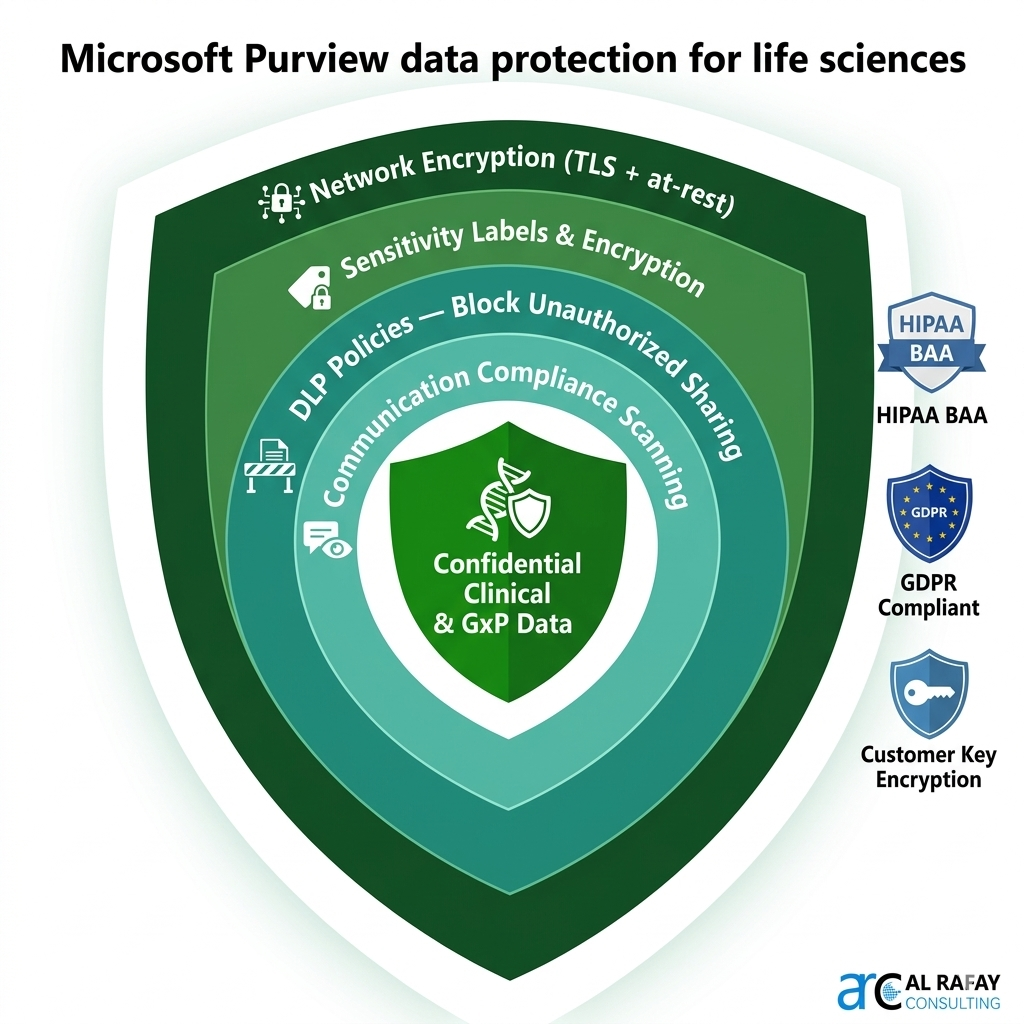
Life sciences organizations handle extraordinarily sensitive data — clinical trial data, patient health information (PHI), proprietary formulations, intellectual property, and regulatory submissions. Microsoft Purview Information Protection provides a multi-layered approach to classifying, labeling, encrypting, and controlling access to this data across the entire M365 ecosystem.
Sensitivity Labels & Encryption
Design a label taxonomy that maps to regulatory categories: Confidential – Clinical Data, Confidential – GxP Controlled, Internal – General, Public. Apply labels to documents, emails, Teams meetings, and SharePoint sites.
Labels with encryption prevent unauthorized users from opening a document even if it is shared externally or downloaded — the encryption travels with the file, not the container. Auto-labeling policies can automatically detect and label documents containing clinical trial identifiers, patient data patterns (PHI), or custom keyword classifiers specific to your organization’s data classification scheme.
Customer Key (M365 E5) allows the organization to control its own encryption keys stored in Azure Key Vault — critical for organizations that require customer-managed encryption (CMK) as part of their regulatory compliance posture.
Data Loss Prevention (DLP)
Configure DLP policies to detect and block sharing of regulated content outside approved channels — e.g., prevent any document labeled ‘Confidential – Clinical Data’ from being emailed to external domains other than approved CROs, regulatory agencies, or authorized partners.
GxP-specific DLP rules can detect clinical data patterns, IND/NDA document structures, patient identifiers, and batch record formats using built-in sensitive information types and custom trainable classifiers. DLP policy tips provide real-time guidance to users attempting to share restricted content — reducing accidental disclosures without blocking legitimate work. All DLP events are fully audited in the Unified Audit Log, providing evidence of the organization’s active data protection posture for FDA and GDPR compliance purposes.
GDPR, HIPAA & Data Residency
For global life sciences organizations, M365’s multi-geo capabilities allow data residency to be configured so that personal data from EU subjects remains within EU data centers, satisfying GDPR Article 44 cross-border transfer restrictions.
M365’s HIPAA Business Associate Agreement (BAA), available to healthcare and life sciences customers, formally establishes Microsoft’s data processing obligations under HIPAA — a requirement for any organization processing PHI in M365 workloads.
Purview sensitivity labels travel with documents across M365 — encrypting clinical data, blocking external sharing of GxP records, and enforcing GDPR data residency for EU subject data
Power Platform in Regulated Life Sciences Workflows
Power Platform (Power Apps, Power Automate, Power BI, Dataverse) is increasingly central to digitizing quality, laboratory, and regulatory workflows in life sciences. Its low-code nature dramatically accelerates development — but in regulated environments, low-code does not mean low-validation. Every Power Platform application used in a GxP workflow must be validated with appropriate rigor.
Computer System Validation (CSV) for Power Platform
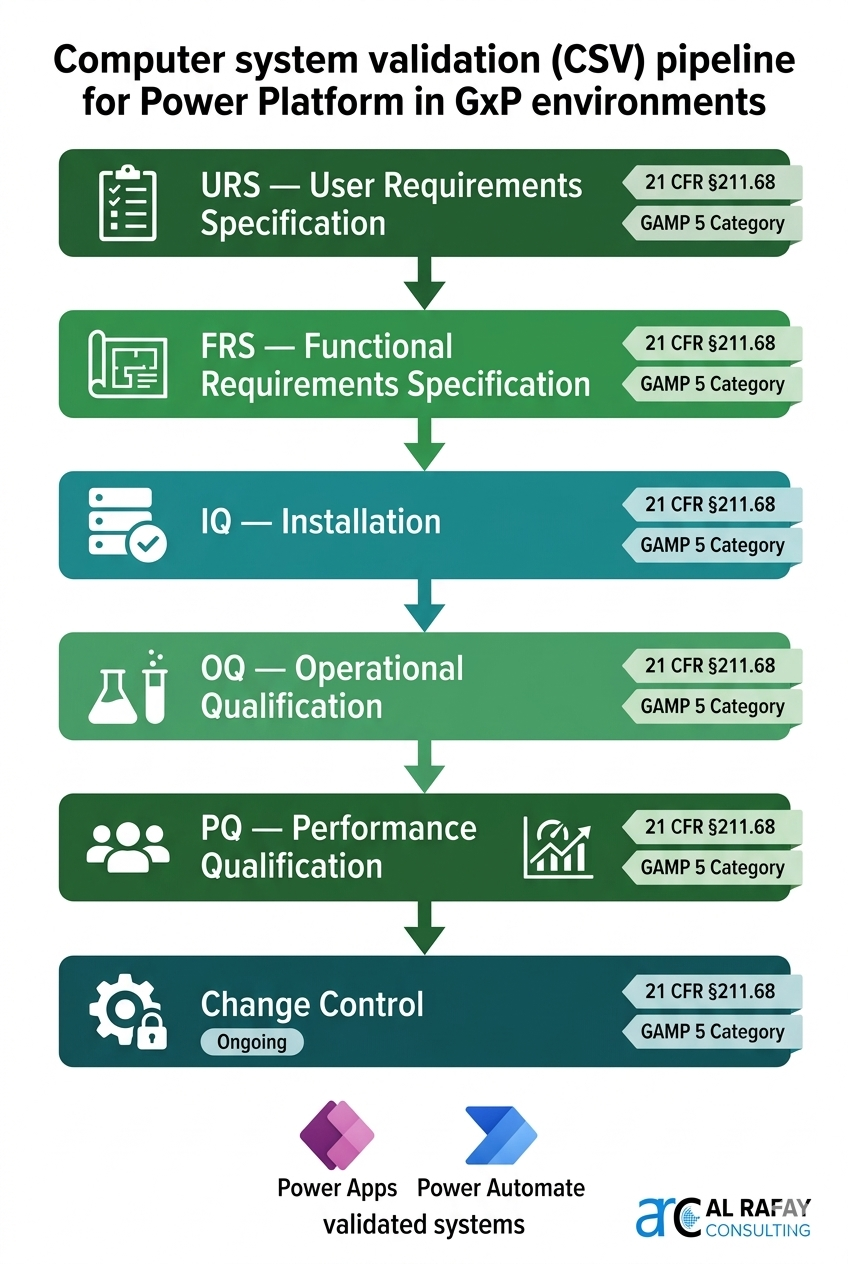
The FDA’s risk-based approach to CSV (per GAMP 5 and 21 CFR §211.68) means that validation effort scales with the risk category and intended use of the system. A Power Apps form used to collect batch record data requires documentation proportional to its impact on product quality and patient safety. At minimum, GxP Power Platform systems require:
- User Requirements Specification (URS) — documented functional and non-functional requirements for the system
- Functional Requirements Specification (FRS) — technical translation of requirements into testable specifications
- Installation Qualification (IQ) — documented evidence that the Power Platform environment is configured correctly (correct connectors, DLP policies, environment variables, access controls)
- Operational Qualification (OQ) — testing of each function against the FRS; documented evidence that the system performs as specified under normal and boundary conditions
- Performance Qualification (PQ) — testing in a production-representative environment with realistic data and user volumes
- Change Control process — all modifications to validated apps and flows must go through documented change control before deployment to the production environment
Power Platform Governance Architecture for Life Sciences
| Governance Control | Implementation | Regulatory Justification |
|---|---|---|
| Environment Strategy | Separate Dev / UAT / Production environments; no GxP apps in the Default environment | Prevents cross-contamination of validated and unvalidated systems; satisfies §211.68 change control |
| DLP Policies | Classify all connectors used in GxP workflows; block unapproved external connectors | Controls data flow from validated systems; prevents unapproved data paths |
| Managed Environments | Enable for all Production GxP environments; enforces solution checker and usage telemetry | Provides audit evidence of platform governance; supports validation maintenance |
| Solutions (ALM) | Package all apps and flows in Dataverse Solutions; promote via managed solutions only | Ensures production deployments are version-controlled and traceability is maintained |
| Power Platform Admin Audit Log | All admin actions (environment creation, DLP change, app import) captured in M365 Unified Audit Log | Provides the admin-level audit trail required by §11.10(e) for system configuration changes |
| CoE Starter Kit | Deploy Microsoft’s Center of Excellence toolkit for usage monitoring, app catalog, governance dashboards | Supports ongoing compliance monitoring, orphan app detection, and periodic user access reviews |
GxP Power Platform governance: separate Dev/UAT/Production environments, Managed Environments, DLP connector policies, and ALM solution pipelines ensure validated workflows remain change-controlled
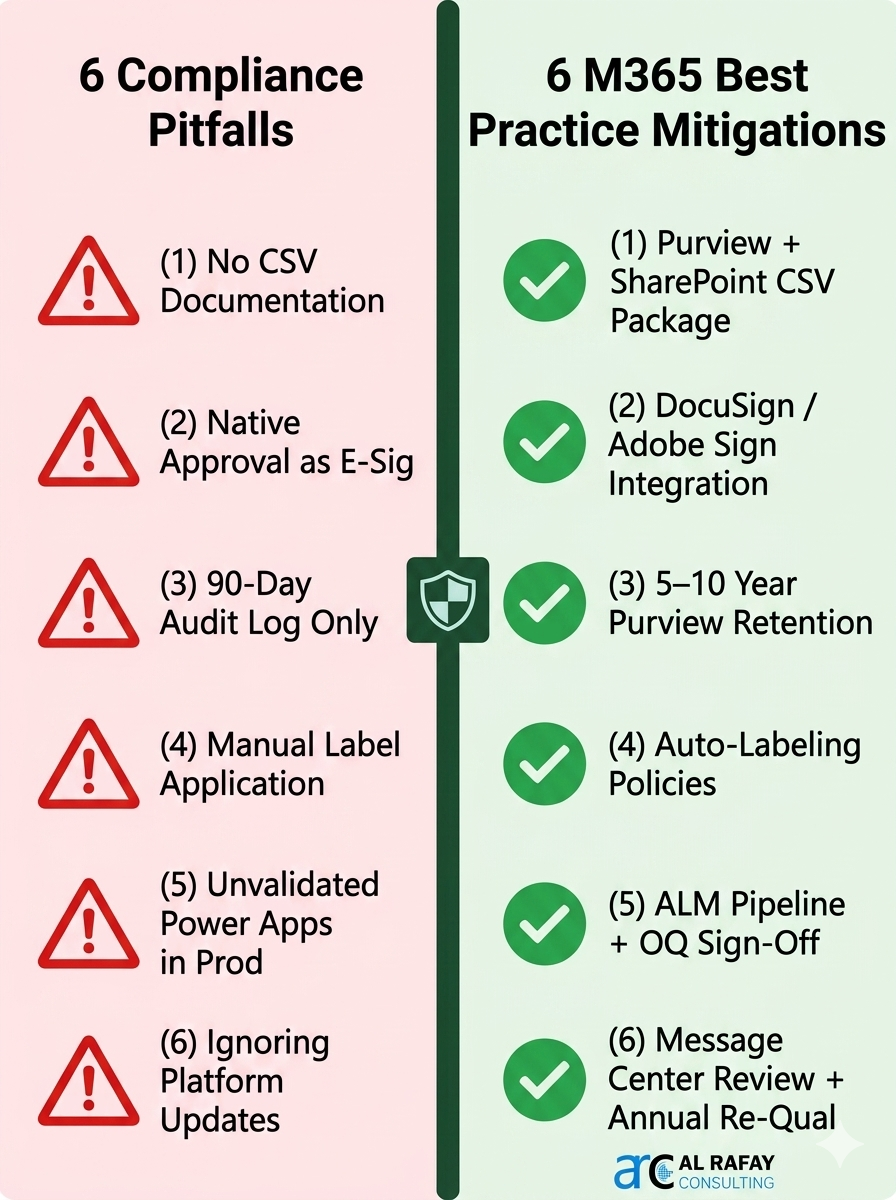
Common Compliance Pitfalls & How Microsoft 365 Mitigates Them
Adopting Microsoft 365 in a GxP environment requires more than licensing and configuration — it requires cultural change and rigorous process adherence. These are the six most frequent compliance failures seen in FDA warning letters and audit observations.
Treating M365 as a Validated System Without CSV Documentation
Risk: FDA inspectors expect documented IQ/OQ/PQ evidence for every computer system used in GxP processes. Assuming M365’s own certifications transfer to your deployment is a critical misunderstanding of the shared responsibility model.
Mitigation: Develop a CSV Package for each GxP workload (SharePoint site, Power App, Power Automate flow). Use Microsoft’s ‘GxP Guidelines for Microsoft 365’ (co-developed with Montrium) as the framework. Map Unified Audit Log event types to Part 11 controls in a Traceability Matrix.
Using Native SharePoint Approval as a Part 11 Electronic Signature
Risk: Native SharePoint approval actions lack a signed meaning manifest, an explicit signer acknowledgment, and a compliant rendering of the signed record — failing §11.50 requirements.
Mitigation: Supplement native approvals with a validated e-signature solution (DocuSign with MFA, Adobe Sign, or a certified SharePoint ISV like Montrium ConnectSuite). Document the e-signature SOP referencing Part 11 §11.50 requirements including signed meaning manifestation.
Ignoring Audit Log Retention — Relying on the 90-Day Default
Risk: M365 E3’s default 90-day audit log window is wholly inadequate for GxP records retained 5–25 years. A compliance program built on a 90-day audit trail cannot demonstrate §11.10(e) conformance.
Mitigation: Configure Purview audit retention policies for minimum 5 years for all GxP workloads. For submissions-critical records, use Advanced Audit (E5) with 10-year retention. Export monthly to Azure Blob Storage (WORM-configured) as regulatory archive backup.
Over-Relying on End Users to Apply Retention Labels
Risk: Manual labeling by end users results in mislabeled or unlabeled records — creating gaps in record protection that regulators will find during audits or inspections.
Mitigation: Implement auto-labeling policies using trainable classifiers and sensitive information types. Configure default mandatory labels on GxP SharePoint sites so all documents receive at least a baseline retention label on upload — eliminating human error from the record protection chain.
Deploying Power Platform Apps to Production Without Validation
Risk: Unvalidated Power Apps or Power Automate flows used in batch record capture, CAPA management, or deviation tracking are a direct FDA 483 observation risk — regardless of how simple the application appears.
Mitigation: Mandate that no Power App, Power Automate flow, or Power BI report used in a GxP workflow reaches Production without a documented OQ sign-off. Use Power Platform Pipelines for automated, gate-controlled environment promotion. Track all deployments in a change control register.
Failing to Account for Microsoft Platform Updates in the Validation Lifecycle
Risk: Microsoft updates M365 continuously. Teams without a formal update assessment process may find that a platform change has silently altered validated functionality — without documentation to demonstrate impact assessment.
Mitigation: Include a platform update review step in your quality management process. Subscribe to the Microsoft 365 Message Center. Conduct periodic re-qualification (at least annually) to document that platform changes have not adversely affected your validated configuration.
GxP Cloud Maturity Roadmap: 5-Phase Implementation
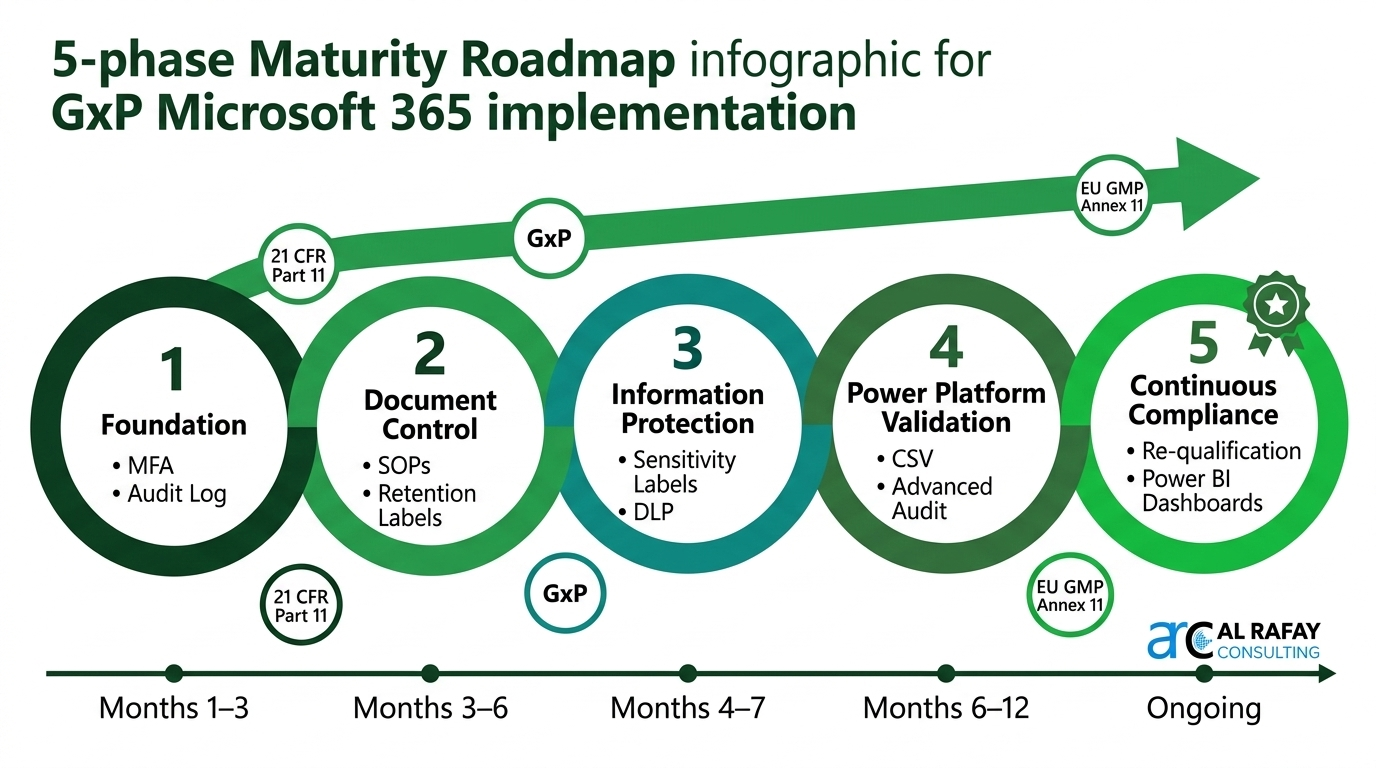
Achieving full GxP compliance in Microsoft 365 is a journey, not a single project. Industry leaders follow a phased maturity model that builds foundational controls first, then layers advanced capabilities as organizational confidence and regulatory posture develop.
Phase 1 — Foundation: Identity, Access & Basic Audit (Months 1–3)
- -> Enable and enforce MFA for all users accessing any GxP-relevant M365 workloads
- -> Configure Conditional Access policies: compliant devices, approved locations, MFA-required for all SharePoint GxP sites
- -> Enable Purview Unified Audit Log with minimum 1-year retention (extend to 5 years where feasible)
- -> Establish SharePoint governance: GxP site collection structure, versioning enabled, permission groups aligned to roles
- -> Complete User Requirements Specification for GxP SharePoint environment; begin IQ documentation
Phase 2 — Document Control: SOPs, Retention & Records (Months 3–6)
- -> Implement controlled document content types with mandatory metadata (Status, Effective Date, Owner, Regulatory Reference)
- -> Design and publish Purview Retention Label taxonomy aligned to regulatory schedules (FDA, ICH, GxP minimum periods)
- -> Configure auto-labeling policies for GxP content types; enable mandatory default labels on all GxP SharePoint sites
- -> Deploy Power Automate document approval workflows for SOP review and approval cycle; complete OQ for the approval flow
- -> Implement validated e-signature solution for document approvals; validate against Part 11 §11.50 requirements
Phase 3 — Information Protection & DLP (Months 4–7)
- -> Deploy Purview Sensitivity Label taxonomy: Confidential – Clinical, Confidential – GxP, Internal, Public
- -> Configure DLP policies for each label: block external sharing of Clinical and GxP-labeled content except to approved domains
- -> Enable Communication Compliance scanning for GxP-relevant Teams channels and Exchange groups
- -> Configure HIPAA BAA if processing PHI; establish GDPR data residency configuration for EU subject data
- -> Complete OQ for sensitivity labeling and DLP; document in the CSV package
Phase 4 — Power Platform Validation & Advanced Compliance (Months 6–12)
- -> Establish Power Platform environment strategy (Dev / UAT / Production) with DLP policies and Managed Environments enabled
- -> Deploy CoE Starter Kit for Power Platform governance and usage telemetry
- -> Complete CSV (URS / FRS / IQ / OQ / PQ) for the first validated Power Apps / Power Automate GxP workflow
- -> Enable Advanced Audit (E5) for 10-year audit log retention on submissions-critical workloads
- -> Set up Azure Blob Storage (WORM) as secondary audit archive; automate monthly export via Logic Apps or Power Automate
Phase 5 — Continuous Compliance & Optimization (Ongoing)
- -> Establish annual re-qualification review process: review Microsoft Message Center updates, assess impact on validated configuration
- -> Connect Purview compliance data to Power BI for real-time compliance dashboards covering audit log health, label coverage, and DLP incidents
- -> Expand Power Platform validated app portfolio using established CSV framework and ALM pipelines
- -> Implement Microsoft 365 Copilot governance framework as AI-assisted features become GxP-relevant
- -> Conduct quarterly access reviews using Entra ID Access Reviews to verify principle of least privilege is maintained
The 5-phase GxP cloud maturity roadmap — organizations typically reach full compliance across all phases within 12 months, building layered controls that each phase validates before advancing
Ready to Validate Microsoft 365 for Your Life Sciences Environment?
Al Rafay Consulting delivers GxP-aligned Microsoft 365 compliance implementations for pharmaceutical, biotech, and medical device organizations — from foundation configuration and CSV documentation to full Power Platform validation programs.
We deliver:
- 21 CFR Part 11 and EU GMP Annex 11 compliance architecture design tailored to your regulatory profile
- Microsoft Purview retention label design, auto-labeling configuration, and deployment
- Computer System Validation (CSV) documentation — URS, FRS, IQ/OQ/PQ — for all M365 GxP workloads
- Electronic signature solution selection, integration, and end-to-end validation
- Power Platform GxP governance framework and validated workflow development programs
- Ongoing compliance monitoring and annual re-qualification support
For the document retention and records management component of your M365 compliance program, see our Document Retention for Life-Sciences REITs: SharePoint & Purview Guide. For Power Automate approval workflows used in your quality management or SOP approval cycle, see our detailed implementation guide. For broader M365 strategy, see our Microsoft 365 Consulting Services.
Frequently Asked Questions
Is Microsoft 365 FDA 21 CFR Part 11 compliant out of the box?
No cloud platform is Part 11 compliant 'out of the box' — compliance is a shared responsibility. Microsoft provides a Part 11-capable platform with pre-audited infrastructure (SOC 2 Type II, ISO 27001, FedRAMP High), tamper-evident audit logging via Purview, identity controls via Entra ID, and record protection via retention labels and encryption. Your organization is responsible for correctly configuring these controls, supplementing with a validated electronic signature solution, and producing Computer System Validation (CSV) documentation. When properly implemented, M365 can satisfy all 21 CFR Part 11 §11.10 technical requirements.
What is the difference between Standard Audit and Advanced Audit in Microsoft 365?
Standard Audit (included with M365 E3) retains most audit events for 90 days, extendable to 1 year via Purview audit retention policies. Advanced Audit (M365 E5 or the Compliance add-on) extends retention to 10 years for specific event types, provides access to high-value forensic events (MailItemsAccessed, SearchQueryInitiatedExchange), and enables bandwidth-on-demand for high-volume regulatory investigation export. For GxP workloads where audit trail retention must meet FDA's 5-to-21-year record retention requirements, Advanced Audit with custom retention policies is strongly recommended.
Can SharePoint Online serve as a GxP-compliant electronic document management system (EDMS)?
SharePoint Online can function as a GxP-compliant EDMS when configured with the required controls: major/minor versioning, mandatory controlled document metadata, checkout enforcement, Purview retention labels to declare records, Power Automate approval workflows for the review-approval cycle, and a validated electronic signature solution for final approval. Many life sciences organizations use this configuration as their primary EDMS. The key requirement is that the entire configuration is documented in a Computer System Validation package (URS, FRS, IQ/OQ/PQ) and change control is applied to any modifications.
How do we handle Microsoft 365 platform updates in the context of GxP validation?
Microsoft updates M365 continuously — this must be addressed in your validation strategy. Best practice: (1) Subscribe to the Microsoft 365 Message Center and designate a responsible person to review update notifications monthly. (2) Assess each update against your validated configuration using a documented impact assessment process. (3) For updates that do not affect validated functionality, document a brief 'no impact' assessment. (4) For updates that change validated behavior, perform targeted re-testing and update validation documentation before the change reaches production. (5) Conduct a full annual re-qualification review. This approach aligns with FDA guidance on continuous compliance for SaaS systems.
What electronic signature solution should we use with Microsoft 365 for Part 11 compliance?
The most common validated e-signature approaches for M365 are: (1) DocuSign or Adobe Acrobat Sign integrated via Power Automate or the Teams Approvals app — both provide Part 11-compliant signed meaning manifestation, signer authentication via Entra ID MFA, and tamper-evident signature records. (2) ISV solutions built specifically for SharePoint/M365 — Montrium ConnectSuite, Nintex Workflow with e-signature, or Veeva Vault integration. (3) For organizations with simpler needs, a documented hybrid approach combining Entra ID MFA authentication, Power Automate approval with mandatory attestation statement, and Purview record declaration can meet Part 11 requirements with appropriate validation documentation.
Does Microsoft 365 satisfy EU GMP Annex 11 requirements?
M365 addresses most Annex 11 requirements. Clause 4 (Validation) requires a documented validation plan — you must produce this for your M365 configuration. Clause 7 (Data storage) — M365 provides geo-redundant storage with 99.99% availability SLA. Clause 8 (Printouts) — documents can be printed with metadata and version information from SharePoint. Clause 9 (Audit trails) — Purview Unified Audit Log and SharePoint version history directly satisfy this requirement. Clause 14 (Data management) — Purview retention policies address Annex 11's requirement for data integrity throughout the system lifetime. Clause 17 (Archiving) — Azure Blob Storage WORM configuration can serve as a validated archive for long-term record retention.
How should we approach Computer System Validation (CSV) for Power Automate workflows used in GxP processes?
Apply risk-based CSV proportional to the impact of the workflow. For a Power Automate flow that routes SOP approvals (direct GxP impact): document a URS capturing all functional requirements, create an FRS with testable specifications for each step, execute an IQ verifying environment configuration (connectors, DLP, environment variables, access control), perform an OQ testing each function against the FRS with representative users, and conduct a PQ with real data. Package all documentation in a controlled SharePoint library with retention labels. Establish a change control process — no uncontrolled changes to validated flows. Maintain the validation package for the lifetime of the system plus regulatory retention period.
What Microsoft 365 license tier is required for life sciences GxP compliance?
At minimum, M365 E3 is required — it includes Purview retention policies (1-year audit log), sensitivity labels, DLP, SharePoint Online, Teams, Power Automate, and core Entra ID features. M365 E5 (or E3 + Compliance add-on) is strongly recommended for GxP environments requiring 10-year audit log retention (Advanced Audit), Advanced eDiscovery for FDA inspection response, Communication Compliance, Insider Risk Management, and Customer Key encryption. For organizations using Power Apps and Power Automate in validated GxP workflows, Power Automate Premium per user licenses are required for Dataverse and premium connector access.
How does Microsoft 365 support ALCOA+ data integrity principles required by GxP?
ALCOA+ (Attributable, Legible, Contemporaneous, Original, Accurate — plus Complete, Consistent, Enduring, Available) is the FDA/WHO data integrity framework for electronic records. M365 addresses each principle: Attributable — Entra ID links every record, edit, and action to a unique authenticated user identity. Legible — SharePoint version history preserves all versions in their original format. Contemporaneous — Purview Unified Audit Log timestamps all events with system-generated UTC timestamps that cannot be altered by users. Original — SharePoint versioning preserves the original record while tracking changes. Accurate — metadata, approval workflows, and content type validation enforce data quality at entry. Enduring — Purview retention labels prevent deletion for the full retention period. Available — M365's 99.99% availability SLA and geo-redundant storage ensure records are accessible for the system lifetime.

Al Rafay Consulting
ARC Team
AI-powered Microsoft Solutions Partner delivering enterprise solutions on Azure, SharePoint, and Microsoft 365.
LinkedIn Profile