Ransomware Recovery on Azure: A Practical Playbook
Ransomware recovery is the process of restoring clean systems, data, identity, and operations after an attack while preventing reinfection.
Recover from ransomware fast — without paying. A practical Azure playbook covering Backup, Site Recovery, immutable vaults & RTO/RPO.
Al Rafay Consulting
· Updated July 15, 2026 · ARC Team

Most organizations discover the same issue too late: backup configured does not mean recovery proven.
Ransomware operators increasingly target backup chains, admin credentials, and recovery documentation directly. If your recovery design is untested, the safest-looking architecture can still fail under pressure.
This playbook focuses on practical, Azure-specific recovery steps to restore cleanly and fast without paying attackers.
If you are standardizing incident readiness across enterprise azure cloud services, this guide is designed as an implementation companion.
What Ransomware Recovery Really Means
Ransomware recovery is not the same as decryption, backup, or conventional disaster recovery.
- Recovery vs decryption: recovery restores trusted data and systems from clean points, independent of attacker cooperation.
- Recovery vs backup: backup stores copies, while recovery proves those copies can be restored into functioning operations.
- Recovery vs DR: DR addresses continuity; ransomware recovery adds adversary-aware validation so restored systems are actually clean.
Why Traditional Backup Plans Fail During Ransomware
Traditional plans are usually designed for hardware failure, not active adversaries.
Common failure modes:
- Backup deletion or encryption through compromised admin access.
- Recovery points already contaminated because compromise went undetected for weeks.
- Restore runbooks missing practical sequencing for identity, apps, and dependencies.
- No realistic restore drills under incident pressure.
Azure Ransomware Recovery Architecture
A resilient Azure pattern typically includes:
- Azure Backup for immutable, policy-driven recovery points.
- Azure Site Recovery for cross-region continuity of critical workloads.
- Recovery Services vault hardening with soft delete and immutability.
- Multi-user authorization and Resource Guard for destructive-operation control.
- Isolated clean-room restore environment for validation before production cutover.
For foundational controls and policy sequencing, pair this with our Azure Backup setup guide.
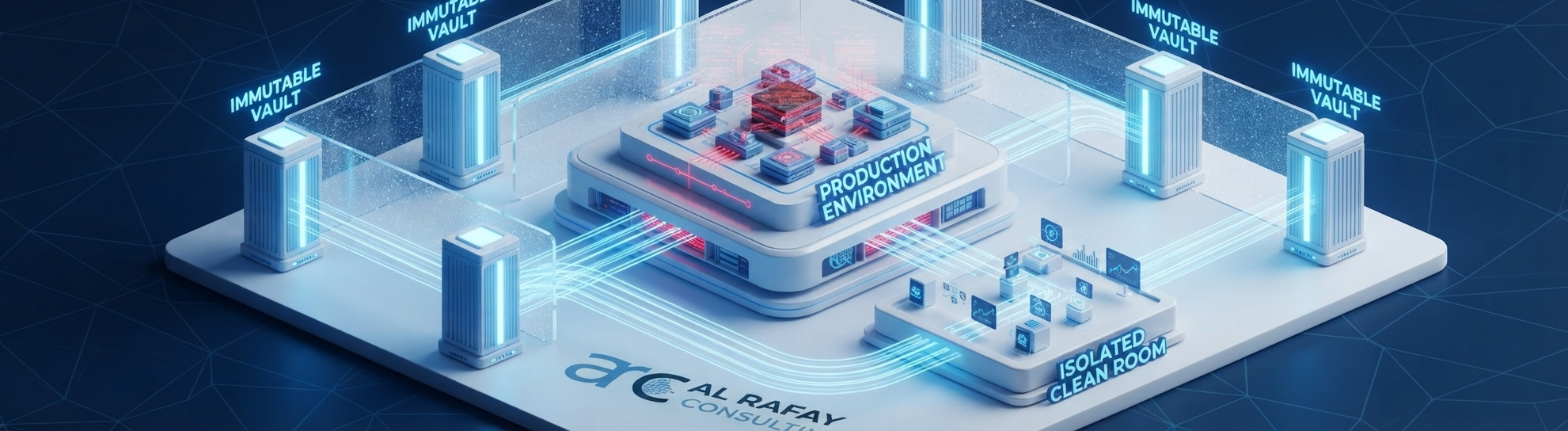
The Azure Ransomware Recovery Playbook
- Detect and contain compromised systems.
- Preserve forensic evidence and establish attack timeline.
- Select a clean recovery point that predates compromise.
- Restore into an isolated validation environment.
- Validate data, identity, and application dependencies.
- Promote clean environment to production.
- Monitor aggressively for reinfection.
Azure Backup vs Azure Site Recovery
| Factor | Azure Backup | Azure Site Recovery |
|---|---|---|
| Primary function | Point-in-time data restore | Workload replication and failover |
| Best use | Data recovery and retention | Continuity for critical services |
| RTO profile | Generally longer | Generally shorter |
| Ransomware value | Immutable recovery points | Operational fallback path |
Most mature architectures use both together.
For implementation support across failover and continuity design, align this model with ARC Backup & Disaster Recovery services.
RTO and RPO Planning for Recovery
Recovery targets should be tiered by business impact, not set uniformly.
This operating model is easiest to sustain under structured Azure Managed Services governance.
- Tier 1 systems: minutes-to-hours RTO, near-zero RPO, usually backup plus site recovery.
- Tier 2 systems: hours RTO, hours RPO, frequent backups and tested restore runbooks.
- Tier 3 systems: longer recovery windows with standard backup policy.
Common Challenges and How to Avoid Them
- Assuming backup success equals recovery readiness.
- Restoring directly into production without clean-room validation.
- Ignoring identity-layer recovery.
- Skipping immutable vault and authorization hardening.
- Running no realistic recovery drills.
Best Practices
- Make immutability and soft delete default for critical backup workloads.
- Enforce Multi-user authorization for high-risk backup operations.
- Validate identity systems before application cutover.
- Test restores quarterly for critical workloads.
- Keep offline-accessible recovery runbooks.
- Separate production and recovery administration boundaries.
Ready to Validate Your Recovery Strategy?
When you need faster clean recovery, stronger controls, and proven drills, ARC can help you operationalize an Azure-native ransomware recovery model.
Start with a focused resiliency design session inside our azure cloud services practice.

Frequently Asked Questions
What is ransomware recovery?
Ransomware recovery is the process of restoring clean systems, data, identity, and operations after a ransomware attack while preventing reinfection, distinct from simply having backups or paying for decryption.
How do you recover from ransomware without paying?
By maintaining immutable, isolated backup copies that attackers cannot delete or encrypt, combined with tested restore procedures that let you rebuild clean systems independently of the compromised environment.
Does Azure Backup protect against ransomware?
Yes. Azure Backup includes ransomware-specific protections such as immutable vaults, soft delete, encryption, Multi-user authorization, and monitoring, designed specifically to prevent attackers from deleting or corrupting recovery points.
What is an immutable vault in Azure Backup?
An immutable vault enforces a Write-Once-Read-Many (WORM) state on backup data, meaning recovery points cannot be deleted or modified by anyone, including a compromised administrator account, until the retention period expires.
Can ransomware infect backups?
Yes, if backups aren't isolated from production credentials and networks. This is why immutability, soft delete, and Multi-user authorization are essential, since they prevent attackers with administrative access from destroying your recovery path.
How do you know which recovery point is clean?
By correlating backup history with forensic timeline data to identify a recovery point that predates the compromise, then validating that point in an isolated environment before trusting it.
What is the difference between Azure Backup and Azure Site Recovery?
Azure Backup protects data through point-in-time recovery points, while Azure Site Recovery protects operational continuity by replicating and failing over entire running workloads. Most serious recovery architectures use both together.
Should ransomware recovery restore in place or to a clean environment?
Restoring to an isolated, clean environment first is strongly recommended. Restoring directly to production risks reintroducing the attack if the recovery point or environment isn't fully validated.
What are RTO and RPO in ransomware recovery?
Recovery Time Objective (RTO) is the maximum acceptable downtime before a system must be restored. Recovery Point Objective (RPO) is the maximum acceptable amount of data loss, measured in time. Both should be set per workload based on business criticality.
How often should recovery drills be tested?
Critical workloads should be tested quarterly at minimum, with a full-scale drill at least annually. Untested backups should be treated as unproven, not reliable.
What is Multi-user authorization in Azure Backup?
Multi-user authorization requires a second, independent approval, typically from a separate Microsoft Entra tenant or subscription, before high-risk backup operations like disabling protections or deleting recovery points can be performed.
How does Resource Guard protect backup operations?
Resource Guard enforces the additional authorization layer required by Multi-user authorization, preventing a single compromised account from disabling backup protections or deleting recovery data.
What should be restored first after ransomware?
Identity systems such as Microsoft Entra ID are typically prioritized first, since nearly all other applications and access controls depend on a clean, trustworthy identity layer.
Can Azure Site Recovery help during ransomware?
Yes. Azure Site Recovery provides cross-region failover for critical workloads, offering an operational continuity path independent of the compromised production environment while recovery and validation proceed.
When should we hire an Azure ransomware recovery partner?
Consider bringing in a partner when you've never conducted a full restore drill, are unsure whether your backups are truly immutable and isolated, face cyber-insurance requirements you can't currently meet, or lack in-house Azure Backup and Site Recovery architecture expertise.

Al Rafay Consulting
ARC Team
AI-powered Microsoft Solutions Partner delivering enterprise solutions on Azure, SharePoint, and Microsoft 365.
LinkedIn Profile